
AMP Cookie Consent Setup: A Practical Implementation Guide

What if your consent banner looks right, but analytics or ads still load before a visitor makes a choice? In AMP, a standard JavaScript consent snippet may not control the page. A reliable AMP cookie consent setup connects AMP’s consent controls, your consent management platform (CMP), and every component that should wait for a decision.
That distinction matters when you need a clear consent experience without restricted content appearing too soon. AMP doesn’t automatically block every third-party script. You must configure consent behavior for the components on the page and confirm that your CMP can pass the signals your setup requires.
This guide covers the implementation in a practical order: configure amp-consent, connect a compatible CMP, identify consent-dependent elements, and test what happens before and after a visitor makes a choice. You’ll also learn what to check about AMP-specific hosting and component constraints, and how to verify CMP compatibility before implementation. The goal is a setup you can inspect and test, not a banner that merely looks finished.
Key Takeaways
- Build an AMP cookie consent setup around the connection between AMP controls, your CMP, and the page elements that depend on consent.
- Check your CMP’s current AMP documentation before implementation, and follow its instructions rather than copying another provider’s configuration.
- Compare configuration options by who hosts and maintains them, how updates are handled, and whether AMP support is verified.
- Test the page in its intended production delivery context. Check banner visibility, consent choices, persistence, and each consent-dependent component.
- Use a decision checklist to assess support, consent behavior, ownership, and maintenance. Seek qualified counsel for jurisdiction-specific legal questions.
AMP Cookie Consent Setup: What AMP Changes About Consent Collection
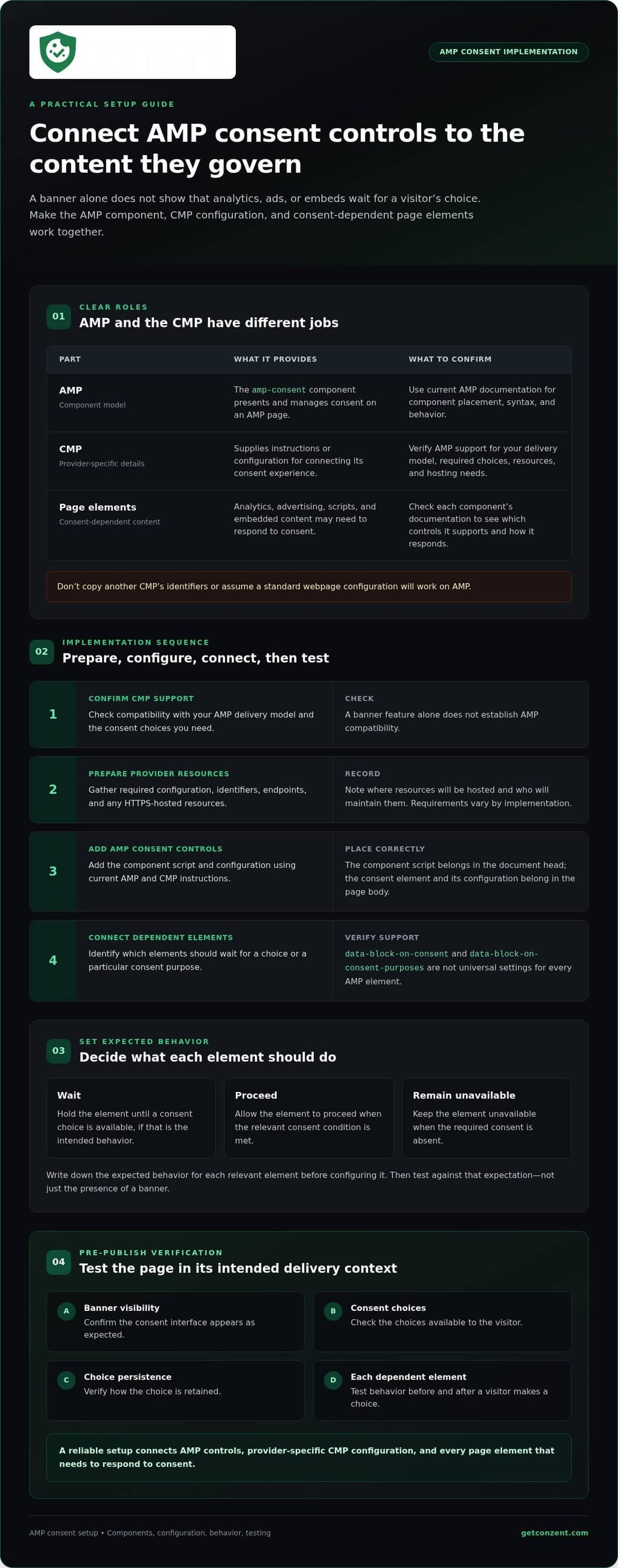
An AMP cookie consent setup connects AMP-compatible consent controls to a consent management platform (CMP) and to the page elements that must respond to a visitor’s choice. It’s not just a banner. The controls, CMP configuration, and consent-dependent content need to work together within AMP’s component model. AMP pages follow framework rules for how components are added and behave. For a neutral overview, see Accelerated Mobile Pages (AMP).
A visible banner doesn’t prove the rest of the page respects consent. If analytics, an ad, or embedded content loads before the required choice is available, the interface and the page behavior are out of sync. AMP consent configuration therefore differs from adding a general cookie banner to a standard webpage. You need to connect the consent decision to the AMP elements affected by it.
What does amp-consent do on an AMP page?
amp-consent is the AMP component for presenting and managing consent on an AMP page. It works with a consent configuration that defines how the interface and consent state are handled. A CMP may provide instructions or configuration for connecting its consent experience, but required values and behavior depend on the provider. Don’t copy identifiers from another CMP. Check current AMP documentation and your provider’s AMP-specific guidance before implementing.
Keep the roles clear: AMP provides the component model, while the CMP supplies provider-specific details. Confirm both sides of the connection instead of assuming that a configuration for a standard webpage will work on AMP.
Which page elements may need consent controls?
Review every element that may collect or use data, including analytics, advertising, scripts, and embedded content. AMP documents patterns such as data-block-on-consent and data-block-on-consent-purposes for tying elements to consent behavior or purposes. These aren’t universal switches for every AMP element. Check each component’s documentation to confirm which controls it supports and how it responds to consent.
- List the AMP components and embeds on the page.
- Identify which ones must wait for a consent choice or a particular purpose.
- Check current AMP documentation for the appropriate control for each component.
Define the expected behavior before configuring anything. For each relevant element, decide whether it should wait, proceed, or remain unavailable when consent is absent or granted. You can then test against that expectation, rather than treating the presence of a banner as proof that consent is handled correctly.
How to Configure AMP Cookie Consent in a Clear Implementation Sequence
Work through the setup in order. First confirm that your CMP supports the way AMP pages reach visitors. Then gather its AMP-specific configuration, add the AMP consent controls, connect the page elements that depend on consent, and test the result. Skipping the compatibility check can leave you with a configuration that works on standard pages but not in your AMP delivery context.
Prepare the CMP configuration and AMP resources
Start with your CMP’s current documentation. Confirm that it supports your AMP delivery model and the consent choices you need to present. Check whether the provider requires a configuration file, specific identifiers, endpoints, or an HTTPS-hosted resource. These details vary by implementation, so example values from another provider aren’t safe defaults.
Make a short implementation record: note the required resources, where they will be hosted, and who will maintain them. If the CMP’s AMP support or hosting requirements aren’t clear, ask the provider before building around assumptions. A banner feature alone doesn’t establish AMP compatibility. For example, Conzent offers customizable cookie banner configuration, but confirm its AMP-specific compatibility separately before choosing it for this setup.
Add amp-consent and control consent-dependent content
In the AMP document, add the component script and configuration in the locations and format specified by current AMP and CMP documentation. The component script belongs in the document head; the consent element and its configuration belong in the page body. Check the official AMP consent documentation for current syntax and behavior before publishing. Don’t rely on a copied code sample without checking that it matches your provider’s instructions.
Next, identify each AMP element that should wait for a choice or a particular consent purpose. Apply the relevant blocking controls only where the component and provider support them. Attributes such as data-block-on-consent and data-block-on-consent-purposes aren’t interchangeable universal settings. Verify the expected behavior for each component in its documentation.
Follow the sequence, then test
- Confirm support: Check CMP compatibility with your AMP delivery model and required consent choices.
- Prepare resources: Gather provider-specific identifiers, configuration, endpoints, and HTTPS hosting requirements.
- Add controls: Place and configure AMP consent components using current, validated syntax.
- Test behavior: Check the banner and each consent-dependent element before and after a choice.
This sequence makes an AMP cookie consent setup easier to review and troubleshoot. If you’re comparing Conzent’s deployment options as part of your CMP evaluation, review the available platform options after confirming AMP support with its documentation or support team.
AMP Consent Implementation Options: Hosted Configuration or CMP-Managed Setup?
Your CMP and AMP delivery model determine whether you need to host a separate configuration resource or can use configuration managed by the provider. Neither approach is automatically better. Compare who controls the configuration, how changes reach production, and whether AMP support is documented for the exact setup you plan to use. As with web standards, the implementation must work in the environment where visitors actually receive the page.
When does a hosted configuration file matter?
Some CMP implementations require a configuration resource hosted by your site or infrastructure. Others may offer a managed configuration path. Check the selected provider’s instructions for HTTPS requirements, resource access, and responsibility for updates. Don’t assume a file is required, or that it can be hosted anywhere, without checking your AMP delivery context.
Some implementations may also encounter iframe access constraints when the consent interface and AMP page use the same domain. This isn’t a universal AMP rule. Ask your CMP whether it applies to your setup, and follow its guidance on any required domain or subdomain configuration. Before launch, test resource access and HTTPS delivery through the production path visitors will use.
How should you choose a CMP for AMP pages?
Ask for explicit confirmation of AMP support, the consent choices supported, current implementation instructions, and which party maintains each configuration resource. Support for standard webpages or other integrations doesn’t establish AMP compatibility. For Conzent, confirm AMP requirements with current documentation or support before presenting either its managed cloud service or self-hosted infrastructure as suitable. You can compare managed cloud and self-hosted consent infrastructure as deployment models, but verify AMP support separately.
| Decision point | CMP-managed configuration | Separately hosted resource |
|---|---|---|
| Ownership | Confirm what the CMP supplies and maintains. | Confirm who manages the file, access, and deployment. |
| Hosting | Check the provider’s hosting and AMP delivery requirements. | Verify the required location, HTTPS access, and production path. |
| Updates | Clarify how provider changes are communicated and applied. | Plan who reviews and publishes configuration changes. |
| Debugging | Identify the provider’s troubleshooting guidance and available logs. | Check resource responses and configuration through the live delivery path. |
| AMP support | Get confirmation for the specific managed setup. | Verify the resource works with your CMP and AMP context. |
Use the table to assign responsibilities before implementation. The right AMP cookie consent setup has verified compatibility, clear ownership, and a configuration path your team can test and maintain. A hosting choice by itself doesn’t prove AMP support.
How to Test AMP Cookie Consent Before Publishing
A consent flow can behave differently outside a local preview. Test the AMP page through the delivery path visitors will use, including its production hosting or cache context where applicable. Check the page for AMP validation errors, then use browser developer tools to inspect network requests and configuration loading. A banner that appears in a preview isn’t enough: each consent-dependent component must respond as intended.
What should the AMP consent test checklist include?
Start with a clean browser state, then repeat the tests after making and changing consent choices. For each test, record what the visitor sees and what the page loads.
- First visit: Confirm the consent interface appears and restricted components remain inactive until their configured condition is met.
- Each available choice: Accept, reject, or select purposes where offered. Check that the page and its components respond to each choice as configured.
- Later visit: Confirm whether the saved choice persists as intended and whether the interface reflects it.
- Preference change: Reopen the controls, change the choice, and check that affected components respond to the updated state.
- Third-party signals: Verify that relevant vendors receive the expected consent state using the CMP’s and vendor’s current documentation.
Repeat the tests on every relevant AMP template, not just one page. Templates may contain different ads, analytics, scripts, or embeds, and each may require its own consent configuration.
How can you diagnose common setup failures?
Start with the symptom, then trace the part of the setup most likely to control it. Keep the expected behavior for each component beside your test results.
- The interface is missing: Inspect the configuration resource request, HTTPS delivery, browser console, and production access path. Look for failed requests or AMP validation errors.
- Content appears too early: Review the component’s consent-blocking configuration and confirm it matches the condition you intended. Don’t assume one blocking attribute works for every element.
- A vendor receives no consent signal: Check the CMP integration and vendor instructions, including the configured signal and any required identifiers. Verify that connection before assuming AMP caused the failure.
- A saved choice doesn’t appear: Check the persistence behavior and test state, then repeat in a clean browser context to rule out stale settings.
Keep technical testing separate from legal interpretation. For background on GDPR consent requirements, review the relevant guidance and seek qualified counsel for jurisdiction-specific questions. If you’re evaluating Conzent, confirm AMP compatibility with its documentation or support before choosing a deployment model, then review Conzent’s platform options.
Choose a Maintainable AMP Cookie Consent Setup for Your Site
A dependable setup needs more than working code today. It needs confirmed AMP support, clear ownership, and a way to keep configuration aligned as your page or CMP changes. Use this checklist before committing to a provider:
- Verify AMP support: Ask which AMP formats and delivery contexts the CMP supports, and request current implementation documentation.
- Map consent behavior: Document the consent choices your interface offers and which AMP elements depend on each choice.
- Confirm signals: Ask how the CMP passes consent states to the vendors your site uses. Check their current documentation too.
- Assign ownership: Clarify who hosts and maintains configuration resources, applies updates, and investigates failures.
- Plan ongoing checks: Record how you’ll retest the setup after changes to the CMP, configuration, or AMP page.
These answers help you judge whether an AMP cookie consent setup is supportable, not just possible. If your site also needs Google Consent Mode v2, confirm how the CMP handles that signal and review its Google Consent Mode v2 implementation details. Don’t assume that signal integration proves AMP compatibility.
What to confirm with a CMP provider before committing
Ask for specifics: which AMP configuration patterns the current product supports, what consent states it can communicate, and whether your planned hosting and delivery path are supported. Clarify who maintains the configuration and what your team should do if a resource stops loading or an update changes behavior. Get these answers before choosing a deployment model.
Conzent offers managed cloud and self-hosted consent infrastructure, but its AMP-specific compatibility and requirements aren’t confirmed here. Evaluate it only after checking current documentation or asking its support team about your AMP context. A clear answer is part of the compatibility check, not a detail to resolve after implementation.
Next steps after the compatibility check
Write down each required consent state and the AMP elements it controls. Implement the configuration in staging, test visitor choices and affected components, and resolve failures before publishing. Repeat those checks after material configuration changes. This gives your team a shared record of expected behavior and a practical baseline for maintenance.
Technical testing doesn’t settle how privacy requirements apply in every jurisdiction. Treat implementation and legal interpretation as separate tasks, and consult qualified counsel for jurisdiction-specific advice. Once you’ve confirmed the technical fit, compare managed cloud and self-hosted options for your consent infrastructure.
Build an AMP Consent Setup You Can Maintain
A reliable AMP cookie consent setup connects the consent choice to the page elements that depend on it. Confirm your CMP supports your AMP delivery context, follow its current implementation guidance, and test the complete experience beyond a local preview. The banner is only one part of the system. Consent-dependent content must respond as configured, and the setup needs clear ownership when updates or failures arise.
Conzent provides source-available consent infrastructure with self-hosted and managed cloud deployment options. Its listed capabilities include IAB TCF v2.3 and Google Consent Mode v2 integration. AMP-specific compatibility isn’t confirmed, so verify the requirements with current documentation or support before considering Conzent for an AMP implementation.
If the compatibility check fits your needs, review Conzent pricing and deployment options. A clear plan, careful testing, and confirmed support help you maintain consent controls as your site changes. Start by verifying the compatibility of your AMP delivery context with the CMP you’re considering.
Frequently Asked Questions
What is amp-consent, and how does it work?
amp-consent is the AMP component for presenting and managing a consent choice on an AMP page. It works with a configured consent interface and state, which can then control elements that depend on that choice. It isn’t a complete CMP by itself, and it doesn’t automatically manage every script or embed. Check current AMP documentation and your CMP’s instructions for supported behavior and configuration details.
How do I add cookie consent to AMP pages?
Start by confirming that your CMP supports the AMP format and delivery context your site uses. Follow its current AMP-specific instructions to add the required component script, configuration, and consent interface. Then connect each consent-dependent element to the appropriate controls and test the page in its intended delivery context. A sound AMP cookie consent setup depends on the whole flow working, not just the banner appearing.
Can I use my existing cookie consent platform with AMP?
Possibly, but support for standard webpages doesn’t establish AMP compatibility. Ask your CMP whether it supports your AMP delivery model, which consent choices and signals it can handle, and what configuration or hosting it requires. Follow that provider’s current instructions rather than copying another platform’s identifiers. For Conzent, AMP-specific compatibility isn’t confirmed, so verify it with current documentation or support before choosing it.
Do AMP cookie consent configuration files need to use HTTPS?
Follow the requirements for your specific CMP configuration and AMP delivery path. If the implementation uses a remotely hosted configuration resource or consent interface, the provider may require it to be accessible over HTTPS. Confirm the URL, access rules, and hosting expectations in current documentation. Test the resource through the production delivery path as well as in staging, since a local preview may not reveal access or loading problems.
Why is my cookie banner not showing on AMP pages?
A missing banner can result from a failed configuration request, incorrect component setup, an HTTPS or access issue, or a difference between your preview and production delivery context. Check the browser console and network panel for failed requests, then review AMP validation output and the CMP’s current setup instructions. Confirm that the consent interface is configured for the page. Change one issue at a time and retest.
How do I block AMP components until a visitor gives consent?
Use AMP’s documented consent controls on the components that need to wait. Patterns such as data-block-on-consent or data-block-on-consent-purposes may apply, depending on the component and configuration. Don’t assume every AMP element supports the same attribute or behavior. Check current AMP and CMP documentation, then test each affected ad, analytics component, script, or embed before and after the relevant consent choice.
Does AMP support granular cookie consent?
AMP consent configuration can support purpose-based choices where the relevant component and CMP implementation provide them. This lets a page connect particular components to defined consent purposes instead of treating every element identically. The exact configuration and behavior depend on the implementation, so confirm them in current AMP and CMP documentation. Test each available choice to make sure the corresponding page elements respond as intended.