
Analytics for Consent Management: Understand Your Data

A consent banner records a choice, but analytics for consent management also depends on what happens afterward. A consent management platform (CMP) records people’s preferences and helps connected tools respond to them. When someone declines analytics cookies, reports may contain less directly observed data. That gap is part of the picture, not a reason to ignore consent.
It’s reasonable to expect analytics to show how people use your site. To interpret the numbers fairly, you also need to understand which choices shaped the data. Consent tools can communicate a user’s consent state to platforms such as Google, while consent records show when and how choices were collected.
This article explains what a CMP does, how consent choices affect analytics coverage and interpretation, and how integrations connect consent signals with analytics platforms. It also covers what consent records can contain and why they matter when you need to demonstrate how preferences were handled. The goal is useful measurement that respects people’s choices.
Key Takeaways
- A CMP does more than display a banner: it captures user preferences and helps ensure tracking follows those choices.
- Consent signals shape what analytics tools can observe, so interpret changes in data coverage alongside traffic trends.
- Consent Mode can help model missing data, but its usefulness depends on event volume and consent patterns.
- Useful consent records show when and how a choice was collected and what information users received.
- Reliable integrations pass consent states to analytics platforms and make it possible for users to change preferences later.
What is a Consent Management Platform (CMP) and its use?
A consent management platform collects and stores visitors’ choices about cookies and other tracking. It connects those choices with the tools that use consent signals. To interpret analytics for consent management, know which tracking permissions visitors granted, rejected, or changed.
A consent banner offers choices such as accepting analytics cookies, rejecting them, or opening detailed settings. The platform records the selection and communicates it to relevant tools. For example, someone who rejects analytics cookies should not be treated like someone who accepted them. This distinction helps teams interpret collected data accurately.
Design affects whether a choice feels clear or pressured. The European Union says GDPR consent must be specific and informed. Use direct labels, explain what each category does, and make opt-out choices visible. Avoid dark patterns, such as emphasizing acceptance while hiding rejection in a settings panel. Visitors should understand their options before deciding.
Cookie scanning can help identify cookies and tracking technologies used on a site, then connect them to banner categories and explanations. If a scan finds an analytics cookie that the banner does not describe, visitors may not understand its purpose. The mismatch can also make consent records harder to interpret. A cookie banner configuration should align the choices shown with the technologies being managed.
Consent Analytics and Banner Optimization
Consent analytics summarizes how visitors respond to a banner, helping teams identify patterns that can inform its design. Use analytics for consent management to compare opt-in rates by country and traffic source, then investigate where responses differ. Those patterns can guide tests of clearer wording or layouts while keeping every choice understandable and accessible. The goal is clarity, not pressure to accept.
Privacy-Preserving Consent Data Analysis
Privacy-preserving analysis uses consent records to understand choices without building visitor profiles. Report totals by consent category, country, or traffic source instead of linking an individual’s choice to unrelated browsing activity. Limit analysis to information needed to assess banner performance, and restrict detailed records to people who need them. Keep the focus on patterns and system behavior.
Useful measurements distinguish a choice from its effect on tracking. For example, compare the share of visitors who accept analytics cookies with the share whose analytics events are recorded. A difference may reflect consent choices, not a change in visitor behavior. Keep those measures separate so a lower event count isn’t mistaken for weaker engagement.
Consent Mode traffic and engagement requirements
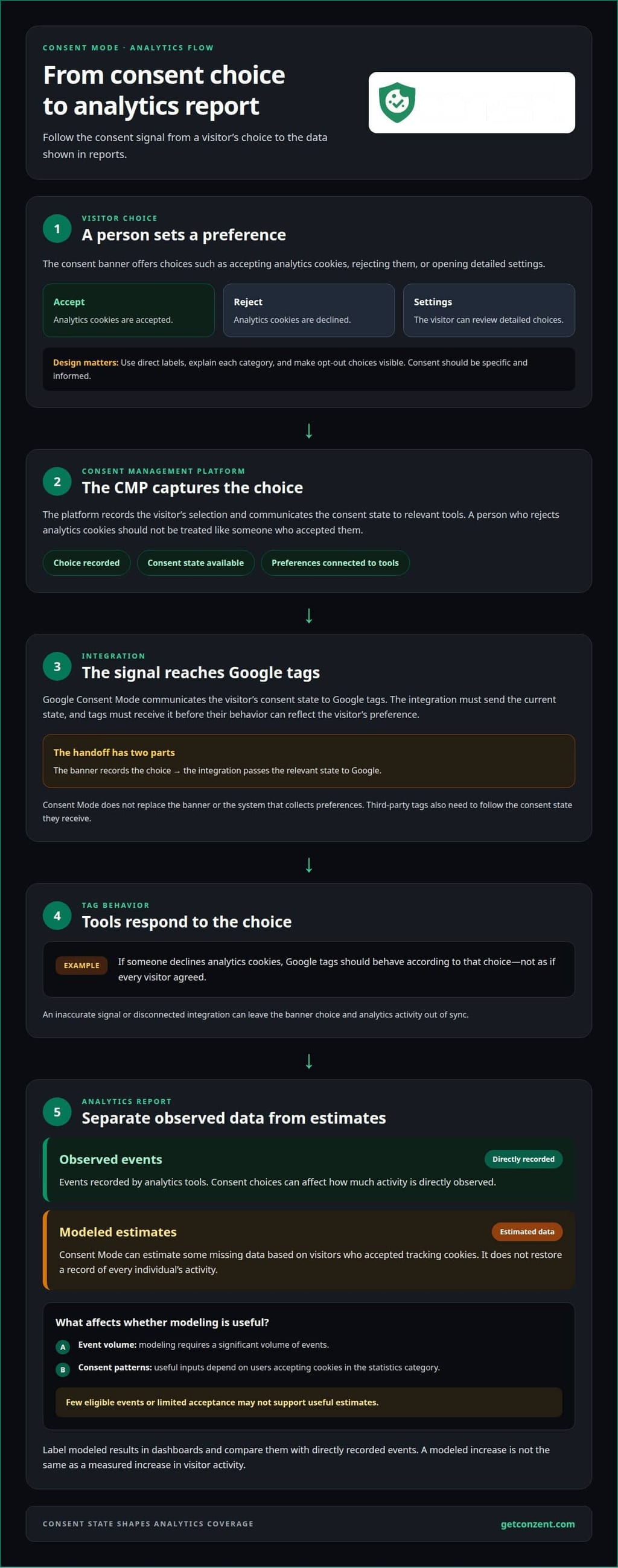
Google Consent Mode communicates a visitor’s consent state to Google tags. The signal helps tags respond to the choice instead of treating every visit alike. The integration must send the current state to Google, and tags must receive it before their behavior can reflect the visitor’s preference. Without that connection, a banner choice and analytics activity can become disconnected.
Consent Mode doesn’t replace a consent banner or the system that collects preferences. It works with a consent solution: the banner records a visitor’s choice, and the integration passes the relevant state to Google. If someone declines analytics cookies, for example, Google tags should behave according to that choice. Third-party tags also need to follow the consent state they receive.
Google Consent Mode can model and estimate some missing data based on visitors who accepted tracking cookies. Modeling doesn’t restore a record of every individual’s activity. It provides an estimate to help interpret gaps in observed analytics. Results depend on the signals and events available, so estimated data and directly observed events should remain separate in reports.
Traffic and engagement matter. Useful modeling requires a significant volume of events and users willing to accept cookies in the statistics category. If a site has few eligible events or limited acceptance, the available inputs may not support useful estimates. Consider consent patterns and event volume when interpreting reports, rather than treating modeled figures as a complete substitute for observed activity.
Google Consent Mode v2 is the version relevant to integrations that implement that framework. The integration must pass consent choices accurately, and tags must respond to the state rather than firing as if all visitors had agreed. Regulations and user expectations differ across global markets, so clear consent and transparency matter alongside technical configuration. A model cannot correct an inaccurate signal or justify tracking that conflicts with a visitor’s choice.
For analytics, separate observed events from modeled estimates in dashboards and analysis. For example, label sections that include modeled results, then compare them with directly recorded events. This makes changes easier to interpret when consent rates shift. It also prevents a modeled increase from being mistaken for a measured increase in visitor activity.
Integration reviews should follow the signal from banner to tag: confirm that the consent state reaches Google, that tags respond to it, and that reports distinguish modeled from observed data. Teams assessing implementation choices can review consent platform options as part of planning their analytics setup.
Consent records, evidence, and audit readiness
A consent management platform (CMP) collects users’ consent choices and keeps evidence of how those choices were obtained. Good records connect a visitor’s preference with the tags and analytics activity that followed.
Consent Analytics Requirements
Consent analytics for US audiences should distinguish opt-in choices from opt-out signals. Under the CCPA and most newer US state privacy laws, processing is generally permitted until a consumer opts out, so organizations need to detect and honor those signals. The California Department of Justice, Office of the Attorney General says businesses sharing personal information for advertising or analytics must offer an opt-out mechanism or use a CCPA-compliant service provider.
For CCPA- and CPRA-related analytics, record whether an opt-out was received and whether systems acted on it. A CMP should also recognize Global Privacy Control signals under the CCPA and pass the choice to relevant technologies. This lets reports distinguish an opt-out from missing or broken tracking.
Risks of Inaccurate Consent Records
Inaccurate consent records can make analytics misleading and leave an organization unable to show which choice a visitor made. For example, a record might show acceptance even though a later opt-out wasn’t applied to Google Consent Mode or another tag. Reports could then include activity that doesn’t match the recorded preference.
Incomplete evidence creates another problem: an organization may be unable to show when or how consent was obtained, or what information users saw. A reliable record preserves that context alongside the choice. It helps teams investigate discrepancies instead of assuming a low event count or unexpected tag firing reflects visitor behavior.
Setting Up and Auditing Consent Analytics
Setting up consent analytics means connecting the preference interface, consent records, and tracking implementation so each choice has a traceable outcome. Record when and how consent was obtained and what information users received. Then test representative choices, including acceptance, rejection, and a later change, against the behavior of relevant tags.
An audit can compare the stored choice with the signal sent to analytics tools. For example, verify that a recorded opt-out matches the state passed to Google Consent Mode and that tags respond accordingly. Keep a clear record of changes to banner wording or configuration so teams can explain why consent rates or observed events changed after an update.
Review records alongside analytics reports, not as separate systems. If an opt-out rate changes while tag behavior stays constant, investigate the signal flow. If tag behavior changes without a corresponding consent change, inspect the implementation. This comparison helps identify whether a reporting shift reflects visitor choices, configuration changes, or a tracking fault.
Integrating a consent management platform with analytics
A consent management platform connects collected preferences with analytics tools that use consent signals. Integration works when the cookie banner, preference controls, and tags share a consistent configuration.
Consent Platform Features for Analytics
Analytics features should show how consent choices relate to analytics activity without confusing observed events with estimates. Useful reports can group opt-in rates by country and traffic source, then compare those patterns with changes in recorded events. That context helps teams understand whether a reporting shift reflects visitor choices or a change in site activity.
Integration begins with the preference signal. A visitor selects an option in the cookie banner, the platform stores that choice, and connected tags receive the relevant consent state. Google Consent Mode and the IAB Transparency & Consent Framework provide ways to communicate consent from websites and apps. Map each available choice to the tags and purposes it affects.
For example, a site may use one analytics tool and a separate advertising tag. The consent configuration should communicate the visitor’s relevant choice to each system, rather than send one broad status that obscures differences between purposes. This matters when separate tags serve separate functions. A person’s preference should remain clear as it moves from the banner into analytics and advertising systems.
Tracking Consent Rates
Consent rates measure how visitors respond to the available choices, such as accepting, rejecting, or changing preferences. A platform can summarize selections by country or traffic source, helping teams spot differences between audience segments. These rates describe choices, not the behavior of visitors who declined tracking, so they aren’t a complete picture of site activity.
Cross-platform synchronization depends on passing the same current consent state to each connected service. If someone changes a preference in a preference center, the updated choice should reach relevant tags and analytics integrations. Google Consent Mode can receive consent states for Google tags, while IAB TCF signals can support communication with participating services. Consistent mapping prevents a platform from acting on an outdated choice.
Before relying on reports, test integration paths with distinct scenarios: acceptance, rejection, and a later preference change. For each scenario, compare the stored choice with the signal received by Google tags or other connected tools. If the values differ, inspect the configuration and tag behavior before interpreting analytics. This tests the full path, not just whether the banner appears.
Keep reporting definitions consistent across platforms. For example, specify which choices are included in the consent-rate denominator and whether results are grouped by country or traffic source. This makes dashboard comparisons meaningful. Give visitors a straightforward way to change preferences later, then ensure the updated selection reaches every connected integration.
For websites using a supported content platform, the WordPress consent integration can be part of the configuration, alongside the analytics and tag connections it needs to support.
The effect of CMP cookie choices on analytics data
Cookie choices affect which tracking events analytics tools can collect, so a smaller dataset doesn’t automatically mean fewer visits. If a visitor rejects analytics cookies, reports may contain less directly observed activity from that session. Meanwhile, people who actively opt in may be more engaged, making collected data more useful despite lower overall volume. Treat coverage and engagement as separate measures.
For example, compare recorded events with consent-choice patterns before interpreting a reporting drop. Fewer page-view events could reflect fewer tracking permissions, a site change, or both. Separate these possibilities in your analysis. Otherwise, teams may mistake an expected gap for a performance problem or confuse changes in coverage with changes in visitor behavior.
Transparent, granular choices help people understand what permission they’re granting. Explain each category’s purpose in plain language, such as analytics for measuring site use or advertising for ad-related tracking. Avoid bundling unrelated purposes under a vague label. Clear choices support informed decisions and give analysts more meaningful categories for interpreting consent and measurement data.
Cookie and tracker discovery helps by showing which technologies operate on a site. Compare discovered trackers with the categories and descriptions shown in the banner. For instance, if a marketing tag appears under analytics, its classification and explanation may not reflect its actual use. Correcting that mismatch aligns the stated choice with tracking behavior.
Blocking behavior matters too. A tag that collects data before the visitor grants the required permission can make analytics inconsistent with the recorded choice. Test the site with different selections: accept analytics, reject it, and withdraw a previous choice. Confirm relevant tags respond to each state. Withdrawal should stop the associated collection, while other permitted functions follow their own choices.
Interpret results with clear labels. Distinguish directly collected events from estimates, and note when a report covers only visitors who granted permission. For example, an engagement rate calculated from opted-in sessions describes that group, not necessarily every visitor. Keep the denominator visible in dashboards, and compare like with like across reporting periods. This makes consent-related gaps easier to recognize without mistaking them for lost traffic.
When banner wording or layout changes, compare consent choices and analytics coverage before and after the change. Keep the available options clear and balanced; a higher acceptance rate alone doesn’t show that visitors understood the choice. Explore consent platform options for measuring revenue impact as you plan how to assess these effects.
Conzent: Revenue Impact Analytics
Conzent’s Revenue Impact Analytics helps teams examine how consent choices relate to revenue outcomes. It’s useful for assessing banner performance alongside business metrics, rather than treating acceptance rates as the only measure of success. Pair that analysis with Consent A/B Testing to compare banner variations while keeping visitor choices clear and meaningful.
Conzent also offers a Managed Cloud Consent Platform and Self-Hosted Open Consent Infrastructure. These options support different deployment needs, while the focus remains on understanding consent and its impact. Analytics can inform decisions, but it doesn’t replace clear consent practices or guarantee a particular revenue result.
Contact Conzent to discuss how Revenue Impact Analytics fits your consent measurement needs.
Turn Consent Insights Into Your Next Decision
Make your next step a clear measurement question. Decide what you need to understand, which signals can answer it, and how you’ll distinguish observed activity from estimates. This keeps analytics for consent management tied to decisions your team can act on, rather than creating another dashboard without a purpose.
Treat measurement as an ongoing learning process. As visitor expectations, traffic patterns, and site experiences change, revisit whether your reporting still supports sound decisions. Keep the goal practical: understand performance while respecting people’s choices. Better insight starts with focused questions and careful interpretation.
Conzent can help you explore an approach that fits your consent and analytics needs. Discuss consent analytics with Conzent and consider a useful next step for your team.
Frequently Asked Questions
How and Where Do You Track It All?
Track consent choices in the CMP’s records, then review aggregated results in its reporting tools or analytics dashboard. Send the relevant consent state to connected platforms, and compare that state with the events they record. For example, if a dashboard shows analytics events after someone rejects analytics cookies, investigate the signal and tag configuration. Keep reports focused on trends and system behavior, not identifying individual visitors.
What KPIs are used to measure consent management performance?
Useful KPIs include acceptance, rejection, and withdrawal rates; preference changes; and consent rates by country or traffic source. Also track whether consent signals reach connected tags as expected. These measures answer different questions: a high acceptance rate describes choices, while event coverage shows what analytics tools recorded. Review them together and document how each rate is calculated so comparisons across dashboards remain meaningful.
What consent analytics and reporting requirements apply under GDPR and ePrivacy rules?
Under the GDPR, consent must be specific and informed, according to the European Union. Organizations should retain evidence of when and how consent was obtained and what information users received. The ePrivacy Directive is also relevant to consent management, but analytics reports don’t replace compliance with applicable rules. Keep records that connect a person’s choice with the consent information presented and the resulting system response.
How do consent rates vary by banner design, wording, and user experience?
Rates can change when visitors encounter different wording, layouts, or ways to accept, reject, and manage preferences. To understand what influenced a change, compare versions while changing one design element at a time. For example, test clearer category descriptions while keeping choices equally accessible. Measure selections and completed preference changes, then review visitor feedback or support questions for context. A higher acceptance rate alone doesn’t prove a design is clearer or fairer.
How can consent analytics integrate with Google Analytics, a customer data platform, or a data warehouse?
Pass the current consent state to Google tags and any connected data platform, then map the same categories consistently across systems. For a customer data platform or warehouse, define which consent fields are needed for analysis and avoid adding unrelated personal data—an area where enterprise data consultancies like Kagool help design compliant ingestion pipelines. Test how acceptance, rejection, and preference changes appear in each destination. Reconcile those signals with recorded events, and label modeled estimates separately from directly collected measurements.