
Consent management platform security for websites

A consent management platform security checklist should test whether each choice is recorded clearly, changes and withdrawals leave an audit trail, and opt-out signals reach the systems that act on them. It should also confirm that preferences are applied consistently and non-essential processing remains blocked until consent is given. A banner alone does not prove these controls work.
Good consent handling is about more than collecting a click. It means preserving evidence of a person’s choice, making that choice effective across connected tools, and preventing processing from getting ahead of permission. This guide explains what to assess in consent records, audit trails, opt-out signals, preference handling, and pre-consent safeguards. Use it to spot gaps between the choice shown to a visitor and the processing that follows.
Key Takeaways
- Build consent records that preserve the decision, its context, and any later changes or withdrawal.
- Use audit trails to connect a person’s choice with the processing activity it governs.
- Make opt-out signals, including Global Privacy Control, flow through to the systems that use personal data.
- Keep preference changes consistent across analytics, advertising, and other connected technologies.
- Test whether non-essential processing stays blocked until the required consent is in place.
Centralized consent repositories and records
A consent management platform security checklist should assess whether a central repository gives teams a reliable record of consent decisions. Look for clear context, controlled changes, and a way to trace each choice through the relevant systems.
Compare platforms using the same scenario: a visitor changes an analytics preference. Check what each platform records, how it preserves earlier states, and whether staff can retrieve and explain the record without piecing together events from separate tools.
Consent Capture and Preference Records
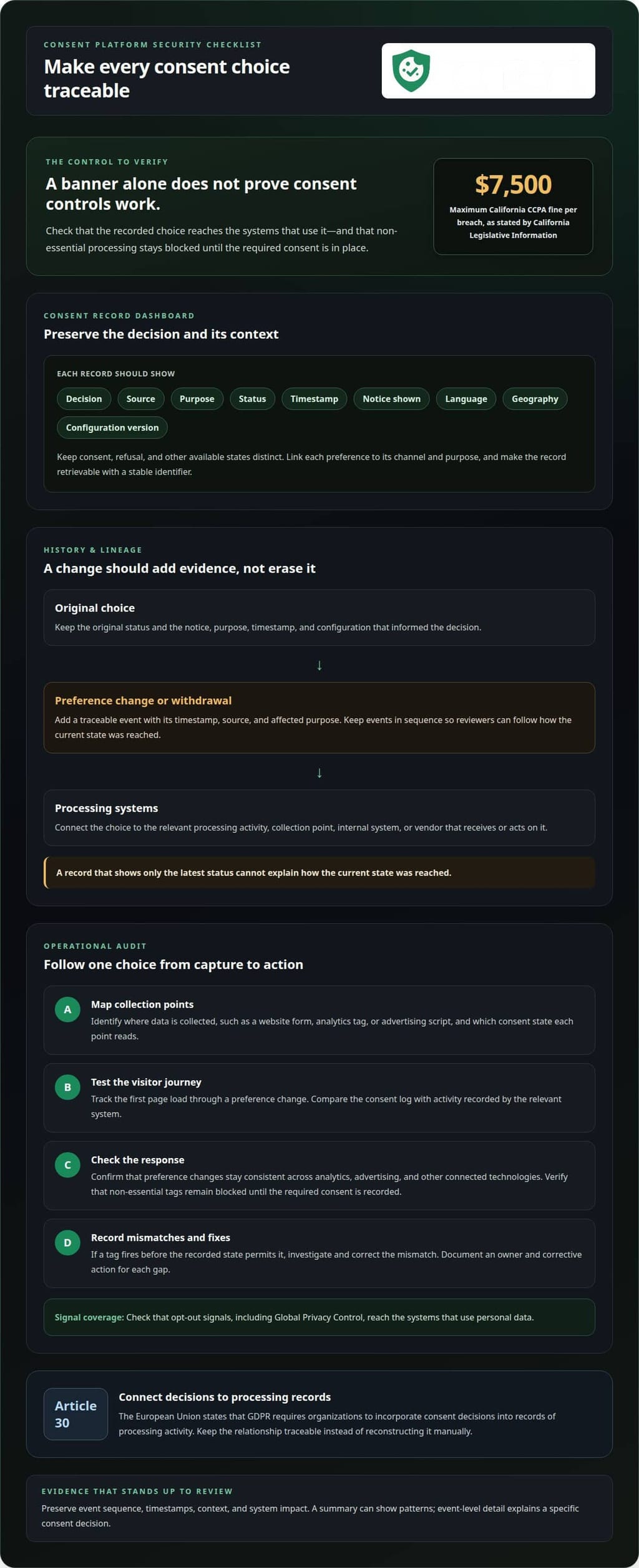
Each record should identify the decision, source, purpose, status, and timestamp. It should also preserve the notice shown, language, geography, and configuration version. This context distinguishes an analytics preference from a marketing choice and shows which settings informed the visitor’s decision.
Check whether the repository links each preference to its relevant channel and purpose. A record that says only “accepted” leaves teams guessing about what the visitor accepted. Keep consent, refusal, and other available states distinct. Then confirm that staff can retrieve a record using a stable identifier rather than searching unrelated customer entries.
Withdrawal Records and Consent History
A withdrawal should add a traceable event, not erase the earlier choice. Preserve the original status, withdrawal event, timestamp, and affected purpose. This lets a reviewer see what the person selected first and what changed later. For example, a visitor might withdraw a marketing preference while leaving another choice unchanged.
Check whether updates retain their source and configuration version. These details help distinguish a visitor’s action from a system adjustment or corrected record. Keep events in sequence so staff can follow the decision from capture through withdrawal. A record showing only the latest status cannot explain how the current state was reached.
Record Lineage and Audit Readiness
Record lineage connects a consent entry to the notice, configuration, and processing purpose it governed. An internal reviewer can then follow one decision through its changes. A useful repository supports retrieval by a stable identifier and shows the event sequence, rather than returning an isolated status without context.
Test a sample record by locating its notice version, confirming its timestamp and purpose, then following any change or withdrawal. Record whether each step is traceable and where gaps occur. California Legislative Information states that violating the California Consumer Privacy Act can result in a fine of up to $7,500 per breach.
Restrict repository access and make changes attributable to an authorized process. Include vendors and internal systems in the lineage when they receive or act on a choice. For example, link a recorded preference to the system that applies it. This gives reviewers a clearer account of how a decision shaped processing and helps teams explain discrepancies without relying on memory.
Consent logs, audit trails, and reporting
Logs should connect consent collection to the processing decisions that follow. Evaluate vendor evidence, coverage at collection points, and incident records, not just dashboard screenshots.
Choose security certifications and compliance standards relevant to your data, geography, and procurement requirements. Confirm that their scope covers the CMP and its supporting infrastructure. If an incident occurs, preserve relevant logs, contain affected collection paths, record a timeline, and follow a documented response process.
Consent Logs and Audit Trails
A useful audit trail records events in sequence, with timestamps, event types, and the systems involved. For example, it should distinguish a preference update from a configuration change. Check whether authorized staff can trace an event to its source and explain its effect on consent handling. Logs should support governance without obscuring the original event.
The European Union states that the GDPR requires organizations to incorporate consent decisions into records of processing activity to satisfy Article 30 requirements. A consent management solution should make those decisions traceable to relevant processing activities, rather than leaving teams to reconstruct the relationship manually.
Data Collection Point Auditing
Map each collection point, such as a website form, analytics tag, or advertising script, to the consent state it reads. Then test a visitor journey from the first page load through a preference change. Compare the resulting log with activity recorded by the relevant system. This can reveal collection paths that operate outside the expected consent flow.
Repeat the test after changing a banner or tag configuration. A governance record should show what changed, when it took effect, and which collection points it covered. If a marketing tag fires before the recorded state permits it, investigate and correct the mismatch.
Audit Evidence and Reporting
Reports should help teams answer practical questions: which consent state applied, what event changed it, and which collection point responded? Useful evidence ties each answer to a log entry or configuration record. A summary chart can show patterns, but it cannot replace event-level detail when teams need to explain a specific decision.
Check whether reports provide the detail teams need to review consent events. Confirm that exports retain timestamps and context. A report that drops these details may be difficult to reconcile with operational records or explain during an internal review.
For a focused audit, select one consent event and trace it end to end. Match the event log to the relevant processing record, inspect the connected collection point, and note any gaps. Then document an owner and corrective action for each mismatch. This turns audit findings into trackable work instead of a report detached from implementation.
Keep incident documentation separate from routine consent reporting, while preserving links between related events. For example, if a security incident affects a collection point, the timeline should identify that system and the relevant log entries. This helps teams explain what happened, what they changed, and whether consent handling was affected.
As you assess implementation scope and operating needs, you can review the available consent platform options alongside the controls your governance process requires.
CCPA opt-out handling and Global Privacy Control signals
For opt-outs, the key security test is whether a signal changes processing across connected systems. The CCPA requires an option to object to the sale of personal data, and a CMP should act on Global Privacy Control signals.
The CCPA is one state law affecting consent records. In 2026, organizations will need to comply with 21 distinct U.S. privacy laws, so configurations must account for applicable state requirements rather than assume one rule fits every visitor.
Processing practices and opt-out handling can vary, so organizations should detect and honor consumer choices. A CMP must detect that choice and pass it to relevant vendors and systems. Test the full path: send a Global Privacy Control signal, confirm the opt-out status is recorded, then verify that advertising or sale-related processing responds accordingly. Preserve the event and its history so teams can explain when the signal arrived and what changed.
Deployment affects operational control. With cloud hosting, the provider manages the platform infrastructure; private cloud or on-premise deployment gives the organization more direct responsibility for access, configuration, and maintenance. Document who manages each layer, including backups and security updates. The right model depends on internal capacity and governance, not simply a preference for more control.
Personalization and privacy can coexist when consent preferences determine which activities proceed. For example, an organization can keep a visitor’s marketing opt-out in force while applying other permitted preferences. Avoid treating an opt-out as a blanket instruction unless the applicable configuration requires it. Keep each choice distinct and traceable to its purpose.
Assess encryption and access controls as separate safeguards. Protect sensitive consent records during transmission and storage, while using role-based access to limit who can view or change them. Review administrator permissions, authentication controls, and access logs. Document who can alter regulatory settings, and ensure routine users cannot make those changes without authorization.
Secure configuration starts with a defined test plan. Set the applicable geography and consent preferences, then test acceptance, refusal, withdrawal, and Global Privacy Control signals. Confirm that each outcome reaches connected tags and vendors. Repeat tests after configuration changes, and document results alongside the configuration version. This makes expected behavior clear to technical and governance teams.
Continuous monitoring keeps those tests relevant. Track changes to tags, vendor connections, and regulatory settings, then investigate unexpected processing or failed signals. For example, compare the recorded opt-out with the status received by an advertising system. A mismatch should prompt a documented investigation and correction, not remain hidden in a dashboard.
Sephora was fined $1.2M under the CCPA for failing to disclose the sale of personal information and not honoring Global Privacy Control signals.
Consent collection, storage, and preference management
Protect consent records with restricted access, secure storage, and a clear history of changes. A CMP should also make preferences easy to review and update through banners and self-service centers.
Consent Withdrawal and Preference Changes
A customer should be able to revisit a preference center and change a prior choice. Withdrawal should be as accessible as the original consent action. Record the new status, timestamp, and affected purpose while preserving the earlier event. This creates a usable history without confusing a changed preference with the original decision.
Test a withdrawal from the banner and the self-service portal. Confirm that the displayed preference updates and the change reaches connected systems. Under the GDPR, withdrawing consent must be as easy as giving it.
Downstream Preference Enforcement
A preference only works if connected technologies follow it. Map each choice to the analytics, advertising, marketing, and other tools it governs. Then test a change and confirm that those systems receive the updated state. For example, a visitor who withdraws analytics consent should not remain represented downstream as having an active analytics preference.
Check the flow from the preference center through each integration. Record failed deliveries, retries, and unresolved differences between the CMP and receiving systems. Where Google Consent Mode v2 is used, verify that consent signals pass correctly to Google services. Clear status reporting helps teams locate a break in the flow.
Protection for Consent Records and Personal Data
Limit access to consent records by role. Give administrators only the permissions they need for configuration, and prevent routine users from changing security settings. Protect stored records and data in transit with encryption. Record administrative access and changes so teams can trace who accessed or altered a preference history.
Store only the personal data needed to support the consent purpose. Set retention rules for associated data, then delete or anonymize it when its retention period expires. Separate the consent evidence needed for accountability from unrelated profile details. This reduces unnecessary exposure if a record is accessed improperly.
Design consent banners with clear, distinct controls. A visitor should be able to understand the available choices without searching through unrelated settings. Keep the same preference categories visible in the banner and the self-service center. For example, if a banner offers separate analytics and marketing choices, the preference center should let customers review and change both. A well-structured cookie consent banner gives people a direct route to those controls.
Finally, test the whole journey with a sample customer account: set a preference, change it, and confirm that the record and connected systems reflect each event. Document the result and investigate any mismatch before relying on the configuration in production.
Blocking non-essential processing until consent
Non-essential tags should stay inactive until the visitor’s choice allows them to run. Test this across websites, mobile apps, and tag managers.
The GDPR and Quebec Law 25 require affirmative consent before non-essential processing begins. Build the test around the actual visitor journey, not only the banner’s appearance.
Blocking Unauthorized Tags and Cookies
Start by discovering cookies, pixels, scripts, and other trackers across key pages and user paths. Compare that inventory with the tags allowed to load before consent. Investigate any unexpected tag. For example, analytics should not start simply because a page loaded when consent is still required.
Use browser and network activity to see which requests fire before a choice. Repeat the test after a visitor rejects or withdraws consent. This exposes tags that bypass the expected control.
Secure Website, App, and Tag Manager Integration
A CMP can connect securely when the website, mobile app, and tag manager read the same consent state. Configure each integration to hold non-essential tags until that state permits processing. Test acceptance and rejection on each platform, including pages where tags load through a tag manager.
For mobile apps, test the consent flow and subsequent tracking separately from the website. Differences in implementation can leave an app collecting data while the website blocks it.
Run a repeatable test after each tag or configuration change. First, open a clean browser session and load a page without making a choice. Inspect network requests for analytics and advertising activity. Next, reject optional processing, reload the page, and inspect again. Blocked tags should not begin tracking.
Then accept a specific purpose and confirm that only the related tags activate. Change that preference and test again. This sequence shows whether the platform applies each state accurately rather than treating every interaction as blanket permission.
Keep a discovery record for each site section and app flow. Note the tracker, its purpose, triggering condition, and test result. When a vendor adds a script or a team publishes a new tag, compare it with that record. Keep unrecognized tags blocked until the team reviews their function and consent conditions.
Global websites may serve visitors under different privacy requirements. Apply the relevant configuration to the visitor’s context, then test the resulting behavior. A single default can fail where regional settings differ. Document which configuration governs each experience and retest after updates to tags, banners, or app releases.
Monitoring should catch changes between planned reviews. Compare observed cookies and requests with the approved tracker inventory. Investigate a new cookie, a tag firing too early, or a consent state that fails to reach the tag manager. Record the cause and corrective action so the issue does not disappear without a trace.
For a platform setup built around these controls, explore consent platform options.
Conzent: Managed Cloud Consent Platform
Conzent’s Managed Cloud Consent Platform supports consent management for teams that need to manage consent records, preferences, or tag controls. Its Self-Hosted Open Consent Infrastructure is for teams that want to run the platform on their own infrastructure.
Consent A/B Testing lets teams compare banner variations, and Revenue Impact Analytics helps them examine how consent choices relate to revenue. These tools support measurement and configuration, but do not replace accurate implementation or legal advice.
Contact Conzent to discuss whether its managed cloud or self-hosted platform suits your setup.
Make consent security part of everyday operations
Consent controls need an owner after launch, not just a successful setup. Keep the consent management platform security checklist as a working control map, and revisit it whenever your website, integrations, or data practices change. Assign responsibility for documenting changes and deciding when a fresh test is needed.
When something changes, record what changed, who approved it, and which pages or integrations need testing. Then check that consent choices still control the relevant tags and that the banner works as expected for visitors.
Use Conzent's pricing page to compare available plans with your site's consent requirements.
Frequently Asked Questions
What security features should a consent management platform have?
A CMP should protect its administration layer as well as consent data. Look for encryption, multi-factor authentication, role-based permissions, and controls for API credentials. Assess what happens if a consent service or integration becomes unavailable. A clear failure mode helps prevent tags from treating missing or delayed consent information as permission. Include configuration changes and administrator access in your security review.
What audit logs and consent evidence should a CMP retain?
Retain enough evidence to distinguish user actions from administrative changes. For example, a log should help explain whether a consent state changed after a visitor acted or after an administrator updated settings. Keep exports readable and linked to the relevant configuration. Define who can retrieve them and how long they remain useful under your organization’s retention policy. This supports investigations without relying on screenshots or informal notes.
What security risks should organizations assess before choosing a CMP?
Assess risks across the platform, its integrations, and the people who administer it. Ask how access is limited, how credentials are handled, and how teams detect configuration changes. Review what happens when a website, tag manager, or CMP connection fails. Also consider whether your organization can retrieve usable records and move its configuration if operating needs change. These checks reveal practical dependencies beyond feature lists.
What security certifications and compliance standards should CMP vendors meet?
Choose certifications and compliance standards relevant to your data, geography, and procurement requirements. Confirm that their scope covers both the CMP and its supporting infrastructure.