
Cookie Consent for Google Analytics: When Is It Needed

Whether Google Analytics needs cookie consent depends on where your visitors are and how tracking is configured. In the EU, GDPR requires explicit visitor consent before Google Analytics cookies are used. In the EU and UK, ePrivacy rules generally require prior consent for non-essential cookies. The cookie consent impact on Google Analytics is practical: a banner that blocks analytics until a visitor chooses can reduce the activity recorded.
It’s reasonable to worry that stronger consent controls will leave you with less useful data. The US has no single federal cookie-consent law, so the answer also depends on applicable state rules. This article explains when consent is needed, what changes when a banner blocks analytics scripts, and how Consent Mode can affect reporting when visitors decline.
You’ll also see how EU and UK requirements differ from the US approach, and why consent choices can create gaps in analytics rather than simply turning measurement on or off. The key is understanding the trade-off: respect a visitor’s choice while knowing what your reports can and can’t show.
Key Takeaways
- Choose between blocking Google tags until consent and loading them with consent denied by default; the choice affects what data can be collected before a visitor opts in.
- Make sure consent signals match the visitor’s choice, including analytics and advertising preferences, so tags respond as intended.
- Design banner choices and script behavior together: consent settings shape which sessions appear in your analytics reports.
- Use consent testing and revenue impact analytics to understand how banner choices affect measurement and site outcomes.
Do You Need Cookie Consent for Google Analytics?
The US has no single federal cookie-consent law, and state requirements vary. Cookie consent requirements vary, and it can be useful to explain cookie use and give visitors choices about non-essential cookies. There’s no typical rejection percentage: choices depend on the banner, audience, and context.
Basic and Advanced Consent Mode Setups
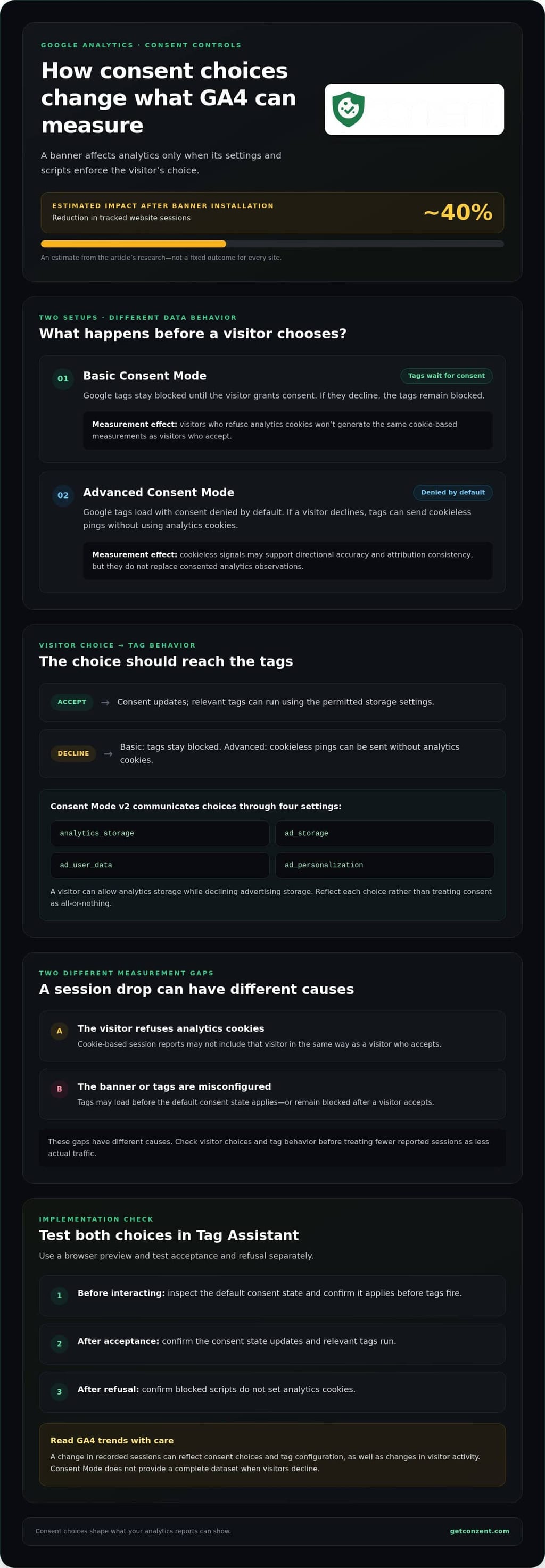
Basic Consent Mode blocks Google tags until a visitor grants consent. Advanced Consent Mode loads tags with consent denied by default and sends cookieless pings. This distinction matters because it changes what Google can receive before a visitor makes a choice. With Google Tag Manager, set the default consent state before tags fire, then update it when the visitor responds. A tag firing does not mean the visitor has permitted analytics cookies.
Google Signals and Consent Controls
Google Signals supports reporting and advertising features associated with signed-in Google users. Consent Mode, by contrast, controls how Google tags behave according to consent choices. These controls aren’t interchangeable: a Google Signals setting doesn’t replace the consent state sent to tags. Consent Mode includes settings for analytics storage, advertising storage, ad user data, and ad personalization. Knowing the difference helps you identify whether a reporting change follows a visitor’s choice or a separate Google Analytics setting.
Analytics Behavior After Consent Choices
When a visitor declines analytics consent, basic Consent Mode keeps Google tags blocked; advanced Consent Mode can send cookieless pings without using analytics cookies. When consent is granted, tags can use the relevant storage settings. The data available in reports therefore depends on both the visitor’s choice and the implementation. A consent banner can change what activity appears in analytics, not just what the banner displays.
Test both choices in Tag Assistant. Open the site in a browser preview, inspect the default consent state before interacting with the banner, then accept and decline in separate tests. Confirm that the relevant tags and consent states change as expected. This catches a common implementation gap: the banner records a choice, but the tags don’t receive the corresponding update. Comparing consent-related changes with revenue impact data can also help put reporting shifts in context.
Consent Mode v2 and GA4 Reporting
Consent Mode v2 uses four parameters: analytics_storage, ad_storage, ad_user_data, and ad_personalization. Together, they communicate choices about analytics and advertising data to Google tags. For example, a visitor may allow analytics storage while declining advertising storage, so the settings should reflect each choice rather than treating consent as one all-or-nothing switch.
Consent Mode doesn’t provide a complete dataset when visitors decline consent. It can help maintain directional accuracy and attribution consistency across campaigns, but modeled or cookieless signals aren’t a replacement for consented analytics observations. Read GA4 trends with that distinction in mind: a change in recorded sessions may reflect consent behavior and tag configuration, as well as changes in visitor activity.
Consent banners and blocking analytics scripts
A consent banner can change Google Analytics data because its script controls when analytics tags run. If the default setting blocks those tags until consent, a visitor who declines won’t generate the same cookie-based measurements as someone who accepts. An estimate in the research for this article puts the reduction in tracked website sessions after banner installation at roughly 40%. Treat that as an estimate, not a fixed outcome for every site.
The effect depends on how the banner connects to your analytics setup. A visible banner alone doesn’t stop tracking: the related scripts or consent controls must enforce the visitor’s choice. For example, if Google Analytics loads before the banner applies its default state, data may be collected before the visitor responds. If the tag stays blocked after consent is granted, the site can miss data from visitors who agreed.
That creates two distinct measurement gaps. First, visitors who refuse analytics cookies may not appear in cookie-based session reports. Second, a misconfigured banner can block measurement for visitors who accept. The causes differ, so compare banner choices with tag behavior before treating a change in reported sessions as a change in actual traffic.
- Before a choice: confirm the default state matches the intended behavior for analytics tags.
- After acceptance: test that the visitor’s choice updates consent and allows the relevant tags to run.
- After refusal: confirm that blocked scripts don’t set analytics cookies.
Privacy laws also affect what a banner needs to communicate and which choices it must provide. In the United States, the CCPA doesn’t require explicit consent, but covered businesses must disclose cookie types and allow visitors to opt out of non-essential cookies. The banner design and script behavior should work together. A choice shown on screen won’t provide the intended control if it isn’t passed to Google tags.
Compare reporting over the same periods and distinguish accepted traffic from visitors who declined. Check whether a session drop follows banner deployment, whether tags fire after acceptance, and whether the banner’s default state is applied before analytics loads. That analysis makes the cookie consent impact on Google Analytics easier to interpret without treating every missing session as lost traffic. If you’re assessing a consent platform, review its pricing information alongside the controls and analytics features your implementation needs.
Collecting website user consent
Consent collection connects a visitor’s choice to the settings used by Google Analytics. A banner can ask whether someone accepts analytics cookies, but the site must also pass that choice to its tags. Google recommends using a Consent Management Platform or working with a Content Management System to collect consent and send it to Google. The practical test is whether the selected setting changes what the analytics tag does.
Keep the choice clear and specific. For example, separate analytics from advertising instead of making a broad “accept all” control the only option. Visitors should be able to choose without leaving the page. Make the available options easy to understand so people can distinguish measurement from other uses of data.
Consent needs to affect browser behavior, not just the banner’s appearance. If a visitor declines analytics, the site should apply that setting before analytics cookies are written. If they accept, update the relevant consent state and allow the intended tags to run. A mismatch can occur when the banner records a choice but Google Analytics continues using an earlier default.
For a reliable setup, map each choice to the settings and tags it controls. Then test the path from the banner to Google Analytics:
- Before a choice: load the page in a fresh browser session and observe which tags run under the default settings.
- After acceptance: choose to allow analytics, then confirm the consent update reaches the relevant Google tags.
- After refusal: decline analytics and inspect whether the browser stores analytics cookies or identifiers.
- After changing a choice: reopen the banner, revise the setting, and confirm the site responds to the new choice.
Test after installing a new banner, changing tag configuration, or updating the site’s consent settings. For example, a banner may work on the homepage but fail on a checkout page that uses a separate tag setup. Testing both page types helps reveal where consent signals stop reaching Google Analytics.
Keep the language visitors see aligned with the behavior behind it. If a control says “reject analytics,” a browser test should confirm that this choice doesn’t set analytics cookies. Clear settings also make reports easier to interpret: compare a change in collected sessions with the consent options visitors actually received, rather than treating it as unexplained traffic loss.
Businesses that meet certain conditions must comply with the CCPA when collecting or processing personal data from California residents.
Also verify that your CMP sends the Google Ads consent signals ad_storage, ad_user_data, and ad_personalization. Checking each signal helps ensure the consent information is complete and reflects the visitor’s selection.
EU and UK cookie consent
In the EU, GDPR requires explicit visitor consent before Google Analytics cookies are used. The US has no single federal cookie-consent law, and applicable state rules differ. EU and UK ePrivacy rules generally require prior consent for non-essential cookies.
That difference affects the default configuration. For an EU visitor, Google Analytics cookies must wait until consent is given. Across the EU and UK, a consent banner must also give visitors an opportunity to refuse cookie storage on their devices, as stated in EUR-Lex. A banner that offers acceptance without a clear refusal option doesn’t provide that choice.
Consent affects what a website can collect. If someone declines analytics cookies, a cookie-based session may not be recorded in the same way as one after acceptance. That can influence reported visits, conversion paths, and attribution. It doesn’t automatically mean fewer people visited or purchased; it means measurement reflects visitors’ choices and the tag configuration.
For a site serving US and European audiences, the consent experience can depend on visitors’ locations and the rules that apply. The key operational step is ensuring the banner’s choice reaches Google tags before they act. Test it in a fresh browser session: decline analytics and observe whether analytics cookies are set. Then accept and confirm that the tags respond to consent.
France has a narrow audience-measurement exemption described by the CNIL. It requires the tracker to be limited to one site, the cookie lifetime to be no more than 13 months, and the last byte of the IP address to be truncated. Those conditions are specific to the exemption, not a general EU rule for Google Analytics. A site that doesn’t meet them shouldn’t treat the exemption as a substitute for consent.
Data protection choices can also change over time. If a website materially changes how it collects, uses, or shares personal data, GDPR may require proactive notice and sometimes fresh consent. For example, adding a new use for analytics data calls for reviewing the information shown to visitors and whether their existing choices still cover that use.
Keep the consent record, banner wording, and Google Analytics configuration aligned. If the banner says analytics is optional, tags must respect a refusal. If the site changes its measurement setup, review the visitor-facing explanation and test acceptance and refusal again. This makes session and conversion reports easier to interpret across regions, without treating EU and UK consent rules as identical to the US approach.
For this exemption, keep the tracker limited to one site. That boundary remains central to the narrow audience-measurement allowance described here.
What is Google Consent Mode v2 and how does it affect GA4 reporting?
Google Consent Mode v2 passes a visitor’s consent choices to Google tags through four parameters. These settings distinguish analytics storage from advertising storage and advertising data uses. GA4 can therefore respond to consent signals instead of treating every visitor as having the same preferences. The distinction matters when someone accepts analytics measurement but declines advertising-related use.
The four parameters describe separate controls:
analytics_storageindicates consent related to analytics storage.ad_storageindicates consent related to advertising storage.ad_user_datacovers consent for sending user data for advertising purposes.ad_personalizationcovers consent for personalized advertising.
For example, a visitor might allow analytics storage while refusing personalized advertising. The consent signals should preserve that distinction. If a setup sends one broad acceptance value for every purpose, GA4 and other Google tags may not receive the visitor’s separate choices. Accurate signals depend on the connection between the banner controls, tag configuration, and consent updates.
Reporting still has limits. Consent Mode doesn’t create a complete dataset when visitors withhold consent. It can help maintain directional accuracy and attribution consistency across campaigns, but those benefits don’t make missing consented observations identical to recorded activity. Treat GA4 reports as a view shaped by both visitor choices and the signals the site sends.
This affects how you compare campaign performance. If one campaign has more visitors who decline analytics consent, its recorded sessions may not represent all visits in the same way as another campaign. A conversion count in GA4 can also reflect which interactions were measurable under the consent settings. To bridge gaps caused by tracking limitations, solutions from Nodal AI offer advanced analytics methods to help marketers uncover deeper campaign insights. Compare trends alongside consent behavior and tag configuration, rather than assuming every reporting difference comes from campaign performance.
To assess an implementation, inspect the consent state and the four parameters in a test visit. Confirm that each banner choice updates the corresponding signal, then compare GA4 reporting before and after the change. For example, accepting analytics while declining ad personalization should not be treated as blanket consent for both purposes. This check helps separate configuration errors from expected measurement gaps.
Consent Mode v2 is a signaling framework, not a promise of full recovery for declined-cookie data. Use its reporting as directional context, and keep the visitor’s choices central to measurement. If you’re evaluating a consent setup that supports these controls, review the platform options for your implementation.
Conzent: Managed Cloud Consent Platform
Conzent’s Managed Cloud Consent Platform helps websites manage visitor choices and consent signals alongside analytics. Teams that want to run the infrastructure themselves can use Conzent’s Self-Hosted Open Consent Infrastructure instead.
Consent A/B Testing helps compare banner approaches, while Revenue Impact Analytics helps show how consent choices relate to business outcomes. These tools are useful when refining a banner or examining how consent settings affect measurement. They support implementation and analysis, not legal representation or decisions about which requirements apply to your site.
Contact Conzent about a consent setup for your website.
Make Consent Part of Your Measurement Plan
Set a clear purpose for analytics before changing your consent experience. Decide which decisions your reports need to support, then document the assumptions behind those measures. The cookie consent impact on Google Analytics is easier to interpret when measurement choices are recorded, not treated as a technical afterthought.
When you change a banner, tag, or analytics setting, record what changed and when it took effect. Add a brief note to your reporting records. If sessions or conversions shift afterward, your team can compare the change with the implementation timeline before drawing conclusions.
If you’re ready to consider a consent setup that fits your website and measurement needs, explore consent platform options with Conzent. A practical record of changes gives your team a clearer starting point for future decisions.
Frequently Asked Questions
What Is Google Changing, and Why Does It Matter?
Google Consent Mode gives Google tags consent signals that affect how they behave. Version 2 uses separate parameters for analytics storage, advertising storage, user data, and ad personalization. This matters because a visitor can agree to one purpose and decline another. For example, your settings can distinguish permission for GA4 measurement from permission for personalized advertising, rather than treating consent as one combined choice.
How Does Cookie Consent Affect Google Analytics Data Collection?
Consent choices determine whether Google Analytics tags can use analytics storage, so reports reflect only the activity your setup can measure under those choices. For a useful comparison, note the date you change a banner or tag configuration. Then compare equivalent periods and investigate whether reporting shifts align with the change, rather than assuming they reflect a change in visitor interest.
How Does Denied Analytics Consent Affect Traffic, Conversions, and Attribution Data?
When analytics consent is denied, cookie-based measurement may not capture a visitor’s session or connect their actions into a conversion path. A campaign can therefore appear to generate fewer sessions or conversions than it did in reality. Treat reported figures as observed activity, not a full count of visits. Compare trends with your consent configuration before making campaign decisions based on a sudden reporting change.
How Do You Implement Cookie Consent for Google Analytics 4 With a Consent Management Platform?
Connect the platform’s banner choices to Google’s consent settings, then test each choice before relying on GA4 reports. Set the default consent state before Google tags run, map acceptance and refusal to their relevant signals, and use Tag Assistant to inspect the results. Test a fresh browser session for both outcomes. Confirm the tags respond to the choice and that changing a saved preference updates their behavior.