
E-commerce Consent Management: Privacy & Customer Trust

What if a privacy prompt could give shoppers real control without turning browsing or checkout into an obstacle course? Consent management for e-commerce is more than a banner. It is a system for presenting clear choices, recording them, and applying them to the technologies used throughout the shopping journey.
If you are unsure which tags need consent or how a shopper’s choice affects analytics and advertising, start by mapping the tools on your site. A prompt that interrupts the customer experience can create friction, while tags that ignore consent choices can undermine trust and make measurement harder to interpret.
This guide explains how to manage consent from a shopper’s first visit through checkout and beyond. You will learn how to inventory the technologies involved, assess consent platforms, and connect privacy choices with tags and measurement. We also compare managed-cloud and self-hosted approaches, so you can choose a setup that fits your store’s technical needs and present privacy choices clearly.
Key Takeaways
- Consent management for e-commerce covers the choices shoppers make and how store technologies record and apply those choices.
- Map consent signals to your tags so analytics and advertising tools respond to each relevant choice.
- Compare consent tools by banner flexibility, signaling, reporting, standards support, and ongoing maintenance.
- Use a repeatable rollout: inventory technologies, map purposes, configure choices, test tag behavior, and review results.
- Choose managed cloud or self-hosting based on how your team wants to handle infrastructure and administration.
Why e-commerce consent management is more than a cookie banner
A shopper lands on a product page, compares options, creates an account, and checks out. Each step may involve different website technologies, from tools that support store functions to analytics and advertising tags. Consent management for e-commerce means collecting visitor choices, applying them to the technologies they affect, and respecting those choices across the shopping journey. It is an operational process, not just a notice on the screen.
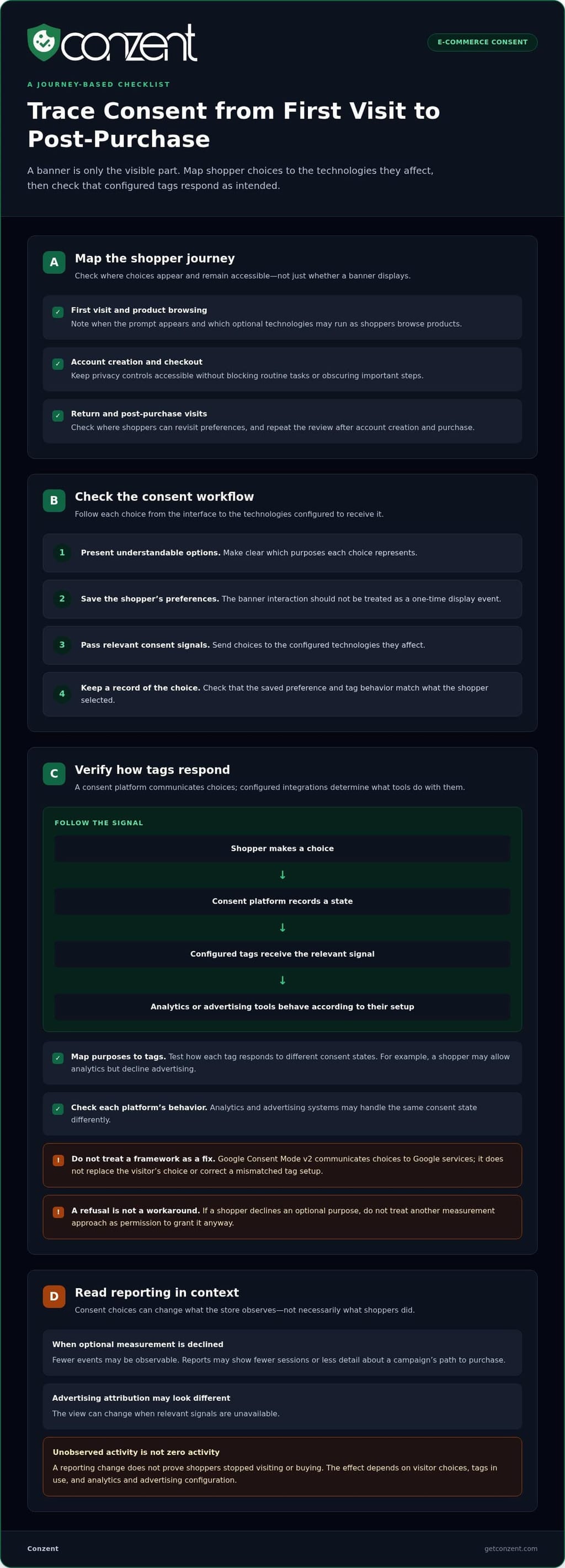
The banner is only the visible part. Behind it, a store needs to present understandable options, save the visitor’s preferences, pass the resulting signals to configured technologies, and keep a record of the choice. If one of those steps is missing, the banner may look clear while tags behave differently from what the shopper selected.
This matters in a sector shaped by digital transactions and changing rules. The general E-commerce and its regulatory landscape helps explain why privacy choices belong in the shopping experience, not as an afterthought.
Where consent choices appear in an online shopping journey
A first-visit choice can affect which optional technologies run as someone browses products. A shopper might allow one purpose but decline another. The store should carry that selection to the relevant configured tags, rather than treating the banner interaction as a one-time display event.
Choices also matter when shoppers create accounts, reach checkout, or return after a purchase. Keep privacy controls accessible without blocking routine tasks or obscuring important steps. Distinguish technologies needed for store functions from optional measurement or advertising purposes, then verify how each category should be handled for the relevant jurisdictions and technologies. Do not assume every store or tag follows the same rules.
What a consent management platform does
A consent management platform (CMP) gives visitors a way to review and set preferences, then communicates those choices to website technologies configured to receive them. The platform supports the workflow, but the store still needs to map its technologies and purposes accurately and test the resulting behavior.
A banner is one interface in that workflow. Clear wording and usable controls help shoppers understand their options, while preference handling and consent signals connect those choices to the site’s setup. Stores can explore customizable consent banner features to shape how choices appear without confusing the display with the underlying process.
For a practical starting point, trace a visit from landing page to checkout. Note when the banner appears, where a shopper can revisit preferences, which purposes each choice represents, and how related tags respond. Repeat the check after account creation and on a post-purchase visit. This journey-based review can reveal gaps that a banner-only check would miss, while keeping privacy choices visible and the shopping flow usable.
How e-commerce consent choices affect tags, analytics, and advertising
A visitor’s selection matters only if the store’s technology responds to it. The practical chain is: a shopper makes a choice, the consent platform records a state, configured tags receive the relevant signal, and analytics or advertising tools behave according to their setup. Each step needs to match the store’s actual tag configuration.
A CMP communicates a shopper’s choices; configured integrations determine what analytics and advertising tools do with them. A consent platform does not automatically make every tag behave as intended. Map purposes to tags and test how those tags respond to different consent states.
How consent signals reach analytics and advertising tools
Think of the workflow as choice, consent state, tag configuration, and resulting measurement. A shopper might allow analytics but decline advertising. The consent signal should reach the relevant configured tools so each can respond according to its role. Analytics and advertising systems may handle the same consent state differently, so do not assume one signal produces identical behavior across every platform.
Google Consent Mode v2 is one framework for communicating consent choices to Google services. It does not replace the visitor’s choice or correct a mismatched tag setup on its own. Check how your specific tags and analytics configuration use consent signals, then test the outcomes. For technical context, see Google Consent Mode v2 requirements.
Consent-aware measurement is not permission to ignore a refusal. If a visitor declines an optional purpose, a measurement approach must not be treated as a workaround that grants that permission anyway. Respect the selected state and make sure the system’s behavior reflects it.
Why store reporting may change when visitors decline
When visitors decline optional measurement, fewer events may be observable in analytics. Reports may show fewer sessions or less detail about a campaign’s path to purchase. Advertising attribution may also look different if the relevant signals are unavailable. These changes do not prove that shoppers stopped visiting or buying. They may reflect what the store can measure under the choices visitors made.
There is no fixed amount of revenue or measurement loss to expect. The effect depends on visitor choices, the tags in use, and how analytics and advertising systems are configured. Compare reporting over time with those limits in mind, and do not treat unobserved activity as zero activity. A clear explanation of the revenue impact of cookie consent can help teams assess what consent-related measurement changes mean for their own store.
For a practical check, test the same browsing and purchase journey under different consent choices. Confirm which tags fire, what signals they receive, and what appears in reporting. Record the expected behavior beside the observed result. This gives marketing, analytics, and development teams a shared view of what works and where configuration needs attention. You can also review available platform options against your store’s operational needs.
How to compare consent management options for an online store
Choose a consent platform by looking beyond the banner. Compare how shoppers set preferences, how those choices reach configured technologies, what the team can learn from reporting, and how much ongoing work the setup requires. The right approach to consent management for e-commerce depends on your store’s tools, workflows, and technical ownership. No single operating model fits every team.
Use the questions below to make the comparison concrete. Answer them against your actual tags, analytics setup, and team responsibilities, rather than a generic feature checklist.
| Criteria | Questions to resolve | Implications for store teams |
|---|---|---|
| Banner control | Can you present clear choices and adapt the banner to the store experience? | Marketing and e-commerce teams can assess whether the interface fits the browsing and checkout flow. |
| Consent signaling | Can choices reach the tags and tools you actually use? | Development and analytics teams need to map signals to configured behavior and test the result. |
| Reporting | Can the team understand consent choices and their measurement effects? | Clear reporting helps distinguish changes in observed data from changes in shopper activity. |
| Standards support | Does the platform support standards relevant to your advertising or measurement workflows? | Support matters when those standards match the store’s setup, not simply because a feature exists. |
| Administration | Who handles infrastructure, updates, access, and routine review? | Choose a workflow the team can maintain consistently as store technologies change. |
Managed cloud or self-hosted consent infrastructure?
The main difference is who operates the underlying infrastructure. With managed cloud, infrastructure maintenance and automatic updates are handled as part of the service, and analytics dashboards are cloud-based. With self-hosting, the store runs the consent infrastructure on its own infrastructure and retains more direct operational control. Consider your team’s capacity for maintenance, updates, and infrastructure ownership. Self-hosting may suit teams that want to operate the system themselves, while managed cloud reduces infrastructure work.
Which standards and measurement capabilities matter?
Evaluate standards against real workflows. IAB TCF v2.3 support is relevant when a store’s advertising setup uses that framework; it is not automatically necessary for every online store. Assess Google Consent Mode v2 against the site’s measurement configuration, then test the signals and resulting behavior.
Check whether reporting is understandable to the people who use it, whether controls are documented, and whether the team can repeat tests after configuration changes. A feature list alone cannot show how well a platform fits daily work. The strongest choice is one your team can operate, review, and connect to its actual consent and measurement needs.
How to implement and improve consent management on an e-commerce site
A reliable rollout starts with the store’s actual setup, not a default configuration. Inventory the technologies in use, connect each to a clear purpose, then test how choices affect the storefront and its measurement. This makes consent management for e-commerce a repeatable process that teams can review as the site changes.
- Inventory technologies. List the tags, analytics tools, advertising technologies, and other services used across the storefront. Note where each appears, such as product pages, account creation, checkout, or post-purchase pages.
- Map purposes. Record why each technology is used and which team owns it. Separate store functions from optional measurement or advertising purposes, and verify how categories should be treated in the store’s context.
- Configure choices. Set up clear preference options and connect each purpose to the relevant configured tags. Make it easy for shoppers to find and update their choices.
- Test behavior. Check the banner, preference controls, and tag responses under each relevant consent state. Test mobile and desktop layouts, as well as browsing, account, and checkout paths.
- Review and maintain. Revisit the inventory and tests when tags, campaigns, analytics, or store functionality change. Record what changed, who reviewed it, and whether expected behavior still matches the result.
Give the work clear owners. E-commerce should coordinate the customer journey and storefront changes. Marketing should document campaign technologies and purposes. Analytics should review measurement behavior and reporting. Development should manage tag configuration and technical testing. Shared ownership helps prevent a campaign change or new feature from bypassing the agreed process.
Test the consent experience across store journeys
Check that the banner is readable and its controls work at common mobile and desktop viewport sizes. Test each relevant choice and confirm that configured tags respond as intended. Then repeat the checks through product browsing, account creation, and checkout. A test record helps teams compare expected and observed behavior, especially after updates to tags, campaigns, analytics, or store features.
Measure usability without weakening user choice
A/B testing can compare clear banner designs and help teams understand how presentation affects choices. Keep the available options meaningful and equally usable; a test should improve clarity, not steer shoppers away from refusal. Review consent and revenue-related metrics as diagnostic evidence, alongside implementation checks. If reported outcomes change, investigate rather than making choices less transparent.
Legal interpretation depends on the store’s circumstances, technologies, and applicable jurisdiction. This overview is not legal advice. Use GDPR and cookie consent guidance as a starting point, and assess the rules relevant to your own setup.
Once the workflow is mapped, tested, and assigned to owners, compare the platform options that support your approach. Compare Conzent plans against your team’s operational needs.
A transparent consent management approach for growing e-commerce teams
Once a store has mapped its technologies and tested how consent choices affect them, the next decision is operational: which platform can the team manage confidently? Conzent provides an open-source consent platform with managed-cloud and self-hosted options. It helps teams present understandable choices, connect them to configured technologies, and maintain a practical workflow.
Consent management for e-commerce works best when the interface and the supporting controls serve the same purpose. A banner should explain choices clearly. The underlying setup should communicate those choices to relevant technologies and help the team assess what happens next. A tool can support this work, but it cannot replace accurate configuration or informed decisions about the store’s setup.
Different capabilities serve different needs:
- Customizable consent banners let teams shape how preferences and controls appear to shoppers.
- Consent A/B testing helps compare banner variations while keeping choices clear and meaningful.
- Revenue impact analytics help teams examine consent-related measurement effects instead of treating changes in reported data as a complete picture of store performance.
- IAB TCF v2.4 integration supports workflows where that standard is relevant to the store’s advertising setup.
- Google Consent Mode v2 supports consent signaling for stores whose measurement configuration uses it.
These capabilities are useful when they fit the technologies, reporting needs, and responsibilities already in place. Consider who maintains infrastructure, who reviews banner choices, and who interprets measurement data. Choose a model that gives those people clear controls and fits the work your team can sustain.
When Conzent’s managed cloud model fits store operations
Managed cloud suits teams that prefer not to maintain consent-platform infrastructure themselves. The service includes infrastructure maintenance, automatic updates, and cloud-based analytics dashboards. This takes infrastructure upkeep out of the store team’s routine while giving teams a place to review analytics. It is an operational choice, not a promise of a particular setup time or performance result.
When self-hosting and measurement controls matter
Self-hosting lets a team run the consent infrastructure on its own infrastructure, an option for those who want direct operational control. Teams can use banner testing to compare presentation and revenue impact analytics to examine measurement effects. Treat those findings as evidence for careful decisions, not as a reason to make refusal harder or promise revenue gains.
Clear choices and manageable operations belong together. Conzent’s open-source platform offers different hosting approaches and consent capabilities for teams building a process around their store configuration. Review Conzent pricing and plans to compare the operating approaches.
Make privacy a lasting part of the shopping experience
Trust grows through the choices a store makes every day, not through a single prompt. As your catalog, campaigns, and technology change, keep privacy part of the conversation between the teams shaping the customer experience. Treat consent management for e-commerce as an ongoing commitment to clear choices and respectful measurement.
Bring your e-commerce, marketing, analytics, and development leads together around one question: do your current consent choices still reflect how the store works today? A shared review can identify where your approach needs attention before configuration changes create confusion for shoppers or teams.
Choose a setup your team can understand and maintain. Review Conzent pricing and plans to explore the options for your store. Clear choices are a practical foundation for customer trust, and your team can build on them as the business grows.
Frequently Asked Questions
Does an e-commerce website need a consent management platform?
Not every store needs the same setup. The decision depends on where the store operates, what data its technologies use, and how visitor choices need to be handled. A small store with few technologies may have different operational needs from one using several analytics and advertising tools. A CMP can centralize consent management for e-commerce, but it does not determine which legal requirements apply. Get jurisdiction-specific advice for that assessment.
Are cookie banners enough to manage consent on an online store?
A banner alone may not meet a store’s needs if shoppers have no practical way to revisit their preferences later. For example, someone might accept analytics while browsing, then want to change that choice from an account or privacy settings area. Decide where returning shoppers can find preference controls and keep that route available after the first visit.
Can a consent management platform affect checkout or conversion?
It can affect how easy checkout feels, especially if a prompt competes with form fields or obscures payment instructions on a small screen. Review the full mobile checkout, including scrolling, keyboard navigation, and error messages. If shoppers struggle to find the next step, adjust the placement or presentation without removing meaningful privacy options. Aim for clear choices and a usable checkout.
What happens to analytics when a shopper declines consent?
Declining a measurement purpose can change what appears in analytics, so label reports to show what the data represents. For example, compare analytics trends with completed orders in the store’s transaction records, while recognizing that the two sources measure different things. This helps teams avoid treating a reporting difference as a change in customer demand without further evidence.
Can a CMP work with Google Consent Mode v2?
Yes. Conzent supports Google Consent Mode v2. Check that the implementation covers the store’s Google tags across relevant page templates, not only the homepage. A product page, account area, and checkout may load different tags or use different configurations. Keep a record of the templates and tags included in testing so future technical reviews can use the same coverage.
How much does consent management software for e-commerce cost?
Costs depend on the operating option. Conzent’s managed cloud service uses a monthly subscription, and sponsorships lower its cost. With self-hosting, the customer runs the platform on their own infrastructure. Compare current plan details and consider the internal resources each approach requires, such as infrastructure management for a self-hosted setup. Avoid relying on old prices or generic estimates when planning a store budget.
How often should an online store review its consent setup?
Set a recurring review rhythm that fits how often your store changes, then use each review to clean up the technology inventory. Check whether listed tools are still active, whether each one still has an owner, and whether obsolete entries can be removed. A focused inventory review keeps documentation useful and gives teams a clear starting point for future decisions.