
Fastest cookie consent manager: Assess speed, support, and fit

The fastest cookie consent manager isn’t simply the one with the smallest script. Its real impact depends on how it loads, how it handles the banner, and what happens when a visitor gives consent. A fast tool must also support the consent signals and privacy requirements relevant to your site.
Speed matters, but a banner that loads quickly can still disrupt page performance after a visitor interacts with it. And a quick response doesn’t establish that your consent process meets the privacy rules that apply to your audience. Both parts deserve attention.
This guide explains how consent tools work and what to assess in their loading behavior, Google Consent Mode v2 support, consent records, and privacy-law compliance. It also shows why testing both before and after consent gives a clearer view of performance. The goal is a practical way to compare tools without treating speed as the only measure of fit.
Key Takeaways
- Assess consent-script loading and what happens after a visitor makes a choice; the banner’s initial load is only part of its performance impact.
- Check that Consent Mode v2 fits the Google products and tags your site uses, and assess how consent signals move through your setup.
- Look for consent records that help you understand and evidence visitor choices, not just display a banner.
- Map your audience and data practices to the privacy rules that apply in each market; speed alone doesn’t establish compliance.
- Compare managed cloud and self-hosted consent infrastructure alongside testing and analytics needs to find the right operational fit.
How does the Cookie Consent Tool Work?
A consent management platform displays a banner, records a visitor’s choice, and controls related scripts. Its loading order matters because one blocking script can delay the whole page.
Synchronous Scripts Can Become a Single Point of Failure
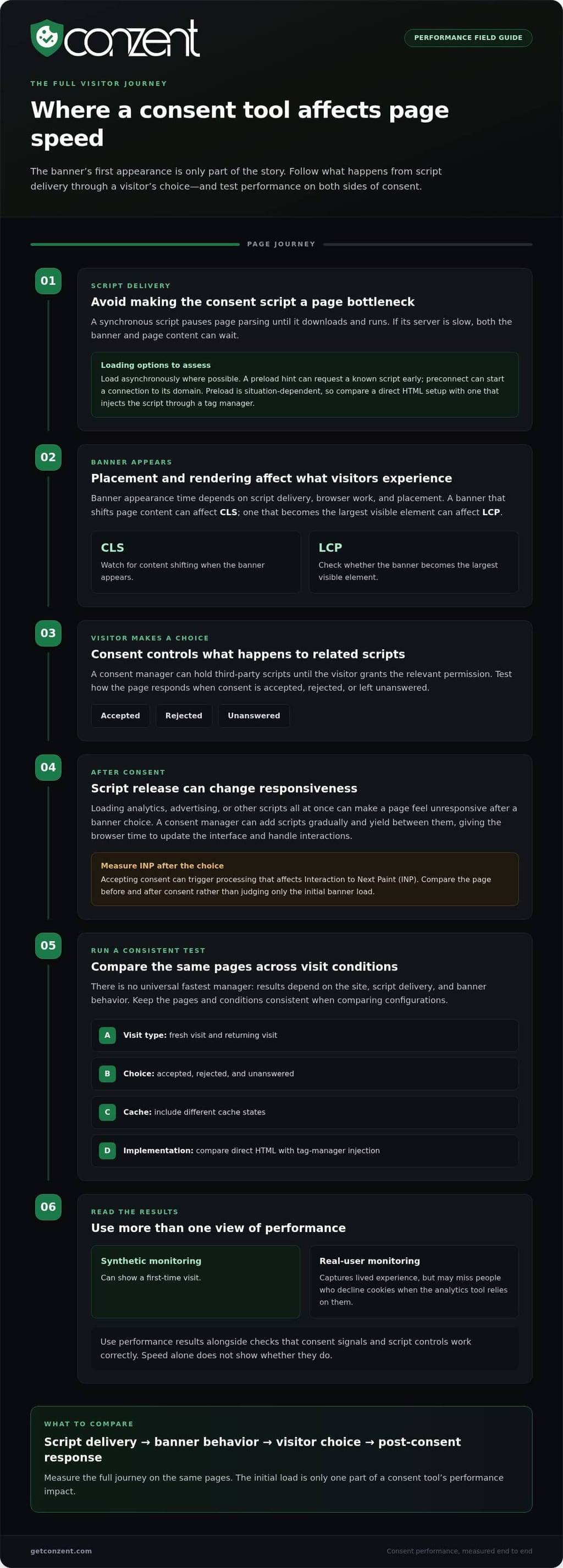
A synchronous consent script makes the browser pause page parsing until the script downloads and runs. If its server responds slowly, the banner and page content can both wait. Place the consent script directly in the main HTML and load it asynchronously where possible. This reduces blocking, but the page still needs a reliable way to control non-essential scripts before consent.
Third-Party Script Delays After Consent
A consent manager can hold third-party scripts until a visitor grants the relevant permission. After consent, it can add scripts gradually and yield between them, giving the browser time to update the interface and handle interactions. This matters because loading analytics, advertising, or other scripts all at once can make the page feel unresponsive after a banner choice.
Async Loading and Preload Hints
Asynchronous loading lets the browser continue parsing HTML while a consent script downloads. A preload hint can request a known script early, while preconnect can begin a connection to the script’s domain. These hints can reduce waiting when the script is needed early, but preload is situation-dependent. Test a direct HTML implementation against one that injects the script through a tag manager.
Page Speed and Banner Performance
A consent banner can affect Largest Contentful Paint (LCP), Cumulative Layout Shift (CLS), and Interaction to Next Paint (INP). A banner that shifts page content can raise CLS; one that becomes the largest visible element can affect LCP. Accepting consent may also trigger processing that affects INP. Banner appearance time depends on script delivery, browser work, and banner placement, so measure the actual page.
Compare Setup, Speed, and Testing
There is no universal fastest manager: the result depends on the site, script delivery, and banner behavior. Platforms also differ in setup, so compare the steps needed to install the script and connect existing tags, then measure performance on the same pages. Prices and free-plan limits vary by provider and plan; compare published terms without treating a low price as evidence of speed.
Test a fresh visit and returning visits, with consent accepted, rejected, and unanswered. Include different cache states, then compare page performance before and after consent. Synthetic monitoring can show a first-time visit, while real-user monitoring captures lived experience but may miss people who decline cookies when the analytics tool relies on them. Speed alone doesn’t show whether consent signals and script controls work correctly.
Google Consent Mode v2 support
Google Consent Mode v2 connects a visitor’s consent choices with Google tags. Support matters when a site uses Google tools, but an integration label alone doesn’t show whether signals reach every tag correctly. Assess which products the setup covers, how choices affect tag behavior, and whether language and consent settings match the visitors you serve.
Google Consent Mode supports Google Ads, Google Tag Manager, Google Analytics, Gtag, Conversion Linker, and Floodlight. Inventory the tags your site actually runs, then compare that inventory with the consent platform’s supported integrations. For example, a site using Google Analytics through Google Tag Manager should test that path, rather than assuming support for one product covers every connected tag.
Consent signals should reflect the visitor’s choice and reach the relevant Google tags. Test the full sequence: open a fresh page, make a choice in the banner, and observe how tags respond. Repeat with different choices and on pages that use different Google products. This helps expose gaps between a platform’s stated integration and the way your site has configured scripts.
International language support affects whether visitors can understand and use the banner. Check each language your site presents, including translated button labels, preference controls, and explanations of consent choices. A banner displayed in English on a Spanish-language page can undermine clarity, even if its technical signals work. Also test how language selection behaves across pages and repeat visits.
Multilingual support is more than translating the visible banner. Review whether language settings stay consistent across the consent interface and the rest of the site. For example, test a visitor who switches from an English page to a French page before setting preferences. The interface should remain understandable, and its consent controls should still work as expected.
Consent Mode support helps connect consent choices to Google tools; it doesn’t, by itself, establish privacy-law compliance. Compliance also depends on the site’s disclosures, choices, and handling of data. Treat the integration as one part of a broader review, alongside the rules relevant to your visitors and the consent records your organization keeps.
For a practical comparison, document your Google tags, languages, and consent states, then test the same pages with each configuration. Record whether the banner appears correctly, whether choices persist as intended, and whether relevant tags receive the expected signals. Teams comparing deployment options can also review the available platform plans against their implementation needs.
Consent records and audit evidence
A consent banner collects a visitor’s choice; a consent record helps explain what the website did with it. Useful records connect the choice to the notice shown, the preferences selected, and the scripts or consent mode signals that followed. That context helps teams investigate questions such as why Google Analytics did or didn’t receive a consent signal.
Consent logging captures events as they happen. For example, a visitor opens a banner, rejects optional analytics, then changes that preference through the site’s privacy controls. An audit trail should make those changes understandable in sequence. A current preference alone may not show what the visitor originally selected or how the website responded.
When assessing a platform’s records, look for details that make an event interpretable. The record should connect a visitor’s action to the relevant banner or preference interface and the consent categories involved. A notice version can also help distinguish choices made before and after the wording or settings changed.
Consent records and audit logs serve related but different purposes. A record describes a visitor’s consent state at a point in time. An audit log can help reconstruct changes to settings, notices, or system behavior. For example, if a website updates its analytics configuration, an administrator needs to distinguish that technical change from a visitor changing preferences.
Consent Mode adds another layer. A consent platform may send signals to Google tags, but those signals are not the same as a readable record of the visitor’s choice. Compare the stored preference with the signal sent to Google Analytics or Google Ads. This can reveal mismatches between the banner interface, saved choice, and tag behavior.
Records also need sensible access controls. Limit access to people who handle privacy operations, analytics, or technical investigations, and document configuration changes. Avoid collecting extra personal data just to make a log appear comprehensive. A record should answer a practical question without turning the audit trail into a new source of unnecessary data.
Use a repeatable review process. Make a choice in the consent banner, confirm the saved preferences, and inspect the resulting script behavior. Then change the choice and compare the new record with the earlier event. Include a language or notice-version change in testing when those options exist on the website.
Finally, assess whether records can be retrieved and understood during an internal review. A useful audit trail connects the visitor’s action, the applicable notice, and the resulting consent mode behavior in plain terms. That is more valuable than a large export that lacks context. Keep the evidence aligned with your privacy processes and the questions your team must answer.
Cookie consent and privacy-law compliance
A fast cookie banner is only one part of a compliant consent process. The rules depend on where visitors are and how the website collects or uses their information.
Compliance Across Jurisdictions
Privacy compliance across jurisdictions means matching banner choices and data practices to the rules relevant to each audience. A website serving visitors in the European Union and California may need to handle consent and opt-out choices differently. Map visitor locations, data uses, and audience settings before deciding what the banner should display. A single global configuration can miss important differences.
For example, businesses that sell or share personal information must offer consumers two or more ways to opt out of its sale, according to the California Department of Justice, Office of the Attorney General. A quick-loading banner does not establish that this requirement is met. Review the available choices and the processes behind them, not just the banner’s appearance.
GDPR and ePrivacy Compliance
In the European Union, the GDPR and ePrivacy Directive govern cookie consent, according to the European Union. The GDPR requires opt-in consent, according to the European Union, so a cookie banner must let visitors make an active choice before non-essential cookies are used. That affects how scripts load and how user consent reaches analytics or advertising tools.
The financial stakes also matter. According to the European Union, under the GDPR, fines can reach €20 million for violations involving non-essential cookie consent. According to the European Union, fines can also reach 4% of global annual revenue for those violations. A fast response cannot replace clear choices, accurate settings, and controlled scripts.
IAB Europe TCF and CPRA Compliance
IAB Europe’s Transparency and Consent Framework (TCF) provides a structured way to communicate consent choices in the digital advertising ecosystem. A website using TCF should ensure its banner choices map correctly to the signals passed to participating vendors. Integration helps organize those signals, but it does not replace checking the website’s disclosures and actual data practices.
California’s CCPA and CPRA bring different considerations, including consumer opt-out rights. Check whether the cookie banner presents the choices relevant to the site’s data practices, then test that each selection changes the related processing. Google Consent Mode and a Google tag can transmit consent states to Google services, but those signals alone do not prove compliance.
Use a jurisdiction-by-jurisdiction review: identify visitor regions, connect each region to applicable choices, and test the resulting scripts and signals. Then compare the live banner with the privacy notice and actual data flows. This process makes gaps visible, such as an opt-out control that appears on screen but does not change analytics or advertising behavior.
Cookie consent and privacy laws
Privacy-law compliance is an ongoing operating practice, not a banner setting that stays correct forever. Websites change as teams add features, revise content, or connect new services. A consent process should therefore have an owner, a review routine, and a clear record of why its settings match the site’s current activities.
Start with a responsibility map. Identify who maintains consent settings, who approves public privacy language, and who handles technical changes. For example, a marketing team may request a new analytics tool while a product team controls its deployment. Agreeing on who reviews that change prevents the consent setup and the website’s actual behavior from drifting apart.
Next, define a change trigger. A new form, advertising partner, embedded feature, or analytics service can alter how a website handles visitor information. Route those changes through a privacy review before they reach production. The review can document the feature’s purpose, the teams involved, and whether existing disclosures and preferences still describe what visitors encounter.
Keep public explanations practical. A privacy notice should use language that reflects the website’s real features, rather than generic descriptions copied from an old template. For instance, if a site adds an embedded video service, review whether its explanation still matches the visitor experience. Clear wording helps people understand the choices presented and gives internal teams a shared reference.
Make the review repeatable. Keep a dated internal note for each material change, name the person responsible for approval, and record the decision in terms your technical and policy teams can both understand. This is an internal governance practice, not a substitute for legal advice. It helps teams spot mismatches early and explain how they reached a configuration decision.
Review the process after significant site changes, not only during initial setup. A redesign can alter where a notice appears; a new feature can change the information flow; and staff turnover can leave consent settings without an owner. Assigning responsibility and documenting the review path keeps those operational details visible as the site evolves.
Choose a platform that fits this way of working, including how your team manages configuration and deployment. If you’re comparing managed and self-hosted options, review the platform options as part of that decision. Then establish an internal review routine so consent practices stay connected to the website your visitors actually use.
Conzent: Managed Cloud Consent Platform
Conzent offers a Managed Cloud Consent Platform for websites that need consent controls without managing the platform infrastructure themselves. Teams that prefer to run the system on their own infrastructure can use Self-Hosted Open Consent Infrastructure. The right fit depends on how your organization handles deployment and ongoing operations.
Consent A/B Testing helps compare banner variations, while Revenue Impact Analytics helps assess how consent choices relate to revenue. These tools support ongoing evaluation, not a shortcut around careful consent design or privacy review. They can be useful when you want to improve the visitor experience while keeping consent behavior visible.
If managed or self-hosted consent infrastructure fits your needs, explore Conzent’s consent platform.
Make Your Next Consent Decision Deliberate
The right next step is to turn your performance findings into a clear operating decision. Identify the pages and visitor journeys where consent behavior matters most, then define what a successful setup should do for those experiences. That gives your team a practical basis for choosing the fastest cookie consent manager for your needs, rather than chasing speed in isolation.
Bring your technical and privacy requirements into the same conversation. A defined set of priorities can help you evaluate deployment fit, implementation needs, and how your consent approach may evolve as your website changes. Conzent can help you explore the platform options that align with those priorities.
Explore Conzent’s platform options and take the next step toward a consent setup that fits your website. A thoughtful choice can support a faster, clearer experience for visitors while keeping consent at the center.
Frequently Asked Questions
Will the cookie banner work on my website platform?
Yes. Conzent supports a range of website platforms, and custom sites can add the banner with a script tag. Before publishing, test it on a staging version of your site. Check pages with different themes, checkout flows, and embedded content. This helps catch platform-specific conflicts, such as a banner hidden behind a menu or an integration that behaves differently on key pages.
Can I customize the look and feel of the banner?
Yes. Conzent’s banner offers nine layouts and dark and light themes. Choose a layout that fits your page structure, then review how it appears on mobile and desktop screens. Keep the wording consistent with your site’s voice, but make the available choices easy to distinguish. A preview on a live-content staging page can reveal contrast or spacing problems before visitors encounter the banner.
Does the banner block cookies until a user accepts them?
Yes. Conzent’s Auto-Block Until Consent blocks scripts, cookies, and trackers until consent is given. For a useful site-specific check, include embedded media and third-party widgets in your test pages, not just analytics tags. Those elements may load their own resources. Review the page’s network activity before launch so you know which services are present and how the configured consent behavior applies to them.
What is the fastest cookie consent manager to install and configure?
There’s no universal fastest option because setup depends on your site architecture and existing tag configuration. Separate installation time from runtime speed: a tool can be quick to add but still need careful configuration. For a fair comparison, measure how long it takes to reach a tested setup, including banner settings, tag connections, and checks across your important page types. That gives a more useful measure than installation alone.
Which cookie consent managers support automatic cookie scanning and blocking?
Conzent provides both automatic scanning and blocking. Its scanner detects and categorizes cookies and trackers, giving site teams an inventory to review against the site’s actual features. Use the results to investigate unfamiliar entries and keep the inventory aligned with changes, such as adding an embedded service. Scanning identifies what appears on the site; teams still need to understand each tool’s purpose and configure consent behavior accordingly.