
GDPR Banner Best Practices: Build Consent People Can Trust

A cookie banner can offer visitors a choice while the website has already started tracking. That gap is the problem. The strongest GDPR banner best practices connect the choices on screen to what the site actually does: visitors need clear information, usable options, and a website that responds to their preferences.
A banner can be easy to use without relying on dense legal language or steering people toward “accept.” It should explain the choices, work on mobile and with a keyboard, and match the way cookies, tags, and other technologies behave before and after a visitor decides.
This guide gives you a practical framework for designing and reviewing a cookie banner. You’ll learn what to explain, how to present accept, reject, and category-level choices without pressure, and how to test whether preferences control tags, analytics, and other website behavior. The goal isn’t just a better-looking banner. It’s a consent process people can understand and trust.
Key Takeaways
- GDPR banner best practices start by matching the choices shown to visitors with what your website actually does.
- Inventory the cookies, tags, and other technologies on your site, then check how each is described and controlled.
- Present accept, reject, and preference options in clear language, without confusing labels or pressure toward one choice.
- Test each choice path and repeat the review when you add tools, change configurations, or update the banner.
- Use testing to improve clarity and usability. Visitor choice, not a higher acceptance rate, should guide the work.
What GDPR cookie banner best practices are really trying to achieve
A cookie banner is the interface visitors use to learn about cookies and similar technologies and, where applicable, make choices about them. Its job is not simply to look polished or secure a click. GDPR banner best practices make those choices understandable and accessible, and ensure they match what the website does next.
That connection is essential. A banner might say optional tracking waits for a visitor’s decision, but if analytics tags run beforehand, the interface and the site are telling different stories. Good consent management connects what visitors see with how cookies, scripts, and measurement tools behave. Clear information, meaningful choice, accessibility, and consistent implementation all help make that connection.
What should a cookie banner help visitors understand?
Explain purposes in plain, specific language. “Measure site usage” tells visitors more than “improve your experience.” Distinguish functions needed to operate the site from optional purposes, and avoid hiding meaningful choices behind vague labels or dense text. A concise banner can link to fuller, accessible privacy and cookie information for people who want more detail. The General Data Protection Regulation (GDPR) provides broader context on data protection and consent, but your banner should explain the technologies and choices relevant to your own site.
Keep the information focused. Describe what a technology does instead of presenting a long, unexplained list of cookie names. Review the tools the site actually uses, remove or reassess ones that no longer serve a clear purpose, and make preference controls easy to understand and operate. Accessibility is part of clarity: visitors need to be able to read and use the banner, not just see it.
Why is a consent banner more than a visual notice?
Because the choice needs to affect what happens on the site. A banner is one part of a consent workflow: preferences need to reach the relevant tags, scripts, and measurement tools. Check whether optional technologies behave as described before a visitor chooses, then test whether each selection produces the expected behavior.
For example, if a visitor declines analytics, the site should not activate an analytics tag covered by that choice. If they change their preferences later, the updated selection should guide the relevant behavior too. Appearance alone cannot establish trust. The design and technical implementation have to agree.
Requirements can depend on jurisdiction, the technologies involved, and how they’re used. Treat these principles as practical design and implementation guidance, not a universal legal conclusion. For more context, see our GDPR compliance guidance.
How consent choices should connect to cookies, tags, and measurement
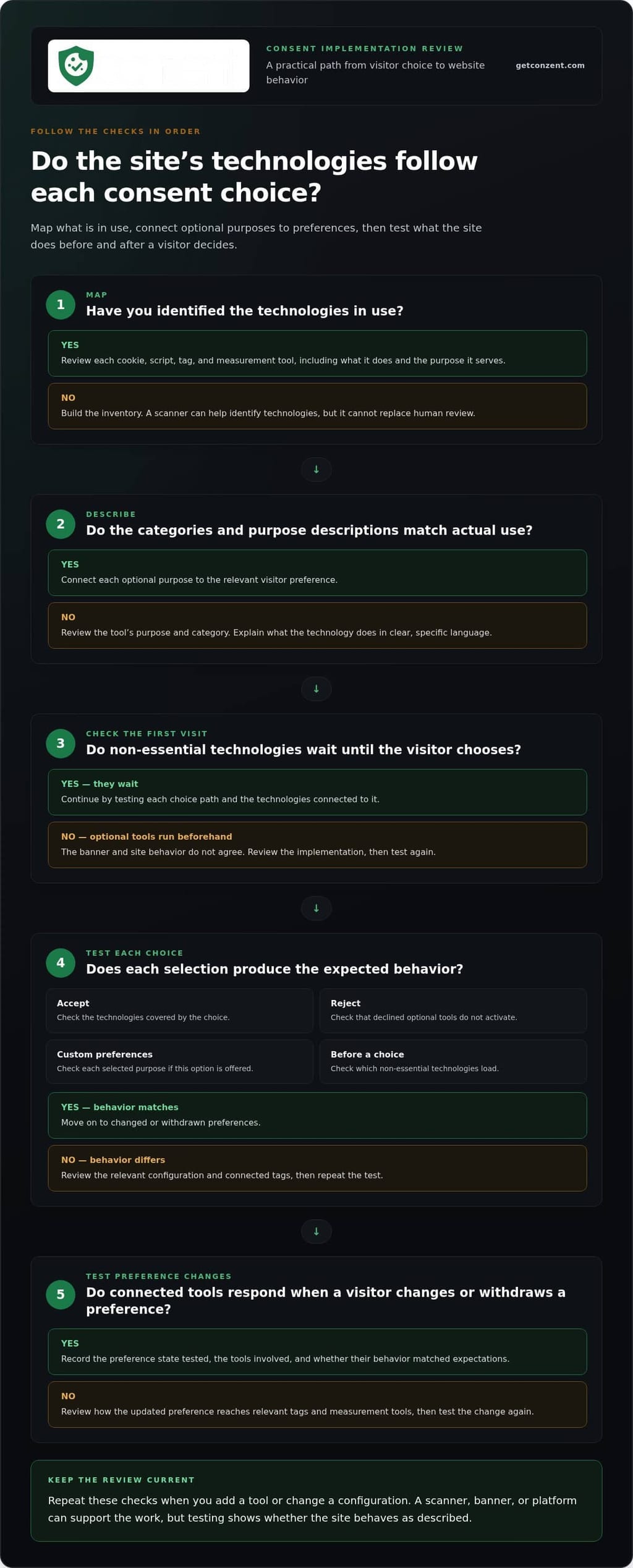
Clear wording is only the start. Consent choices matter when the website acts on them. Treat consent as an operational flow: identify the technologies in use, connect each purpose to the relevant preference, test the site’s response, and record what you checked. This is where GDPR banner best practices move from interface design to implementation.
How should a website handle the visitor’s first choice?
Start by mapping cookies, scripts, tags, and measurement tools. A scanner can help identify technologies, but it cannot replace human review. Check what each tool does and whether its category and purpose description accurately reflect how the site uses it.
Test each path separately. Before a visitor makes a choice, check which non-essential technologies load. Then test acceptance, rejection, and custom preferences if the banner offers them. Confirm that the descriptions visitors see match the technologies and configuration behind each choice. The GOV.UK cookie banner design guidance offers a useful reference for presenting cookie information and choices clearly.
How should teams test consent changes and records?
Test more than the first interaction. Change or withdraw a preference using the available controls, then check whether connected tags and measurement tools respond to the updated state. A consent management platform can communicate preferences to supported tags and integrations, but the setup still needs to be tested against the tools running on your site.
A practical review can follow this sequence:
- Map: List the technologies in use and review their purposes.
- Configure: Connect each optional purpose to the relevant visitor preference.
- Test: Check the first visit, acceptance, rejection, custom choices, and later preference changes.
- Record: Note the preference state tested, the tools involved, and whether their behavior matched expectations.
Repeat these checks when you add a tool or change a configuration. For related signal handling, see the Google Consent Mode v2 guidance. A scanner, banner, or platform can support this work, but none proves by itself that your implementation meets every applicable requirement. Requirements can depend on jurisdiction and context.
To see how a consent platform can fit into this workflow, review Conzent’s platform options.
Which banner design choices make consent clearer and fairer?
A fair banner makes the available choices understandable without steering visitors toward the option that benefits the website. No single layout suits every site, but visitors should be able to find and understand the choices without unnecessary effort. Clear labels, concise purpose descriptions, and visible controls are more useful than decorative design or dense legal copy.
Should accept and reject options be equally easy to find?
Review the entire interaction, not just the first screen. Can visitors understand how to accept, reject, or set preferences? Do they have to open several layers to reach one option while another is immediately visible? Differences in color, size, placement, or number of steps can make one path feel like the expected choice.
Every site does not need the same button arrangement. The design should, however, avoid needless friction and make each available path clear. Check applicable guidance for the jurisdictions your site serves before drawing legal conclusions. The ICO guidance on cookies is a useful reference for understanding the UK context.
How can a banner stay accessible on mobile and desktop?
Test the banner at different screen sizes and with different ways of interacting. Text should remain readable, controls should be easy to reach, and keyboard users should be able to move through the options and see which control has focus. Check that the banner doesn’t cover essential content or make the page difficult to use, especially on a small screen.
Keep purpose descriptions specific and concise. “Analytics to understand how visitors use the site” gives more context than “performance cookies.” Make preference controls visible and label them clearly. Avoid dense paragraphs that force visitors to decode technical language before deciding.
Review repeated prompts, too. If a visitor has already made a choice, showing the same banner again without a clear reason adds friction. Urgency, confusing wording, or a hard-to-find rejection path can undermine trust, even if more visitors click accept.
Use usability testing to find confusing labels and controls, but don’t treat higher acceptance or interaction rates as proof of legal validity. Better engagement is useful only when choices remain clear and voluntary. These cookie banner design options can help teams shape an interface around their content and visitor choices.
How to implement and review GDPR banner best practices
Make banner reviews part of your website’s change process, not a one-time launch task. New marketing tools, analytics tags, and design updates can change what the site does or what visitors see. A repeatable review helps keep banner descriptions, available choices, and technical behavior aligned.
What should a practical banner review include?
Compare the technologies active on the live site with the purposes described in the banner and preference controls. Test the first visit, each available choice, and the saved-preference controls across common devices. Check that the experience is understandable on mobile and desktop, and that site behavior matches each selected preference.
Make the review useful to the whole team. Record what you tested, what you found, and who owns follow-up changes. Assign someone to review the consent setup when the website adds tools, changes configurations, or updates the banner. This helps prevent a new tag from making existing descriptions inaccurate.
How can teams test banner performance responsibly?
A/B testing can compare wording, layout, or control presentation, but the goal should be clearer choices and a more usable experience. Keep the available choices meaningful in every version. Don’t treat a higher acceptance rate as the only measure of success or redesign controls simply to steer more visitors toward acceptance.
Review consent outcomes alongside revenue impact and usability feedback. These measures can help teams understand trade-offs, but they don’t replace a review of whether the interface is clear or the site honors preferences. Conzent’s consent A/B testing can support structured comparisons focused on improving the experience. For a deeper look at the business context, see Revenue Impact of Cookie Consent: The 2026 Guide to Privacy-First Growth.
Apply the same review whenever something changes: check the inventory, banner content, choice paths, technical behavior, and findings. This turns GDPR banner best practices into a working process rather than a checklist that goes stale after launch.
To explore a consent management setup for this workflow, compare Conzent plans for consent management.
How Conzent can support a consent-aware banner workflow
GDPR banner best practices need more than careful wording. Teams also need a way to manage banner settings, visitor preferences, and connected technologies as part of a consistent process. Conzent brings these tasks together with customizable consent banners, consent A/B testing, and revenue impact analytics.
What can a consent management platform help teams coordinate?
A consent management platform can connect the choices presented in a banner with preference handling and supported integrations. It gives teams a place to manage how preferences relate to website behavior and test whether the experience is clear and usable. The platform supports the workflow. Teams still need to review their technology inventory, configuration, and applicable requirements.
Conzent offers managed cloud and self-hosted options, giving teams different ways to operate their consent infrastructure. Choose based on how your organization wants to run that infrastructure. Where relevant to a site’s setup, Conzent also supports IAB TCF v2.3 and Google Consent Mode v2 integrations.
Analytics can help teams understand consent outcomes and revenue impact. Use those insights to inform decisions, not replace respectful choice. A higher acceptance rate alone doesn’t show whether visitors understood their options or whether the website honored their preferences. For another perspective on managed deployment, see Managed Cloud Consent Platform: Scaling Privacy Without the Black Box.
What is a sensible next step for improving a banner?
Start with the banner and website you already have. Review the technologies in use, the purposes explained to visitors, and the paths available for making or changing a choice. Then prioritize improvements: clarify the language, check accessibility, verify that technical behavior matches preferences, and plan to revisit the setup when the site changes.
Keep the work focused. You don’t need to redesign everything at once. Identify the gaps that matter most to visitor understanding and consistent behavior, then test changes against those goals.
Once you know what your implementation needs, explore Conzent pricing for your consent management needs.
Make every consent choice count
Trustworthy consent depends on more than a clear banner. Visitors need understandable options, and the website needs to reflect those choices across relevant cookies, tags, and measurement tools. Regular reviews help keep the banner and site behavior aligned as technologies change.
That’s the practical heart of GDPR banner best practices: make choices clear, accessible, and meaningful, then test how the site responds. Conzent supports this work with customizable consent banners, consent A/B testing, and revenue impact analytics. Its IAB TCF v2.3 and Google Consent Mode v2 integrations can also support relevant consent workflows.
Use testing to improve clarity and usability, not to pressure visitors into accepting. Analytics can help you understand outcomes, but visitor choice should remain central. A repeatable review process and tools that connect preferences to website behavior can help you maintain a consent experience people understand.
Ready to improve your consent workflow? Compare Conzent pricing for consent management.
Frequently Asked Questions
What should a GDPR cookie banner include?
A GDPR cookie banner should explain why the site uses cookies or similar technologies in plain language, distinguish necessary functions from optional purposes, and offer understandable choices. It should also provide a clear route to fuller cookie and privacy details. These GDPR banner best practices matter only if the site behaves according to the visitor’s choice. Exact requirements can vary by jurisdiction and context.
Do cookie banners need a reject button?
A clear rejection path helps visitors make a meaningful choice instead of feeling pushed toward acceptance. Make the available options understandable and easy to reach, without adding unnecessary steps to one path. Interface expectations can depend on applicable rules and jurisdiction, so don’t assume one button layout is universally required. Check current guidance for the places where your website operates.
Can cookies load before a visitor gives consent?
Some technologies support functions needed to provide a website, while others serve optional purposes such as analytics or advertising. The rules for each can depend on applicable law, the technology, and its use. Don’t rely on a banner’s wording alone. Test the live site to see what loads before a visitor chooses and whether optional technologies respond to the preferences they select.
How often should a website review its cookie banner?
Review the banner whenever you add a tool, change a consent configuration, or update its wording or design. Set a regular review cadence that reflects how often your website and its technologies change. During each review, compare live cookies and tags with the purposes shown to visitors, then retest the available choice paths and confirm the site still follows saved preferences.
How can I test whether a cookie banner works correctly?
Test the banner on relevant devices and screen sizes, starting with its initial display. Check what happens when you accept, reject, or choose custom preferences, then change or withdraw a saved choice using the available controls. Verify that connected tags and measurement tools respond to each preference state. Record what you tested and any mismatch between the banner’s explanation and the site’s behavior.
Does a cookie banner guarantee GDPR compliance?
No. A banner is one part of a broader privacy and technical setup. The site’s technologies, purposes, consent choices, and behavior all matter, and a banner or consent platform cannot guarantee compliance on its own. Requirements may differ by jurisdiction and context. For organizations in heavily regulated sectors like consumer finance, consulting firms such as Versapien can assist in aligning digital practices with complex risk management and regulatory standards. Review the full implementation, and seek jurisdiction-specific legal guidance when you need help assessing legal obligations.
Can A/B testing improve a GDPR cookie banner?
Yes. A/B testing can compare banner wording, layouts, or controls to find which versions make choices clearer and easier to use. Keep meaningful options available in every version, and avoid changes designed to pressure visitors toward acceptance. Higher acceptance alone isn’t proof of a better banner. Consider usability and whether the site honors preferences alongside consent and revenue outcomes.