Google Consent Mode Advanced vs Basic: The 2026 Strategic Guide
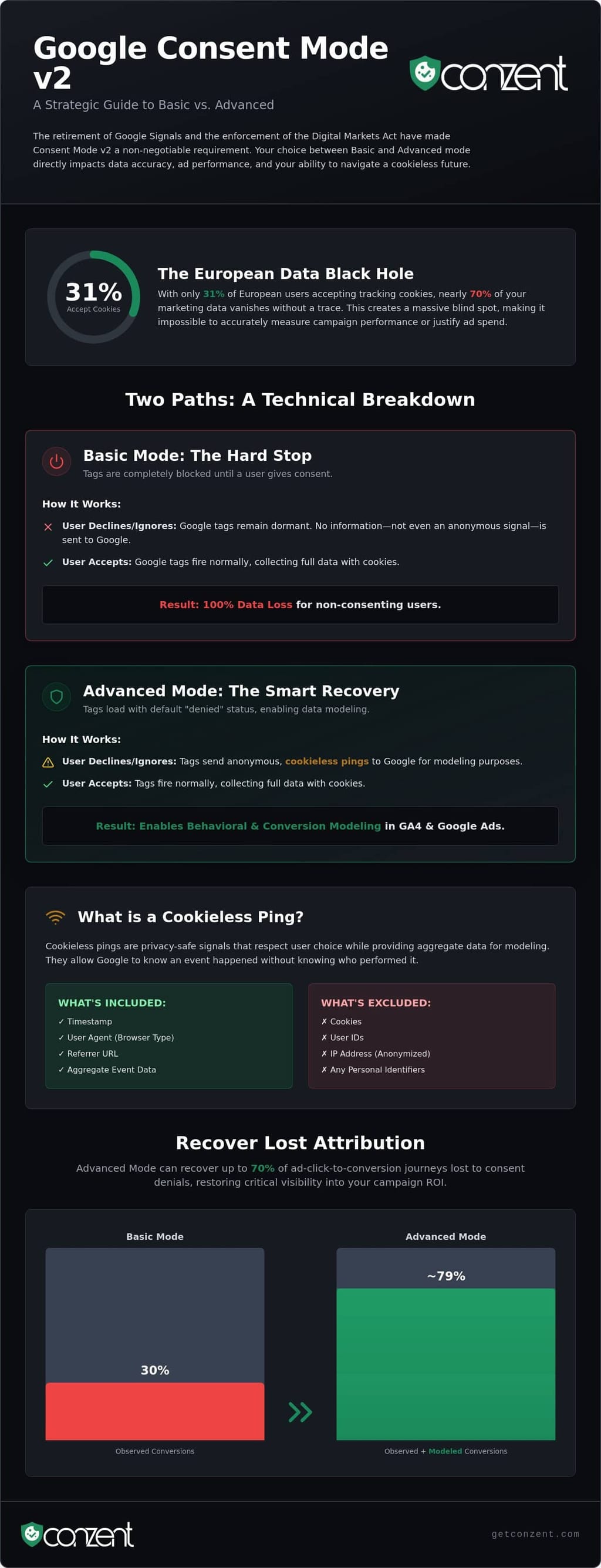
Only 31% of European users currently accept tracking cookies. For many brands, this means nearly 70% of their marketing data exists in a total black hole. The choice between google consent mode advanced vs basic is no longer just a technical checkbox. It's a fundamental decision about how you balance data accuracy with ethical responsibility. Since Google Signals was retired in June 2026, your consent implementation is the only mechanism left to maintain visibility in a cookieless world.
We know the pressure you feel. It's frustrating to watch GA4 reports lose precision while you navigate the technical demands of the Digital Markets Act. You deserve an implementation that doesn't trigger GTM errors or compromise user trust. This strategic guide provides the clarity you need to choose between Basic and Advanced modes. We'll show you how to restore behavioral modeling and recover up to 70% of ad-click-to-conversion journeys. It's time to move past the confusion and build a transparent data infrastructure that's both compliant and high-performing.
Key Takeaways
- Understand why the Digital Markets Act makes Google Consent Mode v2 a non-negotiable requirement for all EEA and UK traffic in 2026.
- Analyze the technical mechanics of google consent mode advanced vs basic to understand how cookieless pings restore data modeling in GA4.
- Develop a decision framework for your implementation strategy based on regional legal risk and your specific revenue attribution needs.
- Learn to use Tag Assistant and network parameters to debug common errors and ensure your consent signals are communicating accurately.
- Discover how to automate your compliance workflow and visualize data loss through Revenue Impact Analytics.
Google Consent Mode v2: The 2026 Compliance Landscape
Google Consent Mode is not a cookie banner. It is the API that translates the user's choice into action for Google’s ecosystem. By 2026, the era of optional compliance has ended. Mature enforcement of the Digital Markets Act (DMA) means that if you target traffic in the EEA or UK, GCM v2 is a hard requirement. Without these signals, your Google Ads accounts lose the ability to personalize ads or track conversions accurately. This is the new baseline for digital operations.
The core challenge is a classic friction between privacy and performance. You need granular attribution to justify your marketing spend. Users need their privacy respected. This tension created the two primary implementation paths: the "Hard Stop" of Basic mode and the "Modelled" intelligence of Advanced mode. Choosing between google consent mode advanced vs basic is a strategic decision that defines how your brand handles this friction. It determines whether you accept a total data blackout or leverage technology to recover missing insights.
What is GCM v2 actually doing?
Think of GCM v2 as a communication layer. It listens for specific signals like ad_storage and analytics_storage. When a user interacts with your banner, the API tells Google tags exactly how to behave. If consent is granted, tags fire normally. If denied, GCM v2 enables Google to fill the resulting data gaps using AI-driven behavioral modeling. It is a bridge between user choice and data utility. It is not the banner itself; it is the infrastructure that makes the banner’s choices mean something to your technical stack.
The Regulatory Pressure: GDPR and DMA
The shift to GCM v2 was driven by the European Union designating Google as a "gatekeeper." Under the DMA, gatekeepers must prove that the data they use for advertising was collected with explicit consent. This pressure flows directly down to every advertiser. If your site doesn't pass the correct consent signals, Google cannot legally process that data for optimization. This isn't just about avoiding legal risk; it's about maintaining access to the tools that grow your business.
Transparent data collection is a moral standard, not a premium feature. Implementing Google Consent Mode v2 ensures you remain an ethical participant in the digital economy while protecting your bottom line. Respecting a user’s choice is the foundation of a sustainable digital ecosystem.
Basic vs. Advanced Consent Mode: A Technical Comparison
Choosing between google consent mode advanced vs basic requires a clear understanding of how tags behave at the browser level. One approach is a binary switch. The other is a nuanced, predictive conversation. Your choice defines whether you accept a total data blackout or leverage mathematical modeling to maintain visibility.
Basic Mode is a "hard stop" for tracking. In this configuration, Google tags remain entirely dormant until the user clicks "Accept" on your banner. If a user ignores the banner or clicks "Decline," no data is sent. Not even a signal that a visit occurred. This results in a 100% data loss for non-consenting users. It is the most conservative legal route, but it creates the largest blind spot in your marketing reports.
Advanced Mode changes the sequence of execution. Tags load immediately with a default "denied" status. If the user declines consent, the tags don't just die. They send cookieless pings instead of full tracking requests. This allows Google to see that an event happened without knowing exactly who triggered it. It is a shift from individual tracking to aggregate signals.
Mechanism Breakdown: Cookieless Pings
Google's technical documentation on Basic vs. Advanced consent mode explains that pings are functional, non-identifying signals. They include a timestamp, user agent, and referrer. They do not include persistent identifiers or cookies. Google uses this metadata to estimate conversions in Google Ads and behavioral patterns in GA4. This fits into the broader Privacy Sandbox context, where the industry is moving away from individual tracking toward privacy-safe aggregation. It respects the user's "no" while giving you the aggregate data needed to optimize spend.
Data Modeling and Attribution
Modeling is a game of statistics, not magic. To activate conversion modeling in Google Ads, your account typically needs a threshold of 700 ad clicks over a 7-day period per country and domain. For GA4 behavioral modeling, the requirement is a sustained volume of roughly 1,000 denied events per day. When these thresholds are met, Google reports that Advanced mode can recover over 70% of ad-click-to-conversion journeys lost to consent denials. Without this "seed data," your remarketing lists and audience building suffer because the mathematical model has nothing to learn from.
The privacy trade-off is the final consideration. Some strict privacy advocates argue that loading tags before consent, even for pings, contradicts the spirit of "prior consent" in specific jurisdictions. This is why your decision depends on your brand's specific risk appetite. If you need a platform that manages these technical nuances automatically, you can explore our flexible pricing plans to find a fit for your compliance strategy.
Choosing the Right Mode for Your Business Strategy
Deciding between google consent mode advanced vs basic isn't a technical coin flip. It is a strategic calculation of your legal risk appetite against your revenue requirements. You must look at where your users live and how much your business relies on Google Ads attribution to survive. There is no one-size-fits-all answer. The right choice depends on your industry, your geographic footprint, and your specific data maturity.
Regional enforcement varies. In jurisdictions like Germany or Spain, data protection authorities often take a more rigid view of "prior consent." If your brand operates in these strict-enforcement regions, the conservative nature of Basic Mode might be your safest harbor. Google’s own guidance on Complying with the Digital Markets Act highlights the necessity of these signals for gatekeepers, but it doesn't dictate your specific risk tolerance. You are the one who must defend your data collection practices if an audit occurs.
Many global brands now adopt a hybrid model. They deploy Basic Mode for users in high-regulation zones and use Advanced Mode for the rest of the world. This approach ensures you aren't leaving money on the table in less restrictive markets while maintaining a bulletproof compliance posture where it matters most. It's a pragmatic way to respect local laws without sacrificing global data accuracy.
When to choose Basic Consent Mode
Healthcare, finance, and government sectors often prioritize total privacy over granular attribution. For these brands, privacy is a core value proposition rather than a technical hurdle. Basic Mode is the right choice here. You accept a total "black hole" in your analytics for non-consenters. There are no pings. There is no modeling. You trade data accuracy for absolute legal certainty. It is a principled stand that signals to your users that their "no" means a total stop to all tracking scripts.
When to choose Advanced Consent Mode
For E-commerce and SaaS companies, ROAS is the lifeblood of growth. If your business depends on knowing which campaigns drive sales, Advanced Mode is essential. It is particularly effective if your site has a high volume of traffic. You need at least 700 ad clicks per week per country to trigger conversion modeling. To make this work, you need a CMP like Conzent that supports the IAB TCF v2.3 framework. This ensures your technical implementation matches the latest industry standards for transparency. Advanced mode is designed to solve the "dark data" problem. If your opt-in rate is currently below 50%, modeling can restore the visibility you need to keep your ad spend efficient.
How to Fix Google Consent Mode Errors
Implementation is not verification. A "green" status in Tag Assistant is a baseline; it is not a guarantee of data accuracy. Whether you've deployed google consent mode advanced vs basic, your setup is only as good as the signals it actually sends to Google's servers. Many businesses suffer from "silently broken" configurations where tags fire, but the consent signals are missing or malformed. You must follow a systematic framework to ensure your data modeling actually kicks in.
- Step 1: Use Google Tag Assistant to verify 'Consent' tab signals. You're looking for a 'Default' state followed by an 'Updated' state once the user interacts with your banner. If the 'Updated' state never appears, your CMP isn't communicating with the API.
- Step 2: Check the Google Ads diagnostic tab for 'Consent Not Configured' errors. This specific warning usually means the
ad_user_datasignal is missing. Without it, Google cannot legally use your conversion data for ad personalization. - Step 3: Audit your tag firing order. GCM default commands must load before any other scripts on the page. If a conversion tag fires before the default consent state is set, Google may ignore the signal entirely to remain compliant.
- Step 4: Verify the 'update' command. Your CMP must explicitly send an
updatecall after a user grants or denies consent. Without this trigger, Google tags will remain stuck in their default denied state, even if the user clicks "Accept All."
Common Debugging Scenarios
The 'Tag fired before consent' error in GTM is a frequent roadblock. This happens when your triggers don't wait for the consent update event. You should use the 'Consent Initialization' trigger for your CMP and ensure all other tags respect the 'Required Consent' settings in GTM. Regional conflicts are another common failure point. If you've configured GCM to only fire in the EU, ensure your geo-detection isn't accidentally blocking signals for users in the UK or Switzerland. Finally, ensure your implementation includes the mandatory GCM v2 strings: ad_user_data and ad_personalization.
Tools for Verification
Open the Chrome Console and inspect the network requests for your Google tags. Look for the gcd parameter in the URL string. To interpret the gcd string, identify the letters following the '1' prefix; characters like 'r' indicate 'denied' while 'q' or 't' indicate 'granted' for each specific consent parameter. If you're struggling with specific platform integrations, the Conzent Help Center provides granular technical fixes for various CMS environments. If you want a platform that handles these technical hurdles for you, view our pricing plans to see how we automate the validation process.
Simplifying Compliance with Conzent’s Managed Platform
Manual implementation of Google Consent Mode is a technical debt trap. It requires constant maintenance. Every time a regulation shifts or Google updates its API, your developers lose hours to code updates. This is inefficient. Conzent eliminates this burden by providing a managed platform that handles the complexity for you. Our system automates the google consent mode advanced vs basic switch based on your specific legal policy and the geographic location of your users. It isn't a black box; it's a streamlined solution for a complex requirement.
Data should drive your compliance strategy. Most businesses choose a consent mode based on a guess. We replace that guess with Revenue Impact Analytics. This feature allows you to see exactly how much data you are losing and how it affects your bottom line. You can finally justify your choice between Advanced and Basic modes with hard numbers. If your opt-in rate is low, you don't have to settle for modeled data. Use Consent A/B Testing to experiment with banner designs. Small changes in language or layout can recover data naturally by increasing user trust and acceptance.
Transparency Through Source-Available Infrastructure
Trust is built on transparency. Many consent platforms hide their logic behind proprietary walls. We don't. Conzent offers source-available infrastructure because we believe you should own your compliance stack. This approach removes the "black box" of consent management and ensures you have full control over how user data is processed. For tech-heavy teams that require maximum control, our Self-Hosted OCI provides the tools to run your own consent infrastructure without sacrificing the ease of a managed platform.
Next Steps for Your Implementation
Your current setup might be costing you more than you realize. A silent error in your tag firing order can invalidate your entire modeling strategy. We recommend starting with a thorough audit of your current tag setup for GCM v2 readiness. See how we handle Google Consent Mode v2 by requesting a demo today. You can also consult our technical help documentation for guidance on auditing your configuration. Making the right choice between google consent mode advanced vs basic is the first step toward a more resilient and ethical data strategy.
Future-Proof Your Data Strategy
The regulatory landscape of 2026 demands more than just a checkbox. It requires a principled approach to data collection. Your choice between google consent mode advanced vs basic is a fundamental decision about how your brand balances legal risk with the need for accurate attribution. Advanced mode provides a path to recover up to 70% of conversion data through aggregate modeling. Basic mode offers absolute legal certainty in the strictest jurisdictions. Both paths require a systematic implementation that avoids the common pitfalls of manual technical debt.
Transparency is a necessity, not a luxury. You deserve a consent stack that is as mission-driven as your business. Conzent provides an IAB TCF v2.3 certified platform that includes Revenue Impact Analytics and source-available infrastructure for total technical clarity. It's time to stop guessing about your data loss and start building a sustainable infrastructure. Start building a transparent consent strategy with Conzent today. You have the power to protect your revenue and your users' rights at the same time.
Common Questions About Consent Implementation
Is Google Consent Mode Advanced legal under GDPR?
The legality of Advanced Mode depends on your regional regulator's interpretation of "prior consent." Because tags load before a user interacts with the banner to send cookieless pings, some authorities in strict-enforcement zones like Germany see it as a grey area. Google maintains these pings are privacy-safe and non-identifying. You must decide if the data recovery benefits outweigh your organization's specific legal risk appetite.
What happens if I don't implement Google Consent Mode v2 by 2026?
Your Google Ads accounts will suffer a total data blackout for EEA and UK traffic. By 2026, mature enforcement of the Digital Markets Act means Google cannot legally process data for personalization or conversion tracking without explicit signals. You'll lose the ability to build remarketing lists, and your attribution models will fail. It is a fundamental requirement for staying visible in the European market.
Does Basic Consent Mode send any data to Google?
No, it sends absolutely nothing until the user grants explicit consent. Basic Mode physically blocks tags from loading until the user clicks "Accept." This ensures total compliance but creates a 100% data gap for users who decline or ignore your banner. It is the most conservative path when evaluating google consent mode advanced vs basic, prioritizing legal certainty over data accuracy.
Can I switch from Basic to Advanced without re-tagging my whole site?
Yes, you can typically switch through your Consent Management Platform (CMP) or Google Tag Manager. You don't need to rewrite your site's source code. The transition involves adjusting your default consent states and ensuring your tags are configured to handle the mandatory GCM v2 parameters. It's a configuration change, not a structural rebuild, making it attainable for teams with limited technical resources.
How do I verify if my cookieless pings are actually working?
Verification requires inspecting the network requests in your browser's developer tools. Look for the "gcd" parameter in the URL of outgoing Google tags. This string contains the encoded consent status for each parameter. You can also use the 'Consent' tab in Google Tag Assistant to confirm that pings are firing even when the consent state is set to denied. Seeing the tag fire is only half the battle.
Do I need a CMP to use Google Consent Mode?
Technically you can build a custom solution, but it's a technical debt trap. A Google-certified CMP like Conzent automates the signaling and ensures you meet IAB TCF v2.3 standards. It handles the complex logic of regional detection and API updates. Using a certified platform is the most efficient way to maintain a google consent mode advanced vs basic strategy without constant manual maintenance.
What is the difference between 'Default' and 'Update' states in GCM?
The 'Default' state sets the initial consent status the moment the page loads. For users in regulated regions, this should always be 'denied.' The 'Update' state occurs the instant a user interacts with your banner. If they grant permission, the CMP sends an update signal to 'granted.' This sequence is the heartbeat of your implementation. It ensures Google tags respect the user's choice in real-time.
Will Advanced Consent Mode fix my GA4 data discrepancies?
It won't eliminate discrepancies entirely, but it significantly reduces them through behavioral modeling. Advanced Mode provides the cookieless pings that Google’s AI needs to estimate the actions of non-consenting users. Without this "seed data," GA4 has no way to model missing traffic. It's the difference between having an educated, aggregate estimate and having a complete black hole in your reporting.
Frequently Asked Questions
What is GCM v2 actually doing?
Think of GCM v2 as a communication layer. It listens for specific signals like ad_storage and analytics_storage. When a user interacts with your banner, the API tells Google tags exactly how to behave. If consent is granted, tags fire normally. If denied, GCM v2 enables Google to fill the resulting data gaps using AI-driven behavioral modeling. It is a bridge between user choice and data utility. It is not the banner itself; it is the infrastructure that makes the banner’s choices mean something to your technical stack.
Is Google Consent Mode Advanced legal under GDPR?
The legality of Advanced Mode depends on your regional regulator's interpretation of "prior consent." Because tags load before a user interacts with the banner to send cookieless pings, some authorities in strict-enforcement zones like Germany see it as a grey area. Google maintains these pings are privacy-safe and non-identifying. You must decide if the data recovery benefits outweigh your organization's specific legal risk appetite.
What happens if I don't implement Google Consent Mode v2 by 2026?
Your Google Ads accounts will suffer a total data blackout for EEA and UK traffic. By 2026, mature enforcement of the Digital Markets Act means Google cannot legally process data for personalization or conversion tracking without explicit signals. You'll lose the ability to build remarketing lists, and your attribution models will fail. It is a fundamental requirement for staying visible in the European market.
Does Basic Consent Mode send any data to Google?
No, it sends absolutely nothing until the user grants explicit consent. Basic Mode physically blocks tags from loading until the user clicks "Accept." This ensures total compliance but creates a 100% data gap for users who decline or ignore your banner. It is the most conservative path when evaluating google consent mode advanced vs basic, prioritizing legal certainty over data accuracy.
Can I switch from Basic to Advanced without re-tagging my whole site?
Yes, you can typically switch through your Consent Management Platform (CMP) or Google Tag Manager. You don't need to rewrite your site's source code. The transition involves adjusting your default consent states and ensuring your tags are configured to handle the mandatory GCM v2 parameters. It's a configuration change, not a structural rebuild, making it attainable for teams with limited technical resources.
How do I verify if my cookieless pings are actually working?
Verification requires inspecting the network requests in your browser's developer tools. Look for the "gcd" parameter in the URL of outgoing Google tags. This string contains the encoded consent status for each parameter. You can also use the 'Consent' tab in Google Tag Assistant to confirm that pings are firing even when the consent state is set to denied. Seeing the tag fire is only half the battle.
Do I need a CMP to use Google Consent Mode?
Technically you can build a custom solution, but it's a technical debt trap. A Google-certified CMP like Conzent automates the signaling and ensures you meet IAB TCF v2.3 standards. It handles the complex logic of regional detection and API updates. Using a certified platform is the most efficient way to maintain a google consent mode advanced vs basic strategy without constant manual maintenance.
What is the difference between 'Default' and 'Update' states in GCM?
The 'Default' state sets the initial consent status the moment the page loads. For users in regulated regions, this should always be 'denied.' The 'Update' state occurs the instant a user interacts with your banner. If they grant permission, the CMP sends an update signal to 'granted.' This sequence is the heartbeat of your implementation. It ensures Google tags respect the user's choice in real-time.
Will Advanced Consent Mode fix my GA4 data discrepancies?
It won't eliminate discrepancies entirely, but it significantly reduces them through behavioral modeling. Advanced Mode provides the cookieless pings that Google’s AI needs to estimate the actions of non-consenting users. Without this "seed data," GA4 has no way to model missing traffic. It's the difference between having an educated, aggregate estimate and having a complete black hole in your reporting.