
Google Consent Mode v2 Advanced vs Basic: 2026 Debugging Guide

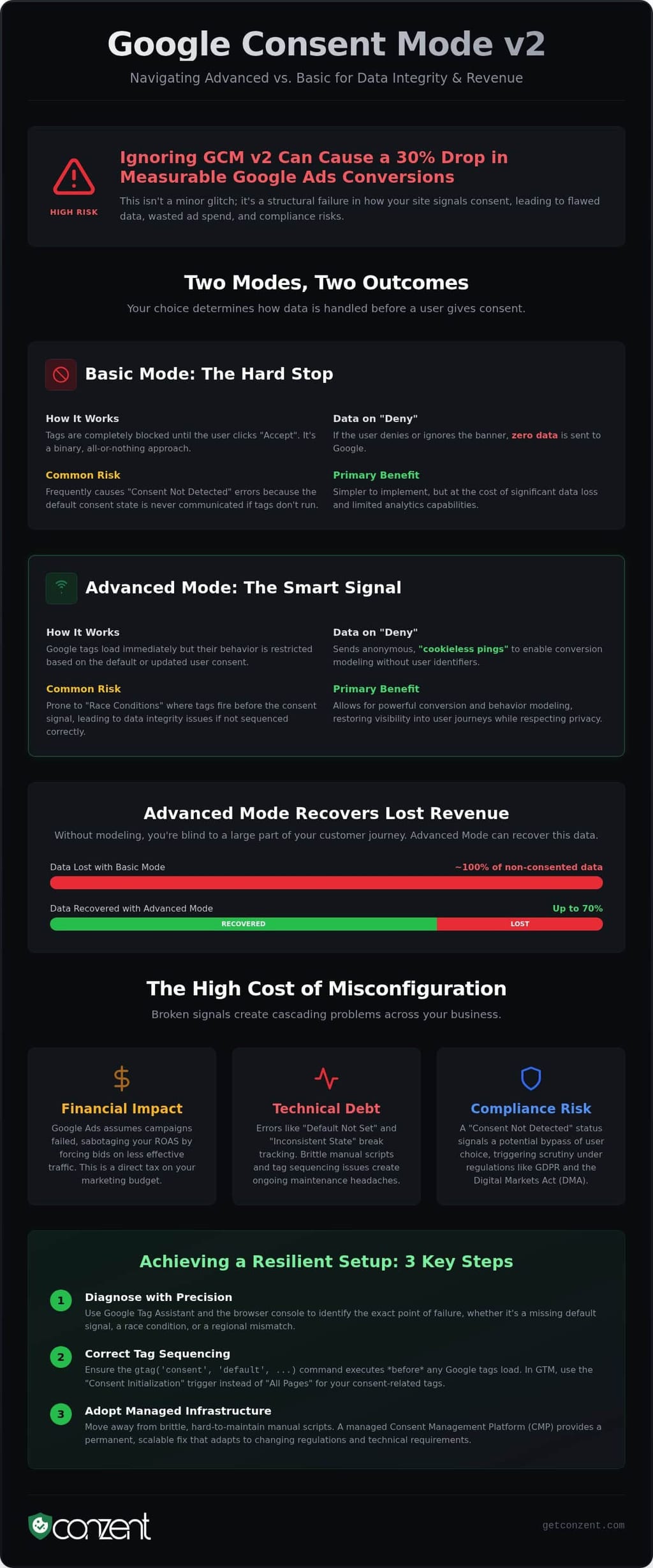
Websites that ignore Google Consent Mode v2 could see a 30 percent decrease in measurable Google Ads conversions. This is not a minor technical glitch; it's a structural failure in how your site communicates with global privacy standards. It's exhausting to navigate fragmented GA4 data and the threat of GDPR fines while deciphering Google's dense technical jargon. You deserve a setup that works. Deciding on google consent mode v2 advanced vs basic is the first step toward reclaiming your data integrity and protecting your revenue.
We'll show you how to diagnose common errors and choose the right implementation strategy for your needs. Since the June 15, 2026, update established ad_storage as the sole control signal, technical precision is a necessary standard. You'll learn to move past brittle manual scripts and toward a resilient, transparent infrastructure. This guide provides the path to a green status in Google Tag Assistant and restored conversion modeling accuracy. We're here to demystify these requirements and help you build a consent framework that respects both user rights and your technical efficiency.
Key Takeaways
- Master the technical trade-offs between google consent mode v2 advanced vs basic to stop data leaks and restore GA4 modeling accuracy.
- Identify and fix "Consent Not Detected" errors by mastering the correct initialization sequence for your global site tag.
- Use Google Tag Assistant and the browser console to isolate race conditions before they break your conversion tracking.
- Configure GTM triggers to fire on "Consent Initialization" instead of "All Pages" to ensure your default consent states are set correctly.
- Understand why managed consent infrastructure provides a permanent, scalable fix compared to brittle and manual script configurations.
Advanced vs. Basic: Why Your Consent Mode Strategy is Leaking Data
Choosing between google consent mode v2 advanced vs basic determines how your website communicates with Google’s servers before a user interacts with your banner. It's a choice between total data silence and modeled intelligence. Basic Mode acts as a hard wall. Tags remain completely blocked until the user clicks "Accept." If they ignore the banner or click "Deny," no data ever leaves the browser. This often leads to "Consent Not Detected" errors because the default consent state is never communicated to Google's tags. The script simply doesn't run. It's a binary approach that favors simplicity over data recovery.
Advanced Mode functions differently. It loads Google tags immediately but restricts their behavior based on the user's choice. If a user denies consent, the tags send "cookieless pings" instead of setting identifiers. These pings provide enough context for GA4 and Google Ads to perform conversion modeling without compromising privacy. However, Advanced Mode is prone to "Inconsistent States." These occur when pings fire before your Consent Management Platform (CMP) has initialized the default consent command. It's a race condition. If the tag wins the race against the consent signal, your data integrity collapses. Implementation in 2026 demands valid signal integrity, not just a visible banner.
The Revenue Cost of Missing Signals
Broken signals are a direct tax on your marketing budget. When Google Ads cannot see a conversion, it assumes your campaign failed. This forces the algorithm to bid on less effective traffic, which actively sabotages your ROAS. Research shows that Advanced Mode can recover up to 70 percent of ad-click-to-conversion data that would otherwise be lost. Without these modeled signals, your reporting is blind to a significant portion of your customer journey. We developed Revenue Impact Analytics to help you quantify this loss. It's a diagnostic tool that reveals exactly how much revenue is leaking through implementation gaps. Measuring the cost of errors is the first step toward fixing them.
Legal Compliance vs. Technical Functionality
A technical script error can quickly become a regulatory liability. The Digital Markets Act (DMA) requires gatekeepers like Google to verify that consent was explicitly granted before processing data. If your site sends an "update" signal without a preceding "default" state, you aren't just failing a technical check; you're failing a compliance standard. A "Consent Not Detected" status in Tag Assistant signals to Google that your site might be bypassing user choice. This triggers scrutiny. You can review our GDPR compliance overview to see how technical signal integrity aligns with legal requirements. Compliance is not a checkbox. It is a continuous state of technical accuracy.
Decoding GCM v2 Status Codes: Identifying "Consent Not Detected"
The "Default Not Set" error is the most frequent obstacle when troubleshooting google consent mode v2 advanced vs basic. This error occurs when the gtag('consent', 'default', ...) command fails to execute before the Google Tag Manager (GTM) container loads. If the default state isn't established immediately, Google’s tags cannot determine their initial behavior. This results in a total loss of signal. It's a structural failure that leaves your analytics blind and your compliance status in doubt.
Regional mismatch errors are equally disruptive. In 2026, Google Ads relies exclusively on the ad_storage signal. If your website configuration only triggers consent commands for European users but omits them for global traffic, Google Tag Assistant will flag a "Missing Update" message for those ignored regions. Redundant scripts compound this problem. When multiple versions of the same tag fire, they often send conflicting signals. This corrupts your data modeling and makes it impossible to trust your ROAS. Consistency is not just a technical preference; it's a requirement for accurate reporting.
Interpreting Tag Assistant Status Messages
The "GCM v2 Not Detected" status is a clear warning that your consent framework is invisible to Google’s ecosystem. This often happens because your CMP is hard-blocking the Google Tag before it can even read the user's settings. You might also see an "Inconsistent Consent State" when moving between subdomains. This occurs if your consent cookies aren't properly scoped to the root domain. To ensure your implementation meets the latest technical standards, you should review Google's official consent mode documentation for precise script placement guidelines.
Advanced Debugging: The "gcs" and "gcd" Parameters
The "gcs" parameter is a network ping value that summarizes the current state of user consent for Google’s services. A status code of "111" indicates that both analytics and advertising storage are granted, whereas a "100" signifies that advertising storage has been denied. Monitoring these codes in the network tab reveals the exact moment a signal fails. Identifying race conditions requires tracking the sequence of "default" vs "update" commands. If the "update" arrives too late, the initial ping has already fired with the wrong permissions. If you want to move beyond brittle manual setups, you can explore our managed infrastructure pricing for a more resilient solution.
The 2026 Debugging Toolkit: Tools to Isolate Implementation Gaps
Debugging is not a luxury. It's a technical necessity for signal integrity. To resolve the friction between google consent mode v2 advanced vs basic, you must look beyond the user interface. Visual banners often mask broken backend logic. You need tools that reveal the sequence of commands in real time. Without diagnostic transparency, your implementation is just a guess. We use a specific stack of tools to turn that guesswork into technical certainty.
The Network Tab in your browser is your first line of defense. It allows you to verify that pings actually reach Google’s servers. By inspecting outgoing requests, you can find the "gcs" and "gcd" parameters that define your consent state. While client-side tools are helpful, they have limits. Managed platforms like Conzent provide deeper, server-side error logs through our diagnostics features. These logs reveal implementation gaps that browser tools often miss. A resilient infrastructure requires this level of visibility to survive frequent API updates.
Mastering Tag Assistant in 2026
Google Tag Assistant remains the standard for monitoring consent sequences. It allows you to set up debug sessions for specific conversion actions, such as leads or purchases. By reading the "Consent" tab, you can pinpoint exactly where an "Update" command is dropped. This is critical for verifying your GCM v2 implementation against Google's official Consent Mode overview. If the "Update" doesn't follow the "Default" command, your data modeling will fail. Tag Assistant makes these gaps visible before they impact your revenue.
Isolating Script Conflicts in the Console
The Browser Developer Console catches errors that Tag Assistant might overlook. You should filter for "gtag" or "dataLayer" to find execution blocks. You'll often find "Unexpected Token" errors caused by brittle, manual scripts. This tool helps you verify that your CMP script loads before any marketing tags fire. If the tags win the race, you face a "Race Condition." This means tags fire before the default consent state is defined. It leads to inconsistent data and potential compliance risks. Use the console to ensure your script hierarchy is logical and functional. A clean console is the sign of a healthy, compliant website. We believe that technical efficiency is a public good that every business should prioritize.
Resolving Tag Sequencing Errors and "Race Conditions"
A race condition occurs when your marketing tags fire before your consent command has defined the rules. It's a structural conflict. If Google Tag Manager initializes its container while the consent state is still "undefined," the tags often default to a blocked state or, worse, fire without legal permission. The technical resolution for google consent mode v2 advanced vs basic hinges on which command wins this race. You don't just need a banner; you need a strict execution order that prioritizes signal integrity over script speed.
Mapping your CMP categories to Google’s definitions is the next critical step. In 2026, Google Ads relies exclusively on the ad_storage signal. You must ensure your "Marketing" or "Targeting" category maps directly to ad_storage, ad_user_data, and ad_personalization. If these mappings are misaligned, your "Update" command will send the wrong permissions, leading to the data leaks we discussed earlier. URL Passthrough also remains vital for cross-domain tracking. When cookies are denied in Advanced Mode, URL Passthrough allows the "denied" pings to maintain session continuity across your ecosystem without violating privacy standards.
Step-by-Step Fix for Tag Timing
To fix timing errors, you must move your consent-dependent tags to the "Consent Initialization" trigger in GTM. This is the earliest possible trigger in the GTM lifecycle. It's designed specifically to set the consent state before any other tags attempt to load. As a fail-safe, you should hard-code a "default" state directly into your site header. This ensures that even if GTM experiences a delay, the browser already knows the baseline privacy rules. Once the user interacts with your cookie banner, your CMP must fire an "update" command immediately. Any delay here results in lost conversion data during the most critical moment of the user journey.
Resolving Integration Conflicts
Platform-specific integrations often introduce hidden conflicts. For WordPress or Shopify, many plugins include "Auto-blocking" features. These features are often too aggressive. They don't just block cookies; they block the entire Google Tag script, which prevents Consent Mode from sending the necessary pings for data modeling. You must disable these internal auto-blockers and allow your CMP to manage the script execution through the GTM API. Finally, verify that your IAB TCF string is passed alongside your GCM signals. This dual-layer communication ensures that your site remains compliant with both Google’s requirements and broader industry standards. If you're tired of managing these brittle manual sequences, you can explore our managed implementation options for a more resilient setup.
Scaling Compliance: Why Managed Infrastructure Beats Manual Fixes
Manual scripts are a liability. They're brittle. They break whenever Google updates an API or a browser changes its tracking prevention. If you're managing the choice between google consent mode v2 advanced vs basic through manual code, you're building on sand. Every minor change in tag sequencing requires a manual audit. This isn't just a waste of time; it's a risk to your compliance status and your ad revenue. Managed infrastructure turns these technical hurdles into a standardized public good. We believe that technical efficiency should be accessible, not a luxury hidden behind complex documentation.
Conzent automates the GCM v2 signal across your entire ecosystem. Whether you use WordPress, Drupal, or a custom stack, the "Update" signal remains consistent. Our source-available model offers a level of transparency that closed-source vendors can't match. You can inspect the logic yourself. This builds community trust and ensures that your debugging process isn't hidden behind a "black box" vendor dashboard. It's the difference between a distant vendor and a knowledgeable peer. We provide the infrastructure; you maintain the ownership of your data and your code.
The Resilience of Managed Cloud Consent
Centralized control is the only way to scale. Fragmented local scripts lead to data silos and inconsistent consent states. This is especially true for enterprise-grade environments where hundreds of subdomains must share a single, authoritative signal. If your consent logic is scattered across different headers and tag managers, you'll never achieve signal integrity. With our Managed Cloud Consent Platform, you manage all domains from a single interface. When privacy standards shift in late 2026, we update the infrastructure centrally. Your site stays compliant without a single line of new code. It's a shift from reactive patching to resilient, mission-driven engineering that respects your time and your resources.
Proactive Monitoring and Alerting
Errors don't just hurt compliance; they kill ad spend. If a tag stops firing the "default" command, your conversion modeling stops instantly. You might lose days of data before you notice the drop in GA4. Conzent provides proactive monitoring that alerts you before a "Consent Not Detected" error drains your budget. You don't have to wait for a weekly report to see that your data has flatlined. You can also use Consent A/B testing to optimize your opt-in rates. This allows you to find the balance between user experience and data recovery without breaking your tags. It makes compliance feel attainable rather than overwhelming for business owners. Stop fixing tags and start scaling. Try Conzent’s Managed Cloud Consent to secure your infrastructure for the long term.
Secure Your Data Integrity and Compliance
Technical precision is a requirement, not a luxury. We've decoded the status codes and isolated the race conditions that disrupt your modeling accuracy. Whether you implement google consent mode v2 advanced vs basic, your goal remains the same: transparent signal integrity. Manual patches fail because they can't adapt to the rapid shifts in 2026 privacy standards. Brittle scripts are liabilities that threaten your ad revenue and your regulatory standing.
You don't have to navigate this complexity alone. Conzent provides a Danish-engineered, source-available infrastructure that automates the "Update" signal and secures your revenue. Our platform is IAB TCF v2.4 certified (CMP ID 446) and provides native GCM v2 support to ensure your setup is both compliant and technically efficient. We offer the transparency you need to debug with confidence and the automation you need to scale. Upgrade to managed, error-free Google Consent Mode v2 with Conzent to reclaim your conversion accuracy and protect your infrastructure. You've got the tools to fix your data leaks. Now it's time to build a foundation that lasts.
Frequently Asked Questions
Why is Google Tag Assistant saying "Consent Not Detected" even though I have a banner?
This error usually means your marketing tags are loading before the consent default command has initialized. It's a common race condition where Google Tag Manager initializes its container before your CMP communicates the user's settings. You can resolve this by moving your tags to the Consent Initialization trigger. Brittle manual script configurations often fail here. Managed infrastructure provides a more resilient sequence that ensures your signals are visible to Google's ecosystem from the first page load.
What is the main difference between Basic and Advanced Consent Mode?
The core difference between google consent mode v2 advanced vs basic is how the system handles users who deny consent. Basic Mode blocks all tags entirely until a user interacts with the banner. If they deny consent, no data is sent. Advanced Mode allows tags to load immediately but sends anonymous, cookieless pings if consent is refused. This enables conversion modeling to fill data gaps. Choosing the right strategy is essential for protecting your ad revenue and compliance.
How do I fix the "Inconsistent Consent State" error across my subdomains?
You fix inconsistent states by scoping your consent cookies to your root domain. If your CMP sets a cookie on a specific subdomain but your tags fire on the main domain, the consent signal won't carry over. This breaks session continuity and triggers errors in Tag Assistant. You must also verify that URL passthrough is active for cross-domain tracking. Managed platforms like Conzent handle this scoping automatically across your entire infrastructure to prevent fragmented user data and technical signal conflicts.
Does Google Consent Mode v2 work without a certified CMP?
You can implement the API manually, but Google requires a certified CMP for websites serving users in the EEA or UK. Without a certified partner, you risk losing access to Google Ads data collection and remarketing features. Conzent is IAB TCF v2.4 certified (CMP ID 446) and provides native support for these requirements. Using a certified platform ensures your signals meet the legal standards of the Digital Markets Act while maintaining your technical functionality and data integrity.
How do I verify if my "ad_storage" signal is firing correctly?
Open your browser's developer tools and navigate to the Network tab to find outgoing pings to Google's servers. Look for the "gcs" parameter in the request URL. A value of "111" means consent is granted for both advertising and analytics. A value of "100" indicates that advertising storage is denied. Verifying these codes in real time is the most accurate way to confirm that your ad_storage signals match the user's actual banner choice.
Can I fix consent mode errors without a developer?
Simple trigger adjustments in Google Tag Manager are manageable for some, but resolving deep-seated race conditions usually requires technical expertise. Manual fixes are often brittle and break during API updates. Managed infrastructure offers a more permanent solution by automating the signal logic for you. Conzent's source-available platform provides the transparency a developer needs while offering the automation a business owner requires. It's a mission-driven approach to making complex technical compliance attainable for every website.
Why did my Google Ads conversion volume drop after implementing Consent Mode v2?
Your conversion volume likely dropped because your implementation is failing to capture modeled data. In Basic Mode, you lose 100 percent of data from users who don't opt in. If you use Advanced Mode but have implementation errors, Google cannot fill those gaps with modeled signals. We recommend using Revenue Impact Analytics to measure exactly how much these errors cost your ad spend. Restoring signal integrity is the only way to recover lost attribution and stabilize your ROAS.
What happens if I ignore Google Consent Mode errors in 2026?
Ignoring these errors results in a complete loss of measurement for users in the EEA and UK. Google Ads will stop receiving the ad_user_data and ad_personalization signals required for optimization and remarketing. This isn't just a technical glitch; it's a compliance failure that invites regulatory scrutiny under GDPR. Your campaigns will lose efficiency as the algorithm loses its ability to attribute conversions. Maintaining a resilient consent infrastructure is a necessary standard for modern digital advertising.