Google Consent Mode v2 Checklist: The 2026 Implementation Guide
Compliance isn't a legal hurdle; it's the new foundation of your digital infrastructure. Most marketers treat privacy as a barrier to growth. They're wrong. In 2026, privacy is the only way you get to keep your data at all. If you're targeting users in the EEA, you already know that a google consent mode v2 checklist isn't just a suggestion. It's the gatekeeper for your entire marketing stack. You've likely felt the stress of watching conversion data vanish or struggling with conflicting information on Basic versus Advanced setups. It's a common pain point that shouldn't exist.
This guide serves as your technical and business-focused roadmap. You'll learn how to manage the June 15, 2026, shift where Consent Mode became the sole controller of advertising data collection. We'll show you how to maintain accurate ad attribution and full GDPR compliance while achieving a zero-error status in Google Tag Assistant. We'll move from the philosophical need for data sovereignty to the practical steps of configuring parameters like ad_user_data and ad_personalization without breaking your revenue model.
Key Takeaways
- Understand why the Digital Markets Act transformed Google Consent Mode v2 from a choice into a mandatory technical requirement for 2026.
- Follow a detailed google consent mode v2 checklist to verify your CMP is Google-certified and your GTM triggers function correctly.
- Compare Basic and Advanced implementation modes to find the right balance between user privacy and accurate data modeling.
- Use Google Tag Assistant and GTM Preview mode to identify and fix consent state errors before they impact your ad revenue.
- Explore how open consent infrastructure and revenue analytics provide transparency that traditional "black box" platforms hide.
Why Google Consent Mode v2 is Mandatory in 2026
Google Consent Mode v2 is a communication protocol, not a legal ornament. It acts as a technical bridge between your website’s consent banner and Google's advertising ecosystem. It ensures every tag, pixel, and script respects user choices in real time. If you haven't finalized your google consent mode v2 checklist, you're essentially flying blind. Implementing a robust Google Consent Mode v2 strategy is now the baseline for any business that values data integrity. Without these signals, Google Analytics 4 (GA4) and Google Ads lose their ability to model data for users who decline cookies. You don't just lose a few conversions; you lose the ability to see the full picture of your marketing performance.
The Impact of the Digital Markets Act (DMA)
The Digital Markets Act (DMA) is the engine behind this technical shift. This legislation designates companies like Google as "gatekeepers," which carries a legal mandate to verify consent before processing data for advertising. This requirement is a direct extension of the General Data Protection Regulation (GDPR). By July 2026, the grace periods for compliance have expired. The DMA affects any platform with over 45 million monthly active users in the EU, forcing Google to be strict. If you target users in the EEA, Google requires a certified CMP to pass these signals. Failing to comply means your remarketing lists will stop growing. Your automated bidding strategies will starve for data. It's a binary state: comply or go dark.
New Consent Parameters: A Technical Breakdown
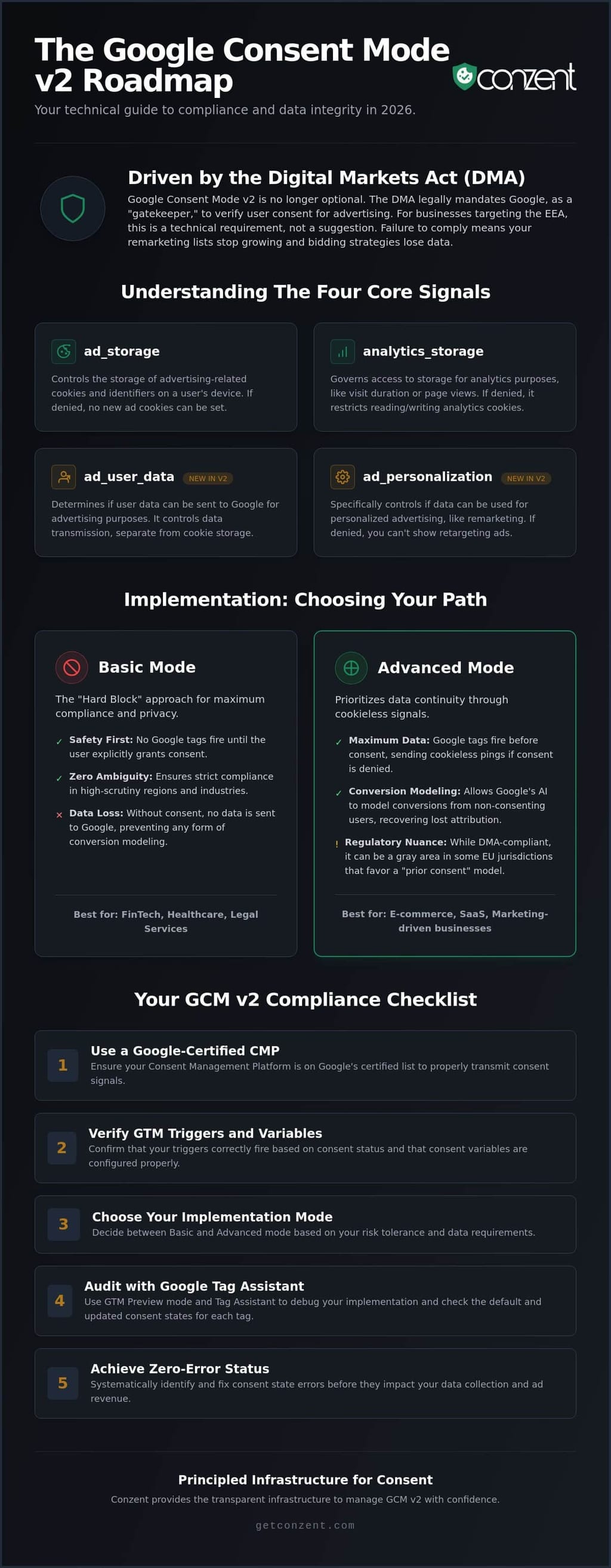
The v2 update introduced two critical parameters: ad_user_data and ad_personalization. These are distinct from the original ad_storage. While ad_storage controls whether cookies can be set on a user's device, ad_user_data determines if that user's data can be sent to Google’s servers for advertising purposes at all. ad_personalization is the specific toggle for retargeting. If this is set to "denied," you can't show ads to that user based on their previous behavior, even if they've visited your site a dozen times. As of June 15, 2026, Consent Mode is the sole controller of advertising data collection for GA4 properties linked to Google Ads. The old "Google Signals" toggle no longer provides a secondary gate for this data.
The four core parameters, ad_storage, analytics_storage, ad_user_data, and ad_personalization, work together to define cookie permissions, analytics tracking, data transmission to Google, and retargeting eligibility.
Basic vs. Advanced Implementation: Choosing Your Path
Deciding between Basic and Advanced implementation is the most critical technical crossroads on your google consent mode v2 checklist. It isn't a simple preference. It's a choice between data density and conservative privacy. Most platforms treat this as a technical toggle. We view it as a statement of your brand's relationship with its users. You're balancing the need for accurate attribution against the risk of regulatory friction. Understanding how these two paths handle data determines how you'll justify your marketing spend in a post-cookie era.
Advanced Mode: Maximum Data, Higher Complexity
Advanced Mode prioritizes data continuity. In this setup, Google tags fire as soon as the page loads, even before the user interacts with your consent banner. If the user declines consent, the tags don't set cookies. Instead, they send "cookieless pings" to Google's servers. These pings provide just enough signal for Google’s AI to perform behavioral and conversion modeling. This process fills the gaps in your GA4 reports, allowing you to recover a significant portion of "lost" attribution.
There's a trade-off. Firing tags before consent is granted is technically allowed under the Digital Markets Act (DMA), but it remains a gray area in specific EU jurisdictions. Regulators in countries like Germany or France often favor a strict "prior consent" model. If your brand operates in high-scrutiny regions, Advanced Mode might invite unwanted attention. It’s a powerful tool for growth, but it requires a transparent privacy policy to back it up.
Basic Mode: Safety First, Data Second
Basic Mode is the "Hard Block" approach. No tags fire. No pings are sent. No data leaves the browser until the user explicitly clicks "Yes" on your banner. It's the most principled path for industries with zero room for error, such as FinTech, legal services, or healthcare. Just as financial analysts require exact translations between indices using tools like the SPX to SPY Converter, marketers in these sectors must ensure their consent signals are perfectly calibrated. You aren't guessing about consent; you're waiting for it. This ensures you're always on the right side of local interpretations of the GDPR.
The cost of this safety is a total loss of data for non-consenting users. Without those initial pings, Google cannot model the behavior of the people who opted out. Your conversion numbers will look lower than they actually are. Your ad spend might appear less efficient because the "path to purchase" is broken for a large segment of your audience. If you're trying to decide if the data loss is worth the peace of mind, you can explore how different managed compliance tiers handle these reporting gaps. Choosing Basic Mode means accepting a "black hole" in your analytics in exchange for absolute legal certainty. Whichever path you take, ensuring it's documented on your google consent mode v2 checklist is the only way to maintain a clean audit trail.
The 2026 Google Consent Mode v2 Checklist
Implementation is not a checkbox. It is an architecture. To maintain data integrity, your google consent mode v2 checklist must move beyond basic tag firing and into precise signal management. You aren't just trying to satisfy a legal requirement; you're building a system that preserves your ability to measure marketing ROI. A flawed setup doesn't just risk a fine. It corrupts your GA4 audiences and breaks your Google Ads bidding algorithms. Follow these five steps to secure your technical foundation.
- Audit your container: Review every tag in GTM or gtag.js. Stale triggers from 2024 are data leaks waiting to happen.
- Verify CMP certification: Google requires a certified Consent Management Platform. Ensure yours supports TCF 2.3 for maximum compatibility.
- Configure default states: Set your initial consent values to "denied" for EEA regions while maintaining flexibility for other markets.
- Update GTM triggers: Move away from generic "All Pages" triggers. Your tags must now listen for specific consent updates.
- Use Consent Initialisation: This is the first event in the GTM timeline. Use it to set the stage before any other tags attempt to fire.
Technical Configuration in GTM
GTM's "Consent Overview" is your command center. It allows you to map every tag to its required consent type without digging into individual code blocks. You must ensure the gtag('consent', 'default', ...) command fires before the GTM container even loads. This prevents "race conditions" where tags fire before they know if they have permission. Integrating your cookie banner directly with the GTM Consent API is the only way to ensure zero-latency communication between the user's click and your data collection.
Regional and Global Consent Defaults
Compliance is not one-size-fits-all. The Digital Markets Act (DMA) mandates strict verification for EEA traffic, but you don't have to throttle your US data to match. Use region-specific defaults to apply GDPR-level protection where required while following CCPA/CPRA logic for California. This allows you to stay compliant without over-correcting and losing valuable insights in less regulated markets. The wait_for_update parameter ensures your tags don't fire with stale consent data by giving your CMP a specific millisecond window to broadcast the user's latest choice. This small technical detail is often what separates a successful google consent mode v2 checklist from a container full of errors.
Auditing and Debugging: How to Verify Compliance
Implementation is only the first half of the google consent mode v2 checklist. Verification is where you ensure your data has integrity. If you skip this phase, you're guessing. You might think your tags respect privacy while they're actually leaking data. Or worse, you're blocking everything and killing your ROI. Verification isn't a luxury. It's a requirement for technical sovereignty. You need to know exactly what signals you're sending to Google's servers before you push your container to production.
Google Tag Assistant is your first line of defense. It allows you to watch consent states change in real-time as you interact with your banner. You should see "denied" states on page load followed by "granted" states after a user clicks "Accept". If these states don't flip, your implementation is broken. The "Consent" tab in GTM Preview mode provides a more granular view. It shows the "On-page Default" versus the "Current State" for every single event in the timeline. Look for "Consent not defined" errors. This usually happens when your CMP fires after your tags. It's a race condition you must win. Another red flag is "Out of order firing". This occurs when a tag executes before the consent update event reaches the data layer.
For a deeper dive, use the browser's Network Tab. Filter for "collect" pings sent to Google. Look for the &gcd= parameter. This string is an encoded map of your consent signals. It tells Google exactly which parameters, like ad_user_data, are granted or denied. If this parameter is missing or formatted incorrectly, Google's servers won't know how to treat your data. This leads to the immediate loss of modeling capabilities in GA4 and Google Ads.
Common Implementation Errors and Fixes
Conflict is common. TCF v2.3 and GCM v2 often fight for control over the same signals. You can resolve most issues by using trigger exceptions to block tags until a specific "consent_updated" event occurs. This ensures no data leaves the browser prematurely. For a detailed list of troubleshooting steps, see our guide on Common Google Consent Mode Errors. Proper debugging ensures your google consent mode v2 checklist leads to a zero-error status.
Verifying Data Modeling in GA4
Modeling doesn't happen instantly. Google usually requires at least seven days of consistent data before behavioral modeling appears in your reports. You can check your status in the GA4 Admin panel under "Data Display" and then "Consent Settings". To see the actual financial cost of non-consent, use revenue impact analytics. It bridges the gap between technical compliance and business reality. You shouldn't have to guess how much revenue you're losing to privacy opt-outs.
Ready to secure your data integrity? Explore our managed implementation plans.
Principled Infrastructure: The Conzent Approach to GCM v2
Completing a google consent mode v2 checklist is a technical win, but it shouldn't be the end of your journey. Most platforms treat consent as a legal burden to be hidden away. We see it differently. Compliance is a foundational standard for digital rights and technical efficiency. Many Consent Management Platforms (CMPs) operate as "black boxes." They hide the logic behind their signals and leave you guessing about the impact on your data integrity. Conzent flips this model. We provide the transparency you need to own your data while respecting your users' choices.
Managed Cloud vs. Self-Hosted OCI
Choosing your infrastructure is about balancing speed with sovereignty. For teams that need to scale quickly without managing servers, our Managed Cloud service offers a streamlined path. It handles the heavy lifting of GCM v2 and IAB TCF v2.3 integration automatically. You don't have to worry about manual code updates every time Google changes a parameter. Your tags stay compliant because the platform evolves with the regulations.
For developers and organizations that demand total data sovereignty, we offer Self-Hosting OCI. This is our source-available Open Consent Infrastructure. It allows you to host your own consent logic, ensuring that sensitive user signals never leave your controlled environment. Whether you choose cloud or self-hosted, the goal remains the same: a transparent system that satisfies every requirement on your google consent mode v2 checklist without compromising your site's performance.
Optimizing for Revenue and Trust
Principled privacy doesn't have to mean lower revenue. In fact, transparency often builds the trust necessary to increase opt-in rates. We provide the tools to prove this. By using A/B testing, you can experiment with different banner designs and messaging to see what resonates with your specific audience. You aren't guessing which layout works; you're using data to find the most ethical and effective way to secure consent.
This approach moves you beyond a simple one-time setup. It creates a permanent compliance infrastructure. You gain the ability to use revenue impact analytics to see exactly how consent choices affect your bottom line. You can finally stop viewing GCM v2 as a barrier and start seeing it as a tool for better, more honest marketing. It's time to move from a checklist to a principled strategy that respects both your business and your users.
Build a Transparent Compliance Infrastructure
The shift in 2026 is clear. Consent is no longer a peripheral concern; it's the core of your technical architecture. By now, you understand that Google Consent Mode v2 is the only way to maintain accurate attribution under the Digital Markets Act. Whether you choose the data density of Advanced mode or the strict safety of Basic mode, your implementation must be precise. Finalizing your google consent mode v2 checklist is the first step toward technical sovereignty. It ensures your marketing data remains actionable while respecting every user's digital rights.
You don't have to navigate this complexity alone. We provide a path that balances principled privacy with business performance. Our platform is IAB TCF v2.3 certified, Google Consent Mode v2 ready, and built on source-available infrastructure. This transparency gives you the clarity that "black box" vendors hide. Get Started with Conzent Managed Cloud to secure your revenue and your reputation. You've done the hard work of auditing your setup. Now it's time to build a permanent, error-free foundation for your data.
Frequently Asked Questions
Do I need Google Consent Mode v2 if I don’t use Google Ads?
You need it if you use Google Analytics 4 (GA4) to track users in the EEA. Even if you don't run ads, GA4 relies on these signals to perform behavioral modeling. This process fills the reporting gaps left by users who decline cookies. Without it, your analytics will significantly underreport your actual traffic and engagement levels.
What happens if I don’t implement GCM v2 by the 2026 deadline?
You'll lose the ability to build remarketing audiences and use automated bidding for EEA traffic. Google effectively shuts off the flow of user data for advertising purposes. Your marketing spend will become less efficient because the algorithms won't have the data needed to optimize. It's a technical shutdown that impacts your bottom line.
Is Google Consent Mode v2 compatible with IAB TCF v2.3?
It is natively compatible. Most certified CMPs are built to map IAB TCF v2.3 strings directly to Google's parameters. This ensures your google consent mode v2 checklist works seamlessly across different advertising networks. It creates a unified signal that respects user choice while maintaining data flow for compliant services.
Can I implement GCM v2 without a certified CMP?
No, not if you are a publisher using AdSense, Ad Manager, or AdMob. Google requires these publishers to use a certified CMP for traffic in the EEA and UK. While you can manually code the parameters for other services, using a certified platform is the only way to guarantee your signals meet Google's verification standards.
Does GCM v2 Advanced Mode violate GDPR?
It depends on your local regulator's interpretation. Advanced Mode sends cookieless pings before a user interacts with your banner. While Google considers this privacy-safe, regulators in countries like Germany or France often require explicit consent before any pings are sent. Basic Mode is the only way to ensure 100% safety in those jurisdictions.
How do I check if my website is sending the correct ad_user_data signals?
Open your browser's Developer Tools and look at the Network tab. Filter for "collect" to find pings sent to Google's servers. Inspect the request URL for the &gcd= parameter. This string contains the encoded consent signals. If this parameter is missing or shows the wrong values, your implementation isn't communicating with Google correctly.
What is the difference between ad_user_data and ad_personalization?
ad_user_data is the gatekeeper for sending any user data to Google's advertising services. ad_personalization is more specific. It controls whether that data can be used to include the user in remarketing lists or retargeting campaigns. You can grant one while denying the other, though most banners bundle them together for simplicity.
Does GCM v2 work on mobile apps as well as websites?
It works natively for mobile apps through the Firebase SDK. The logic is identical to the web version, but the implementation happens within your app's code rather than a GTM web container. This allows you to apply a consistent google consent mode v2 checklist across your entire digital ecosystem, ensuring unified compliance for every user touchpoint.
Frequently Asked Questions
The Impact of the Digital Markets Act (DMA)
The Digital Markets Act (DMA) is the engine behind this technical shift. This legislation designates companies like Google as "gatekeepers," which carries a legal mandate to verify consent before processing data for advertising. This requirement is a direct extension of the General Data Protection Regulation (GDPR). By July 2026, the grace periods for compliance have expired. The DMA affects any platform with over 45 million monthly active users in the EU, forcing Google to be strict. If you target users in the EEA, Google requires a certified CMP to pass these signals. Failing to comply means your remarketing lists will stop growing. Your automated bidding strategies will starve for data. It's a binary state: comply or go dark.
New Consent Parameters: A Technical Breakdown
The v2 update introduced two critical parameters: ad_user_data and ad_personalization. These are distinct from the original ad_storage. While ad_storage controls whether cookies can be set on a user's device, ad_user_data determines if that user's data can be sent to Google’s servers for advertising purposes at all. ad_personalization is the specific toggle for retargeting. If this is set to "denied," you can't show ads to that user based on their previous behavior, even if they've visited your site a dozen times. As of June 15, 2026, Consent Mode is the sole controller of advertising data collection for GA4 properties linked to Google Ads. The old "Google Signals" toggle no longer provides a secondary gate for this data. The four core parameters, ad_storage, analytics_storage, ad_user_data, and ad_personalization, work together to define cookie permissions, analytics tracking, data transmission to Google, and retargeting eligibility. Deciding between Basic and Advanced implementation is the most critical technical crossroads on your google consent mode v2 checklist. It isn't a simple preference. It's a choice between data density and conservative privacy. Most platforms treat this as a technical toggle. We view it as a statement of your brand's relationship with its users. You're balancing the need for accurate attribution against the risk of regulatory friction. Understanding how these two paths handle data determines how you'll justify your marketing spend in a post-cookie era.
Advanced Mode: Maximum Data, Higher Complexity
Advanced Mode prioritizes data continuity. In this setup, Google tags fire as soon as the page loads, even before the user interacts with your consent banner. If the user declines consent, the tags don't set cookies. Instead, they send "cookieless pings" to Google's servers. These pings provide just enough signal for Google’s AI to perform behavioral and conversion modeling. This process fills the gaps in your GA4 reports, allowing you to recover a significant portion of "lost" attribution. There's a trade-off. Firing tags before consent is granted is technically allowed under the Digital Markets Act (DMA), but it remains a gray area in specific EU jurisdictions. Regulators in countries like Germany or France often favor a strict "prior consent" model. If your brand operates in high-scrutiny regions, Advanced Mode might invite unwanted attention. It’s a powerful tool for growth, but it requires a transparent privacy policy to back it up.
Basic Mode: Safety First, Data Second
Basic Mode is the "Hard Block" approach. No tags fire. No pings are sent. No data leaves the browser until the user explicitly clicks "Yes" on your banner. It's the most principled path for industries with zero room for error, such as FinTech, legal services, or healthcare. You aren't guessing about consent; you're waiting for it. This ensures you're always on the right side of local interpretations of the GDPR. The cost of this safety is a total loss of data for non-consenting users. Without those initial pings, Google cannot model the behavior of the people who opted out. Your conversion numbers will look lower than they actually are. Your ad spend might appear less efficient because the "path to purchase" is broken for a large segment of your audience. If you're trying to decide if the data loss is worth the peace of mind, you can explore how different managed compliance tiers handle these reporting gaps. Choosing Basic Mode means accepting a "black hole" in your analytics in exchange for absolute legal certainty. Whichever path you take, ensuring it's documented on your google consent mode v2 checklist is the only way to maintain a clean audit trail. Implementation is not a checkbox. It is an architecture. To maintain data integrity, your google consent mode v2 checklist must move beyond basic tag firing and into precise signal management. You aren't just trying to satisfy a legal requirement; you're building a system that preserves your ability to measure marketing ROI. A flawed setup doesn't just risk a fine. It corrupts your GA4 audiences and breaks your Google Ads bidding algorithms. Follow these five steps to secure your technical foundation.
Technical Configuration in GTM
GTM's "Consent Overview" is your command center. It allows you to map every tag to its required consent type without digging into individual code blocks. You must ensure the gtag('consent', 'default', ...) command fires before the GTM container even loads. This prevents "race conditions" where tags fire before they know if they have permission. Integrating your cookie banner directly with the GTM Consent API is the only way to ensure zero-latency communication between the user's click and your data collection.
Regional and Global Consent Defaults
Compliance is not one-size-fits-all. The Digital Markets Act (DMA) mandates strict verification for EEA traffic, but you don't have to throttle your US data to match. Use region-specific defaults to apply GDPR-level protection where required while following CCPA/CPRA logic for California. This allows you to stay compliant without over-correcting and losing valuable insights in less regulated markets. The wait_for_update parameter ensures your tags don't fire with stale consent data by giving your CMP a specific millisecond window to broadcast the user's latest choice. This small technical detail is often what separates a successful google consent mode v2 checklist from a container full of errors. Implementation is only the first half of the google consent mode v2 checklist. Verification is where you ensure your data has integrity. If you skip this phase, you're guessing. You might think your tags respect privacy while they're actually leaking data. Or worse, you're blocking everything and killing your ROI. Verification isn't a luxury. It's a requirement for technical sovereignty. You need to know exactly what signals you're sending to Google's servers before you push your container to production. Google Tag Assistant is your first line of defense. It allows you to watch consent states change in real-time as you interact with your banner. You should see "denied" states on page load followed by "granted" states after a user clicks "Accept". If these states don't flip, your implementation is broken. The "Consent" tab in GTM Preview mode provides a more granular view. It shows the "On-page Default" versus the "Current State" for every single event in the timeline. Look for "Consent not defined" errors. This usually happens when your CMP fires after your tags. It's a race condition you must win. Another red flag is "Out of order firing". This occurs when a tag executes before the consent update event reaches the data layer. For a deeper dive, use the browser's Network Tab. Filter for "collect" pings sent to Google. Look for the &gcd= parameter. This string is an encoded map of your consent signals. It tells Google exactly which parameters, like ad_user_data, are granted or denied. If this parameter is missing or formatted incorrectly, Google's servers won't know how to treat your data. This leads to the immediate loss of modeling capabilities in GA4 and Google Ads.
Common Implementation Errors and Fixes
Conflict is common. TCF v2.3 and GCM v2 often fight for control over the same signals. You can resolve most issues by using trigger exceptions to block tags until a specific "consent_updated" event occurs. This ensures no data leaves the browser prematurely. For a detailed list of troubleshooting steps, see our guide on Common Google Consent Mode Errors. Proper debugging ensures your google consent mode v2 checklist leads to a zero-error status.
Verifying Data Modeling in GA4
Modeling doesn't happen instantly. Google usually requires at least seven days of consistent data before behavioral modeling appears in your reports. You can check your status in the GA4 Admin panel under "Data Display" and then "Consent Settings". To see the actual financial cost of non-consent, use revenue impact analytics. It bridges the gap between technical compliance and business reality. You shouldn't have to guess how much revenue you're losing to privacy opt-outs. Ready to secure your data integrity? Explore our managed implementation plans. Completing a google consent mode v2 checklist is a technical win, but it shouldn't be the end of your journey. Most platforms treat consent as a legal burden to be hidden away. We see it differently. Compliance is a foundational standard for digital rights and technical efficiency. Many Consent Management Platforms (CMPs) operate as "black boxes." They hide the logic behind their signals and leave you guessing about the impact on your data integrity. Conzent flips this model. We provide the transparency you need to own your data while respecting your users' choices.
Managed Cloud vs. Self-Hosted OCI
Choosing your infrastructure is about balancing speed with sovereignty. For teams that need to scale quickly without managing servers, our Managed Cloud service offers a streamlined path. It handles the heavy lifting of GCM v2 and IAB TCF v2.3 integration automatically. You don't have to worry about manual code updates every time Google changes a parameter. Your tags stay compliant because the platform evolves with the regulations. For developers and organizations that demand total data sovereignty, we offer Self-Hosting OCI. This is our source-available Open Consent Infrastructure. It allows you to host your own consent logic, ensuring that sensitive user signals never leave your controlled environment. Whether you choose cloud or self-hosted, the goal remains the same: a transparent system that satisfies every requirement on your google consent mode v2 checklist without compromising your site's performance.
Optimizing for Revenue and Trust
Principled privacy doesn't have to mean lower revenue. In fact, transparency often builds the trust necessary to increase opt-in rates. We provide the tools to prove this. By using A/B testing, you can experiment with different banner designs and messaging to see what resonates with your specific audience. You aren't guessing which layout works; you're using data to find the most ethical and effective way to secure consent. This approach moves you beyond a simple one-time setup. It creates a permanent compliance infrastructure. You gain the ability to use revenue impact analytics to see exactly how consent choices affect your bottom line. You can finally stop viewing GCM v2 as a barrier and start seeing it as a tool for better, more honest marketing. It's time to move from a checklist to a principled strategy that respects both your business and your users. The shift in 2026 is clear. Consent is no longer a peripheral concern; it's the core of your technical architecture. By now, you understand that Google Consent Mode v2 is the only way to maintain accurate attribution under the Digital Markets Act. Whether you choose the data density of Advanced mode or the strict safety of Basic mode, your implementation must be precise. Finalizing your google consent mode v2 checklist is the first step toward technical sovereignty. It ensures your marketing data remains actionable while respecting every user's digital rights. You don't have to navigate this complexity alone. We provide a path that balances principled privacy with business performance. Our platform is IAB TCF v2.3 certified, Google Consent Mode v2 ready, and built on source-available infrastructure. This transparency gives you the clarity that "black box" vendors hide. Get Started with Conzent Managed Cloud to secure your revenue and your reputation. You've done the hard work of auditing your setup. Now it's time to build a permanent, error-free foundation for your data.
Do I need Google Consent Mode v2 if I don’t use Google Ads?
You need it if you use Google Analytics 4 (GA4) to track users in the EEA. Even if you don't run ads, GA4 relies on these signals to perform behavioral modeling. This process fills the reporting gaps left by users who decline cookies. Without it, your analytics will significantly underreport your actual traffic and engagement levels.
What happens if I don’t implement GCM v2 by the 2026 deadline?
You'll lose the ability to build remarketing audiences and use automated bidding for EEA traffic. Google effectively shuts off the flow of user data for advertising purposes. Your marketing spend will become less efficient because the algorithms won't have the data needed to optimize. It's a technical shutdown that impacts your bottom line.
Is Google Consent Mode v2 compatible with IAB TCF v2.3?
It is natively compatible. Most certified CMPs are built to map IAB TCF v2.3 strings directly to Google's parameters. This ensures your google consent mode v2 checklist works seamlessly across different advertising networks. It creates a unified signal that respects user choice while maintaining data flow for compliant services.
Can I implement GCM v2 without a certified CMP?
No, not if you are a publisher using AdSense, Ad Manager, or AdMob. Google requires these publishers to use a certified CMP for traffic in the EEA and UK. While you can manually code the parameters for other services, using a certified platform is the only way to guarantee your signals meet Google's verification standards.
Does GCM v2 Advanced Mode violate GDPR?
It depends on your local regulator's interpretation. Advanced Mode sends cookieless pings before a user interacts with your banner. While Google considers this privacy-safe, regulators in countries like Germany or France often require explicit consent before any pings are sent. Basic Mode is the only way to ensure 100% safety in those jurisdictions.
How do I check if my website is sending the correct ad_user_data signals?
Open your browser's Developer Tools and look at the Network tab. Filter for "collect" to find pings sent to Google's servers. Inspect the request URL for the &gcd= parameter. This string contains the encoded consent signals. If this parameter is missing or shows the wrong values, your implementation isn't communicating with Google correctly.
What is the difference between ad_user_data and ad_personalization?
ad_user_data is the gatekeeper for sending any user data to Google's advertising services. ad_personalization is more specific. It controls whether that data can be used to include the user in remarketing lists or retargeting campaigns. You can grant one while denying the other, though most banners bundle them together for simplicity.
Does GCM v2 work on mobile apps as well as websites?
It works natively for mobile apps through the Firebase SDK. The logic is identical to the web version, but the implementation happens within your app's code rather than a GTM web container. This allows you to apply a consistent google consent mode v2 checklist across your entire digital ecosystem, ensuring unified compliance for every user touchpoint.