
Google Consent Mode v2 Checklist: Your 2026 Implementation Guide

Nearly 70% of European traffic becomes invisible to Google Ads without a properly configured Consent Management Platform. Since the June 15, 2026, update, Google has consolidated data controls, making Consent Mode your only line of defense for ad revenue. It's a high-stakes shift that leaves many feeling stuck between technical complexity and the fear of losing critical conversion data. You shouldn't have to choose between ethical privacy and business growth.
We understand the confusion surrounding consent mode v2 advanced vs basic and the pressure to get your GTM setup right. This article provides a pragmatic, step-by-step checklist to ensure your website meets every Google requirement while protecting your bottom line. We'll show you how to move past the noise and secure a green checkmark in your Google Ads account. You'll learn how to restore conversion modeling and build a future-proof privacy setup that respects your users and your data. Let's look at the technical requirements and the strategic choices that will define your performance in 2026.
Key Takeaways
- Identify the four mandatory parameters required for 2026 compliance and how they govern data flow from your CMP to Google Ads.
- Evaluate the performance impact of consent mode v2 advanced vs basic to choose the right balance between data recovery and strict tag blocking.
- Prepare your technical stack by auditing GTM triggers and ensuring your infrastructure supports the IAB TCF v2.3 standard.
- Execute a 7-step implementation plan to configure default consent states and verify your status within the Google Ads interface.
What is Google Consent Mode v2 and Why It Matters in 2026
Google Consent Mode v2 (GCM v2) is a technical protocol. It acts as a translator between your website's consent banner and Google's advertising tools. When a user makes a choice about their privacy, GCM v2 ensures that tags for Google Ads and Analytics behave accordingly. It's no longer a luxury for high-end brands. It's a baseline standard for everyone. You can learn more about meeting these requirements on our GCM v2 compliance page.
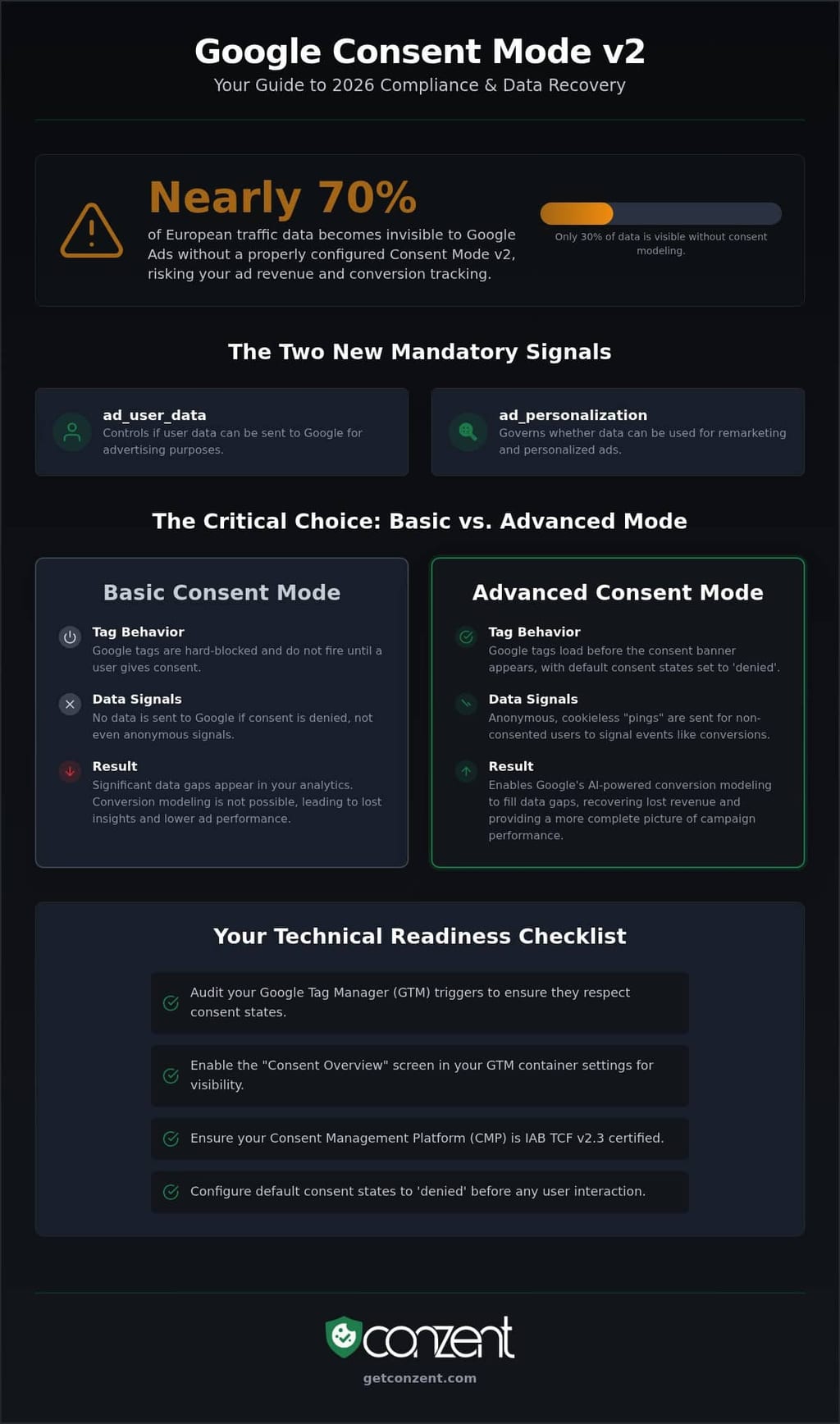
In 2026, this protocol is the primary way Google handles data from the European Economic Area (EEA). Two new parameters define this version: ad_user_data and ad_personalization. These signals tell Google whether it has permission to use personal data for advertising and if it can include that user in remarketing audiences. Without these signals, your tracking stops at the door. It isn't just about following rules. It's about maintaining the utility of your marketing spend.
The Legal Catalyst: DMA and GDPR
The shift to GCM v2 wasn't a choice Google made in a vacuum. It was a direct response to the Digital Markets Act (DMA). This regulation forces "gatekeeper" platforms to prove they have explicit consent before processing user data. While GDPR established the need for granular consent, the DMA turned that need into a technical requirement for advertisers. If you want to use Google Ads features like remarketing or conversion tracking in Europe, GCM v2 is mandatory. It's the bridge between legal responsibility and technical utility.
How Signals Replace Cookies
As third-party cookies disappear, Google is moving toward signal-based tracking. When a user denies consent, GCM v2 sends "pings" instead of setting cookies. These are anonymous, cookieless signals that contain no personal identifiers. They tell Google that a conversion happened without identifying who triggered it. This is a core difference when evaluating consent mode v2 advanced vs basic setups.
This data is the fuel for conversion modeling. We define conversion modeling as the process where Google uses AI to analyze the behavior of consented users to predict the actions of those who opted out. It fills the gaps in your reports that would otherwise remain empty. In an advanced implementation, these pings are sent immediately. In a basic setup, they are blocked until consent is granted. This choice determines whether your data is a complete picture or a series of fragments.
Technical Prerequisites: Preparing Your Privacy Stack
Technical readiness is the foundation of any privacy strategy. It isn't about checking a box. It's about auditing your entire data flow. Before you can implement Google Consent Mode v2, you must ensure your underlying infrastructure is sound. This starts with your data layer. If your tags fire before the consent signal is available, your tracking will fail. You must verify that your data layer is accessible and populated before any Google tags attempt to execute.
A thorough audit of your Google Tag Manager (GTM) container is your first step. Legacy tag triggers are a common point of failure. These triggers often execute based on page views without considering consent states. You need to align these triggers with your chosen strategy. Whether you are weighing consent mode v2 advanced vs basic, the sequence of events remains critical. Refer to the Official Google Consent Mode documentation to understand the specific firing order required for compliance.
Google Tag Manager Configuration
Enable the Consent Overview in your GTM container settings. This feature provides a bird's eye view of every tag's consent status. It allows you to identify which tags have Built-in Consent and which require Additional Consent settings. Tags with built-in logic, like Google Ads or GA4, adapt automatically to consent signals. Other third-party tags require manual intervention. You must organize your container to prevent any tag from firing before the CMP initializes. This prevents data leakage and ensures your privacy signals are respected from the first millisecond of a session.
The Role of Your Consent Management Platform
Your CMP is the orchestrator of your legal signals. It is not just a banner. It is the technical bridge that communicates user intent to your marketing stack. For maximum compatibility in 2026, ensure your CMP is IAB TCF v2.3 certified. This certification guarantees that your signals meet the industry standard for granular transparency. We advocate for source-available infrastructure because technical transparency is a right, not a luxury. It allows you to own your data flow without vendor lock-in. For organizations that need to simplify this complex stack, a Managed Cloud Consent Platform provides the necessary tools to handle GCM v2 parameter mapping and GTM integration efficiently.
Proper preparation here prevents debugging headaches later. You can find more infrastructure details and technical requirements on the Conzent GCM v2 compliance page. Once your stack is prepared, you can make an informed choice between implementation modes.
Choosing Your Setup: Basic vs. Advanced Consent Mode
The choice between consent mode v2 advanced vs basic is more than a technical configuration. It is a fundamental decision about your data strategy and risk tolerance. While both paths lead to compliance, they offer vastly different outcomes for your marketing reports and user trust. One prioritizes absolute privacy through total data suppression. The other uses sophisticated modeling to bridge the gap left by non-consenting users. You aren't just choosing a setting. You're choosing how much of your audience you're willing to lose.
In a Basic implementation, Google tags remain dormant until a user provides explicit consent. If they decline or ignore the banner, no data ever leaves the browser. In an Advanced setup, tags load immediately. They send cookieless pings to Google even if consent is denied. These pings don't identify individuals or set cookies. They provide anonymous signals that Google's AI uses to estimate performance. It's a dialogue between your site and Google's servers that happens without compromising personal identity.
The impact on conversion modeling is the primary differentiator. Basic Mode provides zero data for non-consenting users. This means Google's AI has nothing to work with. Your reports will only show data from users who clicked "Accept." In contrast, Advanced Mode provides the signals necessary for Google to recover an estimated 15-25% of conversion data that would otherwise be lost. It turns a fragmented report into a functional one.
When to Choose Basic Mode
Basic Mode is the standard for organizations where privacy risk outweighs data utility. It is often the preferred choice for high-sensitivity industries like finance, healthcare, or legal services. The primary advantage is clarity. There's no risk of cookieless pings being misinterpreted as unauthorized tracking. The downside is severe. You'll face a total data blackout for approximately 70% of your European traffic. You can't use conversion modeling to fill these gaps. If your business can thrive on a 30% data sample, Basic Mode offers the cleanest legal posture.
When to Choose Advanced Mode
Advanced Mode is built for performance marketing teams. It's for those who need to maintain campaign ROI while respecting privacy standards. By sending cookieless pings, you enable Google to model behavior and attribute conversions accurately. This setup requires a transparent approach. You must clearly explain these signals in your privacy policy. You can monitor the specific gains from this setup using Revenue Impact Analytics. It's a choice for those who view privacy not as a barrier, but as a framework for smarter, more ethical data collection.
The 7-Step Implementation Checklist for GCM v2
Implementation is where theory meets reality. It requires precision. A single misconfigured trigger can invalidate your entire privacy posture. This checklist ensures your setup is technically sound and legally defensible. Whether you are moving toward consent mode v2 advanced vs basic, the following steps are your roadmap to a compliant 2026 configuration.
Step 1: Update your CMP. Your Consent Management Platform must support the four mandatory v2 parameters. These are ad_storage, analytics_storage, ad_user_data, and ad_personalization. If your provider hasn't updated their infrastructure to handle these specific signals, your implementation is non-compliant by default.
Step 2: Configure Default Consent States. This is your baseline. You must set these states before any other tags fire. Typically, you will set all parameters to 'denied' for users in the EEA until they provide explicit consent. This command must execute as early as possible in the page load sequence.
Step 3: Map GTM tags to specific consent types. Use the Consent Overview in Google Tag Manager. Align each tag with the relevant storage type. For example, your Google Ads conversion tag should be linked to both ad_storage and ad_user_data. This ensures tags only fire when the correct permissions are present.
Step 4: Implement GCM v2 API calls. Use the gtag('consent', 'default', ...) command for initial page loads. Once a user makes a choice, trigger the gtag('consent', 'update', ...) command. This update signal is what tells Google to transition from cookieless pings to full tracking or vice versa.
Step 5-7: Testing and Validation
Step 5: Use GTM Preview Mode. Inspect the 'Consent' tab for every event in the summary pane. You should see the 'On-page Default' and the 'Current State' for every parameter. Step 6: Check the Network tab in DevTools. Filter for 'collect' to find Google Analytics or Ads requests. Look for the gcs and gcd parameters in the URL. These strings are the raw data Google uses to determine consent status. Step 7: Verify in Google Ads. Navigate to the Diagnostics tab under 'Conversions'. Look for a green 'Active' status. It can take up to 48 hours for this dashboard to reflect your technical changes.
Common Implementation Pitfalls
Timing is everything. Setting your default consent state too late is a frequent error. If a tag fires before the default is defined, the tag logic fails. Another mistake is hard-coding consent states directly into your website's header. This makes your setup rigid and difficult to update. Use native GTM templates instead. Finally, remember to update your Privacy Policy. If you chose an advanced setup, your documentation must explicitly mention the use of cookieless pings for modeling. Transparency isn't just a legal requirement. It's a technical necessity.
Ready to streamline this process? You can deploy a Managed Cloud Consent Platform to automate these technical steps and ensure your 2026 tracking remains uninterrupted.
Post-Implementation: Debugging and Revenue Recovery
Technical implementation is only the first half of the battle. Once your tags are live, you must verify that Google is receiving and respecting your signals. You'll find the status of your setup in the Google Ads Diagnostics tab. An 'Active' status is your goal. If you see 'Inactive' or 'No Recent Data', your parameters aren't reaching Google's servers. Don't panic if the dashboard doesn't update immediately. It typically takes up to 48 hours for the interface to reflect your technical changes. This is a period for patience, not for constant code revisions.
Revenue recovery through conversion modeling is not instantaneous either. Google's AI requires a training period to understand the relationship between your consented and non-consented traffic. This process usually takes several weeks of consistent data flow. The quality of this modeling depends heavily on whether you chose consent mode v2 advanced vs basic. While the advanced setup provides the cookieless pings necessary for modeling, you can further improve your results through Consent A/B Testing. By testing different banner designs and copy, you can find the balance that maximizes user opt-ins without compromising your legal posture.
Decoding the GCS and GCD Parameters
To truly verify your setup, you must look at the raw network requests in your browser's Developer Tools. Filter for 'collect' and examine the URL parameters. The gcs (Google Consent Status) parameter tells you what Google sees right now. For example, 'G111' indicates that both ad_storage and analytics_storage are granted. 'G100' indicates they are both denied. If you see signals being sent but your Ads dashboard remains empty, Google might be ignoring the pings due to a formatting error.
The gcd parameter is more complex. It's an encoded string that tracks the history of the consent state on that page, including whether the state was set by a default command or an update. This string is the definitive proof of your compliance. If you need help interpreting these technical strings, our GCM v2 technical guide provides a deeper breakdown of the encoding logic.
Long-term Maintenance and Scaling
Privacy is a moving target. A setup that works today might fail tomorrow if a browser update changes how scripts execute. We recommend setting up automated alerts for sudden drops in consent signals. This allows you to catch technical regressions before they impact your monthly reporting. For organizations seeking total data ownership and technical independence, moving toward a Self-Hosted Open Consent Infrastructure is the logical next step. It removes the reliance on third-party vendors and ensures your privacy stack is as transparent as your brand values. Ownership is the only way to future-proof your data in a signal-based economy.
Secure Your Data Infrastructure for 2026
Compliance is no longer a legal hurdle. It's the foundation of your revenue recovery. By following this guide, you've moved from technical confusion to a clear implementation roadmap. You've learned how to audit your GTM container, configure default consent states, and verify your results through raw network parameters. The decision between consent mode v2 advanced vs basic defines your data's future; it determines whether you accept a total data blackout or use signal-based modeling to restore your conversion visibility.
Technical efficiency shouldn't be a premium luxury. It is a standard every business deserves. We provide the tools to make this transition seamless without sacrificing transparency or control. Our infrastructure is IAB TCF v2.3 certified and offers source-available transparency, ensuring you own your data flow. With built-in revenue impact analytics, you can see exactly how your privacy choices affect your bottom line.
Simplify your GCM v2 setup with Conzent’s Managed Cloud Consent Platform and protect your ad revenue today. You've built the knowledge; now it's time to deploy the solution. Your future-proof privacy setup starts here.
Frequently Asked Questions
Is Google Consent Mode v2 mandatory for all websites?
It is mandatory for any business targeting users in the European Economic Area (EEA), UK, or Switzerland. Google requires these signals to verify consent under the Digital Markets Act. While you can technically run a website without it, you cannot use Google's advanced advertising features for these regions without a compliant setup. It is a necessary standard for maintaining access to remarketing and audience building.
What happens if I don’t implement Google Consent Mode v2 by the deadline?
You'll lose access to remarketing, conversion measurement, and personalized advertising features for users in the EEA. Google stops processing these data streams if the required v2 parameters are missing. This results in a significant visibility gap, as approximately 70% of EU traffic can become invisible to your ad campaigns. Without these signals, your bidding algorithms lose the data they need to optimize performance and protect your ROI.
Can I use Google Consent Mode v2 with a custom-built cookie banner?
Yes, you can use a custom banner, but you must manually implement the GCM v2 API calls. Your code must trigger the default and update commands to send the four required parameters to Google. While a custom banner offers design flexibility, it increases technical complexity and the risk of misconfiguration. Most teams choose a Managed Cloud Consent Platform to automate this mapping and ensure their infrastructure remains certified.
Does Google Consent Mode v2 work with server-side GTM?
Google Consent Mode v2 is fully compatible with server-side Google Tag Manager. In this setup, the consent signals are passed from the browser to your server container; the container then determines whether to forward data to Google's endpoints. This architecture provides better data control and security. It ensures that your server only processes personal identifiers when the user has provided explicit permission, aligning your technical stack with principled privacy standards.
What is the difference between ad_user_data and ad_personalization?
The difference between ad_user_data and ad_personalization lies in how Google uses the information. The ad_user_data parameter controls whether personal data can be sent to Google for advertising purposes. The ad_personalization parameter specifically governs whether that data can be used for remarketing and interest-based ads. When evaluating consent mode v2 advanced vs basic, both parameters must be correctly mapped to ensure your advertising features remain active and compliant.
How long does it take for Google Ads to recognize my implementation?
It typically takes up to 48 hours for the Google Ads interface to recognize your implementation. You should monitor the Diagnostics tab under the Conversions menu to verify the 'Active' status. If you don't see a change after two days, you should check your network requests for the gcs and gcd parameters. Don't expect instant updates; the system requires a baseline of traffic to validate that the signals are flowing correctly.
Will Consent Mode v2 slow down my website performance?
A correctly implemented setup won't noticeably slow down your website. The GCM v2 script is lightweight and executes asynchronously. Performance issues usually arise from poorly configured CMPs or heavy third-party scripts that block the main thread. By using a streamlined infrastructure, you ensure that privacy compliance doesn't come at the cost of user experience. Efficiency is a technical advantage that respects both the user's time and their digital rights.