
How to Classify Website Cookies by Type and Purpose

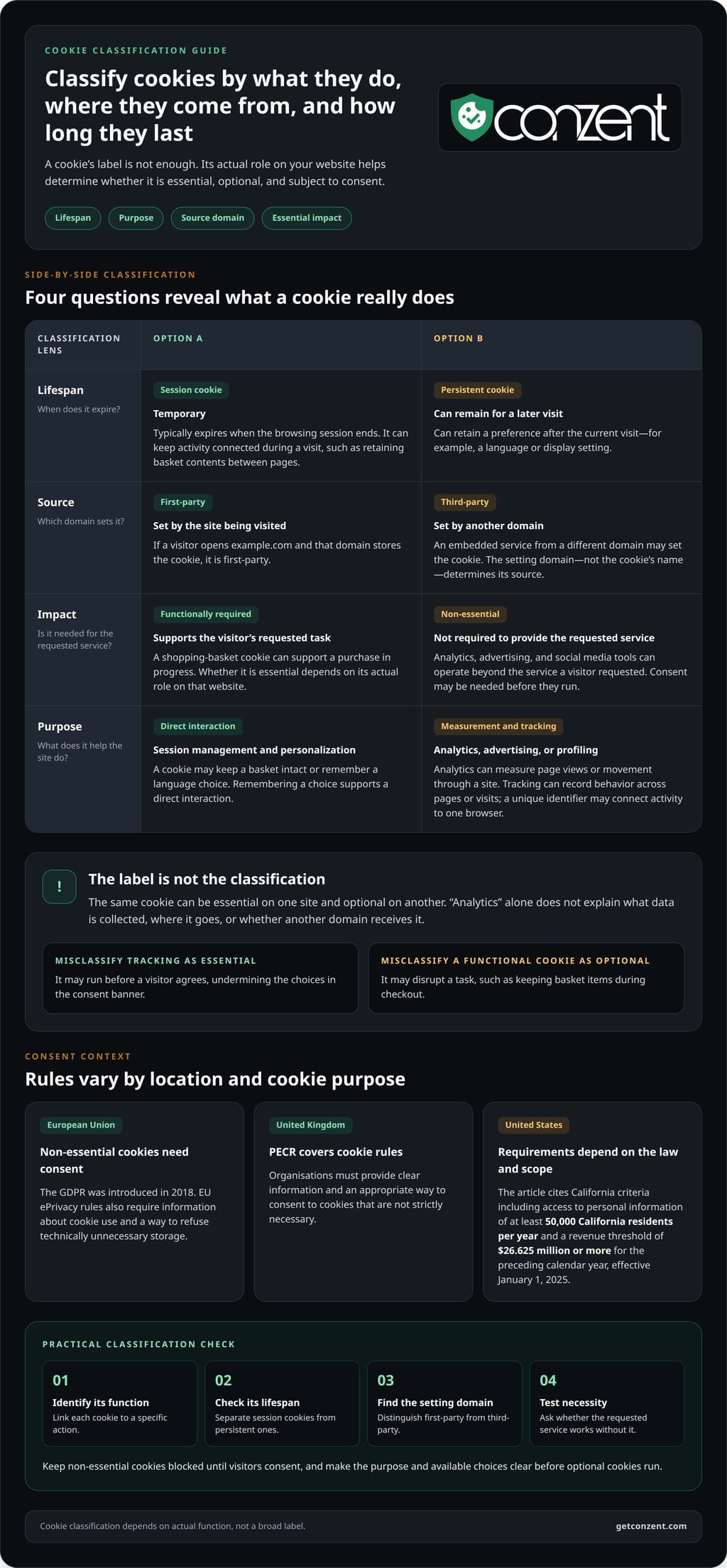
A cookie’s label doesn’t determine whether it needs consent. To understand how to classify website cookies, check how long each lasts, what it does, which domain sets it, and whether it is essential to a service the visitor requested.
It’s easy to group cookies under broad labels like “analytics” or “necessary.” But the same cookie can be essential on one site and optional on another, depending on its role. Consent requirements also depend on the cookie’s purpose and the rules that apply to your visitors.
This guide shows how to classify cookies by lifespan, purpose, source, impact, and consent requirements. You’ll learn why these categories matter, how session and persistent cookies differ, and why a cookie’s actual function on your site is central to an accurate classification.
Key Takeaways
- Classify each cookie by how long it lasts, who sets it, what it does, and whether the site needs it to provide a requested service.
- Separate temporary session cookies from persistent cookies by when they expire and whether they keep working after a visitor leaves.
- Distinguish first-party cookies, set by the site a visitor is using, from third-party cookies set by another domain.
- Look closely at analytics, advertising, and profiling functions: a cookie’s purpose helps determine its impact and whether consent may be needed.
- Clear cookie information and consent choices help visitors understand what they are accepting and manage their preferences.
Cookie consent banners and legal requirements
Consent rules depend on visitors’ locations and what each cookie does. A consent banner should explain the available choices clearly and prevent non-essential cookies from being stored until visitors consent.
Consent for Non-Essential Cookies
Consent for a non-essential cookie means a visitor actively agrees before it is stored on their device. This matters because analytics, advertising, and social media tools can operate beyond the service a visitor requested. A site can block those tools until consent is given, then make the relevant network requests only for visitors who choose to allow them.
In the European Union, the European Union introduced the General Data Protection Regulation in 2018. Under the GDPR, non-essential cookies can be placed on a user’s device only with consent. The EU ePrivacy rules also require information about cookie use and a way to refuse technically unnecessary storage. That means a banner should make the purpose and choice understandable before optional cookies run, not explain them only after they have been stored.
In the United States, cookie requirements depend on the law and whether a business falls within its scope. The California Consumer Privacy Act is one example: its stated scope includes for-profit businesses accessing personal information of at least 50,000 California residents per year. The California Privacy Protection Agency lists a threshold of $26.625 million or more gross annual revenue for the preceding calendar year, effective January 1, 2025. These criteria help explain why a banner’s consent design cannot be treated as one universal legal rule for every US website.
The UK’s cookie rules are covered by the Privacy and Electronic Communications Regulations 2003 (PECR), according to The National Archives. Organisations must provide clear information and an appropriate way to consent to cookies that are not strictly necessary. A banner can support this by offering distinct choices, such as accepting optional analytics while rejecting advertising cookies. Blocking services based on those choices prevents a rejected category from loading, rather than merely recording a preference after the service has already run.
Cookies Exempt from Consent
Cookies exempt from consent are functionally required to provide a service the visitor requested. For example, a cookie that retains a shopping basket’s contents can support a purchase in progress. EU ePrivacy rules do not require notice or authorisation for this kind of functional storage. Classify a cookie by its actual role on the website, not its label: a cookie essential to one service may be optional elsewhere.
For a practical classification, link each cookie to a specific function and ask whether the requested service can work without it. Separate necessary functions from analytics, advertising, and social media tools. This distinction helps a banner present meaningful choices and keeps optional services blocked until the visitor consents.
Cookie uses: session management, personalization, and tracking
A cookie’s function can range from keeping a shopping basket intact to recording browsing activity. Classify it by the action it supports, the information it stores, and how that information is used.
Session management keeps a visitor’s activity connected during a visit. For example, a shopping site can use a cookie to retain basket contents as someone moves between product and checkout pages. Without it, the site may not know which items belong to the current session. A session cookie typically expires when the browsing session ends, while a persistent cookie can retain a preference for a later visit.
Personalization uses stored preferences to adjust what a visitor sees. A language preference can help a site display the same language on another page, and a cookie might remember a display setting. These functions differ from tracking: remembering a choice supports a direct interaction, while tracking can record behavior across pages or visits.
Tracking cookies are often third-party cookies that gather information about browsing activity over time. A unique identifier can help connect page views to one browser across visits. Depending on the setup, that activity may reveal interests or relate to personal information. The cookie itself doesn’t necessarily contain a person’s name; its role depends on how the identifier and browsing data are used.
Analytics cookies help measure activity, such as which pages visitors view or how they move through a site. A site can use these records to understand whether people reach checkout or leave earlier. Classify analytics by how it actually works: measuring activity within one site differs from following a visitor across services. The label “analytics” alone doesn’t explain what data is collected, where it goes, or whether another domain receives it.
Misclassifying a tracking cookie as essential can let it run before a visitor agrees, undermining the choices in the consent banner. Treating a functional session cookie as optional can also disrupt a task, such as keeping basket items during checkout. The practical risks are inaccurate consent handling and a broken visitor experience.
Some browsers offer a Do Not Track setting to signal a visitor’s preference about tracking. Websites aren’t required to recognize or act on that request, so it doesn’t replace a site’s own consent controls. Keep the distinction clear: a browser signal expresses a preference, while a consent choice tells the site which optional cookies it may use.
For teams assessing how consent choices relate to site activity, consent platform options can be considered alongside the site’s analytics needs.
Third-party cookies
A cookie is first-party or third-party based on the domain that sets it, not its name. If a visitor opens example.com and that domain stores a cookie, it’s first-party. If an embedded service from another domain sets one, it’s third-party. A language preference set by the site differs from an identifier set by an embedded video provider.
First-party cookies can help a site remember a visitor’s settings or keep a signed-in session active. Third-party cookies may support an external service, such as an embedded video, analytics tool, or advertising network. The external provider may collect information as the browser loads its content. Classify each cookie by its domain, function, data collected, and the service that receives it.
The distinction can be less obvious when a website loads scripts or content from multiple services. A page may display a map, video, or social media post, and each provider can make requests from its own domain. The visitor’s browser handles those requests. A cookie’s presence in the browser doesn’t reveal its full purpose, so connect it to the service and the action that created it.
To identify cookies in browser developer tools, open the site, launch the tools, and select the Application or Storage panel. Open Cookies, then inspect the listed domains and cookie names. Compare each domain with the page’s domain: a different domain can indicate a third-party cookie. The list shows what the browser stored, but the cookie’s purpose still depends on the service using it.
Classify cookies set by third-party services according to what each service does on the page. For example, identify whether an embedded video sets a playback preference or an advertising service uses an identifier. Record the provider, purpose, data involved, and whether the feature works without the cookie. A vendor’s label alone isn’t enough to determine how the cookie functions on your site.
Third-party cookies aren’t automatically malicious, but they add another point of access to consider. Depending on browser settings and cookie attributes, a request to an external server can send cookie data with it. Attributes such as Secure, HttpOnly, and SameSite affect how browsers handle cookies, but don’t explain what a service does with information it receives.
For a useful inventory, connect each third-party cookie to a specific page element and service. If a video embed sets a cookie, note when it loads and what function the cookie supports. If an analytics script contacts an external domain, distinguish its measurement role from site functions such as remembering a language preference. This makes the classification reflect actual browser behavior, not assumptions based on a cookie’s name.
Advertising and profiling cookies
Advertising cookies support activities such as selecting ads, limiting repeated exposure, or measuring responses. Profiling uses information about browsing activity to infer interests or patterns. For example, a visitor who views hiking shoes may later see related ads. A cookie’s purpose depends on how a site or advertising service uses its identifier, not on its name alone.
A profile can develop over multiple visits. An advertising system may associate a browser identifier with pages viewed, products considered, or actions such as clicking an ad. A shopping site might use that information to show a reminder about an item someone viewed. The record may relate to a browser rather than a named person, yet still help distinguish one visitor’s activity from another’s.
Not every ad uses profiling. An ad selected because a page discusses gardening relates to that page’s subject without necessarily relying on a visitor’s earlier browsing. By contrast, an ad for running shoes shown after someone browsed several shoe pages may reflect activity gathered across visits or domains. This distinction helps identify contextual advertising versus tracking-based personalization.
To classify an advertising cookie, link its stored identifier to the service and purpose. Note which domain sets it, which pages or actions trigger it, and whether it supports ad selection, frequency control, or response measurement. For example, a cookie used to count whether a campaign led to a purchase serves a different purpose from one used to build an interest profile—a key distinction when working with partners like Big Voice - Digital Marketing Agency to track real commercial results. A vendor’s “advertising” label doesn’t explain that distinction.
Purpose matters because a cookie can support more than one advertising function. An identifier might help select an ad and measure a later interaction. Describe both functions rather than assigning only a broad category. If the cookie supports profiling or tracking beyond the page being viewed, record that clearly. This gives visitors a meaningful account of what happens when they accept an advertising purpose.
Keep advertising cookies separate from functions a visitor needs to use the site. A shopping basket that retains selected products supports a requested transaction; an advertising identifier that recalls product interest serves a different purpose. This distinction ties classification to what each cookie actually enables. It also helps consent controls separate advertising choices from site functions, rather than grouping unrelated cookies under a vague label.
A useful inventory entry names the cookie’s setting domain, advertising purpose, information involved, and related service. For instance, record whether a shoe retailer’s page sets an identifier directly or loads an advertising service from another domain. Then describe whether it selects ads based on the current page or uses browsing activity. Clear descriptions make profiling visible without suggesting that every cookie tracks every visitor.
Cookie types by lifespan, essential impact, source, and function
Classify each cookie across several dimensions because one label cannot explain its full role. A useful inventory records its name, setting domain, lifespan, purpose, data collected, and whether the site needs it to perform a requested function.
Cookie Lifespan
A cookie’s lifespan describes how long the browser retains it, either until the session ends or until an expiry condition. This matters because a cookie that remembers a preference after someone leaves lasts differently from one supporting actions during a visit. Record the expiry behavior alongside its purpose, rather than treating “session” or “persistent” as a complete classification.
Cookie Source
A cookie’s source is the domain that sets it. A cookie set by the visited website is first-party; one set by an embedded service’s domain is third-party. This distinction shows which service may collect information and helps identify who controls the cookie. For example, a video player loaded from another domain may set cookies separately from the site hosting the page.
Cookie Function
A cookie’s function describes what it enables, such as retaining a sign-in session, remembering a language, measuring page use, or supporting advertising. This classification helps separate functions needed for a requested service from optional purposes. A cookie’s name may hint at its role, but its actual behavior on the site provides a stronger basis for assigning a category.
Whether a cookie is essential is a separate question. A cookie is necessary only when its function is essential on that specific website. A basket cookie may enable a purchase, while a similarly named cookie elsewhere could support a feature visitors can use without it. Assess the service and its function together; don’t assume a cookie is essential just because a tool labels it “required.”
These dimensions work together rather than competing with one another. For example, a persistent, first-party preference cookie may remember a language, while a session, third-party cookie supports an embedded feature. Each cookie has its own duration, source, and purpose. A clear record keeps those distinctions visible.
For each entry, capture:
- Identity: cookie name and setting domain.
- Duration: session or persistent, plus the recorded expiry behavior.
- Purpose: the function it enables and the actions it supports.
- Data: information it contains or helps collect.
- Impact: whether the site can perform the requested service without it.
Use this inventory to explore consent platform options for managing cookie categories and visitor choices.
Conzent
Conzent helps turn cookie classifications into clear consent choices and practical site controls. Its Managed Cloud Consent Platform and Self-Hosted Open Consent Infrastructure support different approaches to managing consent. Consent A/B Testing and Revenue Impact Analytics help teams assess how banner choices relate to visitor behavior and site outcomes.
Turn to Conzent when your cookie inventory needs to connect with a consent experience, or when you want to understand the effects of consent choices. Clear categories are the starting point. The next step is making them understandable and actionable for visitors.
Contact Conzent to discuss your consent needs.
Make cookie classification part of ongoing site governance
A cookie inventory works best as a living record, not a one-time exercise. A new analytics script, embedded feature, or advertising integration—such as when launching cross-platform campaigns with a partner like I Search Marketing—can change what a site stores and why. Build a review into the process for updating site tools, so consent categories stay aligned with actual cookie behavior.
Knowing how to classify website cookies gives your team a practical basis for these reviews. Clear records also make it easier to explain choices to visitors and maintain a consent experience that reflects how the site works. The next step is choosing an approach that fits your infrastructure and how your team manages consent.
Contact Conzent about cookie consent to discuss the approach that suits your needs. Update the cookie inventory whenever site tools or integrations change.
Frequently Asked Questions
What are cookies?
Cookies are small files of letters and numbers that a website stores in a visitor’s browser. A site can use one to recognize the browser during a visit or remember information for later. For example, an online store may use cookies to keep a signed-in session active or retain a chosen language. The cookie’s contents and behavior depend on the site or service that sets it.
What are the main types of website cookies?
Website cookies can be grouped by lifespan, source, purpose, and necessity. These are different classification dimensions, not competing labels. A cookie could be persistent, first-party, functional, and necessary at the same time. Another might be session-based, third-party, and used for advertising. Combining labels gives a more useful picture than calling a cookie simply “analytics” or “essential.”
How do first-party and third-party cookies differ?
The setting domain distinguishes first-party from third-party cookies: a first-party cookie is associated with the website being visited, while a third-party cookie comes from a different domain. For example, a news site might load a video player from an external service. The browser’s cookie list can show the domain and help identify the source, though the domain alone doesn’t explain the cookie’s purpose.
How are cookies classified by purpose, such as necessary, analytics, functional, and advertising?
Classify a cookie by the action it supports. Necessary cookies enable a requested service, while functional cookies remember choices such as display preferences. Analytics cookies help measure site activity, and advertising cookies may support ad selection or measurement. If one cookie supports several actions, record each purpose separately. For instance, an identifier used to select ads and measure responses has both functions.
How do session cookies differ from persistent cookies?
A session cookie is tied to a browser session and typically expires when that session ends. A persistent cookie remains until its expiry condition, allowing a site to retain information between visits. For example, a site might use one cookie to maintain activity as someone navigates pages and another to remember a preference for a return visit. Check the expiry details to tell them apart.
How do GDPR and ePrivacy rules classify cookies and require consent?
In the EU, ePrivacy rules distinguish technically necessary storage from unnecessary cookies: sites must provide information and an option to refuse unnecessary storage. Under the GDPR, non-essential cookies can be placed on a user’s device only with consent. A cookie’s label doesn’t decide its status; its actual function on the site matters. Apply the rules relevant to the visitors and services involved.