
How to create consent logs for GDPR audit proof

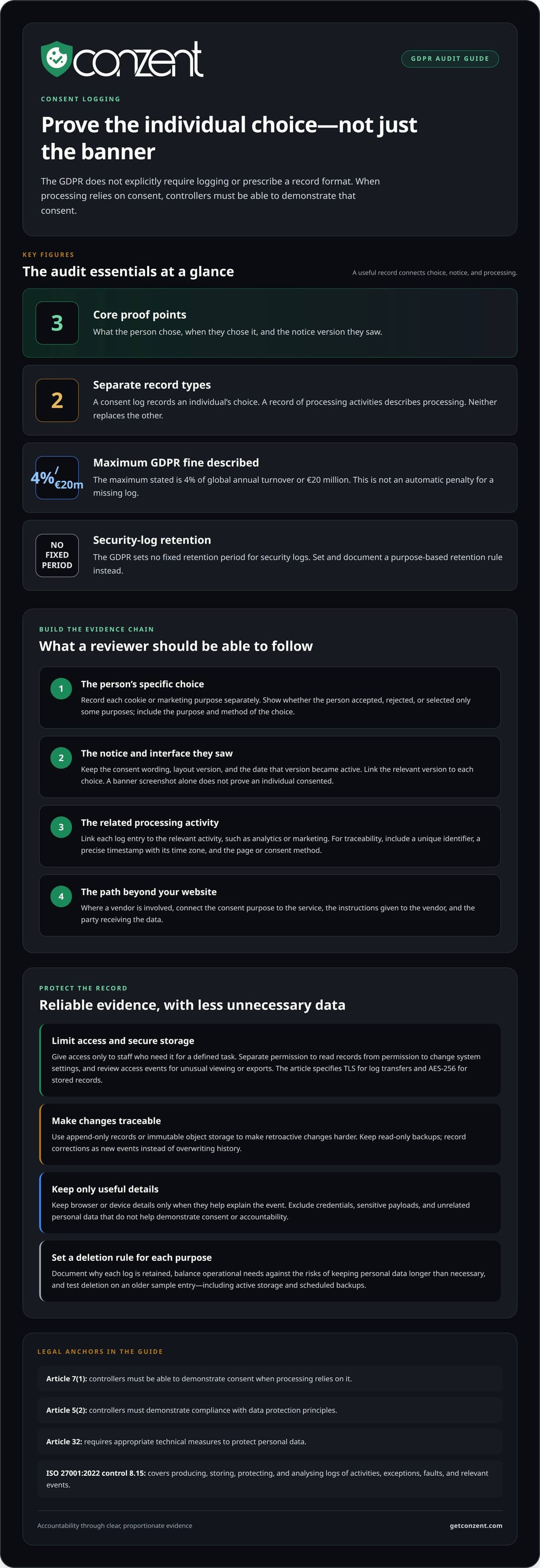
GDPR doesn’t explicitly require organizations to implement logging, but it does require controllers to demonstrate consent when processing relies on it. Article 7(1) sets that proof obligation. To document consent choices for a GDPR audit, record what a person chose, when they chose it, and the notice version they saw.
That distinction matters: a log isn’t paperwork for its own sake. It helps show that consent was specific, informed, and freely given, and that people’s choices were respected. The GDPR doesn’t prescribe a format for consent records, so aim for a clear, reliable record suited to your processing that avoids collecting sensitive details you don’t need.
This guide explains what to capture, what to leave out of logs, and how to assess consent management platform (CMP) logging features without mistaking a banner screenshot for proof of an individual choice. You’ll learn how to audit records for missing details, outdated consent states, and withdrawals, then set a retention approach that balances accountability with data minimization. The result is a practical way to make your records easier to understand and support when questions arise.
Key Takeaways
- Keep evidence of each consent choice, including its purpose, timestamp, and the notice version shown.
- Separate records of processing activities from records that show an individual’s consent.
- Exclude credentials and sensitive payloads that don’t help demonstrate consent or accountability.
- Compare CMP logs for clear choice records, withdrawal tracking, and practical audit exports.
- Review consent records for gaps and outdated choices, and define when records should be deleted.
What is a GDPR compliance audit?
A compliance audit examines whether processing practices meet GDPR requirements and respect people’s rights. Build evidence for each step, from the consent interface to the records that explain a decision.
-
Distinguish Consent Logs from Processing Records
Keep consent logs separate from records of processing activities. According to the European Union, Article 30 of the GDPR requires organisations to maintain records of processing activities. Those records describe processing, while a consent log shows an individual’s choice, its purpose, and when it was made. Neither record replaces the other. Link each log entry to the relevant processing activity, such as analytics or marketing.
-
Document Cookie and Marketing Consent
Record each cookie or marketing purpose as a separate choice. Capture whether the person accepted, rejected, or selected only some purposes, along with the time and method of the choice. For example, don’t combine a cookie banner choice and a marketing signup into one approval. A consent log should show what the person agreed to, not just that a banner appeared.
-
Collect Interface and Consent-Text Versions
Save the consent text and interface version associated with each choice. Retain the wording, layout version, and date a version became active, then connect that version to the relevant log entries. A screenshot can show how a banner looked, but it doesn’t prove that a particular person consented. For GDPR compliance requirements, preserve evidence that links the individual choice to the notice they saw.
-
Evaluate Evidence for Regulator Requests
Assemble a record that lets a reviewer follow the choice from notice to processing action. Include the purpose, timestamp, consent method, and interface version; then check that the record matches the processing activity. The GDPR can impose a maximum fine of 4% of global annual turnover or €20 million, according to the European Union. That is the maximum fine, not an automatic penalty for a missing log.
- For US state privacy laws, map evidence to each law’s relevant choice. Businesses may need to keep evidence showing that choices about sensitive data were valid, even when the applicable law does not specify a particular record format. The CCPA/CPRA also requires proof of compliance with opt-out requirements, including a “Do Not Sell or Share My Personal Information” page.
- Collect third-party evidence that explains each vendor’s role in processing. Link each consent purpose to the relevant service, document the instructions given to the vendor, and retain records showing which party receives the data. This helps reviewers trace a choice beyond the website interface.
- Include technical metadata that makes records understandable and traceable. Use a unique identifier, a precise timestamp with its time zone, and the page or consent method where the choice occurred. Keep browser or device details only when they help explain the event, and avoid unrelated personal data.
Is Logging Required Under GDPR?
The GDPR doesn’t explicitly require organizations to implement logging. It does require controllers to demonstrate compliance, protect personal data, and prove consent when processing relies on it. Records help connect those obligations to what happened in practice.
-
Map Logs to GDPR and Security Standards
Decide what each log type needs to demonstrate before collecting fields. Article 5(2) requires controllers to demonstrate compliance with data protection principles. Article 32 of the GDPR requires appropriate technical measures to protect personal data, according to the European Union. Document why you record access, erasure, or security events. Avoid logging information that has no clear purpose.
-
Store Logs Securely and Control Access
Limit log access to staff who need it for a defined task. Separate permission to read records from permission to change system settings. Use role-based access controls, and review access events for unusual viewing or exports. Encrypt log transfers with TLS and stored records with AES-256. These safeguards help protect audit evidence without exposing more personal data than the review requires.
-
Prepare Tamper-Proof Audit-Ready Logs
Use append-only records or immutable object storage to make retroactive changes harder. Keep read-only backups, and record corrections as new events instead of overwriting history. For an access or erasure request, document the request, response, and relevant timestamps. During a security investigation, connect related events through record identifiers without copying sensitive payloads into the log.
- Set a retention rule for each logging purpose and document the reason for it. The GDPR sets no fixed retention period for security logs. Weigh operational needs against the risks of keeping personal data longer than necessary. Test deletion rules on an older sample entry, then confirm that expiry removes it from active storage and scheduled backups. Don’t retain logs indefinitely by default.
- Use a security framework to organise logging responsibilities where it fits your programme. ISO 27001:2022 control 8.15 covers producing, storing, protecting, and analysing logs of activities, exceptions, faults, and relevant events. It can help structure reviews and incident investigations. Keep records searchable and exportable, but treat the standard as a management aid, not a replacement for GDPR accountability.
- Before deciding where logs will live, map who can access them and how reviewers will retrieve evidence. Compare managed cloud and self-hosted infrastructure against your storage, access, and export needs. Document the reasons for your choice, then revisit them when your system architecture or logging purposes change. A documented decision makes later security reviews more focused and easier to explain.
Sensitive data and credentials to exclude from logs
- Filter log fields before recording events. Exclude passwords, authentication tokens, secret keys, and full payment details: they don’t prove a consent choice or support accountability. Also leave out sensitive payloads, such as health information, unless a defined logging purpose requires specific evidence. A failed login can record the event and outcome without storing the password entered.
- Separate system events from detailed user activity. A system event might record that an account setting changed; a user activity record might identify which account made the change and when. Keep only fields that explain the action, such as an event type, timestamp, and pseudonymous identifier. Avoid capturing message contents, form entries, or full URLs when they expose unrelated personal data.
- Limit each record to its stated purpose. For example, a security investigation may need the affected account, event time, and action taken, but not the contents of a user’s private message. Data minimization means collecting only the personal data needed for that purpose. Purpose limitation also means not reusing access logs for unrelated profiling or marketing analysis.
- Build access and change trails around specific events. Record who viewed or changed a record, what action they took, when it happened, and the relevant system or record identifier. For a permission change, capture the old and new permission levels rather than copying the person’s full profile. Restrict access to the trail itself, since detailed access records can also contain personal data.
- Keep data-subject requests in a separate, controlled record. Article 15 gives people a right to request access to their personal information, while Article 17 provides a right to erasure. For a correction request under Article 16, the organization has one month to respond and implement changes. Record the request type, receipt date, assigned action, and completion status, not unnecessary identity documents or request contents.
- Review every proposed log field against its purpose before enabling collection. Ask whether an auditor or investigator needs the field to understand the activity. If a browser event can be documented with a pseudonymous identifier and timestamp, don’t also store a full IP address or sensitive form data without a clear need. Apply the same filter to exports and diagnostic logs.
- Test logs with sample events before applying the format across production systems. Confirm that a security alert, access request, or erasure action remains traceable without exposing credentials or sensitive payloads. Check the resulting records and exports for hidden fields, copied request text, and excessive personal data. Remove fields that increase exposure without adding evidence.
Comparing CMP consent-logging features
Compare how each CMP turns a person’s choice into a usable record. Test the entire process, from banner interaction to export and later review.
- Check whether the CMP records choices automatically as they happen. A useful entry distinguishes accepted, rejected, and partially accepted purposes. For example, analytics consent shouldn’t be mistaken for marketing consent. Confirm that records show the relevant cookie categories and remain linked to the person’s choice.
- Inspect timestamps and event history. Each choice should include its date, time, and time zone so reviewers can place it accurately. Check whether the CMP records later changes and withdrawals as new events. A system that replaces the original choice with the latest status can obscure what happened earlier.
- Test how the CMP handles changes to consent text and the interface. A record should identify the notice version shown when the person made a choice. Compare an older entry with the current banner, then check whether the earlier wording remains available. Without version history, a later reviewer may struggle to connect the choice to its original explanation.
- Look for common logging failures in a controlled test. Make a choice, reject optional categories, update preferences, and withdraw consent. Then compare each action with the exported record. Missing timestamps, merged purposes, unrecorded withdrawals, and gaps between the banner and the log can weaken the evidence. Also check that a screenshot isn’t presented as proof of an individual choice.
- Review export and search options using a sample data subject record. Can an authorized reviewer retrieve the relevant consent events without exposing unrelated personal data? Check whether the export preserves timestamps, purpose labels, and notice versions. A readable file supports review; a data dump with unexplained codes makes reliable recordkeeping harder.
- Map any third-party logging service in your data flow. Identify which service stores the records, who can access them, and how it returns records for an audit or lawful request. Test an export from that service and compare its fields with the CMP’s original event. Make responsibility for retention and deletion clear across both systems.
- Set retention periods according to each log’s purpose and the risks of keeping personal data. The GDPR doesn’t prescribe a fixed retention period for consent records. Document the reason for your chosen schedule, then test whether expired records are deleted as intended. Don’t retain raw activity indefinitely just because storage is available.
Auditing and updating consent logs
Audits should test whether stored records reflect current choices and processing. Use each review to find gaps, assign corrective actions, and confirm that updates work in practice.
- Set a recurring review schedule and assign an owner to each audit. A quarterly review can sample 100 records and compare each entry with the current consent status. Include different purposes, collection dates, and preference changes. Record the sampling method, reviewer, date, findings, and corrective actions. Regular reviews keep consent logs for GDPR audit proof current as your processing and consent interfaces evolve.
- Test each sampled record against a consistent set of fields. Confirm that it identifies the choice, purpose, timestamp, capture method, and applicable notice version. Use ISO 8601 for timestamps so dates and times follow one clear format. Flag missing values, duplicate entries, or choices that cannot be connected to the notice shown. Record each gap and its resolution.
- Record preference changes as new events rather than replacing earlier choices. For each change, retain the updated selection, timestamp, method, and relevant user identifier. The event history should show whether someone accepted, rejected, or changed a purpose. Compare the new event with the previous state to demonstrate what changed, without collecting unrelated personal details.
- Record withdrawals as distinct events and track the response. Include the request’s timestamp, method, user identifier, and confirmation sent to the individual. Then confirm that processing based on the withdrawn consent stops. Keep the withdrawal record with the consent history for the same retention period. This lets an auditor trace both the request and the action taken.
- Define a retention rule based on purpose and necessity. The GDPR doesn’t set a fixed retention period for consent records, so document why your chosen period fits the processing and the risks of keeping personal data. Test deletion using an older record, including stored copies and exports. Update the schedule when purposes or retention needs change, and record who approved the adjustment.
- Turn audit findings into assigned actions. For example, assign a missing notice version to the team responsible for the consent interface, then retest affected records after the fix. Keep the finding, decision, implementation date, and retest result together. This makes each review a chance to improve record quality, not just produce a list of defects.
- Review audit outcomes alongside incoming data-subject requests. If a request reveals an outdated preference or incomplete history, document the correction and update the process that caused the gap. Regular audits should confirm that stored records match current choices and update them when they don’t. To support consent collection and ongoing review, explore Conzent’s platform options.
Conzent
Conzent helps teams collect consent and measure how banner choices affect consent rates and revenue. Its Managed Cloud Consent Platform and Self-Hosted Open Consent Infrastructure offer two hosting options. Consent A/B Testing lets teams compare banner choices, and Revenue Impact Analytics shows their effects. These tools can support a consistent consent process, but they don’t replace your own decisions about what evidence to retain or how long to keep it.
Consider Conzent if you need consent management, banner testing, and revenue analytics, and want to choose between managed cloud and self-hosted infrastructure. Contact Conzent to discuss your consent-management needs.
Make consent evidence part of everyday operations
Assign someone to keep consent evidence aligned with changes to your website, purposes, and data flows. When a banner or processing practice changes, include the related record updates in the same release process. That keeps your evidence connected to how your organization actually works.
A strong approach to consent logs for GDPR audit proof is practical, not complicated. Teams should be able to explain how records are created, who can maintain them, and how findings lead to improvements. Keep the process clear as your digital services evolve, and treat each audit as a chance to strengthen accountability rather than simply close a task.
If you’re ready to make consent management easier to operate and review, explore Conzent’s platform options. Start by reviewing the next change your team plans to make.
Frequently Asked Questions
What Are Consent Logs?
Consent logs are chronological records of people’s consent choices and later changes. They help connect a choice to the processing it allows. For example, a record could show that a visitor accepted analytics but declined marketing, then later changed that preference. Unlike general server logs, consent logs focus on consent events. Keep the information useful for demonstrating choices without turning each entry into a record of unrelated browsing activity.
What Makes Log Data Subject to GDPR?
Log data falls under GDPR when it identifies someone directly or can reasonably identify them indirectly. A name is not necessary: an account ID, device identifier, or IP address may identify a person when combined with other information. GDPR Recital 26 describes this identification test. Review each field and the systems that can link it to a person, including exports and analytics tools, before deciding how to protect the record.
What are Consent Records?
Consent records document how a person gave, changed, or withdrew consent. They may include an electronic log, a stored preference history, or other evidence. A consent log is one way to maintain these records, but its value depends on whether it can be linked to the relevant person and processing. For example, a preference-center event can supplement a banner choice by showing a later change.
What does the GDPR say about record keeping?
The GDPR requires organisations to keep records of processing activities in writing and provide them to supervisory authorities upon request. Article 30 addresses those records, which describe processing activities rather than proving each person’s consent. Controllers must also be able to demonstrate compliance with data protection principles. Keep operational records organised so a reviewer can connect a processing activity to its purpose, responsible parties, and relevant evidence.
What evidence must GDPR consent logs contain to prove valid consent?
Evidence should let a reviewer understand who made the choice, what they agreed to, and how the choice was presented. Consent must be freely given, specific, informed, and unambiguous. Preserve the selected purposes, notice version, and event that captured the choice. For instance, a record showing a clear selection for one category provides more useful context than a general status that says only “consented.”
What are GDPR requirements for recording and storing consent?
The GDPR doesn’t prescribe a particular format for consent records. Choose a format that preserves the evidence and lets authorized staff retrieve it when needed. Apply access controls, protect stored records, and document why each field is collected. For example, a structured export can make consent events easier to review than an unsearchable folder of screenshots. Keep records secure without collecting unrelated personal data.
How long should GDPR consent records be retained?
The GDPR doesn’t set a fixed retention period for consent records. Keep evidence while you rely on consent, then apply a documented retention schedule based on the processing purpose and relevant legal obligations. Set a deletion trigger, such as the end of the processing activity plus the applicable retention period. Review the rule when purposes change, and include backups and exported copies in deletion procedures.
What consent log fields are recommended for GDPR audits?
Use fields that make each event understandable: a user or device identifier, choice status, purpose, timestamp with time zone, capture method, and notice version. Add a withdrawal or preference-change event when the person updates their choice. Page or browser details can help explain the context, but include them only when useful. Avoid passwords, payment details, and sensitive payloads that don’t help demonstrate the consent event.