
How to Fix Cookie Consent Non-Compliance and Stop Premature Tracking

A consent banner that appears after tracking starts isn’t consent-first. To understand how to fix cookie consent non-compliance, block non-essential analytics, advertising, and social media cookies until a visitor actively consents. The banner should explain the choice before tracking begins, not after.
If a banner is in place but tracking still starts too soon, your concern is well founded. A consent tool only helps when the site’s scripts, banner, and saved preferences work together.
This guide shows how to find and stop pre-consent tracking, explain cookie purposes and data sharing in clear language, and let visitors change their preferences. You’ll also learn how to record consent choices and configure signals such as Google Consent Mode v2 so they reflect those choices. Use these steps to check that tracking waits for consent and that saved preferences control scripts and consent signals.
Key Takeaways
- Find tracking that runs before the consent platform initializes, including scripts that use async or defer, and prevent it from firing prematurely.
- Explain cookie purposes and data sharing in plain language, and make it easy for visitors to revisit their preferences.
- Give visitors clear, balanced ways to accept, reject, or select specific cookie categories.
- Keep a record of consent choices and timestamps so decisions can be demonstrated later.
- Configure consent signals to reflect visitor choices, and honor Global Privacy Control signals automatically.
1. What Is Pre-Consent Cookie Loading — and Why Does It Violate GDPR?
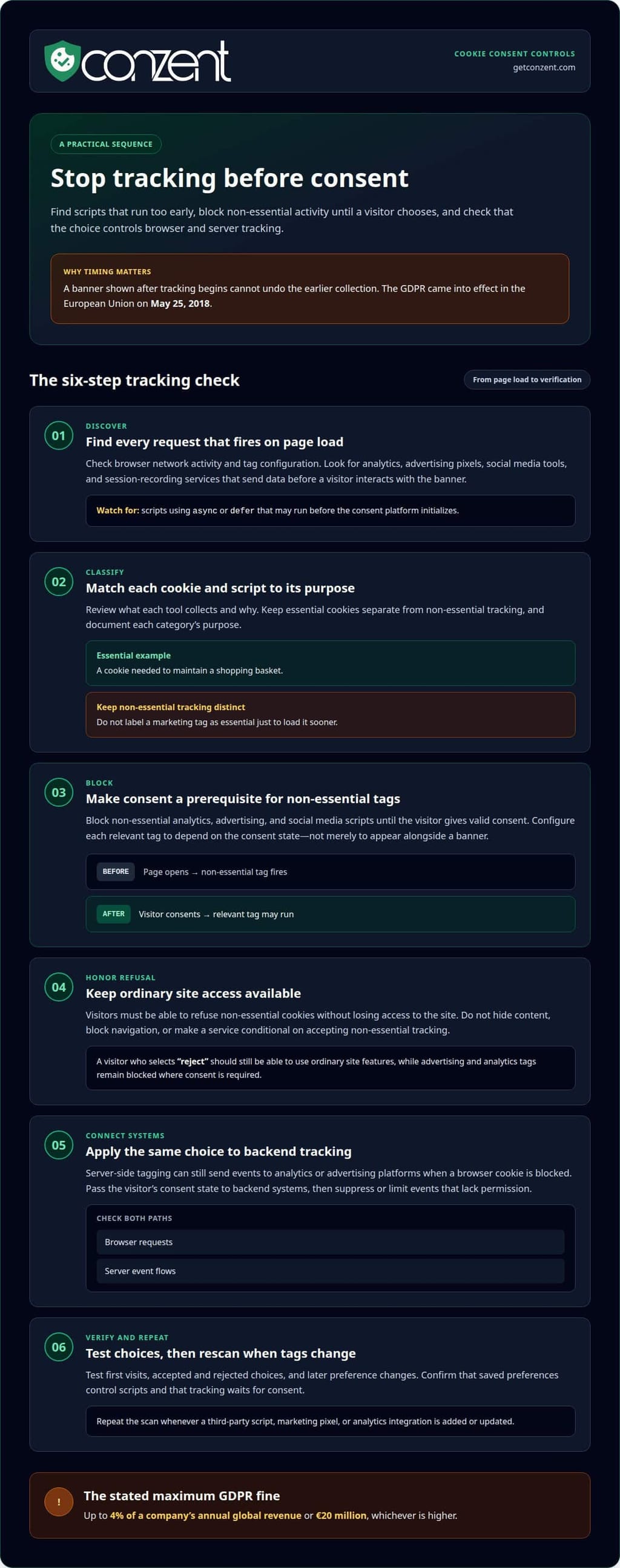
Pre-consent cookie loading happens when a website starts non-essential tracking before a visitor makes a choice. The GDPR came into effect in the European Union on May 25, 2018, according to the European Union. Its consent rules make timing matter: a banner shown after tracking begins cannot undo the earlier collection.
Start by identifying every cookie and script that runs when a page opens. Analytics, advertising pixels, social media tools, and session-recording services can send data before a visitor interacts with the consent banner. The GDPR may apply when cookies help identify people or build profiles, so review what each tool collects and why.
Block non-essential scripts until the visitor gives valid consent. A script using async or defer may run before consent management initializes. Check the browser’s network activity and tag configuration to find requests that fire on page load. Make the consent state a prerequisite for each relevant tag, rather than displaying a banner alongside unrestricted tracking.
Keep essential cookies separate. A cookie needed for a requested function, such as maintaining a shopping basket, may be treated differently from an advertising cookie. Don’t label a marketing tag as essential just to load it sooner. Document each category’s purpose, then configure the banner and blocking rules to match.
Visitors must be able to refuse cookies without losing access to the site. Don’t hide content, block navigation, or make a service conditional on accepting non-essential tracking. Someone who selects “reject” should still be able to use the site’s ordinary features, while advertising and analytics tags remain blocked where consent is required.
Apply the same choice to backend tracking. Server-side tagging can send events to analytics or advertising platforms even when the browser blocks a cookie. Pass the visitor’s consent state to backend systems, and suppress or limit events that lack permission. Test browser requests and server event flows, since checking only the banner misses tracking outside the page.
GDPR non-compliance can result in fines of up to 4% of a company’s annual global revenue. According to the European Union, the maximum can also reach €20 million, whichever is higher.
To fix the gap, inventory scripts, map each to a purpose, and block non-essential activity by default. Test first visits, accepted and rejected choices, and later preference changes. Repeat the scan when a third-party script, marketing pixel, or analytics integration is added or updated. These checks connect visible choices with actual data collection.
2. The ePrivacy Directive's cookie transparency requirements
The ePrivacy Directive requires clear and comprehensive information when a website stores information on or accesses information from a visitor’s device. This includes cookies and similar technologies. Explain what each category does before the consent banner asks for a decision. Transparency means naming the purpose, not hiding it behind technical labels.
Make the notice useful at the point of choice. State which cookies support essential site functions, measure analytics, or enable advertising. Explain each purpose and identify with whom the organization shares data. Visitors should understand the settings without decoding cookie names or searching a technical inventory. Keep the cookie policy consistent with the banner, and update both when scripts or site functions change.
For visitors covered by the GDPR, consent must be an active choice. Pre-selected boxes don’t count as consent, according to the European Union. Offer a separate choice for each processing purpose instead of bundling advertising, analytics, and personalization. Include a visible way to withdraw consent later, such as a persistent cookie-preferences link.
For UK visitors, include the UK Privacy and Electronic Communications Regulations, or PECR, in the jurisdictional review. Don’t assume a banner configured for one region automatically fits every audience. Map relevant rules to visitor location, cookie purpose, and technology, then configure the notice and settings accordingly. Regional differences belong in implementation, not just in a privacy policy footnote.
California’s CCPA follows a deemed-consent-until-opt-out approach in the research facts for this article. That differs from the GDPR’s affirmative opt-in approach. A site serving both audiences shouldn’t treat one banner setting as a universal solution. Provide clear information and an effective way to refuse or change choices, then ensure regional settings apply those decisions to tracking.
Examples help teams classify tags consistently. Advertising cookies that track users across websites require explicit consent. Google Analytics cookies generally require consent before loading under the GDPR and most state privacy laws. By contrast, a cookie needed for a requested site function belongs in the strictly necessary category. Don’t label an analytics or advertising tag essential just because it supports business reporting.
Review the banner, policy, and tag behavior together. Confirm that the information names purposes and data sharing, that visitors can make distinct choices, and that preference changes reach the relevant scripts. If a managed consent setup would help align regional settings and disclosures, explore the managed consent platform options.
3. Can I setup my cookie banner so that users “accept all” by default?
No. Don’t preselect consent or make “accept all” the default. Visitors should actively choose, rather than have silence or a preset treated as agreement. Give “Accept all” and “Reject all” clear, comparable prominence, with an equally usable way to select specific categories. GDPR and CPRA expectations include a clear “Reject all” button next to “Accept all.”
Design matters. A large, high-contrast accept button beside a faint reject link steers people toward tracking. So does hiding rejection behind several screens while acceptance takes one click. Keep the choices visible together, use direct labels, and avoid colors or button sizes that make one option seem like the only practical action. A consent banner informs; it shouldn’t pressure.
Partial choices give visitors meaningful control. Let them accept analytics while refusing advertising, for example, or reject both while keeping strictly necessary cookies enabled. Use understandable category names, then make sure each setting controls the matching tags. A saved preference that doesn’t change tracking behavior isn’t a working choice.
Coverage matters as much as design. The banner should appear on relevant pages across the site, including subdomains, landing pages, and campaign pages. Visitors arriving directly on a campaign page still need a clear choice. Check that the same preference applies across the site where intended and that regional settings don’t leave a page or subdomain outside the consent flow.
Test the banner across browsers, devices, and real scenarios. On desktop and mobile, confirm that text is readable, controls are keyboard-accessible, and the banner doesn’t obscure its own choices. Test a first visit, each selection, a return visit, and a later preference change. Repeat in different browsers to catch inconsistent scripts or layouts.
Clarity also means accessible language and controls. Explain “analytics” or “advertising” in plain terms, make the cookie policy easy to find, and label buttons so assistive technologies can identify their purpose. Don’t use a close icon as a substitute for a decision. Closing the banner must not silently activate tracking or imply consent.
Finally, review the full interaction for deceptive patterns. Confirm that refusing takes no more effort than accepting, no category starts selected, and visitors can change settings later. If the banner uses different layouts for mobile, desktop, or regional audiences, test each version. These checks show whether the choices presented match the site’s implemented consent rules.
4. Consent records and proof of consent
Store each visitor’s choice in a record that can be retrieved during an audit. Include the timestamp, selected preferences, and whether the visitor accepted, rejected, or changed them. A banner click alone isn’t useful evidence if the decision can’t be connected to the consent state applied to tracking.
GDPR Article 7 and Recital 42 are references for proof of consent. A consent management platform can create a consistent record when its configuration captures decisions and applies them to the relevant tags. The record should show what the visitor chose, not merely that a banner appeared.
Document the context behind each choice. For example, keep the consent wording or policy version shown when the visitor made a selection. If the banner changes its categories or explanations, that context distinguishes an earlier choice from a later one. Record events that change preferences, including withdrawal, so the audit trail reflects the full sequence.
How should cookie consent records and user preferences be stored and documented? Keep retrievable timestamps and choices, including later changes, alongside the consent wording shown at the time. Limit access to staff who need the records, and avoid collecting extra identifiers that don’t help explain the decision.
A useful record can include:
- The date and time of the choice.
- The categories accepted, refused, or changed.
- The banner or policy version displayed.
- The resulting consent state sent to relevant tags.
Use a stable consent reference to connect each choice with its audit trail, while limiting personal data in the record. Set access controls and protect stored records from unauthorized changes. Document how the system handles a preference update, such as withdrawing advertising consent, and confirm that connected tracking responds.
Cookie audits test whether records match real behavior. Run a fresh scan when a third-party script, marketing pixel, or analytics integration is added or updated. Compare findings with recorded preferences and tag behavior. A quarterly review can also help identify scripts that changed after the last implementation check.
Keep records usable, not just archived. Define how authorized staff can retrieve a decision, interpret its fields, and trace it through the audit trail. Test a sample journey: make a choice, change it through the preferences mechanism, then confirm both events appear in order. This shows whether the record explains what happened when the visitor made a choice.
5. Google Consent Mode v2 and other consent signals
A consent signal connects a visitor’s choice to the systems that use tracking data. Google Consent Mode v2 communicates consent status to Google tags, so their behavior can reflect the site’s consent state. It does not collect consent by itself or make a banner compliant. The banner and blocking rules must still capture and apply the visitor’s choice.
Start with the sequence. Before the visitor chooses, initialize the consent setup in its default state. When they accept, reject, or change preferences, update the relevant signals and confirm that Google tags receive the updated state. Don’t send an acceptance signal just because the page loaded or the visitor dismissed the banner.
Test each path in a browser’s developer tools. Load a fresh session and inspect whether Google tags receive the default state before any choice. Then accept, reject, and adjust available categories. Confirm that the signal changes with each selection and tags respond as configured. Repeat after a page refresh, because saved preferences must continue to guide tag behavior.
Keep the legal choice separate from the technical signal. A signal tells a system how to respond; it doesn’t turn refusal into permission or replace the consent record. If a visitor rejects advertising cookies, check that the site’s preference mechanism blocks the corresponding tracking and communicates the correct state. Review other tags and integrations too, since Google Consent Mode v2 only addresses systems configured to receive its signals.
Global Privacy Control matters for United States visitors. Websites should honor Global Privacy Control signals automatically, without requiring an additional step. Configure the site to recognize the signal and apply the relevant opt-out choice to data collection and sharing. Test it alongside banner choices to ensure a later interaction doesn’t silently override the signal.
Signals can drift out of sync when teams change tag settings, add an integration, or update banner categories. Keep a simple mapping between each preference, the signal sent, and the tags that use it. After a technical change, retest the initial state, acceptance, rejection, and preference updates. Tracing the flow makes mismatches easier to spot than checking the banner alone.
For an implementation-specific overview, see the Google Consent Mode v2 integration. If you need a consent platform to coordinate banners and consent signals, explore the available platform options.
Conzent
Conzent helps teams put these steps into a coherent consent setup. Choose the Managed Cloud Consent Platform or Self-Hosted Open Consent Infrastructure to support your approach. Consent A/B Testing and Revenue Impact Analytics help assess how banner choices affect user decisions and site performance.
Turn to Conzent when consent controls, records, and signals need a more structured implementation. The platform supports customizable consent banners and integrations including Google Consent Mode. It’s a practical next step for aligning visitor choices with your tracking configuration.
Contact Conzent to discuss your consent setup.
Make consent part of every release
A durable approach to how to fix cookie consent non-compliance treats consent as part of ongoing site governance, not a banner you configure once and forget. Assign a named owner to tracking changes, privacy settings, and consent behavior. Involve that owner in release planning so a new integration or campaign doesn’t bypass the choices visitors expect to control.
Build a simple handoff between the people who approve tracking changes and those who implement them. Before a change goes live, document its purpose, expected consent behavior, and test plan. This creates a clear decision record and makes mismatches easier to catch before they reach visitors. Keep the process workable for the people maintaining the site.
If you want to make that work more structured, explore consent options with Conzent. Clear ownership and careful implementation can make privacy a dependable part of how your site operates.
Frequently Asked Questions
What Is Pre-Consent Cookie Loading — and Why Does It Violate GDPR?
It’s when a site accesses or stores information before a visitor has consented. The practical concern is timing: a tracking request can leave the browser before the banner appears. To diagnose this, use a fresh browser session and inspect the first network requests, including those triggered by embedded video or chat tools. This reveals activity a visual page review may miss.
How often should I re-scan my website for GDPR cookie compliance?
Scan at least once per quarter and after changes that may add or alter tracking. Make each review useful by comparing the latest scan with the previous inventory. Investigate newly detected cookies, changed domains, or altered purposes, then update relevant records and disclosures. A scan is most valuable when it leads to an assigned follow-up, not a report that sits unread.
Can I setup my cookie banner so that users “accept all” by default?
No. A visitor’s choice must come from an affirmative action, not a preselected setting or assumed preference. Keep optional categories off until the visitor selects them. Test what happens when someone clears site data or opens the site in a new browser profile. The banner must not treat an old or missing preference as permission to enable optional tracking.
Does my cookie banner need a “reject” button?
Yes. Give visitors a direct way to refuse optional cookies, rather than requiring them to open settings and switch categories off one by one. Test the reject action from the initial banner and confirm it saves the preference. If the banner has separate desktop and mobile layouts, check both; a control that disappears or is hard to reach on a small screen undermines the choice.
What makes a cookie consent banner non-compliant under GDPR and ePrivacy rules?
A banner’s wording and the site’s behavior must agree. A notice describing one purpose while a tag sends data for another creates a gap. To understand how to fix cookie consent non-compliance, follow a test choice through the full path: banner, stored preference, tag configuration, and resulting request. This reveals mismatches that reviewing banner text alone won’t catch.
What are the CCPA and CPRA requirements for cookie consent and opt-out signals?
For California visitors, make opt-out choices and relevant signals usable in practice. Treat a Global Privacy Control signal as an input to the site’s consent logic, and keep its effect distinguishable from a button selection in internal records. Test a session with the signal enabled and confirm the site applies the resulting preference to relevant data-sharing processes.
How should a compliant cookie consent banner present accept, reject, and settings options?
Use labels that tell visitors what each action does, and make category settings specific enough to support an informed choice. For example, don’t use “Partners” instead of explaining an advertising purpose. Check that banner text fits its controls on mobile and desktop, and that each selection saves the intended categories. Clear labels help visitors choose without guessing.
When is prior consent required before setting analytics or advertising cookies?
Prior consent is generally required for non-essential analytics and advertising cookies under the GDPR. Google Analytics cookies generally require consent before loading under the GDPR and most state privacy laws; advertising cookies that track users across websites require explicit consent. Teams can learn how to fix cookie consent non-compliance by classifying each cookie by purpose and checking its first request, rather than relying only on the vendor’s label.