
How to Increase Cookie Consent Opt-In Rate Through Clear Choices

A higher cookie opt-in rate starts with a clear, fair choice, not a hidden reject button. Cookie consent is a visitor’s permission for a site to use cookies, and the opt-in rate is the share of visitors who choose to accept them. To understand how to increase the cookie consent opt-in rate, make every option easy to find, explain what each cookie category does, and keep non-essential cookies inactive until a visitor consents where consent is required.
It’s reasonable to want useful analytics without making people feel pushed into a decision. Clear choices help visitors understand what they’re agreeing to and give them a genuine way to say no. This guide explains how consent and opt-in rates work, why they matter, and how to improve a banner through transparent wording, balanced controls, careful testing, and proper blocking before consent.
Key Takeaways
- Make accepting and rejecting cookies equally clear so visitors can choose without pressure.
- Explain cookie categories and purposes in plain language, then offer meaningful granular controls.
- Measure consent choices and banner interactions to identify what needs improvement.
- Keep non-essential cookies inactive until a visitor gives consent where opt-in rules apply.
- Use A/B testing and revenue impact analytics to assess how banner changes affect consent and site performance.
Privacy expectations and cookie-banner interactions
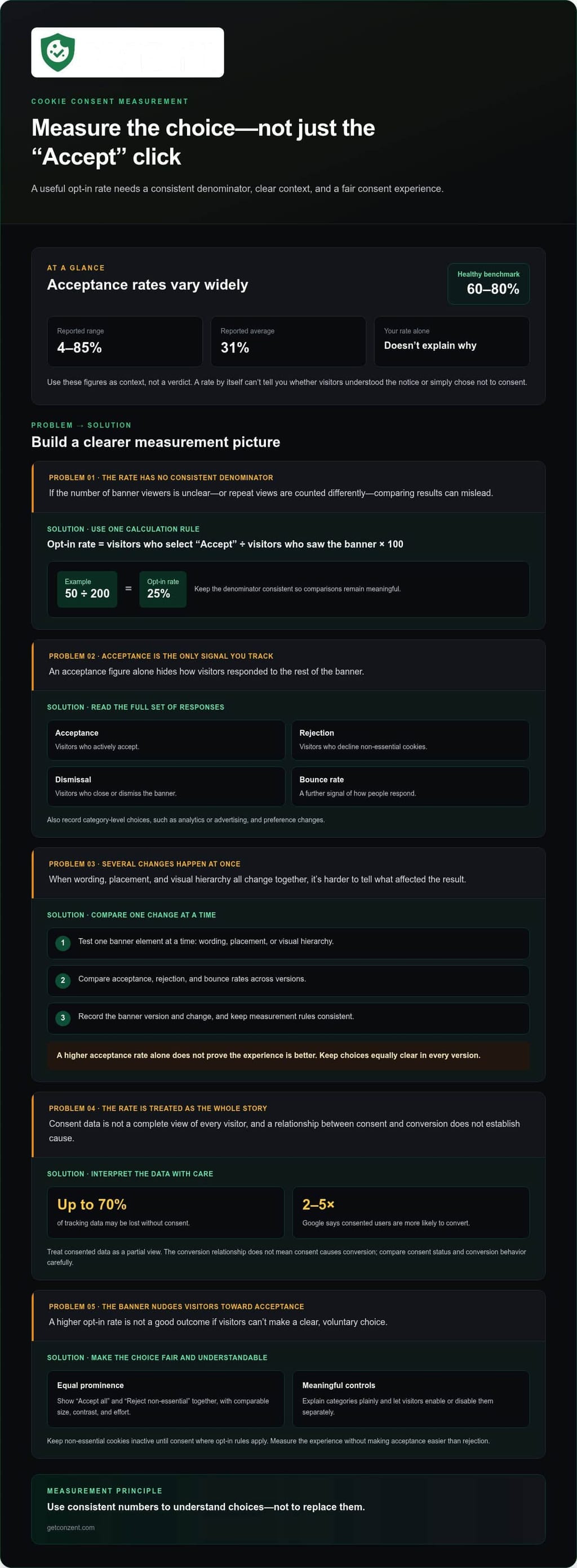
A cookie banner shapes a visitor’s first privacy decision. The GDPR can impose fines of up to 4% of global annual revenue; reported cookie banner acceptance rates range from 4% to 85%, with an average of 31% and a healthy benchmark of 60-80%. Track acceptance alongside rejection, banner dismissal, and bounce rate to see how people respond.
In the United States, state privacy laws such as the CCPA require prominent data-collection notices and clear opt-out mechanisms. Rules differ by jurisdiction, so a banner serving visitors across states should communicate choices clearly and support applicable opt-out rights. Don’t assume one presentation fits every location.
Explain what each category does before asking for consent. For example, label analytics, advertising, and personalization separately, then let visitors enable or disable each category. Plain language helps people understand the consequences of their choices. Avoid vague labels such as “improve your experience” when a more specific description can explain how data is used.
For visitors in multiple countries, adapt the consent experience to the relevant jurisdiction. Geolocation can identify a visitor’s approximate region and display the corresponding banner and rules. Translate the notice into the visitor’s language where appropriate, and keep button labels, category descriptions, and preference controls consistent. A translated banner still creates friction if its settings are unclear.
Placement, size, and timing affect whether visitors can read and use a banner. Test a bottom-right desktop position, keep the notice concise, and avoid covering key page controls. Users typically make cookie choices within 8 seconds of seeing a banner. Since 47% of users expect pages to load instantly, avoid banner behavior that delays content or shifts the layout after loading.
On mobile, use a responsive banner with readable text and touch-friendly controls. Keep accept, reject, and settings options visible without forcing users to zoom or scroll through a crowded panel. Test on small screens to confirm the banner doesn’t obscure navigation or essential content. A usable mobile layout reduces friction without making acceptance easier than rejection.
A/B testing can compare banner wording, placement, and visual hierarchy. Change one element at a time, then compare acceptance, rejection, and bounce rates across versions. Keep choices equally clear in every variant; a higher acceptance rate alone doesn’t prove the experience is better. Use user feedback to understand why a design performs differently, or explore behavioral research solutions like ergoneers.com to study how users visually process and engage with interface elements.
Privacy expectations also carry legal consequences. According to the European Union, the GDPR can impose fines of up to 4 percent of global annual revenue for issues such as collecting data without consent. A banner should support informed choice, not obscure the consequences or steer visitors toward acceptance.
2. Cookie consent opt-in rate definition and importance
A cookie consent opt-in rate measures the share of banner viewers who actively accept cookies. Calculate it by dividing visitors who select “Accept” by visitors who saw the banner, then multiplying by 100. For example, if 50 of 200 banner viewers accept, the rate is 25%. Keep the denominator consistent so comparisons remain meaningful.
Define the measurement window and count each visitor consistently. If a report counts repeat views as new impressions, one person may affect the rate more than once. Record the banner version and accepted categories too. This context helps distinguish a change in consent from a change in traffic or presentation.
Consent rate optimization means improving the banner experience while preserving an informed, voluntary choice. It isn’t simply about increasing clicks on “Accept.” To understand how to increase cookie consent opt-in rate, review the wording, category explanations, button visibility, and path to preferences. Change one element at a time, then compare results using consistent measurement rules.
Why track it? Without consent, most analytics, advertising, and personalization tools do not fire. An unoptimized opt-in rate can mean losing up to 70% of tracking data. That gap can make campaign attribution and audience analysis less complete. Teams should interpret consented data as a partial view, rather than assuming it represents every visitor.
Consent rates also affect how organizations evaluate marketing performance. Google says consented users are 2-5 times more likely to convert than unconsented users. That relationship doesn’t mean consent causes conversion. It does mean teams should compare consent status and conversion behavior carefully, without making assumptions about visitors who decline.
Use a small set of measures to turn the rate into an action plan:
- Track banner impressions and accepted choices using the same reporting period.
- Separate acceptance by cookie category, such as analytics or advertising.
- Compare acceptance with rejection, preference changes, and page engagement.
- Annotate each design or wording change before reviewing its results.
Then ask what the data can and cannot explain. A lower rate may reflect unclear purposes, a mismatch between banner language and visitor expectations, or a genuine preference not to consent. The rate alone can’t identify the cause. Pair it with feedback and category-level choices before changing the design.
For a practical next step, connect your measurement needs to the consent platform setup that fits them. Review the consent platform options and pricing details alongside your tracking and reporting requirements.
3. Equal prominence for accept and reject choices
A consent banner should make acceptance and rejection equally easy to find and use. Under GDPR, declining cookies should be as easy as accepting them. Put “Accept all” and “Reject non-essential” together on the first screen, with comparable size, contrast, and effort. A separate “Manage preferences” option can open granular controls without hiding either main choice.
Use labels that describe the action, not its supposed benefit. “Accept all” tells visitors what happens; “Continue” doesn’t. Avoid making the reject button low-contrast, placing it behind another screen, or requiring extra clicks to decline. These design choices can steer people toward acceptance instead of supporting a free decision.
What wording and button labels can increase consent while remaining clear? Use direct labels such as “Accept all,” “Reject non-essential,” and “Manage preferences,” then explain cookie purposes in plain language. Clarity can improve understanding, but wording should never disguise rejection or pressure visitors into accepting.
Deceptive design that nudges visitors to accept does not create valid consent under the General Data Protection Regulation (GDPR) and exposes websites to legal risk. Examples include a prominent acceptance button paired with a hidden rejection option, confusing labels, or repeated prompts after refusal. The CNIL has issued formal compliance notices where rejecting cookies was harder than accepting them. noyb found that 81% of more than 500 examined banners lacked a visible reject option on the first layer.
Keep the experience consistent across devices. On desktop, compare button prominence side by side. On mobile, make both choices visible and usable without unnecessary scrolling. Test the banner with keyboard navigation too, so people can reach and understand each control without a mouse. Equal prominence means practical access, not merely matching button colors.
Measure acceptance and rejection rates, not acceptance alone. Compare banner impressions with each choice, and segment results by device, language, and banner version. A higher acceptance rate can reflect clearer information, but it can also signal a design that makes rejection harder. Pair analytics with feedback and preference changes before drawing conclusions.
Consent logs make those comparisons auditable. Record when consent was given, which categories visitors accepted or rejected, and the banner version shown. Then connect each banner revision to its analytics. For example, if one version changes button labels, the log helps distinguish its effect from a later change to category descriptions.
Review the evidence before each design update: confirm both choices remain visible, check that labels match their actions, and compare outcomes by banner version. Keep the measurement method consistent across tests. This gives teams a clearer view of consent behavior without treating every additional acceptance as proof of a better experience.
4. What is cookie consent?
Cookie consent is a visitor’s clear choice about whether a website may use non-essential cookies. It’s more than clicking a banner button: visitors need to understand what their choice covers. According to the European Union, valid GDPR consent must be freely given, specific, informed, and unambiguous. Explain the purpose before asking visitors to act.
Can granular cookie choices affect opt-in rates? Yes. Visitors may respond differently when they can accept useful categories without enabling every category. Rates may vary by category, so measure analytics, advertising, and personalization choices separately rather than treating consent as an all-or-nothing decision.
Granular preferences make that decision practical. For example, a website could let visitors enable analytics cookies while rejecting advertising cookies. It could also separate personalization and explain what each category supports in plain language. Google Analytics is one example of an analytics service that may be named in a category explanation. Avoid broad labels that leave people guessing about data collection.
Keep the interface easy to understand. Show a brief explanation beside each category, then let visitors open more detail if they want it. Use consistent labels in the first notice and the settings panel. If “analytics” becomes “performance” on the next screen, visitors may not know whether they’re changing the same preference.
Respect the visitor’s choice. If someone rejects a category, don’t activate it later during that visit. If they accept only analytics, keep advertising and personalization disabled. Apply preferences consistently across the website rather than asking again on every page without a clear reason.
Consent also needs an accessible withdrawal path. Keep a cookie settings control available after the banner closes, such as a persistent privacy link in the site footer. When a visitor changes preferences, apply the updated choice and keep the controls easy to understand. Withdrawal shouldn’t create a penalty or block ordinary access to the website.
Test the complete journey on desktop and mobile. Open the notice, choose a category, save preferences, then reopen settings and confirm the selection remains. Repeat the test after withdrawal. These steps reveal mismatches between the displayed preference and the cookies or trackers the site actually loads.
Finally, record the visitor’s choice and the banner version shown. Use that record to understand which preferences were selected and whether later changes were respected. Granular controls give visitors agency; accurate implementation makes their choices meaningful.
5. Blocking non-essential cookies before consent
A consent banner only works if the website follows the choice it records. Under GDPR, consent for non-essential cookies must come before those cookies are set, according to the European Union. If a visitor declines, advertising and analytics cookies should remain inactive where opt-in consent applies. The banner and the site’s underlying scripts must work together.
Start by making an inventory of every cookie and tracker. Record its purpose, category, provider, and activating script. For example, identify analytics tags in Google Tag Manager and advertising pixels in page templates. Classify each item before configuring consent controls. A category label alone can’t stop a script that loads independently.
Next, test the full sequence in a clean browser session. Open the site without stored preferences and inspect cookies and network requests to confirm non-essential tools haven’t fired before a choice. Select “Reject,” reload, and repeat the check. Then accept one category and verify that only the corresponding tools activate.
Privacy laws differ, so map the consent experience to the jurisdictions your website serves. Under an opt-in model, non-essential tracking stays inactive until a visitor explicitly agrees. Other frameworks may emphasize opt-out rights. A location-aware banner can present relevant choices, but geolocation and banner design can’t replace accurate script control.
A visitor can decline analytics while accepting another category. Configure each category separately, then connect its consent signal to the associated tags. Google Consent Mode can communicate consent choices to Google services, but it doesn’t replace the banner or the visitor’s decision. Keep stored preferences and actual tag behavior aligned.
Check more than the first page load. Test a returning visitor who changes preferences, a person who withdraws consent, and someone who switches from accept to reject. Confirm the updated choice applies across pages and stops relevant scripts. Also test cached pages and third-party embeds, which can load through different site components.
Record each test outcome alongside the banner version and consent state. If a tag fires after rejection, trace its trigger and correct the configuration before evaluating opt-in performance. Otherwise, analytics may misrepresent what the banner choice allowed. Repeat the checks after changes to tags, plugins, or banner settings.
Blocking should be verified technically, not inferred from button clicks. A consent platform can help coordinate banner choices, categories, and tag behavior. If you’re ready to assess the setup for your site, review consent platform options.
Conzent: Managed Cloud Consent Platform
Conzent’s Managed Cloud Consent Platform helps websites manage consent banners and measure how visitors respond. It suits teams that want to refine banner choices, test changes, and understand how consent relates to revenue.
Use Conzent’s Consent A/B Testing to compare banner variations, then use Revenue Impact Analytics to assess their business effects. Teams that want to run consent infrastructure on their own systems can use Conzent’s Self-Hosted Open Consent Infrastructure. The right approach depends on your hosting needs and how you plan to manage testing and analysis.
Clear consent design remains the goal. Measurement helps you improve the experience without turning acceptance into the only easy choice. Contact Conzent to discuss which approach fits your consent setup.
Make your next consent improvement measurable
If you’re deciding how to increase cookie consent opt-in rate, treat it as an ongoing improvement process, not a one-time banner redesign. Choose a clear outcome, assign responsibility for reviewing consent behavior, and document why each change matters. This gives your team a practical basis for deciding what to test next without making acceptance the only measure of success.
Build the review into your existing website workflow. When a page, tracking tool, or privacy notice changes, revisit the consent experience and confirm its choices still match the site’s behavior. This keeps consent work connected to real operations instead of leaving the banner untouched as the website evolves.
Conzent offers consent infrastructure and testing options for teams ready to manage that process. Contact Conzent about cookie consent to explore an approach for your website. Clear choices and consistent follow-through give you a strong foundation to keep improving.
Frequently Asked Questions
What is consent rate optimization?
Consent rate optimization is the ongoing process of improving how a website explains and records visitor choices. Start by identifying a specific friction point, such as unclear category names or a settings panel that’s hard to navigate. Change that element, then compare the results using the same audience and measurement method. Keep the change only if it improves usability while preserving a genuine choice.
What is my cookie banner opt-in rate, and why does it matter?
Your cookie banner opt-in rate is the percentage of banner viewers who choose to accept cookies. Use it to understand how visitors respond, not as a standalone measure of success. Compare results across devices, regions, and banner versions to find where the experience differs. For example, a lower mobile rate may point to controls that are harder to use on a small screen.
Does a custom banner design actually improve opt-in rates?
A custom banner can improve opt-in rates when it makes choices and their purposes easier to understand. Match the layout to your site, keep text readable, and make controls usable on mobile. Then test a specific change, such as a shorter explanation, against the existing version. Review rejection and preference-setting behavior too, so the design supports informed decisions rather than simply driving acceptance.
Is opt-in consent required under the GDPR?
Yes, GDPR consent for non-essential cookies requires an active, informed choice before those cookies are set. According to the European Union, valid consent must be freely given, specific, informed, and unambiguous. A preselected box doesn’t show an active choice. In practice, keep non-essential tracking inactive until a visitor agrees, and provide a clear way to refuse or adjust preferences.
What are consent rates?
Consent rates describe how often visitors give permission under a website’s consent process. The figure depends on what action you measure: accepting all categories, enabling one category, or agreeing through an opt-in flow. Opt-in procedures have an average consent rate of around 84%, while opt-out procedures often exceed 95%. These figures describe different processes, so compare like with like.
Which cookie consent banner designs improve opt-in rates without dark patterns?
Use a design that presents “Accept,” “Reject,” and “Manage preferences” clearly, with comparable visibility and effort. Explain categories in plain language and avoid colors or placement that make one choice look unavailable. For example, don’t put rejection behind a second screen while acceptance sits on the first. A persistent settings control also lets visitors revisit their choices later.
How should cookie consent rates be measured and reported?
Report the measurement period, banner version, visitor segment, and actions counted. Separate acceptance by category and include rejection, preference changes, and banner dismissals where relevant. Review performance regularly, then note design or configuration changes so teams can interpret shifts accurately. Keep consent records showing when a choice occurred, which categories were accepted or rejected, and the banner version displayed.