
How to Track Consent Banner Interactions: A Practical Guide

A consent banner presents a choice. If you’re working out how to track consent banner interactions, focus on whether the banner appeared and what visitors chose. Keep the data about the interaction, not a profile of the visitor, and make sure optional analytics follow the applicable consent state.
A view, an acceptance, a rejection, and a settings change each answer a different question. Collecting more events does not automatically make a report more useful. Start with the decision you need to make, then measure only what helps you make it without steering visitors toward a particular choice.
This guide sets out a practical event model for banner views and choices, and explains how to keep reporting focused and data-minimised. You’ll learn how to interpret interaction patterns, check for friction, and evaluate design changes. It also covers how to consider consent metrics alongside performance and revenue data without treating a visitor’s decision as a reason to override their choice.
Key Takeaways
- Use a compact event model for banner display, visitor choices, preference saves, and later changes.
- For each event, define what it measures, when it fires, its timestamp, and the consent-state context needed to interpret it.
- Choose a reporting approach based on the question you need to answer, and limit detail to what the analysis requires.
- Validate that each event follows a clear user action and fires only at the intended point in the consent flow.
- Use interaction patterns to identify one usability improvement at a time, without steering visitors toward acceptance.
What consent banner interactions should you track?
Interaction tracking records whether a consent banner appeared, which choice a visitor made, and whether they later changed that choice. These events describe how the banner works. They should not become a record of someone’s wider browsing behavior or a way to profile visitors based on their choices.
Keep consent interaction metrics distinct from advertising measurement. A banner impression can show whether the interface was displayed. An acceptance or rejection can show how visitors responded to the available choices. None of these events, on its own, authorizes unrelated analytics or advertising tracking. Recording a choice is not the same as receiving permission for other tracking. Configure optional measurement to follow the applicable consent state.
Which consent banner events are useful to measure?
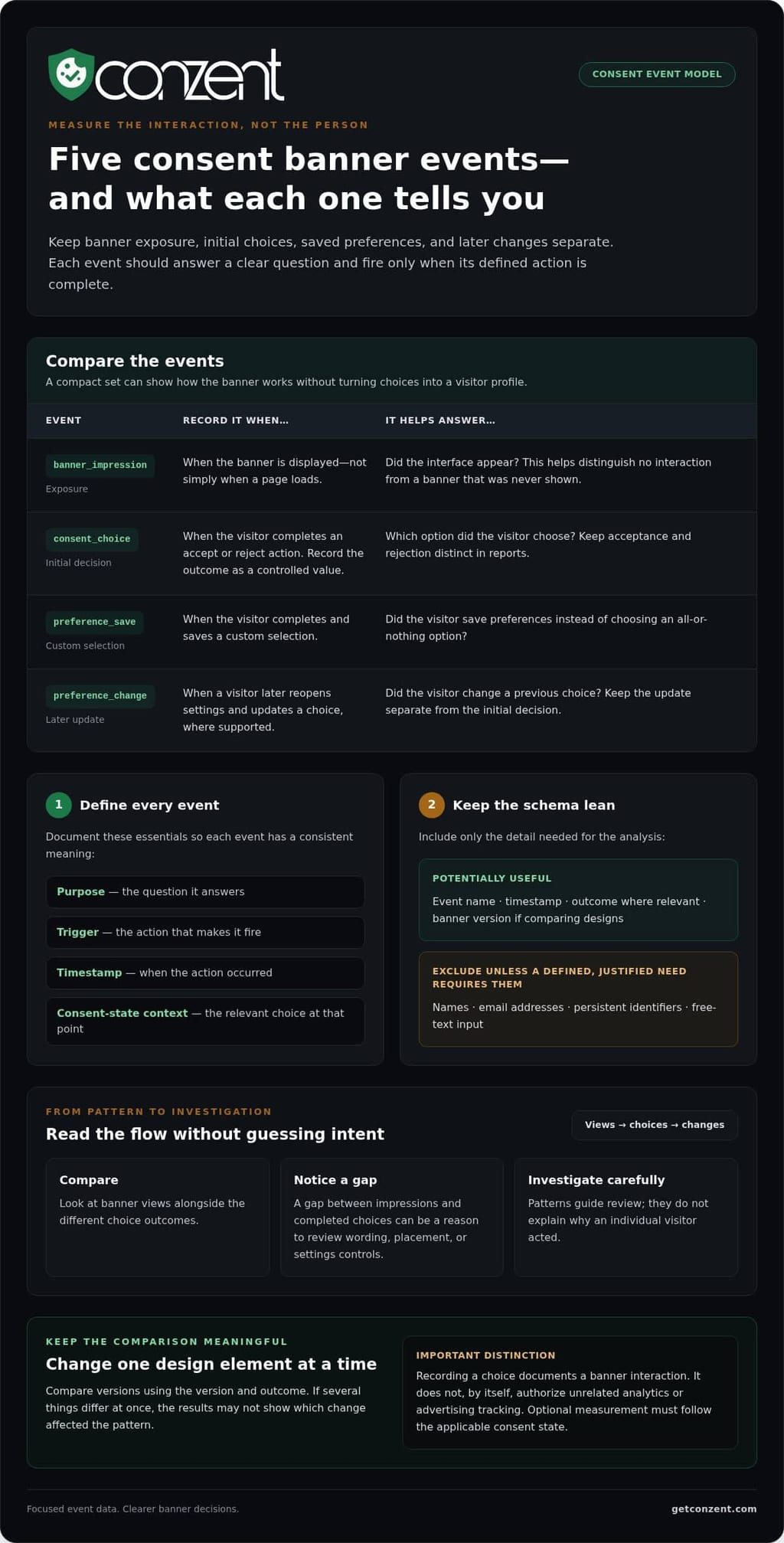
Choose events because they answer specific questions, not because more data is automatically better. A small, well-defined set can show where the flow works or creates friction:
- Banner impression: Did the interface appear? This helps distinguish a lack of interaction from a banner that was never shown.
- Accept: Did the visitor choose to accept the options presented?
- Reject: Did the visitor choose to decline those options? Keep this separate from acceptance so reports do not combine different choices into one outcome.
- Preference save: Did the visitor save a custom selection rather than choose an all-or-nothing option?
- Preference change: Did the visitor later reopen settings and update their choice? Track this separately from the initial decision when your setup supports it.
Define each event by the action that triggers it. A banner impression should mean the interface was displayed, not simply that a page loaded. A preference save should mean the selection was completed, not just that the visitor clicked a button and left the choice unresolved.
What can interaction data tell you?
Compare banner views with the different choice outcomes to spot possible usability issues. For example, a gap between impressions and completed choices can be a reason to review the banner’s wording, placement, or settings controls. It does not explain why an individual visitor acted, so use the pattern to guide investigation rather than infer intent.
Comparisons between banner versions are useful when the measurement design makes them meaningful. Keep the analysis focused on the version and outcome, and avoid personal identifiers that are not needed to answer the question. If versions differ in several ways at once, the results may not show which change affected the pattern.
Banner text, layout, and controls shape the experience visitors see. When deciding what to measure, consider the specific cookie banner configuration options involved. Connect each option to a clear interaction question so the analysis reflects the interface, not assumptions about individual visitors.
How to design a consent banner interaction event model
A useful event model answers a defined question with the least data needed. It describes banner behavior, not a profile of the person making a choice. Start with a compact set of event types: impression, choice, preference save, and preference change. Keep them distinct so reports show whether the banner appeared, which action occurred, and whether the visitor later updated their selection.
The model below is an implementation pattern, not a standard. Adapt the labels to your system and document exactly what each event means.
banner_impression: Record when the banner is displayed. This measures exposure, not page loads.consent_choice: Record a completed accept or reject action. Use a controlled value for the outcome, such asacceptorreject.preference_save: Record when a visitor saves a custom selection. Use a limited set of consent-state categories if the analysis needs them.preference_change: Record a later update as a separate action, where the implementation supports it. This distinguishes a change from the initial choice.
Define event names and properties consistently
For every event, document its purpose, trigger, timestamp, and consent-state context. Use stable names and controlled values rather than free-text descriptions. The timestamp should mark when the action occurred, while the state should describe the relevant choice at that point. Do not infer an action from a page view or fire a save event before the selection is complete.
Keep the schema lean. Essential properties might include the event name, timestamp, outcome where relevant, and banner version if you need to compare designs. Mark optional fields clearly. Exclude names, email addresses, persistent identifiers, and free-text input unless a defined, justified need requires them. Those details can identify or single out visitors without improving a basic banner-performance report.
For background on cookie consent, GDPR Cookie Consent Requirements explains how consent relates to cookies. Use that context to decide what your event model needs to record instead of assuming every analytics question requires person-level data.
Keep consent state separate from analytics permission
A recorded choice documents a banner interaction. It does not, by itself, grant permission to collect separate analytics data. Configure measurement so analytics collection follows the applicable consent state. An interaction event should not silently enable other tags. Consent signals communicate state to systems, while analytics permission governs whether measurement can run. For the technical distinction, see this guide to Google Consent Mode v2.
With the event definitions in place, you can explore consent platform options that support your measurement approach, whether you need managed cloud or self-hosted infrastructure.
Which tracking and reporting approach fits your needs?
The right tool depends on the question you need to answer, your consent setup, and the analytics stack you already use. Aggregate reporting is often enough to understand overall banner exposure and choice patterns. Contact-level records add identifiable detail, but that detail is not automatically useful or necessary.
Use this comparison to match the reporting method to the job:
| Approach | Granularity | Implementation effort | Privacy considerations | Best suited to |
|---|---|---|---|---|
| CMP dashboard | Usually aggregated around banner interactions and consent outcomes | Can be simpler when reporting is part of the consent platform; depends on setup | Can support a data-minimised view without defaulting to contact profiles | Monitoring banner exposure, choices, and broad patterns |
| General analytics tool | Depends on the events and dimensions configured | Requires event mapping, implementation, and validation within the existing stack | Collection must respect the applicable consent state and avoid unnecessary identifiers | Combining interaction trends with other site-performance measures |
| CRM contact activity | Individual activity associated with a contact record | Requires connecting consent events to CRM records and defining access | Identifies people, so purpose limitation and access controls matter | A specific operational workflow that needs a contact’s consent history |
When are aggregate dashboards enough?
Aggregate views can answer practical product questions: did the banner appear, how do choice outcomes compare over time, and did a version change coincide with a different pattern? These reports help teams assess the interface without attaching every event to a named person. A CMP dashboard can suit this need; a general analytics tool can be a better fit when the question also involves broader site performance. Revenue impact analytics can help frame how consent experience and revenue measures relate.
Keep the interpretations distinct. Descriptive reporting summarizes what happened. An experiment compares versions under a defined measurement design. Revenue attribution tries to connect outcomes to contributing factors, which requires more than observing a change in banner choices. A simple before-and-after difference does not prove that the banner caused a business result.
When might contact-level records be relevant?
A contact record may be useful when a defined operational process requires staff to understand a particular person’s recorded choice, such as handling a consent-related support request. That is narrower than measuring banner performance across a site. HubSpot’s contact timeline is one platform-specific way to display activity, not a universal requirement for consent reporting.
If a workflow needs identifiable records, restrict access to people who need them and use the information only for that purpose. For most site-level questions about how to track consent banner interactions, begin with aggregate data and add individual detail only when the task genuinely calls for it. Teams evaluating a consent platform can compare available platform options against their reporting needs.
How to implement and validate interaction tracking
Reliable reporting starts with a clear question and ends with a check that the numbers match real interactions. Use this workflow before relying on consent metrics to assess a banner or guide a change.
- Define the measurement question. Decide what you need to learn, such as whether the banner appears or visitors can complete a preference choice. Keep the question narrow so you do not collect extra data without a purpose.
- Map each event to an action. Write down the user action that should trigger each event. An impression should correspond to the banner appearing, while a choice event should fire only after the visitor completes that choice.
- Document the data and ownership. Record which properties each event collects, who can access the reports, how long data is retained under your organisation’s retention approach, and who owns the implementation. Keep the documented fields aligned with the question you defined.
- Test each path in a controlled session. Use a test environment or controlled session to try acceptance, rejection, saving custom preferences, and changing them later. Check repeat visits and relevant device layouts too, since the banner may behave differently across them.
- Review the first report. Compare impressions with recorded choices, accounting for differences in when and where events fire. Investigate missing actions, duplicates, or unexpected changes before treating the totals as a reliable baseline.
Test event behavior before relying on reports
Check that each action produces only its intended event. Rejecting should not also record an acceptance, for example, and opening settings should not count as a completed preference save. Confirm that analytics behavior follows the configured consent state. A banner event should not silently enable separate analytics collection.
Test the complete flow, not just the buttons. Reload the page, return in a repeat session, and use the controls at the layouts your visitors encounter. If you use Matomo, follow the relevant Matomo configuration guidance when checking how that analytics setup relates to consent behavior.
Check reports for gaps and misleading totals
Impressions and choices may not line up one-to-one. A visitor might see the banner and leave without acting, or the implementation might record an impression at a different point from another event. Check for these possibilities before reading a gap as a tracking failure. Then look for repeated events after reloads and missing preference changes.
Keep a short release note for tracking changes, including what changed and who made the update. If a report shifts after a release, the record helps distinguish a change in visitor behavior from a change in event logic. Once your test results support the measurement plan, compare consent platform options for your implementation needs.
Turn consent interaction data into better banner decisions
Interaction data is useful when it points to a specific question about the experience. It is not a scorecard for how often visitors accept. Use the results to make the banner clearer and easier to use while preserving a genuine choice. A change that increases acceptance but makes rejection harder to find is not a usability improvement.
Start with a measured friction point. If visitors often open preferences but do not save a choice, check whether the instructions are understandable and the controls are easy to use. Treat the pattern as a clue, not proof of the reason. Make one focused change, then assess the same interaction outcomes again.
Use interaction patterns to identify a testable change
Write down one interface question before changing the banner. For example: are the preference instructions clear enough for visitors to make and save a selection? Change one meaningful element at a time where the testing design allows. That makes results easier to interpret than changing copy, layout, and controls together. Consent banner A/B testing can help evaluate variations against a defined question.
Set a baseline first. Compare like with like: use the same event definitions, comparable time periods, and the same outcome measures. Note site or measurement changes that could affect results. If a choice rate shifts after a redesign, that alone does not establish that the redesign caused it. Describe what the data shows without claiming more than it supports.
Keep the test focused on usability. Check whether visitors can understand the options, reach settings, and complete the action they intend. Do not make rejection less visible, add unnecessary steps to declining, or treat a higher acceptance rate as the sole measure of success. The aim is a clearer decision, not a predetermined answer.
Choose a consent analytics setup that matches your workflow
Once the measurement question and comparison approach are clear, choose tools that fit the work. Conzent’s managed cloud service includes cloud-based analytics dashboards. The platform also offers consent A/B testing and revenue impact analytics. These capabilities can support banner evaluation and analysis of business outcomes, but the results still need careful interpretation.
Conzent can also be self-hosted on customer infrastructure. Managed cloud and self-hosted options differ in where the platform runs, so choose the approach that fits your operational workflow. Neither option replaces sound measurement or turns correlation into causation.
To apply how to track consent banner interactions in practice, keep the decision loop simple: identify a friction point, make one focused change, and review comparable results without steering visitor choices. Compare Conzent pricing options to explore the platform in relation to your consent measurement needs.
Make your next measurement decision count
Turn one unanswered question about your consent experience into a small, considered next step. Decide what would make the experience clearer for visitors, and keep their freedom to choose at the center. Measurement should help you make a better-informed decision, not push visitors toward an outcome.
With a clear question guiding your next action, choose tools that fit the way your team works and the evidence it needs.
Compare Conzent pricing options and take the next step toward more thoughtful consent measurement.
Frequently Asked Questions
Is it legal to track consent banner interactions?
It depends on what you collect, why you collect it, and which rules apply to your site and audience. Before implementation, map where each event originates, where it is sent, and who can access it. Document its purpose and collect only the fields that purpose needs. A banner action does not settle whether a separate measurement activity is permitted. For a decision about your specific setup, consult a qualified legal professional.
Can I track consent banner clicks in Google Analytics 4?
Possibly, depending on how your tags and consent signals are configured. In a test session, inspect the tag behavior and the event received by your analytics property for each relevant state. Check the event name and parameters, and confirm it appears at the intended point in the flow. A click handler firing in the browser does not, by itself, confirm that the event was collected and reported as intended.
What happens to interaction tracking when a visitor rejects cookies?
Your implementation should apply the configured behavior for that rejection and the requirements that apply to your site. Test what happens after the choice as the visitor moves to another page or returns later. Check that the saved state remains consistent and that tags respond to it as designed. Decide separately whether the rejection action itself can be measured in your setup. Do not assume it will be recorded just because the visitor clicked a button.
Should consent banner views and choices be stored against individual contacts?
Only when a defined workflow needs to connect the interaction to a person. For example, a support team may need a relevant record to resolve a specific account question. Do not automatically copy every banner event into a CRM timeline. Decide which roles need access, what action the record enables, and when that detail is no longer useful. If the workflow works without identifying a contact, keep reporting at that level.
How can I tell whether consent banner interaction data is accurate?
Check both the event trigger and the reporting path. To track consent banner interactions accurately, compare what happens in a controlled browser session with what appears in the analytics report. Look for issues such as an event firing twice during a single-page navigation or a report grouping events under an unexpected date because of timezone settings. Recheck these details after changes to tags, templates, or reporting configuration.
Can consent banner interaction tracking improve opt-in rates?
It may help you evaluate whether visitors complete the available flow, but the numbers cannot explain an individual’s reasons. If acceptance changes, consider other useful signals too, such as whether visitors save custom preferences or return later to change them. Those outcomes add context to the acceptance figure. Treat opt-in rate as one measure of the experience, not a complete account of whether the banner serves visitors well.
How often should I review consent banner interaction reports?
Set a schedule that fits your site’s traffic and release cadence, then review reports after a change that could alter event behavior. A new banner template, tag update, or analytics configuration can affect what a trend means, even if visitor behavior has not changed. Record when measurement changes go live. That makes later comparisons easier to interpret and helps you decide whether a report needs investigation before anyone acts on it.