
Magento Cookie Compliance Guide: A Practical Setup and Testing Walkthrough

A cookie banner can look complete while analytics and advertising scripts still run before a visitor makes a choice. That’s why this Magento cookie compliance guide starts with what the storefront actually does, not how its banner looks. Magento’s basic cookie notification doesn’t, by itself, block non-essential cookies or provide granular consent choices.
If you’re unsure which cookies your store sets, whether tracking waits for consent, or what happens to checkout and measurement when someone opts out, start by checking the storefront’s behavior. Consent needs to work across the whole store, not just in the banner.
This guide walks through a practical process: inventory Magento cookies and third-party scripts, set clear consent categories, connect preferences to tracking behavior, and test the experience before launch. Check key journeys, including checkout, and verify that scripts respond to a visitor’s choice. The goal is straightforward: make consent understandable, make preferences stick, and confirm the storefront behaves as intended.
Key Takeaways
- Use this Magento cookie compliance guide to audit cookies, define consent choices, connect scripts to those choices, and test the results.
- Compare Magento extensions, custom implementation, and consent management platforms by control, maintenance needs, and preference handling.
- Test fresh visits, changed choices, and returning sessions to confirm that tracking follows consent settings.
- Include checkout in testing so essential storefront tasks still work when visitors change or reject optional consent.
- Choose a setup that fits your store’s complexity and technical ownership. Conzent offers managed cloud and self-hosted options through its source-available platform.
Magento cookie compliance starts with finding what the store actually loads
Cookie compliance means aligning a store’s tracking behavior with visitors’ choices and the privacy requirements that apply to its audience. A banner is only the visible part of that process. The store also needs to save preferences and control when optional technologies run.
A current cookie and script inventory records the cookies, browser storage, and tracking technologies a storefront uses, where they come from, what they do, and when they activate. It gives you a baseline for assigning consent categories and testing whether a choice changes site behavior. An HTTP cookie is one kind of browser-held data, so an audit should look beyond cookies too.
Magento pages can load technologies from the core storefront, installed extensions, custom code, analytics tools, advertising tags, and embedded third-party services. The mix can vary between pages. This Magento cookie compliance guide starts with real store journeys, not a list copied from another website.
Which Magento cookies and scripts should you inventory?
Review the storefront and checkout in a fresh browser session. Inspect cookies and browser storage, then use the browser’s developer tools to observe network requests and scripts as pages load and as you interact with the site. Include product, cart, and checkout pages, along with any flows that use third-party services.
For each item you identify, record its name or script, source or domain, purpose, likely category, and activation behavior. Note whether it appears before a choice, after consent, or only after a specific action. Separate technologies needed for core store functions from analytics, advertising, and other optional tracking. If the purpose or trigger is unclear, flag it for investigation rather than guessing.
Why a cookie banner alone does not establish consent behavior
A banner presents choices, but it doesn’t prove the storefront honors them. A visitor might reject analytics while an analytics tag still loads, or accept one category while unrelated scripts activate. Check what the browser actually stores and what requests the page sends before and after a choice.
Test a new session before interacting with the banner. Then accept, reject, or adjust available categories and inspect again. Check whether optional scripts behave differently and whether the preference remains effective as the visitor moves between pages. Magento’s basic cookie notification is informational; it doesn’t, by itself, block non-essential cookies or provide granular choices. A banner, badge, or consent platform alone is not proof of compliance. Verify the complete setup against the requirements that apply to your store.
How to configure cookie consent on a Magento storefront
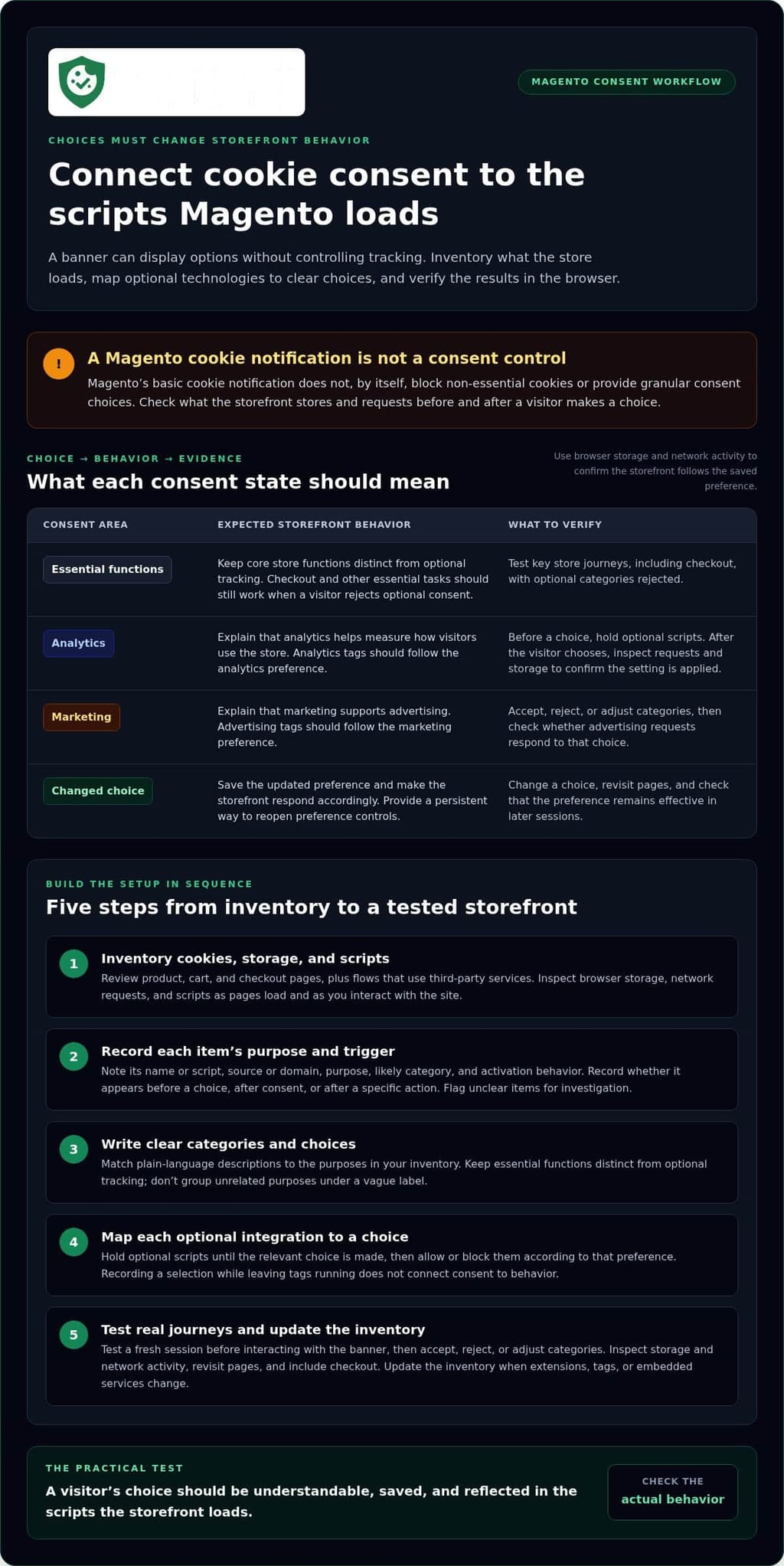
Use a sequence that connects visitor choices to what the storefront loads. The workflow in this Magento cookie compliance guide is: inventory cookies and scripts, assign each a purpose, configure clear choices, connect those choices to optional tracking, then test the result. Treat the inventory as a working record, not a one-time task. Update it when you add an extension, analytics tool, advertising tag, or embedded service.
Magento and Adobe Commerce settings, as well as extension behavior, can vary by version and implementation. Check the current interface and documentation for the tools you use rather than relying on old menu paths or assumptions. For requirements that apply to your audience, consult GDPR cookie consent guidance alongside applicable official sources, including the UK's Information Commissioner's Office (ICO) guidance.
Set up clear consent choices and preference controls
Write category descriptions in plain language and match them to the purposes in your inventory. For example, explain that analytics helps measure how visitors use the store, while marketing supports advertising. Keep essential store functions distinct from optional tracking, and don’t group unrelated purposes under a vague label such as “other.”
Make the available choices easy to understand. Visitors should be able to accept, reject, or adjust optional categories without navigating confusing screens. Provide a persistent way to reopen preference controls after the first interaction. When someone changes a choice, the saved preference should update and the storefront should respond accordingly.
Connect consent choices to Magento scripts and integrations
Map every optional tag or integration to the category it depends on. Analytics tags should follow the analytics preference; advertising tags should follow the marketing preference. Configure the consent mechanism to hold optional scripts until the relevant choice is made, then allow or block them according to that choice. A banner that records a selection but leaves tags running has not connected the two parts of the system.
Test the live storefront configuration, not only an admin preview. In a fresh session, inspect browser storage and network activity before and after selecting each option. Confirm that changing preferences also changes script behavior as expected. If your store sends consent signals to Google advertising or analytics services, review Google Consent Mode v2 guidance. It communicates consent signals but doesn’t replace asking for and applying a visitor’s choice.
Once the workflow is mapped, compare implementation approaches and decide how you’ll maintain the setup as your scripts change. You can also review consent platform options as part of that planning.
Magento consent implementation options: extension, custom work, or a CMP
There isn’t one right setup for every Magento store. The best fit depends on how many scripts and integrations you need to control, who maintains the storefront, and how much ongoing work your team can own. This Magento cookie compliance guide compares the options by control, maintenance, preference handling, and testing, not banner appearance alone.
| Approach | Control and preference handling | Maintenance and testing |
|---|---|---|
| Magento extension | May offer settings designed for Magento, but capabilities vary. Confirm how it stores preferences and controls each optional script. | Updates must fit the store’s Magento version and extension stack. Retest after changes to extensions, tags, or storefront code. |
| Custom implementation | Can be tailored to the store’s scripts and consent categories, with behavior defined by the implementation. | Your technical team owns updates, preference records, script changes, and repeat testing. |
| Consent management platform (CMP) | Can centralize banner choices and consent controls, depending on its capabilities and how it is connected to the storefront. | Configuration and ongoing maintenance still matter. Test every relevant tag and user journey in the Magento storefront. |
When an extension or custom implementation may fit
An extension may suit a store whose team wants consent controls within its existing Magento extension architecture. But installation doesn’t guarantee that every third-party tag is blocked correctly. Check how the extension handles each script, saves preferences, and responds when a visitor changes a choice.
Custom work can make sense when the store has specific integrations or a technical team ready to own the logic. That control comes with responsibility: someone must maintain the implementation as scripts, extensions, and storefront code change, then retest preference handling and blocking behavior.
When a CMP can simplify operations
A CMP can help when you want to manage consent choices and banner settings centrally. Its value depends on whether its controls match your needs and whether each choice connects to the right scripts. Configure and test it with the actual Magento storefront.
Conzent offers a source-available consent platform through a managed cloud service or a self-hosted option. The platform includes tools for managing consent choices and connecting them to your storefront’s scripts. Explore the Open Consent Infrastructure approach for the self-hosted model.
Choose based on your integrations and internal ownership. Whether you use an extension, custom implementation, or CMP, keep a clear record of how preferences affect scripts and retest when the setup changes.
How to test Magento cookie consent before and after launch
A consent setup isn’t ready just because the banner looks right. Test script behavior, not banner display alone. Start in a clean browser session, then repeat after saving and changing preferences. Use the same sequence before launch and whenever the store’s scripts or configuration change.
Test acceptance, rejection, and preference changes
Open a private browser window or clear site data to start without a saved choice. Use browser developer tools to inspect cookies, storage, and network requests. Check what loads before interacting with the banner, then test each available choice. Optional analytics and advertising tags should follow the relevant preference.
Next, reopen the preference controls and change the saved choice. Reload the page and check whether script behavior changes to match it. Repeat on representative pages, such as a product page, cart, and checkout. Confirm that essential functions still work, including adding an item to the cart and moving through checkout, after a visitor rejects or adjusts optional tracking.
- Before a choice: Check whether optional scripts or related requests appear.
- After acceptance or rejection: Compare network activity and browser storage with the expected behavior.
- After changing a preference: Reload and revisit a page to see whether the new choice takes effect.
- In checkout: Verify that consent changes don’t disrupt essential store tasks.
Keep consent behavior accurate as the Magento store changes
Consent testing is ongoing. An added extension, analytics tool, advertising tag, or storefront update can introduce new cookies or change when scripts run. Recheck affected pages after each change, and rerun the full sequence when an update could affect consent controls or shared storefront code.
Keep a short test record with the date, page or journey, visitor choice, and observed script behavior. This makes changes easier to trace and gives the team a clear baseline for the next review.
If you run consent A/B testing, check that each banner variation preserves the same preference handling and script controls. Review measurement configuration too, so the experiment doesn’t activate optional tracking outside the visitor’s choice. Testing should validate both the visitor experience and the underlying signals.
Use a consent setup your team can continue to test as the store evolves. Explore consent platform options for managing consent and measurement.
Choose a Magento consent workflow that stays manageable over time
A consent setup should fit the store you run and the team that maintains it. This guide has covered the key implementation work; now choose a workflow your team can keep accurate as scripts, extensions, and storefront features change. Consider how many integrations need consent controls, who owns updates, and who will retest the experience after each change.
Conzent’s source-available consent platform offers customizable banners, consent A/B testing, revenue impact analytics, IAB TCF v2.3 integration, and Google Consent Mode v2 capabilities. You can use its managed cloud service or self-host the platform. Connect consent choices to the relevant Magento storefront scripts, then test that those scripts follow each preference.
Match consent operations to your Magento team
Start with ownership. Identify who maintains storefront scripts, consent categories, preference handling, and release testing. If your team wants to limit infrastructure responsibilities for the consent platform, consider managed cloud. If your organization prefers to operate the platform in its own environment, consider self-hosting and assign responsibility for the related infrastructure.
In either case, document how your storefront connects choices to scripts, and assign responsibility for checking that behavior after updates. Clear ownership prevents gaps between banner configuration and the tags that run on Magento pages. Review cookie banner configuration to make sure it supports the choices your store needs.
Turn setup into an ongoing review
Keep a working record of current scripts, consent categories, available choices, test cases, and the person or team responsible for each part. Update it when the store adds an extension, analytics tool, advertising tag, or storefront feature. That record gives the next reviewer a clear starting point instead of requiring another audit from scratch.
Use A/B testing and revenue impact analytics to evaluate consent experiences and their effect on measurement. They can inform operational decisions, but they don’t guarantee legal compliance. Keep checking that each variation presents choices clearly and that tracking behavior follows the visitor’s preference.
After assessing your team’s needs and ongoing responsibilities, compare Conzent plans as a practical next step.
Make consent part of your Magento release process
A dependable consent workflow starts with a current inventory of cookies and scripts, then connects each optional technology to a clear visitor choice. Test those choices across storefront and checkout journeys, and repeat the checks whenever integrations or site behavior change. The practical standard is simple: verify what runs, not just what the banner displays.
Consent also needs an owner. Keep script changes, preference controls, and release testing in view as your store evolves. Conzent’s source-available platform offers managed cloud and self-hosted options, with customizable banners, A/B testing, revenue impact analytics, and IAB TCF v2.3 and Google Consent Mode v2 capabilities. These tools support consent operations, while your storefront configuration determines how preferences affect tracking.
Ready to plan a consent workflow for your Magento store? Compare Conzent plans and choose the setup that fits your team.
Frequently Asked Questions
Does Magento have built-in cookie consent?
Magento includes a basic cookie notification, but it isn’t a complete consent management system. The notification can inform visitors, but it doesn’t by itself block optional tracking, offer detailed category choices, or connect preferences to every script. Review what your store loads, including extension and third-party tags. Configure a consent solution to apply visitor choices to those technologies, then test it on the actual storefront.
How do I add a cookie consent banner to Magento?
Add a banner through a Magento extension, a consent management platform, or a custom implementation. Choose clear categories that match your store’s tracking purposes, then configure the available choices and preference controls. The banner is only the front end: connect each choice to the relevant scripts and integrations. Magento settings and extension behavior vary, so check current documentation and test the setup across storefront and checkout pages.
Can Magento block cookies before consent?
Yes. A consent setup can prevent optional tracking from activating before the visitor makes a relevant choice, but Magento’s basic cookie notification doesn’t do this on its own. Configure the consent mechanism to hold optional scripts until the applicable preference is set. Then inspect browser storage and network requests in a fresh session. Check that analytics and advertising tags stay inactive until permitted, while essential store functions continue working.
How do I test cookie consent on a Magento store?
Start with a fresh browser session and inspect cookies, storage, and network activity before selecting anything. Test each available choice, then reopen preferences, change a saved choice, and check whether scripts respond. Repeat on representative pages, including cart and checkout. Record the page, choice, and observed behavior. Run the tests again after adding an extension, analytics tool, advertising tag, or storefront update that could affect consent.
Does a Magento cookie banner make my store GDPR compliant?
No. A banner alone doesn’t establish that your store handles consent correctly. Your Magento cookie compliance guide should account for the requirements that apply to your visitors, clear choices, saved preferences, and the actual behavior of cookies and scripts. Check whether optional tracking waits for the relevant choice and whether visitors can change preferences. A consent platform can support this work, but using one doesn’t guarantee legal compliance.
Should I use a Magento extension or a consent management platform?
Choose based on your store’s integrations and who will maintain the setup. An extension may fit an existing Magento workflow, while a consent management platform can centralize banner settings and consent controls. Neither option removes the need to connect choices to scripts and test the storefront. Conzent offers a source-available platform with managed cloud and self-hosted options, so deployment and technical ownership can factor into your decision.
Can cookie consent affect Magento analytics and advertising?
Yes. If a visitor rejects or limits optional tracking, analytics and advertising scripts should respond to that choice, which can change what data those tools receive. Google Consent Mode v2 can communicate consent signals to Google services, but it doesn’t ask visitors for consent or replace the controls that apply preferences to scripts. Test analytics and advertising behavior after acceptance, rejection, and preference changes.