
Preventing Consent Data Breaches With Encryption and Access Controls

A consent data breach doesn’t require a system outage. Personal information can be exposed, accessed without permission, or lost without anyone noticing at first. Preventing consent data breaches means protecting both the records and the systems that control who can view or change them.
Consent records may reveal a person’s choices and include information that can be linked to them. Encryption makes exposed data harder to use, but it cannot protect records if decryption keys are also exposed or access is too broad.
This article explains what counts as a personal data breach and how practical safeguards can reduce risk. You’ll learn how encryption and separate key storage work together, why insider mistakes matter, and how least-privilege access limits who can handle consent data.
The goal is not to make security mysterious or promise perfect protection. It is to explain the controls clearly, so you can understand where risks arise and how a layered approach can help contain them.
Key Takeaways
- Treat unauthorized access, exposure, loss, or alteration of personal information as potential breach risks, including when consent records are involved.
- Encrypt sensitive data and keep encryption keys separate so a single exposure is less likely to reveal usable information.
- Reduce accidental exposure with clear data-handling practices, staff awareness, and safeguards for unattended devices.
- Apply least-privilege access so each person and system can reach only the consent data needed for its role.
- Use a consent platform that fits your infrastructure needs, with options for managed cloud or self-hosted deployment.
Definition and types of personal data breaches
A personal data breach involves personal information being lost, altered, disclosed, or accessed without authorization. For a website, the risk includes both the data it collects and the records that show a visitor’s consent choices.
Breach Definitions and Causes
A data breach is an incident in which personal information is compromised through unauthorized access, disclosure, alteration, loss, or destruction. It can put people at risk even if an attacker never publishes the data.
Breaches can result from a cyberattack, a stolen password, a misdirected email, or a misconfigured database. For example, an employee might send a spreadsheet containing customer details to the wrong recipient. An incident can also involve legitimate access: someone using a work account may view or share information beyond their role.
Personal data is information that identifies someone or can be linked to them. Processing includes actions such as collecting, recording, storing, consulting, changing, or deleting that information. A website that stores email addresses and records visitor choices processes personal data in each of these ways.
Breaches take different forms, each creating a distinct kind of exposure:
- Confidentiality: A database becomes visible to an unauthorized person, such as through a public storage setting.
- Integrity: Someone changes a record, such as altering a saved consent choice.
- Availability: A system failure or attack makes records inaccessible when the organization needs them.
Consent Data Exposure
Consent data records a person’s privacy choices, such as whether they agreed to particular uses of data and when that choice was recorded. A consent log can be linked to an identifiable visitor, especially when it includes an account ID, device identifier, or timestamp.
An attacker could expose consent records by accessing a database or an account with excessive permissions. Human error can expose the same information through an incorrectly shared export. Unauthorized changes create another risk: an altered record may no longer accurately reflect the visitor’s choice.
The GDPR sets an important framework for organizations handling personal data. Organizations were required to comply with the GDPR starting May 25, 2018, according to the European Union. The regulation addresses data protection by design and by default in Article 25, according to the European Union. This makes security relevant when systems and processes are designed, not only after an incident. The GDPR’s data protection requirements provide context for that responsibility.
Consequences can include regulatory penalties as well as loss of trust. GDPR penalties can reach €20 million, according to the European Union. The GDPR’s maximum penalty can be 4% of global revenue when that amount exceeds €20 million, according to the European Union. These figures underscore why organizations need to understand what their systems store, how records could be exposed, and how security controls protect them.
Data encryption and key storage
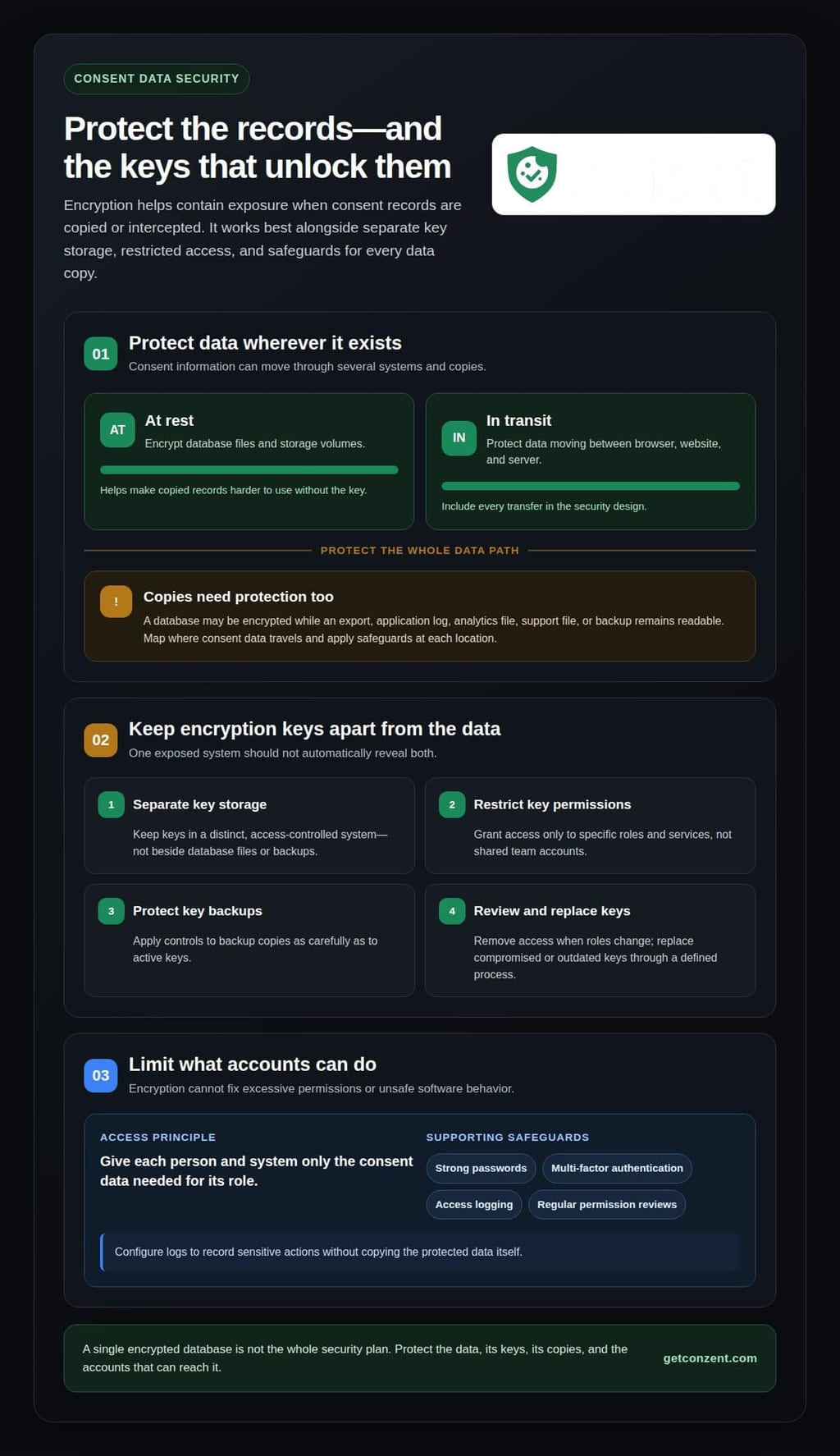
Encryption transforms readable data into ciphertext that requires a key to recover. If someone copies an encrypted consent database, the records are harder to use without that key. Encryption reduces exposure but does not prevent every breach. Someone with access to both the data and its keys may still read the records. Preventing consent data breaches starts with protecting both separately.
Protect consent information both when it is stored and when it moves between systems. Encryption at rest covers database files and storage volumes. Encryption in transit protects information moving between a visitor’s browser, a website, and its server. Encrypting a database, for example, will not protect an unencrypted export saved to a shared folder. Include every transfer and copy in the security design.
Store encryption keys separately from encrypted data, so one exposed system does not automatically reveal both. Limit key access to the people and software components that need it. A server account that retrieves a database should not automatically have broad access to its decryption keys. Preventing consent data breaches also means accounting for systems and copies that encryption alone cannot protect.
- Separate key storage: Keep keys in a distinct, access-controlled system rather than beside database files or backups.
- Restrict key permissions: Assign access to specific roles and services, not shared accounts used by a whole team.
- Protect key backups: Apply controls to backup copies as carefully as to active keys.
- Review and replace keys: Remove access when a role changes, and use a defined process to replace compromised or outdated keys.
Encryption depends on how it is implemented. A website may encrypt its main database but leave application logs, analytics exports, or support files readable. Map where consent data travels, then apply consistent safeguards at each location. If a support export contains an identifier and a recorded choice, protect the file or remove fields the task does not require.
Encryption cannot correct excessive permissions or unsafe software behavior. A compromised account may decrypt records using functions available to its legitimate user. Strong passwords, multi-factor authentication, access logging, and regular permission reviews help limit this risk. Configure logs to record sensitive actions without copying the protected data itself.
Choose controls that fit the data and system design. Plan key access before deployment, and account for databases, exports, and backups as one workflow. If platform selection is part of that work, compare consent platform options as one input to the decision.
Insider threats and accidental data exposure
An insider threat comes from someone with legitimate access who misuses it, makes a mistake, or has an account taken over. One in three data breaches occur due to insiders, and 78% of breaches are unintended. These figures show why safeguards must address everyday routines, not just outside attacks.
Accidental exposure can happen during routine work. An employee might send a consent export to the wrong address, save it in a broadly shared folder, or paste personal information into an unapproved tool. A support worker could also leave a dashboard open on an unattended screen. In each case, exposure stems from an everyday action or a gap in safeguards, rather than a deliberate attack.
Intentional insider misuse requires different controls. A staff member might use an account to view records unrelated to their role or copy information before leaving the organization. Limit access by job function, use individual rather than shared accounts, and remove permissions when responsibilities change. Access logs can help identify unusual activity, such as a user opening records outside their normal work pattern.
- Train with realistic examples: Show employees how to handle consent exports, report misdirected messages, and avoid entering personal or financial information into unapproved AI tools.
- Protect active sessions: Implement automatic logout and screen locking when a device is idle or left unattended.
- Strengthen account security: Use unique accounts, strong passwords, and multi-factor authentication to make stolen credentials harder to use.
- Make reporting clear: Give staff a direct process for reporting a lost device, suspicious access, or an accidental disclosure.
Training is most useful when it reflects the software and tasks employees actually use. A team that exports consent records, for example, needs guidance on where files may be stored, who may receive them, and how to dispose of unnecessary copies. Managers can reinforce good practice by using approved storage locations and reviewing access when team duties change.
Make safeguards routine rather than relying on perfect attention. A locked screen reduces exposure when someone steps away, while individual accounts make activity easier to trace. A clear reporting process helps staff raise concerns quickly, including mistakes they made themselves. Straightforward procedures support accountability without treating every error as deliberate misconduct.
Insider safeguards should reduce both the chance of exposure and the amount of data at risk. Keep access aligned with current duties, train staff on the tasks they perform, and make secure behavior the easiest option. These practices protect individuals and help teams respond to incidents with useful context.
Least-privilege access controls
Least privilege gives each person, account, and software service only the access needed for its specific task. A support agent may need to view a visitor’s consent status, but not export every record or change system settings. Limiting permissions reduces what an intruder can reach if phishing or stolen credentials compromise an account.
Start by separating permissions by task. Someone who reviews consent requests may need read-only access, while an administrator may need to update configuration. Neither role automatically needs access to every database, backup, or confidential report. For each permission, define which records it covers and which actions it allows.
Apply the same principle to technical accounts. A website service that writes consent records does not necessarily need permission to delete the database or manage user accounts. Restrict its access to the functions and data needed to operate. Review permissions when software changes, integrations are added, or responsibilities shift.
- Use individual accounts: Assign each worker a separate account so activity can be tied to a person and role.
- Separate access levels: Give viewing, editing, exporting, and administration distinct permissions where the system allows.
- Limit device access: Restrict sensitive dashboards to approved devices and managed accounts.
- Remove outdated access: Update permissions when an employee changes roles or no longer needs a system.
Strong authentication supports these boundaries. Use multi-factor authentication for accounts that can view or change sensitive consent records. It adds a verification step beyond a password, which can help if phishing captures login details. Authentication does not replace permission limits: even a verified user should see only the records needed for their work.
Access logs make the policy testable. Record actions such as viewing, exporting, and changing consent data, then review unusual activity. A support account that suddenly exports a large set of records, for example, may warrant investigation. Logs should show who acted and what changed without unnecessarily duplicating sensitive information.
Access controls need regular attention because teams, devices, and software evolve. Review permissions after role changes, new integrations, or system updates. In a reported survey, 97% of organizations experienced an AI-related security incident without adequate AI access controls. AI systems should follow least privilege too: give each system access only to the consent data and actions its task requires. Apply the same standard to every account and service that can reach consent data.
What is consent data and how is it exposed in a breach?
Consent data records a person’s privacy choices and the context needed to interpret them. A website might store whether someone accepted analytics cookies, when the choice was made, and which notice they saw. The record may also include an account ID, cookie identifier, or another detail that links the choice to a person.
That context makes a consent record useful, but can also make it sensitive. A choice alone may not identify anyone. Combined with an email address, device identifier, or account profile, it can reveal who made that choice. For example, a timestamped record linked to a logged-in account may connect a browsing decision to a named user.
Consent data can be exposed through the systems that create, store, or transfer it. A misconfigured database could make records accessible beyond the intended team. A compromised administrator account could let someone view or export records. An employee might also share a spreadsheet containing consent choices and identifiers with the wrong recipient.
- Stored records: Database tables, backups, and downloadable exports may contain choices alongside identifiers.
- Operational traces: Application logs or support tickets may capture consent details that weren’t needed for troubleshooting.
- Connected systems: Data passed between a website and another service may be exposed if access or transfer settings are mismanaged.
- Changed records: Unauthorized edits can make a saved choice inaccurate, even if nobody copies the original data.
Reduce unnecessary exposure by mapping where each consent field goes. For example, determine whether an export needs a full account identifier or only a record reference. Keep fields out of logs when they are not needed to diagnose a technical issue. Set permissions so support staff can resolve a visitor’s concern without exporting unrelated records.
Retention matters too. Old exports left in shared folders create extra copies that may outlive their purpose. Define which systems hold active records, which copies support recovery, and when unnecessary files should be removed. When someone changes a preference, make sure the current record and connected systems reflect that choice instead of relying on an outdated export.
A consent workflow should make the recorded choice understandable and traceable without collecting needless identifiers. Review what each record contains, where it travels, who can access it, and how updates propagate. If you’re evaluating a consent platform for that workflow, explore consent platform options as part of your assessment.
Conzent
Conzent helps teams manage website consent through a Managed Cloud Consent Platform or Self-Hosted Open Consent Infrastructure. These options let organizations choose an operating model that fits their infrastructure and how they manage consent records.
Consent A/B Testing and Revenue Impact Analytics help teams make informed decisions about consent experiences and their effects. They complement safeguards such as encryption, protected key storage, and restricted access. A consent platform supports the workflow, but does not replace the security measures your systems and team need.
If you’re assessing how consent management fits your security approach, contact Conzent to discuss your needs.
Make consent security part of ongoing operations
Consent systems change as websites add tools, teams adjust responsibilities, and data flows shift. Treat security as an ongoing practice, not a one-time configuration. Assign responsibility for reviewing permissions, protecting records, and addressing changes to the consent workflow. This makes preventing consent data breaches a continuing part of how the organization manages privacy.
Connect your consent management approach to the way your team works. Consider who controls the infrastructure, how consent records fit into existing processes, and which tools support your consent strategy. Conzent offers managed cloud and self-hosted infrastructure, along with Consent A/B Testing and Revenue Impact Analytics. Choose the operating model that fits your needs, then review Conzent’s platform.
Clear decisions make it easier to keep privacy choices understandable and security practices consistent as your site evolves. Discuss your consent security needs with Conzent and explain how your team manages consent today.
Frequently Asked Questions
What can attackers do with stolen data?
Attackers can use stolen data to impersonate people, send convincing phishing messages, or attempt account takeovers. A consent record linked to an email address could help an attacker tailor a message around someone’s apparent privacy choices. Exposed records may also be combined with information from other sources. Limit the usefulness of stolen data by collecting fewer identifiers and, where practical, separating consent records from account details.
What is the best method to safeguard customer data privacy?
No single control protects every system or workflow. A stronger approach combines data minimization, encryption, restricted permissions, staff training, and monitoring. For example, a team could limit an export to the fields needed for a specific support task, store it in an approved location, and remove it when the task ends. The right combination depends on what data the organization holds and how people and systems use it.
Where does your data live (and travel)?
Customer data can move through a website, consent interface, application server, database, support tools, exports, and backups. Trace a consent choice from the visitor’s browser through every system that receives or stores it. Include logs and temporary files, which may retain copies outside the main database. A simple data-flow inventory can list each system, its purpose, who can access it, and whether it sends information onward.
What are the most common causes of consent data breaches?
Common causes include stolen credentials, phishing, accidental sharing, excessive account permissions, and insecure system settings. An employee might, for example, upload a consent report to a shared workspace with broader access than intended. A compromised account can cause similar exposure without changing the database itself. Review sharing defaults, remove unused accounts, and train staff to report suspicious messages to address several of these risks.
What security controls best protect consent records and preferences?
Use layered controls: encrypt records, store keys separately, require strong authentication, and restrict access by role. Log sensitive changes so teams can investigate unexpected edits. Set retention rules for exports and backups, and ensure recovery copies remain protected. A support role, for example, may need to view a specific preference but not download a full customer dataset. Match permissions to the task.
What U.S. laws regulate consent data privacy and security?
Relevant U.S. laws include COPPA, which requires verifiable parental consent before collecting, using, or disclosing personal information from children under 13, and the CCPA, which sets consent rules for selling minors’ personal information. Security laws include New York’s SHIELD Act, California’s SB 327, and Ohio’s SB 220; Maryland’s Online Data Privacy Act also restricts certain sensitive-data practices.
What steps should an organization take after a consent data breach?
Keep a record of the breach, including if it seems insignificant. Under the GDPR, report it to the Supervisory Authority within 72 hours unless it is unlikely to risk individuals’ rights and freedoms, and notify affected data subjects within 72 hours. Replace compromised encryption keys.