
Responsive Cookie Banner CSS: A Developer’s Guide to Compliant UX

A cookie banner shouldn't be a tax on your user experience. For many developers, implementing a responsive cookie banner css framework feels like a forced choice between legal safety and site performance. You've likely seen the results: banners that block critical navigation on mobile or cause a Cumulative Layout Shift (CLS) that tanks your Core Web Vitals. With 43% of websites already failing the Interaction to Next Paint (INP) threshold in 2026, a poorly coded consent layer is a technical debt you can't afford. It's not just about hiding a box; it's about maintaining a functional hierarchy across every viewport.
We agree that privacy is a right, but bad code is a choice. You shouldn't have to sacrifice your mobile UX to honor the Global Privacy Control (GPC) mandate or stay compliant with evolving state laws. This guide teaches you how to build a high-performance, responsive consent banner using modern CSS that respects both the law and the user. We'll explore how to use container style queries and the :open pseudo-class to create a lightweight layout. You'll learn to style IAB TCF v2.3 frames effectively while keeping your CLS below 0.1 and your opt-in rates high.
Key Takeaways
- Compliance is a visual standard, not just a legal checkbox. Learn how to ensure "Reject" and "Accept" buttons maintain equal prominence across every mobile screen size.
- Eliminate Cumulative Layout Shift (CLS) by using responsive cookie banner css to pre-allocate container space. This keeps your Core Web Vitals in the green while respecting user privacy.
- Implement semantic containers with CSS Grid and Flexbox to build stable, multi-category preference centers. These modern layouts provide the flexibility needed for complex IAB TCF v2.3 integrations.
- Turn your consent layer into a revenue recovery tool by A/B testing button hierarchy and contrast. Small, CSS-driven design shifts can significantly improve opt-in rates without using dark patterns.
- Determine whether to self-host your consent infrastructure for total developer freedom or use a managed platform to automate the maintenance of 50+ languages.
Why Responsive CSS is Critical for Consent Compliance
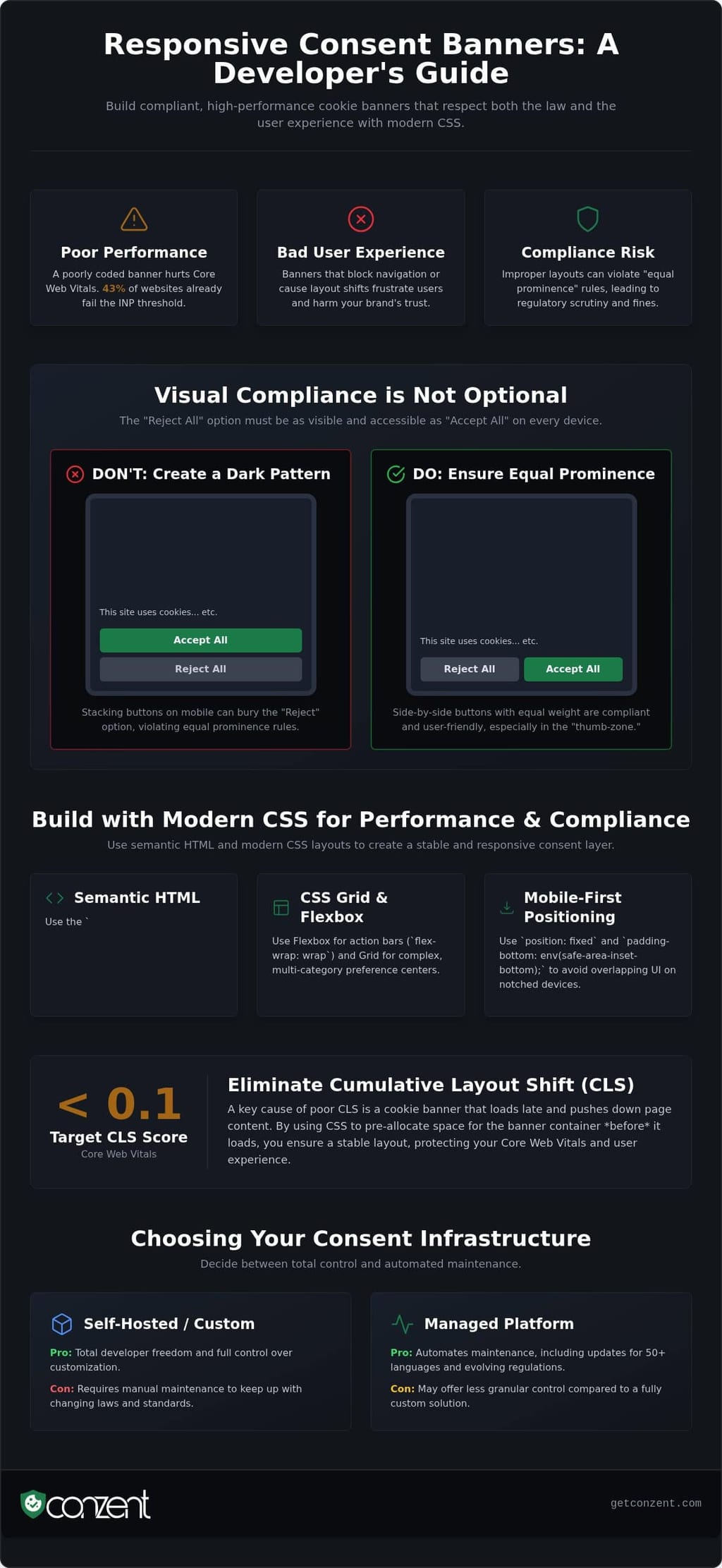
Compliance is not a static checkbox. It is a visual requirement that lives directly in your code. Many developers treat consent as a legal hurdle to be hidden, but regulators view it as a fundamental interaction. If your responsive cookie banner css fails to adapt to a mobile screen, you aren't just dealing with a design bug. You are likely violating the "equal prominence" rule. This mandate requires that a "Reject All" option must be as visible and accessible as the "Accept All" button. On a narrow viewport, a layout that stacks these buttons can accidentally bury the negative choice, creating a dark pattern that invites regulatory scrutiny.
Transparent layout logic builds user trust. When a user interacts with your banner, they are deciding how your site manages every HTTP cookie, from session identifiers to third-party tracking scripts. If the CSS feels deceptive or broken, users are less likely to opt in. Position your consent layer where it's expected and ensure it responds to the user's environment without friction.
The Legal Hierarchy of CSS
Your CSS defines the legal hierarchy of your site. Under WCAG and GDPR standards, contrast ratios and button sizing are not just aesthetic choices. A button that is technically present but visually obscured by a 1:1 contrast ratio is a compliance failure. We recommend using fixed positioning at the bottom of the screen for mobile devices. This placement ensures the banner remains visible until a choice is made. You must also manage your z-index values with precision. A banner that slips underneath a live chat widget or a site-wide overlay prevents the user from providing valid consent. For a deeper look at these requirements, review our documentation on GDPR compliance.
Device-Specific Consent UX
Desktop and mobile users interact with consent differently. On a desktop, a centered modal or a top-aligned bar can work effectively because the user has a mouse and a large field of view. Mobile users rely on the "thumb-zone." If your responsive cookie banner css places primary buttons at the very top of a tall screen, you're making compliance a chore. Consider these practical adjustments:
- Mobile: Use full-width buttons for easier tapping and keep the interaction within the bottom third of the screen.
- Landscape: Ensure the container doesn't overflow the viewport height, which can trap users in a scroll-loop without seeing the "Save Preferences" button.
- Accessibility: Use flex-direction: column-reverse on small screens if it helps maintain the legal hierarchy of choices.
By prioritizing these device-specific details, you transform a legal requirement into a seamless part of the user journey.
Building a Modern Layout with CSS Flexbox and Grid
Building a responsive cookie banner css framework begins with semantic clarity. You shouldn't just wrap your consent manager in a generic div. Use the <dialog> element or a container with role="alertdialog". This ensures that assistive technologies recognize the banner immediately. A semantic foundation is the only way to balance technical efficiency with ethical responsibility. It is the difference between a site that feels inclusive and one that feels broken.
Once your structure is set, use CSS Variables to manage your theme. Custom properties allow you to inject brand colors and spacing without rewriting the entire stylesheet. This approach makes your code maintainable and lightweight. It respects the reader's time and the browser's resources. Following best practices for cookie notices means your layout must be as performant as it is compliant. Use @media queries to shift your layout from a bottom-anchored bar on mobile to a centered modal on desktop viewports.
Flexbox for Action Bars
Flexbox is your primary tool for horizontal action bars. It handles the "Reject" and "Accept" button pairing with ease. To support modern devices, use padding-bottom: env(safe-area-inset-bottom);. This ensures your banner doesn't overlap the home indicator on notched iPhones. On screens as narrow as 320px, buttons often need to wrap. Use flex-wrap: wrap and justify-content: space-between to maintain the legal hierarchy without breaking the layout. If your translations are long, Flexbox prevents buttons from shrinking into illegibility. It keeps the user in control of their choice.
CSS Grid for Preference Centers
Preference centers require a more robust structure. When users need to toggle specific categories like "Analytics" or "Marketing," CSS Grid is the superior choice. Use grid-template-areas to map out your layout. This makes your CSS readable for any developer who inherits your code. It's about transparency in your workflow. Grid allows you to align legal text and toggle switches with precise control, ensuring the interface remains professional and trustworthy.
A compliant preference center should collapse gracefully. Use grid-template-columns: repeat(auto-fit, minmax(200px, 1fr)) to shift from a three-column desktop view to a single-column mobile list. This logic ensures that toggle switches and legal descriptions stay perfectly aligned. You don't need complex JavaScript to manage these shifts. Grid handles it natively. This reduces the weight of your scripts and improves your site's overall speed. If you are looking for a solution that handles these technical complexities out of the box, you can explore our flexible pricing options for managed infrastructure.
Optimizing for Performance and Core Web Vitals
Performance isn't a luxury; it's a technical standard. A slow consent banner is a barrier to entry that can drive users away before they even see your content. Research shows that sites passing all three Core Web Vitals thresholds see a 24% lower bounce rate. If your responsive cookie banner css is poorly optimized, it becomes a liability for your SEO. You aren't just styling a box. You're managing the critical path of your site's rendering engine. At Conzent, we prioritize a zero performance lag design because we believe technical efficiency is a prerequisite for digital rights.
Eliminating Cumulative Layout Shift (CLS) is your first priority. Late-loading scripts often cause banners to pop in and push the entire page down. This is a primary reason why 43% of websites still fail the Interaction to Next Paint (INP) threshold in 2026. To stay below the 0.1 CLS limit, you must pre-allocate container space. Use min-height or fixed positioning to ensure the layout remains stable. For logos and icon placeholders, use the aspect-ratio property. This tells the browser exactly how much space to reserve before the asset downloads. You should also apply contain: content to your banner container. This property informs the browser that the element's subtree is independent, limiting the scope of expensive repaints.
Critical CSS for Consent
Your banner's appearance must be instantaneous. We recommend inlining the critical portion of your responsive cookie banner css directly in the <head>. This prevents a Flash of Unstyled Content (FOUC), which can make your privacy UI look untrustworthy. Aim to keep this initial payload under 14kb to ensure it fits within the first TCP round trip. While the main banner must load immediately, you can load the complex styles for your preference center asynchronously. The user only needs those resources if they choose to manage granular settings, making this a more efficient use of bandwidth.
Lightweight Animation Strategies
Smooth interactions shouldn't come at the cost of speed. If you want a 60fps experience, avoid animating properties like top, bottom, or margin. These trigger layout calculations that stall the main thread. Instead, use transform and opacity. These properties are handled by the GPU and ensure a fluid transition. Ethics also extend to motion. Always respect the prefers-reduced-motion media query. Some users find movement disorienting or physically uncomfortable. Providing a static interface for these users is a necessary part of a truly source-available consent infrastructure.
Advanced CSS for Consent A/B Testing
Design is often the deciding factor in how users interact with privacy controls. While legal teams focus on the text, developers know that CSS is the engine behind successful consent A/B testing. It is not just about what you ask. It is about how you present the choice. By using data-attributes on your banner's container, you can swap entire design systems without touching your core logic. This approach allows you to test whether a centered modal or a bottom-aligned bar generates higher engagement on specific devices. It's about finding the balance between visibility and intrusion.
Testing button colors is a common starting point for many teams. You must balance high-contrast accessibility with your existing brand identity. A button that pops too much might feel like a dark pattern. A button that blends in too well can lead to accidental non-compliance. Your responsive cookie banner css should be flexible enough to handle these variations dynamically. By measuring how these shifts affect user behavior, you move from guessing to knowing. This is Danish-engineered for GDPR precision, ensuring that your experiments never compromise legal integrity.
Implementing Design Variants
Implementing clean variant switching requires a disciplined CSS structure. Avoid nesting styles too deeply. Instead, use a flat hierarchy that relies on a parent data-attribute like [data-consent-variant="A"]. This makes it easy to measure how specific properties, like font-size, affect "Accept" click-through rates. Larger text might improve accessibility for mobile users, but it could also feel intrusive on small screens. You can see how Conzent A/B testing simplifies this technical orchestration. It allows you to deploy variants instantly and see which layout respects the user's intent most effectively.
Data-Driven UI Decisions
Data-driven decisions require more than just a gut feeling. Analyze heatmap data to inform where your responsive breakpoints should live. If mobile users consistently miss the "Preferences" link because it is too small in landscape mode, your responsive cookie banner css needs to adapt. A compliant CSS architecture follows the "less is more" principle. Extra code is extra weight that slows down your site and complicates your testing. You can learn more about revenue impact analytics to see how these subtle design shifts translate into recovered marketing data. Every pixel counts when you're balancing user rights with business goals.
Optimization is a continuous process of refinement and ethical responsibility. If you're ready to stop guessing and start building a more effective consent experience, explore our flexible pricing plans to find the right fit for your infrastructure.
Managed vs. Custom: Choosing the Right Infrastructure
Choosing between a custom build and a managed platform is a decision about where your engineering resources belong. You can build your own responsive cookie banner css from the ground up, but the initial code is only the start of the journey. The real challenge is maintenance. A custom solution requires you to manually update layouts for 50+ languages, each with varying text lengths that can break your carefully crafted Flexbox or Grid containers. It means monitoring regulatory shifts and ensuring your "Reject" button remains as prominent as your "Accept" button across every new device release. Maintenance isn't just about fixing bugs; it's about maintaining a legal standard.
Managed infrastructure is not about giving up control. It's about offloading the repetitive, high-stakes maintenance of compliance so you can focus on your core product. Our Managed Cloud Consent Platform provides a pre-optimized, responsive foundation that's compliant by design. It handles the heavy lifting of legal hierarchy and performance optimization while allowing you to maintain your brand's visual identity. For teams that demand absolute sovereignty over their data and code, we offer a self-hosted option. This path provides total CSS control with the reliability of a battle-tested cloud framework. It's the ultimate developer freedom.
The Developer Advantage of Conzent
We believe in transparency, not black boxes. You can customize the Conzent cookie banner with your own responsive cookie banner css to ensure it fits perfectly within your site's architecture. Because our code is source-available, you can inspect exactly how it works. You aren't just buying a service; you're adopting an infrastructure that respects your technical autonomy. Explore our Open Consent Infrastructure to see how we bridge the gap between developer freedom and enterprise-grade compliance. It's a professional standard, not a luxury.
Future-Proofing Your Privacy Stack
The legal landscape moves fast. Staying compliant means more than just a visible banner. You need automatic updates for IAB TCF v2.3 and Google Consent Mode v2 to ensure your marketing stack continues to function ethically. Our platform scales with you, whether you're managing a single blog or an enterprise-level privacy stack. By using a standardized infrastructure, you eliminate the risk of technical debt as new regulations emerge. Review our GDPR compliance guide to understand how we maintain these standards across our entire ecosystem. We make complex requirements feel attainable for everyone.
Master Your Consent Infrastructure
Building a responsive cookie banner css framework is more than a styling exercise. It is a commitment to technical efficiency and digital rights. You've seen how semantic HTML and modern CSS Grid can eliminate layout shifts while maintaining the legal hierarchy of choice. High performance and strict compliance aren't opposing goals; they are the standard for a professional web. Whether you're optimizing for the thumb-zone on mobile or ensuring equal prominence for "Reject" buttons, your code defines the trust you build with your users.
Maintenance shouldn't keep you from building what matters. You can leverage a source-available, enterprise-grade managed cloud that is already built for Google Consent Mode v2 and IAB TCF v2.3. This infrastructure provides the transparency you need with the reliability your users deserve. If you're ready to stop fighting layout shifts and start scaling your privacy stack, deploy a high-performance cookie banner with Conzent today. You have the tools to make privacy a seamless part of your user experience.
Frequently Asked Questions
How do I prevent my cookie banner from causing layout shift (CLS)?
Prevent Cumulative Layout Shift by reserving the exact space your banner will occupy before the script execution. You should use fixed positioning at the bottom of the viewport to keep the banner outside the normal document flow. If you prefer a top bar, set an explicit min-height on a wrapper element. This ensures the browser doesn't shift your content once the banner renders, keeping your CLS below the 0.1 threshold.
What is the best CSS position for a mobile cookie banner?
The most effective position for a mobile banner is fixed at the bottom of the screen. This placement aligns with the natural "thumb zone" for easier user interaction. You must use the env(safe-area-inset-bottom) property to ensure the banner respects iOS home indicators. Bottom-anchored layouts are less intrusive than full-screen modals, which helps maintain a better user experience while meeting visibility requirements.
Can I use Tailwind CSS for my cookie consent banner?
You can use Tailwind CSS, but you should prioritize semantic HTML and minimal utility bloat. Tailwind is excellent for rapid prototyping. However, you must ensure your final responsive cookie banner css doesn't include unused classes that increase your initial payload. Focus on using Flexbox or Grid utilities to maintain button prominence and always verify that your configuration doesn't override critical accessibility focus states.
How do I ensure my cookie banner CSS is accessible?
Ensure your CSS provides a contrast ratio of at least 4.5:1 for all text to meet WCAG standards. Use relative units like rem for font sizes so they scale with user browser settings. You should wrap your banner in a container with role="alertdialog". Don't forget to style :focus-visible states clearly. This ensures that keyboard users can navigate your privacy choices without getting lost.
Should I use a modal or a bar for my responsive consent UI?
Choose a bar for the initial consent request to minimize user friction. Bars at the bottom of the screen allow users to see your content before they make a decision. You should use a modal specifically for the granular preference center. This visual shift helps users understand they are now managing detailed settings. A/B testing these two layouts is the only way to find what works for your audience.
How does CSS affect my cookie opt-in rates?
Your CSS directly impacts user trust and opt-in rates. A banner that looks broken or hides the "Reject" option creates a negative impression and invites regulatory scrutiny. Using a clean, professional responsive cookie banner css framework shows users that you take their privacy seriously. Fast-loading, non-intrusive designs typically lead to higher quality consent signals because they don't feel like a technical hurdle or a dark pattern.
Is it better to self-host my cookie banner CSS?
Self-hosting offers the ultimate developer freedom and data sovereignty. It allows you to integrate the consent infrastructure directly into your build pipeline without third-party dependencies. However, managed cloud platforms handle the high-stakes maintenance of IAB TCF v2.3 and Google Consent Mode v2. If you have the resources to track global regulatory shifts, self-hosting is powerful. If you need automated updates, a managed service is more efficient.
How do I handle dark mode in my cookie banner CSS?
Handle dark mode by using the prefers-color-scheme media query. This allows the banner to match the user's system settings automatically. Alternatively, use CSS variables for your theme colors and toggle them based on a data-attribute on the body tag. This ensures your consent UI remains legible and visually consistent with the rest of your site. Consistent styling across both modes reinforces your professional standards and builds trust.