
Self-hosted CMP Benefits: Compare Control and Cloud Features

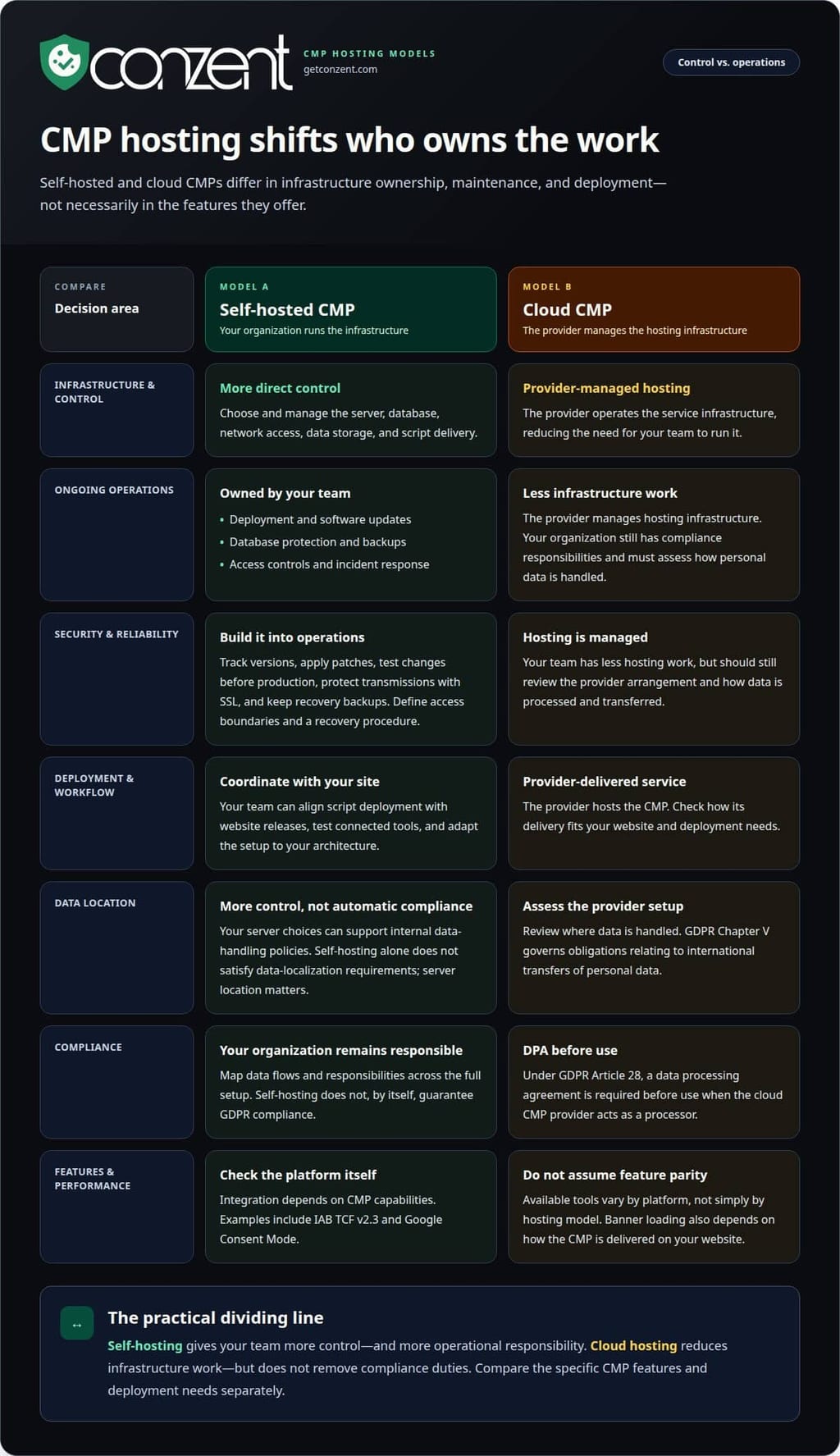
The main self-hosted CMP benefits are greater control over infrastructure, deployment, and data placement. That control also brings responsibility for operating and maintaining the platform. With a cloud CMP, the provider manages the hosting infrastructure, so your team has less operational work.
It’s reasonable to expect hosting choice to determine what a consent platform can do. But hosting model and feature set are separate decisions: the available tools vary by platform, not simply by whether it runs on your infrastructure or in the cloud.
This comparison explains how the two models differ in control, maintenance, security updates, deployment, and features. You’ll see when self-hosting makes sense, what operational work it involves, and when managed cloud hosting may be more practical.
Key Takeaways
- Choose self-hosting for greater control over infrastructure and deployment, but account for the ongoing maintenance and security work it requires.
- Consider managed cloud hosting when you want the provider to manage the service infrastructure; under GDPR Article 28, a data processing agreement is required with a cloud CMP provider acting as a processor before use.
- Match deployment to your data and operational needs. Hosting a CMP yourself does not automatically meet data-localization requirements; server location matters.
- Compare CMP features individually rather than assuming cloud or self-hosted platforms offer the same capabilities.
- Assess banner loading in the context of your website. Hosting model is only one part of how the CMP is delivered and affects performance.
Self-hosted vs cloud CMP: which hosting model fits?
Self-hosting runs a CMP on your own servers or infrastructure; cloud hosting runs it through a provider. A key self-hosted CMP benefit is control over deployment, data storage, and script delivery. The right fit depends on who will manage those choices and the ongoing work.
Customization and Workflow Integration
Customization means adapting the consent interface and integrations to your website’s workflow. With self-hosting, your team controls where the CMP runs and can coordinate its script with your release process. For example, you can deploy the script alongside a website update, then test that consent choices still work with connected tools. This flexibility helps when a standard deployment does not fit your architecture.
First-Party Scripts and System Integrations
First-party script hosting means serving the CMP’s browser script from a domain associated with your website. With self-hosting, your team controls the hosting environment and can plan script deployment alongside site changes. Integration still depends on the CMP’s capabilities: consent signals need to work with the site’s other tools. IAB TCF v2.3 and Google Consent Mode are examples of integrations that may shape the setup.
Control Over Hosting and Data Location
Self-hosting gives an organization more direct control over the server, database, and network access used by its CMP. That control can matter when infrastructure choices need to align with internal data-handling policies. But installing software on your own servers does not automatically meet data-localization requirements. For traffic subject to China’s PIPL or Russia’s FZ-152, server location matters.
Risks and Drawbacks of Self-Hosting
Self-hosting shifts operational responsibility from the cloud provider to your organization. Your team manages deployment, database protection, backups, access controls, and software updates. These tasks matter because a poorly maintained CMP can leave consent records unavailable or expose systems to avoidable security issues. Self-hosting does not, by itself, guarantee GDPR compliance.
Compliance Responsibilities and Cloud Hosting
Cloud hosting reduces the need to operate CMP infrastructure yourself, but it does not remove your organization’s compliance responsibilities. According to the European Union, the GDPR’s Article 28 requires a data processing agreement with a cloud CMP provider acting as a processor before the service is used. The GDPR’s Chapter V governs obligations relating to international transfers of personal data. Hosting choice changes the operational arrangement, not the need to assess how personal data is handled.
Engineering maintenance and security updates
Self-hosting puts maintenance decisions in your team’s hands. That includes software updates, server security, backups, and incident response.
Security and Operational Reliability
A self-hosted CMP needs an operational owner to maintain its software and hosting environment. Ongoing maintenance takes engineering time, including tracking the installed version, applying security patches, and checking that updates have not disrupted consent recording or banner delivery.
Patch regularly. Outdated software can leave known weaknesses unaddressed, while rushed updates can interrupt service. Use a test environment first, record the version being deployed, and schedule production changes through the same review process as other website systems. Encrypt transmissions with SSL and keep recovery backups in multiple locations.
AI-driven threats make disciplined patching and review more important. Automated tools can help attackers find weaknesses, so teams should treat security alerts and updates as operational work. Assign an owner to review notices, assess whether the CMP version is affected, and document the response. Private servers alone do not make a system secure.
Security Boundaries and Compliance
Security boundaries define which people, services, and networks can access the CMP and its consent records. With self-hosting, your organization is responsible for setting and maintaining those boundaries. Restrict administrative access, separate production credentials from test systems, and limit network access to what the deployment needs.
Operational reliability also depends on knowing what happens when a server, database, or deployment fails. Backups support recovery, but your team needs to know how to restore them and identify incomplete consent records after an interruption. A documented recovery procedure clarifies responsibilities during an incident and records the decisions and actions taken.
Audit the actual implementation, not just the security policy. Review who can administer servers, how credentials are stored, whether SSL protects data transmissions, and which software version is running. Record patch dates, access changes, backup tests, and incident findings. These records help security teams trace changes and spot gaps between intended controls and live configuration.
Self-hosting alone doesn’t guarantee GDPR compliance. Compliance depends on how personal data is collected, stored, accessed, and handled across the full setup. Map the CMP’s data flows and responsibilities alongside the rest of the project. If managed hosting better fits your team’s maintenance capacity, compare the managed cloud option as part of that operational decision.
Self-hosting and on-premise deployment models
Self-hosting means running the CMP on infrastructure your organization controls instead of relying on a hosted service. A deployment can range from a compact server setup to a larger environment with separate application and database components.
On-Premise Deployment Models
A small deployment can run on one server or container, with the CMP backend alongside the application and a SQLite database file on local storage. This keeps the main components together and simplifies configuration for a limited setup. Larger deployments may need a different architecture as reporting demands or the number of instances grows. Choose a model that fits how the CMP will be used and maintained.
Source availability is another part of the decision. Some self-hosted, open-source CMPs have no monthly fee or pageview cap, but your organization still operates the deployment. Initial setup can take several weeks, depending on the features and integrations involved. Self-hosting gives you control over those choices, not an automatic, maintenance-free installation.
SaaS is an exception to the self-managed model: the CMP runs as a hosted service, so the organization does not operate its underlying servers. A cloud vendor may handle traffic from 1,000 to 10 million monthly visitors without intervention. That can suit teams prioritizing managed infrastructure over direct control of deployment and configuration.
Uptime and Reliability
Uptime depends on the infrastructure and operating practices behind a self-hosted CMP. Your organization sets its own backup, snapshot, and recovery schedule rather than relying on a vendor’s service-level agreement. For example, your team can decide when backups run, where copies are stored, and who restores the service after an outage. Those decisions shape recovery readiness.
A single-server deployment keeps components together, but it also concentrates the service in one environment. Account for that design when planning recovery and maintenance windows. A separate database or additional instances may suit heavier reporting or multiple-instance writes, but they also change the deployment configuration. Match the architecture to the workload and your team’s capacity to operate it.
Choosing a Hosting Approach
Choose self-hosting when your project needs direct control over infrastructure, data placement, or configuration, and your team can operate it. Choose SaaS when reducing infrastructure work matters more than controlling the underlying deployment. Hosting choice does not establish compliance by itself: server location and data handling still matter for applicable localization requirements.
Keep CMP decisions separate from MCP hosting discussions. Cal.diy and local, hosted, or self-hosted MCP setups concern a different technology category; their deployment choices do not determine how a CMP should run. For a CMP, start with the required data location, expected workload, and available operational ownership. This gives the hosting decision a practical basis without treating full control as a reason to self-host by default.
Feature availability in cloud and self-hosted CMPs
Hosting describes where a CMP runs, not which features it includes. Cloud and self-hosted deployments may offer similar capabilities, but availability depends on the platform, release, and configuration. Compare the actual features rather than treating “cloud” or “self-hosted” as a feature list.
Start with the consent interface. Check whether the platform lets your organization customize banner text, layout, and choices for different audiences. Then consider how those options fit your website’s workflow. If your team needs a particular consent journey, assess whether it can be configured without changing unrelated site components.
Next, evaluate testing and measurement separately. A/B testing compares banner variations, while revenue impact analytics help assess how consent choices relate to revenue outcomes. These are distinct capabilities, not automatic consequences of hosting. For each, identify what the feature measures, where its data is stored, and how your organization will use the results.
Integrations deserve the same scrutiny. IAB TCF v2.3 supports consent signaling in its ecosystem, and new consent strings under that version are required from 1 March 2026. Google Consent Mode is another integration to assess. Confirm that the CMP’s implementation supports the organization’s actual workflow, including how consent signals reach connected services.
Consider a product’s source model and feature set separately. Open-source software can provide visibility into its code, but that alone does not mean every capability is enabled in a given deployment. A self-hosted release may need configuration, storage, and integration work before a feature is ready for production. Cloud hosting may package operations differently. Neither label proves feature parity.
Use a feature-by-feature comparison. List the consent interface, testing, analytics, standards support, and external integrations your site needs. For each item, note whether it is available in the relevant release, whether configuration is required, and which team owns its operation. This grounds the decision in your project rather than broad product claims.
Finally, check how updates affect the capabilities you rely on. Record the installed version and review release notes before changing production configuration. For example, a team using IAB TCF v2.3 should account for the applicable consent-string requirements in its implementation. The useful takeaway is simple: choose the hosting model around control and operational capacity, then verify each required feature on its own merits.
How does a self-hosted CMP affect website performance and consent banner loading times?
A self-hosted CMP can reduce reliance on an external service, but it does not guarantee a faster banner. Loading time depends on the script, server response, network path, and how the banner appears on the page.
Start by separating those factors. The browser downloads and runs the CMP script, then may request consent settings or policy text. With self-hosting, your organization’s infrastructure serves those requests. Its location, capacity, and configuration affect response time. A distant or overloaded server can slow delivery, just as an external service can.
The banner’s content matters too. In a March 2025 test, DebugBear measured Largest Contentful Paint rising from 1.43 seconds to 3.61 seconds when consent-banner policy text became the page’s largest element. The measurement shows why teams should assess the banner as part of the full page, not just the CMP script. Large text blocks or a late-rendering banner can affect what users see first.
Deployment choices shape the request path. For example, a website might serve its CMP script from its own domain, then load settings from a self-hosted backend. This can give your team more control over where requests go, but the server still needs to respond reliably. A cloud CMP may use provider-managed infrastructure; a self-hosted deployment relies on your organization’s capacity and network configuration.
Consent storage also affects the design. If server-side consent records are unnecessary, a CMP frontend can use browser localStorage or cookies without a backend. If the site needs server-side records, the backend and database become part of the consent flow. That can add requests, so configure the implementation to avoid loading data the banner does not need.
Evaluate performance on a representative page with realistic consent settings. Measure the script request, banner appearance, and Largest Contentful Paint before and after changes. Test with the actual policy text, since a short placeholder can hide the effect of a longer production notice. Then identify whether slowdowns come from the script, server response, policy content, or another page element.
The practical takeaway: hosting gives you control over deployment, not a speed result by itself. Compare the managed hosting option for your site’s consent setup, then assess the delivery path against your real page content. Compare consent platform options.
Conzent: Self-Hosted Open Consent Infrastructure
Conzent offers Self-Hosted Open Consent Infrastructure for organizations that want to run their consent platform on their own infrastructure. Its Managed Cloud Consent Platform is an alternative for teams that prefer managed hosting. Choose based on who will operate the deployment and how much control your organization needs.
Both models support practical consent work, not just a hosting choice. Conzent also offers Consent A/B Testing and Revenue Impact Analytics to help teams test banner variations and assess their revenue impact. Consider these capabilities alongside deployment needs, rather than treating hosting as the whole decision.
If you’re weighing self-hosted and cloud deployment for your website, explore Conzent’s consent platform and choose the setup that fits your team’s needs.
Make your next CMP decision with confidence
Self-hosted CMP benefits matter most when they address a real infrastructure or data-control need. Choose a model your team can operate well, and include feature requirements in the same decision. This keeps your next step grounded in your website’s workflows, not assumptions about what a hosting label guarantees.
Conzent offers both Self-Hosted Open Consent Infrastructure and a Managed Cloud Consent Platform, alongside Consent A/B Testing. Consider which deployment approach fits your organization and whether testing banner variations would support your consent strategy. These choices can frame a focused discussion about your CMP setup.
Discuss CMP hosting options with Conzent and explore the approach that fits your needs. A clear decision starts with the way your organization wants to manage consent.
Frequently Asked Questions
How does it work?
A CMP presents consent choices, applies the visitor’s selection, and communicates that choice to relevant site tools. For example, if a visitor rejects advertising cookies, the website can use the consent signal to prevent those tags from running. The CMP’s configuration determines which categories appear and which services respond. Test each choice with the actual tags and integrations on your website.
What is a self-hosted consent management platform (CMP)?
A self-hosted CMP is consent software that an organization deploys and operates on infrastructure it controls. It typically includes a website-facing script and may include a backend that stores consent records or settings. For example, a team could run the backend alongside its application and connect it to its existing release process. The architecture depends on the platform and the organization’s consent-record needs.
What are the benefits of self-hosting a CMP versus using a SaaS CMP?
Self-hosting can give an organization more direct control over deployment, configuration, and data location. A SaaS CMP can reduce infrastructure work because the provider operates the hosted service. Neither model guarantees a broader feature set: compare specific capabilities, such as banner customization, integrations, and reporting. The practical choice depends on whether your team values infrastructure control or prefers the provider to manage that layer.
How does a self-hosted CMP affect data privacy, security, and control?
Self-hosting lets an organization decide where its CMP runs and who can access its systems, but it also makes the organization responsible for securing them. Restrict administrator access, protect credentials, and keep backups recoverable. Server location matters for data-localization requirements. Self-hosting alone does not establish compliance or eliminate privacy risk; the organization still needs to govern its data flows and operational practices.
What technical skills and infrastructure are needed to self-host a CMP?
A self-hosted deployment needs someone who can configure servers or containers, manage updates, secure access, and restore backups. A small site may use SQLite; heavier reporting or multiple-instance writes may call for PostgreSQL, MySQL, or MongoDB. The key question is operational ownership: your team must monitor the deployment and maintain its database. Without that capacity, managed hosting may be a more practical fit.
How do self-hosted CMPs support GDPR, CCPA/CPRA, and other privacy laws?
A CMP can help implement consent choices, record user preferences, and pass consent signals to connected services. Conzent’s open-source platform is designed to help websites meet GDPR, ePrivacy, and other privacy regulations, with support for IAB TCF v2.4, including v2.3. For GDPR, CCPA/CPRA, and other applicable laws, the organization must still configure its practices for its data, audience, and jurisdictions. A CMP does not guarantee legal compliance.