
Session cookies vs persistent cookies: How long do they last

A cookie’s lifespan is a design choice, not a technical afterthought. In the session cookies vs persistent cookies comparison, session cookies generally last until the browser session ends, while persistent cookies remain until their expiry date or the user deletes them. Browser session restoration can sometimes keep session cookies longer than a simple close-and-reopen suggests.
That difference shapes what a website remembers between visits. A short-lived cookie can support activity during one session; a persistent one can retain preferences or login state for later visits. Longer retention isn’t automatically better. The cookie’s purpose and the information it holds matter.
This guide explains how each type expires, where each is useful, and how lifespan connects to privacy. You’ll also see why cookie duration is only one part of responsible consent management, alongside clear choices about which cookies a website uses. The aim is to help you choose the shortest lifespan that serves the cookie’s purpose.
Key Takeaways
- Match each cookie’s expiry to its purpose: session cookies support activity during a visit, while persistent cookies can remember choices across visits.
- Use the cookie’s Expires or Max-Age setting to control how long it remains, and remember that browser session restoration can affect when a session cookie disappears.
- Choose cookie duration based on the information stored and how long the website needs it, not simply for convenience.
- Assess a cookie’s purpose and tracking behavior as well as its lifespan when considering privacy and consent.
- Use session cookies for temporary tasks such as maintaining a shopping cart or login state during a visit, and reserve persistent storage for needs that continue between visits.
Persistent cookie expiration
A persistent cookie stays in the browser after it closes because its settings include an expiration. The expiration date tells the browser when to delete the cookie. A site sets that date to match the cookie’s purpose, such as remembering a language preference between sessions. Persistent cookies have no universal maximum expiration date, although browsers or servers may impose practical limits. Users can also delete a cookie before it expires.
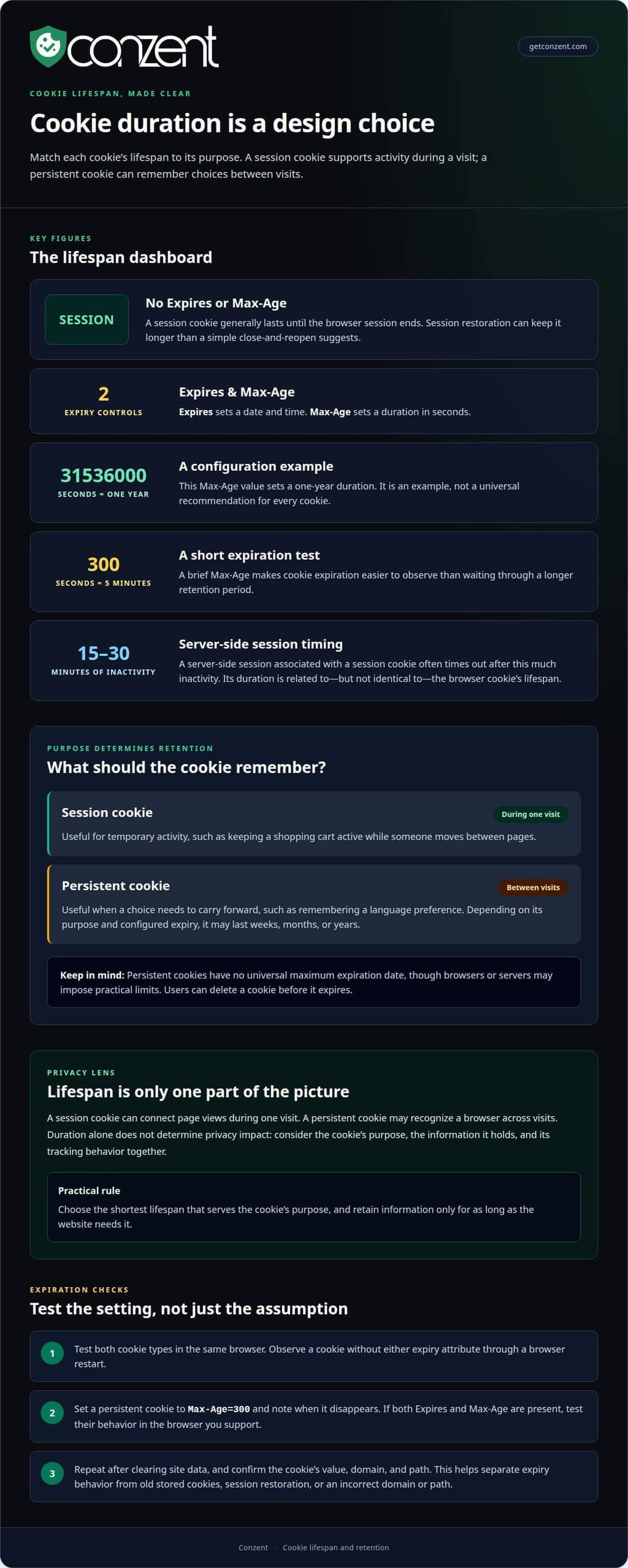
Two attributes can set a cookie’s lifetime: Expires and Max-Age. Expires specifies a date and time. Max-Age specifies how many seconds the cookie should last. For example, a Max-Age value of 31536000 sets a duration of one year. A separate example sets a cookie to expire after 1 month. These are configuration examples, not a universal recommendation for every cookie.
When both attributes are present, don’t assume their values match. Test the behavior in the browser you support and confirm the server sends the intended cookie settings. For a short test, set Max-Age to 300 seconds, or 5 minutes. The cookie should disappear after that duration, unless the user deletes it sooner or browser behavior affects storage. This makes expiration easier to observe than waiting through a longer retention period.
You can test Expires in a similar way. Set its timestamp to 5 minutes ahead of the date and time in the response header. Then inspect the browser’s stored cookie before and after the timestamp. Confirm that the value, domain, and path identify the cookie you intend to test. A wrong domain or path can make a cookie appear unavailable without its expiration being the cause.
Session cookies work differently. They have no Expires or Max-Age attribute, so they generally last until the browser session ends. The browser may restore a session after restarting, which can extend the cookie’s apparent lifetime. Session cookies are temporary by design, but “temporary” doesn’t always mean “deleted the moment a window closes.” A website’s server-side session may also end independently of the browser cookie.
For a reliable comparison of session cookies vs persistent cookies, test both settings in the same browser. First, create a cookie without either expiration attribute and observe it through a browser restart. Then set a persistent cookie to Max-Age=300 and record when it disappears. Repeat after clearing site data. This separates expiration behavior from old stored cookies, session restoration, and other browser-specific effects.
Session and persistent cookie lifespans
A cookie’s lifespan affects what a website remembers during and between visits. Users can view or delete cookies through browser privacy or site settings; the exact controls vary by browser.
Lifespan and Deletion
A session cookie usually lasts until the browser session ends, while a persistent cookie remains until its expiry or deletion. This distinction determines whether users may need to repeat an action when they return. Closing a browser generally removes session cookies automatically, but session restoration can preserve them after a restart. To start fresh, users can close the browser fully or remove site data in its settings.
Lifespan and Uses
Session cookies support tasks during one browsing session, while persistent cookies can retain information across visits. A session cookie can keep a shopping cart active as someone moves between pages. A persistent cookie can remember a language preference for a later visit. Depending on its purpose and configured expiry, a persistent cookie may last weeks, months or years.
Browser cookie controls let users inspect stored site data and remove selected cookies or all cookies. Removing a session cookie can end a login or clear a cart tied to that session. Deleting a persistent preference cookie may reset a language or display choice. Browser settings often group cookies with other site data, so removing all data for a site can affect several saved choices.
Cookie duration and server-side session duration are related, but they are not identical. A server-side session associated with a session cookie often times out after 15 to 30 minutes of inactivity. A user may therefore be logged out while the browser still holds the session identifier. Conversely, deleting that identifier can make the stored server session inaccessible from that browser.
For website owners, the practical test is whether a cookie’s lifespan matches its function. A cart needed only during a visit serves a different purpose from a language choice intended to persist. Consent preferences also shape which cookies a site stores, while privacy regulations govern how those choices are handled. Keep the user experience in view: unexpected logouts frustrate people, but retaining data longer than necessary can undermine trust.
When reviewing consent tools alongside cookie behavior, teams can consider how consent platform options fit their needs. The key decision remains the cookie’s purpose: use a short-lived session for temporary activity, and retain a persistent cookie only for a continuing need.
Cookie privacy and tracking concerns
For U.S. readers, CPRA is a privacy regulation relevant to managing cookies and personal data. The rules that apply depend on what information a site collects and how it uses it.
Cookie duration alone doesn’t determine its privacy impact. A session cookie can connect page views during one visit, while a persistent cookie may recognize a browser across visits. For example, a shopping cart cookie supports a requested task; an advertising cookie may serve a different purpose, such as tracking. Review each cookie’s function, data and lifespan together.
Tracking also depends on who sets a cookie and where the browser sends it. First-party cookies come from the site being visited; third-party cookies are associated with another domain. A persistent identifier can support tracking across websites, while a session identifier can connect activity during one visit. Neither label alone explains how the data is used.
Under the GDPR, websites must obtain consent for cookies except those considered strictly necessary for functionality, according to the European Union. The Article 29 Working Party's Opinion 04/2012 discusses the cookie consent exemption, according to the European Commission. These EU sources help explain why purpose matters, but they do not replace applicable U.S. requirements.
Consent should reflect what a cookie does, not just whether it expires when the browser closes. Analytics cookies, for example, can be temporary and still serve a measurement purpose beyond core site functionality. A clear consent choice lets visitors accept all cookies, reject all, or select preferences. Sites should also make it straightforward to withdraw consent.
A practical review starts with a cookie inventory. For each cookie, record its purpose, whether it is session or persistent, its duration, and whether it supports a requested function or tracking. Then compare the inventory with the consent choices shown to visitors. If a cookie’s purpose changes, update its explanation and consent settings to match.
Keep the data itself limited. A session ID linked to a logged-in person can identify that person, according to the European Union, so it may count as personal data under the GDPR. Avoid putting unnecessary details in cookies. A site can store session data on its server and use the browser cookie only to carry the session identifier.
Finally, treat consent as an ongoing interaction, not a one-time banner. Make choices easy to find when visitors return, and honor changes to their preferences. Someone who rejects advertising cookies shouldn’t continue receiving them because an older preference remains stored. Clear purposes, suitable durations and working controls make cookie use easier to understand and manage.
Session cookie examples and use cases
Session cookies carry temporary state while someone uses a website. For login, the browser sends a session ID with requests, allowing the server to retrieve the user’s current authentication status. Persistent cookies can support a different experience, such as remembering a sign-in choice or language preference across visits.
A session ID usually identifies information held on the server rather than storing the full account or form record in the browser. As a user moves from a product page to checkout, the browser sends that identifier with each request. The server can then connect those steps to the same visit. Closing the browser may end the cookie’s lifetime, while the server can end its associated session separately.
Shopping carts show how the two approaches serve different needs. A session cookie can keep selected items available while a shopper browses and checks out during one visit. Depending on how the site is designed, a persistent cookie may help restore a cart when the shopper returns. Its role is to support continuity, not guarantee that every cart item remains available.
Multi-step forms use session cookies to connect separate pages to one submission. For example, an application form can retain progress as a user moves from contact details to preferences. A session identifier connects the steps without placing every answer in the cookie. This is useful when information should remain available during the task, but not necessarily between visits.
Session cookies also support security tokens and load balancing. A server can use a session identifier to retrieve the appropriate state, while a load balancer can help route requests to the right server context. These uses depend on the browser, identifier and server-side session data working together. If someone steals a valid session ID, they may be able to act as the user until the session ends.
Persistent cookies suit settings that remain useful after a visit, such as a preferred language or display choice. The browser stores the preference on the user’s device, then sends it on a later visit. This can avoid repeated selections. The site should store only the information needed for that purpose.
Choose based on the task. Use a session cookie for temporary progress through a checkout or form; use a persistent cookie when a specific preference should carry between visits. A cookie’s lifetime doesn’t determine its purpose on its own. The same login feature might use a session cookie for active authentication and a separate persistent choice to remember the user’s sign-in preference.
Choosing between session and persistent cookies
Choose a cookie type by asking how long the website needs the stored information. If it supports one active task, a session cookie may fit. If a setting should remain available after the browser closes, a persistent cookie may be appropriate. When comparing session and persistent cookies, start with their purpose, not a default setting applied to every cookie.
Start with the user’s action. A checkout in progress may need temporary state until the visit ends. A language preference may need to remain available on the next visit. Then ask what happens if the cookie disappears too early or stays longer than needed. These outcomes reveal whether its duration serves the user or merely preserves data.
Use this decision test for each cookie:
- Task: Identify the specific function, such as maintaining a login session or remembering a language.
- Time needed: Decide whether the function ends when the browser closes or continues between visits.
- Data: Keep only the information needed for that function, whether stored in browser memory or on the server.
- Review: Revisit the choice when the website changes the feature or the cookie’s purpose.
Advertising needs closer scrutiny than a user-selected display setting. A persistent cookie can support tracking across visits, so a longer duration may create a broader record of activity. A short lifespan doesn’t automatically make an advertising cookie necessary. Separate cookies by purpose, and ensure consent choices match the types of cookies the website uses.
Some features need both approaches, but for different jobs. A website might use a session cookie to maintain authentication during a visit, then offer a separate persistent option to remember a sign-in preference. Treat these as distinct choices. Combining them can make it harder to explain what remains stored after the browser closes and what visitors can change.
Before deployment, test the experience in a browser. Complete a task, close the browser, then return and observe which settings remain. Check whether a session-only feature resets as intended and whether a saved preference is still available. Also test after deleting site data. These steps show whether cookie duration matches the feature, rather than relying on assumptions about the user experience.
The clearest rule is simple: use the shortest lifespan that still supports the stated function. For consent controls that help visitors make informed choices, explore consent platform options as part of your implementation planning.
Conzent
Conzent provides a managed cloud platform and a self-hosted option for handling cookie consent. It also offers A/B testing for consent experiences and revenue impact analytics, so teams can compare versions and review revenue data. These features help teams manage and evaluate consent choices; they don’t decide which cookies a site needs or how long each one should last.
Cookie lifespans depend on each cookie’s function. Consent tools help organize visitor choices, but they don’t determine the right duration for every cookie. Teams can use Conzent to manage consent choices and review different consent experiences.
Make cookie choices part of your ongoing practice
Cookie decisions should keep pace with changes to your website. A new login flow, analytics tool or advertising purpose can change what a cookie needs to do. Treat the choice between session and persistent cookies as part of feature design, not a setting to leave untouched after launch.
A useful next step is to connect each cookie to a clear purpose and review that connection whenever the feature changes. This keeps technical decisions understandable to the people responsible for consent and the visitors making choices. It also gives your team a practical basis for updating cookie information as the site evolves.
Review your cookie inventory and consent setup whenever a feature changes. For help mapping cookies to purposes, contact Conzent to discuss your needs.
Frequently Asked Questions
What are session cookies?
Session cookies carry small data values that a browser sends to a website while someone uses it. They often contain an identifier rather than full account details. For example, after signing in, a user can open an account page and then a settings page without logging in again. The site uses the identifier to connect those requests, while the server stores the related session information.
What are persistent cookies?
Persistent cookies have an expiry setting that lets a browser retain them beyond its current session. A site might use one to remember a language choice or display preference. On a later visit, the browser can send the value back to the same site. Visitors can also remove the cookie through browser settings or site-data controls before its scheduled expiry.
What are HTTP cookies?
HTTP cookies are data values that websites and browsers exchange through HTTP headers. A server sends a cookie in a Set-Cookie header; the browser can return it in a Cookie header with a later request. For example, a site might send an identifier after login, then use it to associate later page requests with the same session.
How do session cookies differ from persistent cookies?
The key difference between session and persistent cookies is whether the cookie has an expiry setting. Understanding session cookies vs persistent cookies starts with that distinction, but the setting alone doesn’t reveal the cookie’s purpose. A site might use one cookie to keep a current task active and another to retain a preference, such as a user’s chosen text size.
How long do session cookies last, and when are they deleted?
Session cookies generally last until the browser session ends, though session restoration can affect what happens after a restart. The server can also end the related session separately. For example, a login may expire while its identifier remains in the browser. Server-side sessions often time out after 15 to 30 minutes of inactivity, which can prompt the user to sign in again.
How long do persistent cookies last, and how is expiration set?
Persistent cookies last until their configured expiry or until someone deletes them. A website can set an Expires date and time or use Max-Age to specify a duration in seconds. For example, Max-Age=300 sets a five-minute lifetime. Browser or server limits may affect retention, so the setting doesn’t guarantee storage on every device.
What happens to session cookies when a browser closes or crashes?
Closing a browser usually ends its session cookies, but after a crash, the result can depend on session restoration. If the browser restores previous tabs and state, a cookie may remain available. To distinguish restoration from a fresh session, reopen the browser without restoring the previous session and revisit the site. You may need to sign in again or restart an unfinished task.
What are the security and privacy risks of session and persistent cookies?
A stolen session identifier can let someone act as the user while the session remains active. Websites can reduce exposure with HTTPS and the Secure and HttpOnly attributes. Persistent cookies can raise privacy concerns if they support tracking beyond a visitor’s expectations. Limit cookie contents, end sessions at logout, and give visitors clear choices about non-essential cookie purposes.