
Vue.js GDPR Consent Component: A Practical Implementation Guide
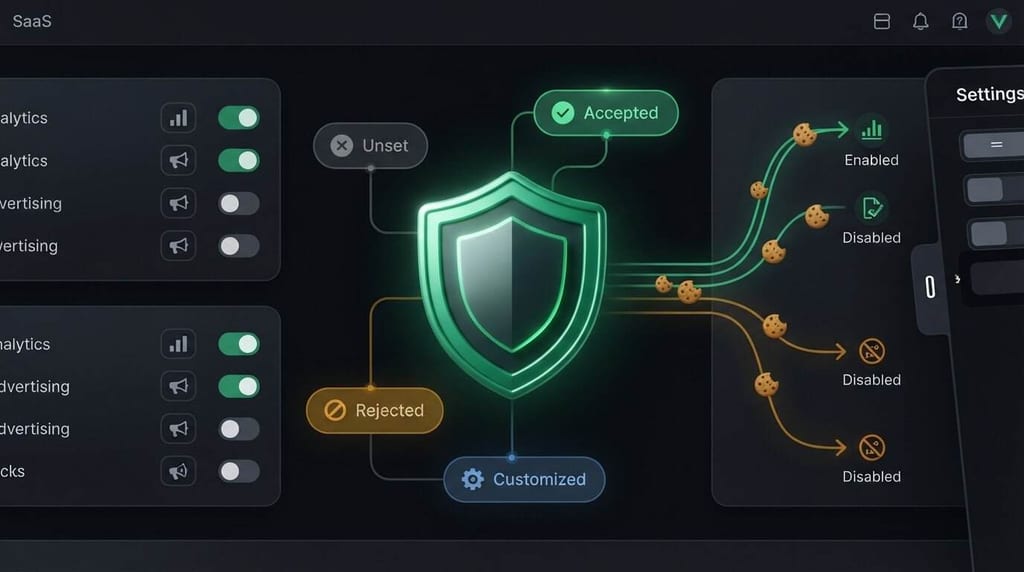
A Vue.js GDPR consent component needs to do more than display a banner. It must connect each user choice to what the application loads, including analytics and advertising scripts. Otherwise, the interface may offer control without enforcing it.
When implementing consent in Vue, the challenge isn’t just building the banner. You also need to manage consent state across a single-page app, save and update choices, support withdrawal, and verify that scripts respond as intended. A custom interface won’t handle every part of that workflow on its own.
This guide covers the responsibilities of a Vue consent component, a practical implementation and testing workflow, and how to decide whether custom code is enough. You’ll learn how to connect user choices to consent-dependent scripts, what to test when preferences change, and when a consent-management platform may be worth evaluating. The goal is a consent experience that works beyond the first page view.
Key Takeaways
- A Vue.js GDPR consent component is the user-facing part of a wider workflow, not proof that consent choices are enforced.
- Define distinct states for unset, accepted, rejected, and customized preferences, then connect each state to the behavior your scripts should follow.
- Use an ordered implementation and testing process to check script signals, saved preferences, and what happens when users change their choices.
- Compare custom code with a consent platform by deciding who will own preference storage, script coordination, updates, and reporting over time.
- Before choosing an approach, document the integrations you need, your hosting preference, reporting needs, and who will maintain the setup.
What a Vue.js GDPR Consent Component Must Do Beyond Showing a Banner
A consent component is the interface users interact with, not the whole consent system. Rendering a banner doesn’t show whether the application respects the choices people make. A complete design connects four responsibilities: presenting clear options, collecting preferences, saving those preferences, and coordinating the scripts or services that depend on them.
Start by listing the technologies your site actually uses. An analytics category should reflect the analytics tools in your stack; the same applies to advertising and other purposes. Avoid generic categories that don’t match your implementation or the policy you communicate. The General Data Protection Regulation (GDPR) provides background on the regulation and its terminology, but whether an implementation is suitable depends on the site, its practices, and the applicable context. A Vue component alone can’t promise compliance.
Which responsibilities belong inside the Vue component?
The Vue component should make choices understandable and usable. Provide accessible controls to accept, reject, or configure preferences. Use clear labels, support keyboard interaction, and make the available choices easy to compare. The interface should show the current choice without becoming the source of truth for every consent rule.
Keep presentation state separate from the application’s consent policy and persistence layer. For example, the component can report that a visitor selected analytics, while another part of the application stores that choice and determines which services may respond to it. This separation makes the interface easier to maintain and the policy easier to test. Give users a persistent way to reopen preferences, review their selections, and change them.
Why a banner alone cannot manage consent
A button click must lead to an observable change. If a visitor rejects analytics, the application needs to prevent or adjust the relevant analytics behavior. If they change their choice later, the system needs to apply the updated state. A banner that records a click but leaves tags running has collected input without coordinating the technology behind it.
Keep the boundaries clear:
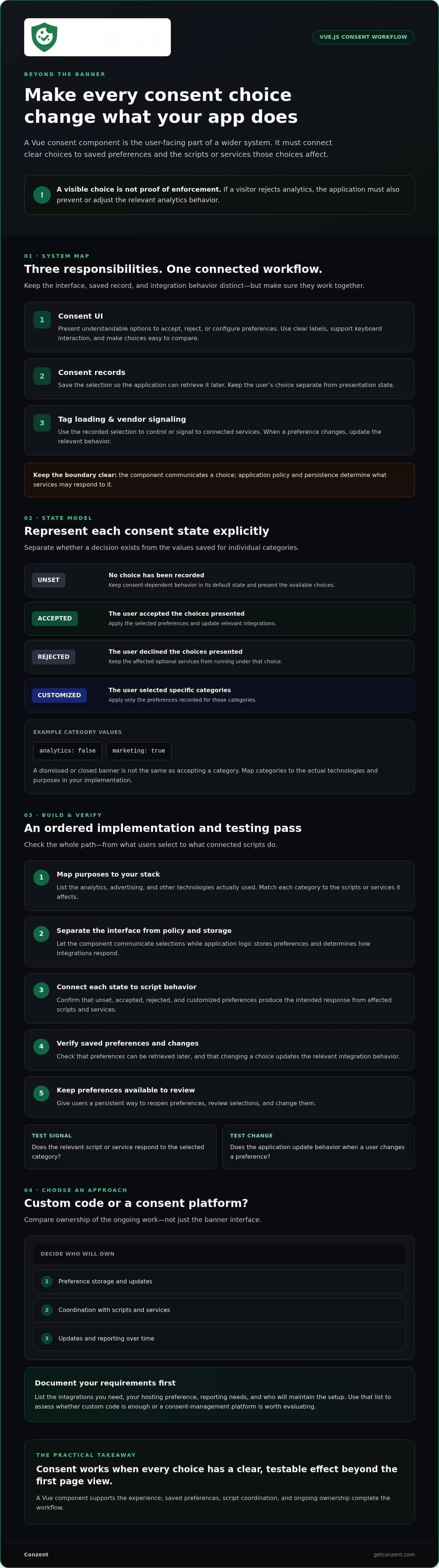
- Consent UI: presents choices and communicates the visitor’s selection.
- Consent records: store the selection so the application can retrieve it later.
- Tag loading and vendor signaling: use that selection to control or signal to connected services.
These responsibilities may live in separate parts of an application, but they must work together. Before connecting tools, map each category to the scripts and services it affects, then verify that changing a preference updates their behavior. For broader context, read the guide to GDPR consent requirements. A Vue.js GDPR consent component is one part of that workflow, not a substitute for reviewing the full implementation.
Designing Vue Consent State, Categories, and Script Signals
A reliable consent model connects each user action to a clear application response. Keep the state distinct when someone hasn’t made a choice. When they accept, reject, or customize preferences, update the relevant categories and pass the resulting state to the code that manages tags and services.
Choose categories based on the technologies your site uses and the purposes described in its policy. Don’t add a category just because it appears in a sample. For legal context, consult the General Data Protection Regulation (GDPR) and assess how its requirements apply to your implementation and situation.
Consent state | Meaning | Application response
Unset | No choice has been recorded | Keep consent-dependent behavior in its default state and present the available choices.
Accepted | The user accepted the choices presented | Apply the selected preferences and update the relevant integrations.
Rejected | The user declined the choices presented | Keep the affected optional services from running under that choice.
Customized | The user selected specific categories | Apply only the preferences recorded for those categories.
Model consent preferences without mixing interface and policy
Represent status and category selections explicitly. For example, store whether a decision exists separately from values such as analytics: false or marketing: true. Dismissing or closing a banner isn’t the same as accepting a category, so don’t treat that interface event as affirmative consent.
At startup, read saved preferences before consent-dependent integrations act. Keep this loading step separate from the Vue controls: the interface displays and changes choices, while the policy and persistence layer determines what those choices mean. The Vue.js GDPR consent component should also let users reopen preferences, make a change, and pass the updated state through the same pathway.
Connect preferences to analytics and advertising integrations
Create a clear boundary between Vue state and tag-management logic. When preferences change, send the updated values to that boundary. The integration layer can then determine whether a script may initialize, must remain blocked, or needs an updated signal. Don’t assume a button click alone controls a script that the app has already loaded.
Google Consent Mode v2 and IAB TCF signals require suitable configuration and integration. UI controls alone don’t generate or verify those signals. Review Google Consent Mode v2 guidance for signal-specific considerations, and the IAB TCF 2.3 overview if your application needs that framework. If you’re comparing managed hosting options for consent, you can also review the available pricing information.
Custom Vue Component or Consent Platform: Compare the Real Responsibilities
A custom Vue.js GDPR consent component gives your team control over the interface, but your team remains responsible for connecting it to the rest of the consent workflow. A platform may provide consent-related capabilities, but you still need to verify how they fit your application and requirements.
Compare who will own each responsibility, not just how quickly you can display a banner:
- Interface: Your team builds and maintains a custom UI. A consent platform may offer customizable banners, such as customizable cookie banner options.
- Preferences and records: Decide who defines the preference model, stores choices, and handles changes over time.
- Scripts and signals: Identify who connects preferences to analytics, advertising, and any required vendor signals.
- Updates and reporting: Assign ownership for keeping integrations current and deciding what consent activity the team needs to review.
These are separate responsibilities. A banner, whether custom or platform-provided, doesn’t automatically address them all.
When a custom Vue consent component may be enough
Custom code can suit a focused setup when the team has capacity to own accessible controls, preference state, storage, script coordination, and ongoing updates. Before building, list the vendors in use and check whether you need consent records, several integrations, or framework-specific signals such as Google Consent Mode v2 or IAB TCF 2.3. A focused interface may be the right choice, but treat it as one part of the system, not a compliance shortcut.
When a consent-management platform may reduce implementation work
A platform is worth evaluating when managing the wider workflow would stretch your team’s time or expertise. Compare deployment models against your operational preferences: self-hosted infrastructure offers a different balance of control and responsibility than managed cloud hosting. In either case, confirm which tasks the platform supports and which remain yours.
Conzent offers customizable banners, self-hosted and managed cloud options, Consent A/B Testing, Revenue Impact Analytics, IAB TCF v2.3 integration, and Google Consent Mode v2. These are platform capabilities, not evidence of a native Vue component or Vue-specific integration. Verify the technical connection method before choosing it for a Vue application.
Make the decision by assigning an owner to every responsibility above. If your team can maintain the full workflow, custom code may fit. If you need ongoing consent functionality with defined hosting preferences, evaluate a platform against those needs and confirm its scope before implementation.
How to Implement and Test a Vue.js Consent Component
Build the consent workflow in sequence. Testing is easier when you know which technologies the component controls and what each preference should change. Treat code examples as illustrative until you’ve checked the Vue version, rendering mode, and integration details in your own project.
- Map the technologies. List analytics, advertising, and other services that depend on user choices.
- Define the states. Specify what unset, accepted, rejected, and customized preferences mean for each service.
- Build the controls. Provide clear actions and a way to revisit preferences.
- Connect the signals. Pass changes from Vue state to the tag or integration layer that controls connected services.
- Test the full flow. Verify the interface, stored choices, and script behavior together.
Build the Vue interface and connect consent state
Place the banner and preference controls in a shared application area so they remain available as users move between routes. Initialize consent before dependent integrations act, and show the interface based on the loaded state rather than a temporary default that could contradict a saved choice. In server-rendered applications, guard browser-only storage access. When preferences change, notify the integration layer through your application’s chosen boundary instead of assuming a specific API.
Verify behavior across visits and integrations
Test with a clean browser state, then repeat with saved preferences. Check that rejection keeps relevant scripts blocked, customization enables only selected categories, and changing or withdrawing a choice updates behavior. Use your project’s real storage and integrations; a passing interface test alone doesn’t confirm that tags respond correctly. For signal workflows, review the Google Consent Mode implementation guidance.
Before release, work through this checklist:
- First visit shows the expected unset state.
- Saved choices load without flashing contradictory preferences.
- Accept, reject, customize, and withdrawal actions update the recorded state.
- Consent-dependent scripts remain blocked or respond as intended before and after a choice changes.
- Keyboard users can reach and operate every control.
- The banner and settings remain usable on mobile screens.
- The browser console shows no relevant errors during initial load or preference changes.
Repeat these checks after changes to vendors, tags, storage, or rendering behavior. If managed hosting is part of your evaluation, compare managed hosting options and pricing.
Choose the Next Step for Your Vue.js Consent Setup
Your next decision is about ownership. You can maintain the full consent workflow in your application or evaluate a platform for ongoing consent management. Base that choice on what the site needs and who will maintain it, not on how quickly you can add a banner.
Before committing, write down the requirements your team needs to evaluate:
- Application: Vue version, rendering mode, and how consent state reaches the parts of the app that control scripts.
- Integrations: Analytics and advertising services, plus any required signals such as Google Consent Mode v2 or IAB TCF 2.3.
- Operations: Preference for managed cloud hosting or self-hosted infrastructure, reporting needs, and who owns updates and testing.
This inventory gives your development team and decision-makers a shared basis for comparing custom code with a platform.
Evaluate platform fit before adopting a Vue integration
Confirm the intended integration approach with your development team before selecting a platform. The available information doesn’t establish that Conzent provides a native Vue component or Vue-specific integration, so verify technical compatibility and connection details rather than assuming a drop-in option exists.
Then compare your interface needs with the platform’s consent banner capabilities. Conzent also offers Consent A/B Testing. Consider it if experimentation is part of your evaluation, and determine whether it fits your goals before adding it to the decision.
Move from an implementation plan to a platform decision
Conzent offers customizable banners, consent A/B testing, revenue impact analytics, IAB TCF v2.3 integration, Google Consent Mode v2, and managed cloud or self-hosted options. These capabilities can inform your comparison, but don’t remove the need to verify how a platform connects with your Vue application and integrations.
Choose custom implementation if your team is prepared to own the interface, preference handling, integrations, testing, and ongoing maintenance. Evaluate a platform if you want to assess managed consent capabilities and hosting options against those responsibilities. Consider what operational ownership would mean for your team, then compare the available options.
If a platform is on your shortlist, compare Conzent pricing as one step in evaluating fit. The right choice is the one your team can understand, verify, and maintain.
Make Your Consent Workflow Ready to Maintain
A reliable Vue.js GDPR consent component does more than display choices. It connects clear preference states to the scripts and services they affect, preserves those choices appropriately, and lets users revisit them. Testing matters just as much: verify first visits, saved preferences, changes, and withdrawals against the integrations your application actually uses.
Your next step is to decide who will own the full workflow. Custom code can fit a focused setup when your team can maintain the interface, state, integrations, and testing. A consent platform may be worth evaluating when you also need ongoing management, hosting options, or capabilities such as consent A/B testing and revenue impact analytics. Confirm how any platform fits your Vue application before adopting it. Don’t assume a ready-made Vue component or integration exists.
Write down your required integrations, hosting preference, reporting needs, and maintenance owner. Then compare options against that list. Explore Conzent pricing as part of your platform evaluation. With clear requirements and tested connections between choices and scripts, you can build a consent experience your team can confidently maintain.
Frequently Asked Questions
What is a Vue.js GDPR consent component?
A Vue.js GDPR consent component is a user-facing interface for presenting privacy choices and collecting a visitor’s preferences. It may show controls to accept, reject, or customize categories such as analytics or advertising. The component is only one part of a broader workflow: application logic must also store preferences and connect them to the scripts and services they affect. Its presence alone doesn’t establish that the full implementation is suitable.
Can I build my own GDPR consent component in Vue?
Yes. You can build a custom consent interface in Vue, provided your team can also manage the surrounding workflow. Plan for accessible controls, explicit preference states, persistence, connections to consent-dependent scripts, and a way for visitors to revisit or change choices. You’ll also need to test those connections and maintain them as your site’s technologies change. A custom component can fit a focused setup, but it isn’t a shortcut around that work.
How do I stop scripts from running before a visitor makes a choice?
Identify which scripts depend on consent, then prevent them from initializing until your application has a relevant preference to apply. Establish the initial consent state before loading or activating those integrations. Don’t rely on hiding a banner or recording a button click while tags load independently. Test a clean first visit in the browser’s network and developer tools to verify that the expected scripts remain blocked until the application’s consent logic allows them.
Does a Vue consent banner make a website GDPR compliant?
No. A banner presents choices; it doesn’t prove that the application applies them correctly. The implementation also needs to handle preference collection, storage, script behavior, and changes to a visitor’s choices. Whether a setup is suitable depends on the site’s technologies, practices, and context. Treat the interface as one part of the work, and review the complete consent workflow rather than relying on the presence of a visible banner.
How should a Vue app store consent preferences?
Store preferences in a way that fits your application’s architecture and lets the app retrieve them before consent-dependent integrations act. Keep the recorded consent status distinct from individual category choices, such as analytics or advertising. Don’t treat closing or dismissing the banner as acceptance. Choose the storage method based on your project and deployment, then test saved choices, changed preferences, and withdrawal using the actual browser and application setup.
Can a Vue consent component work with Google Consent Mode v2?
It can be part of an application that uses Google Consent Mode v2, but the Vue interface alone doesn’t configure or send the required signals. Connect the visitor’s choices to the integration logic, configure the consent signals for your setup, and verify that they’re applied before relevant tags run. Conzent offers Google Consent Mode v2, but confirm the technical integration method and compatibility with your Vue application before adopting any platform.
Should I build a Vue consent component or use a consent-management platform?
Build your own if your team can maintain the interface, preference handling, script coordination, and testing over time. Evaluate a consent-management platform if you want to compare those responsibilities with platform capabilities and hosting options. Check the integrations, consent signals, reporting needs, and ongoing ownership you require. Conzent offers managed cloud and self-hosted options, customizable banners, Consent A/B Testing, and Revenue Impact Analytics. Verify how any platform fits your Vue application before choosing it.