
Website Cookie Policy Best Practices: 2026 Guide

A cookie policy can look complete and still describe a website that no longer exists. A new analytics tool, embedded video, or advertising tag can change what the site stores or accesses while the policy stays untouched. That gap is why website cookie policy best practices start with the technologies running on your site, not a generic template.
It’s reasonable to want a clear answer about what your policy should say, especially when cookies are only part of the picture. Similar technologies may also store or access information. Your disclosures should explain their purposes in plain language and reflect the choices visitors can make and how your site responds to them.
This guide explains what a cookie policy is for, how to build disclosures around your website’s actual tools, and how to review them when your setup changes. You’ll also learn how to keep policy content, consent settings, and website behavior aligned. The goal is a living record of what your site does, not a document that goes stale after publication.
Key Takeaways
- Apply website cookie policy best practices by describing the technologies your site actually uses, rather than reusing generic wording.
- Organize disclosures around each technology’s purpose and provider where relevant, and distinguish first-party from third-party tools.
- Compare template language with observed website technologies to find vague or inaccurate statements.
- Use a repeatable inventory, classification, verification, revision, and testing process to keep disclosures current as your site changes.
- Use a consent platform to help operationalize visitor choices, while keeping disclosures accurate and appropriate legal review in place.
Website cookie policy best practices start with clear, accurate disclosures
A cookie policy is a plain-language account of the cookies and related tracking technologies a website uses, what they do, and which third parties are involved where relevant. Strong website cookie policy best practices begin with a simple test: could a visitor understand what the site does from reading the policy, then recognize those practices while using it?
The details depend on the website and the jurisdictions that apply. Sites don’t all use the same technologies, and legal requirements aren’t universal. Treat the policy as an accurate description of actual practices, then assess applicable requirements using current, authoritative guidance. Publishing a document alone does not resolve questions about consent or privacy.
What a cookie policy does, and what it does not do
The policy explains site practices. A consent banner or preference interface presents choices and lets visitors manage preferences. These serve different purposes. A clearly written policy can describe purposes and relevant providers, but publishing it does not itself establish valid consent. Whether consent is required, and how a site must collect or manage it, depends on the applicable rules and circumstances.
Keep the policy and interface connected without treating them as interchangeable. If a banner lets visitors choose analytics or advertising preferences, the policy should describe those technologies accurately. A consent platform can help operationalize preferences through the interface, but it cannot make an inaccurate disclosure true or replace legal review. A cookie consent banner is one part of the experience, not the written record behind it.
For basic technical context, an HTTP cookie is data a website can store in a visitor’s browser and receive again in later requests. Cookies vary in how they’re set and used. That distinction matters when explaining site practices, but don’t assume every website uses every cookie type.
Why actual website behavior is the starting point
Start by checking what loads and runs on the site. Analytics tools may set or read cookies to measure activity. Advertising tags can support ad delivery or measurement. Embedded media may involve technologies from its provider. Core site functions can also rely on cookies to maintain a session or remember a choice. These are examples to investigate, not claims that every site uses them.
A policy becomes unreliable when it names a service the site no longer uses, misses a tool added through a plugin, or assigns a purpose based on guesswork. The wording may sound plausible and still misrepresent the visitor’s experience. Check pages and features where different tools load, including embedded content and account functions, rather than relying only on a list of tools someone remembers installing.
An accurate cookie policy matches the technologies and purposes observed on the live website. Verify what runs first, then write the disclosure. Revisit it as the site changes. Clarity comes from matching words to behavior, not from making a policy longer.
What a website cookie policy should explain to visitors
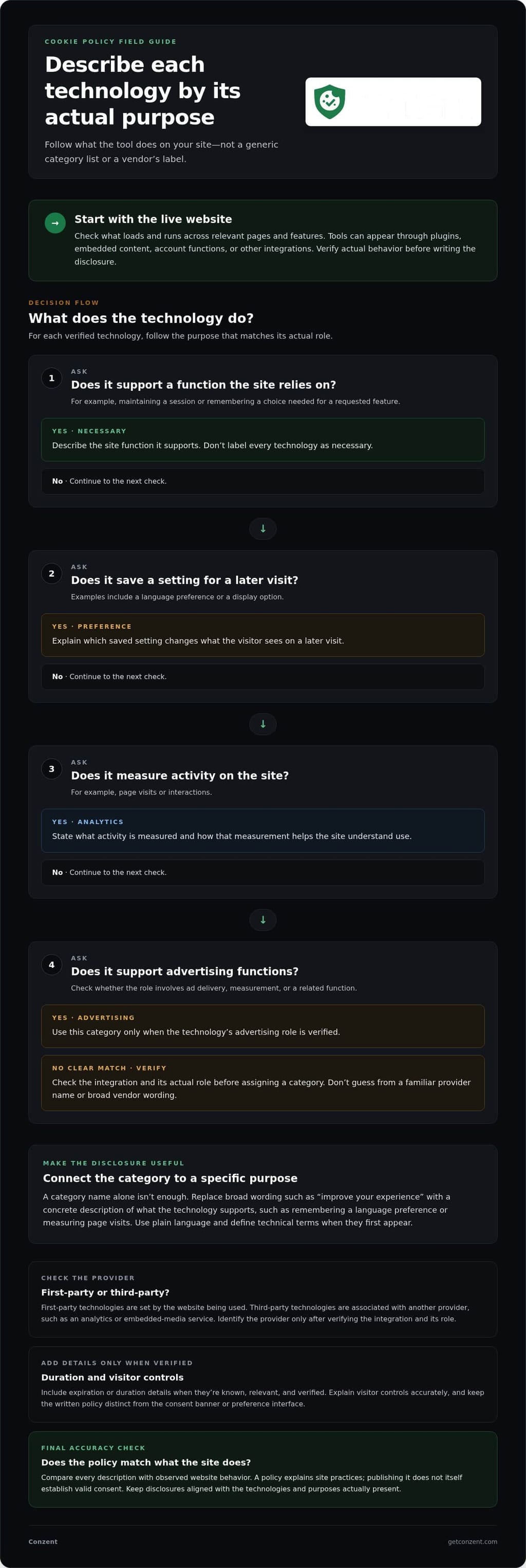
A useful policy gives visitors enough detail to understand what a technology does, why it is used, and who provides it when relevant. Organize each disclosure around those points. Categories can make information easier to scan, but they should reflect the tools actually present on the site, not a standard list copied from another business.
These website cookie policy best practices also help prevent a common source of confusion: broad phrases such as “improve your experience” don’t explain what happens. Say what the tool supports, such as remembering a language preference or measuring visits to pages. Keep the wording direct, and define technical terms the first time they appear.
Describe categories and purposes in concrete terms
Categories are an organizational aid, not proof that a website uses every type. Separate essential functions from analytics, personalization, and advertising where those categories match the site’s inventory. Then connect each category to a specific function or purpose.
- Necessary: Describe a function the site relies on, such as maintaining a session or remembering a choice needed for a requested feature.
- Preference: Explain what a saved setting changes, such as the language or display option shown on a later visit.
- Analytics: State what activity is measured, such as page visits or interactions, and how that measurement helps the site understand use.
- Advertising: If present, explain whether a technology supports ad delivery, measurement, or related functions. Verify its role before assigning this category.
A category name alone isn’t enough. If a tool measures page views, say so. Avoid describing every technology as necessary or assigning a purpose based only on a vendor’s marketing language.
Explain providers, duration, and visitor controls
First-party technologies are set by the website a visitor is using. Third-party technologies are associated with another provider, such as an analytics or embedded-media service. A site may use one, both, or neither. Identify a provider only after verifying the integration and its role; don’t infer its purpose from a familiar name alone.
Include expiration or duration details when they’re known, relevant, and verified. Cookies can persist for different periods, so avoid blanket statements such as “cookies last for one year” unless that accurately describes the specific technologies covered. Omitting an unverified timeframe is more useful than inventing certainty.
Explain how visitors can revisit or change preferences, but describe controls the site actually provides. If the preference interface has a persistent link, tell visitors where to find it. Don’t imply that a control exists if it doesn’t. For broader context on consent design and implementation, see the Secure Privacy 2026 Cookie Consent Guide, then assess legal questions against guidance that applies to your site and visitors.
Clear disclosures and usable preference controls work best when managed together. If you’re assessing consent tools for that work, compare Conzent platform options.
Why generic cookie policy templates can fall short
A template can provide a useful structure, but it can’t tell you what loads on your website, whether a vendor is still in use, or what a tool does in your setup. Treat boilerplate as a draft, not as evidence of accuracy. The problem arises when polished wording describes a typical site instead of the one visitors actually use.
Common mismatches include an analytics provider added through a plugin but missing from the policy, an advertising vendor named after the site stopped using it, or a broad label such as “personalization” applied to tools with different functions. These can make a disclosure misleading or confusing. Compare each claim with observed technology, then revise or verify it.
Compare policy wording with the website’s technology inventory
Check representative pages and experiences, not just the homepage. Include pages with embedded media, account functions, or different plugins. Observe the site before and after a visitor makes a preference choice to see whether tools behave differently across consent states. Then compare the results with every named service and purpose in the policy.
Use a simple comparison table to turn vague claims into specific questions:
| Generic statement | Observed technology | Verified purpose | Needed revision |
|---|---|---|---|
| “We use analytics cookies.” | An analytics script appears on selected pages. | Confirm what activity it measures and how it is configured. | Name the verified function; don’t assume it runs site-wide. |
| “Third parties may collect data.” | An embedded media player loads from an external provider. | Verify the provider’s role and the technologies it uses. | Describe the integration specifically or investigate further. |
| “Cookies improve your experience.” | A site function stores a visitor’s selected setting. | Confirm which setting the site remembers. | Replace the broad claim with the observed function. |
Record uncertain findings as questions for technical verification. A tool’s name alone doesn’t establish its purpose, duration, or provider relationship. Don’t fill those gaps with guesses. If you can’t verify a detail, leave it unresolved until you can inspect the configuration or obtain reliable documentation.
Spot wording that creates confusion or overclaims
Read each sentence beside the relevant inventory entry. Replace blanket claims such as “we use cookies for analytics and marketing” with descriptions supported by observed configuration. Check that the policy’s categories and purposes match the choices shown in the consent interface. If the wording says visitors can control a purpose that the interface doesn’t offer, review both.
Keep factual checks separate from legal interpretation. Your team can investigate which scripts load and what they appear to do; whether a practice meets requirements depends on the jurisdictions and circumstances involved. Get jurisdiction-specific legal review where needed. A template, banner, or consent platform can support clear disclosures and preference management, but none guarantees legal compliance on its own.
How to review and update a website cookie policy
A policy stays useful when someone owns the review process. Build reviews into website changes, not just occasional document checks. A new analytics configuration, advertising tag, embedded service, or site feature can change what visitors encounter. Treat each meaningful change as a prompt to review affected disclosures and the consent experience.
This workflow turns website cookie policy best practices into repeatable work. Keep a record as you go, so a future reviewer can see what changed, why, and what evidence informed the update.
Use a five-step review workflow
- Inventory. Inspect representative pages and experiences, including embedded content and relevant consent states. Record observed technologies rather than relying on an old policy or installation list.
- Classify. Group each technology by its observed function, such as a site feature, preference, analytics, or advertising. Keep the classification provisional until you verify what the tool does.
- Verify. Check the provider, purpose, and duration where relevant and available. Use the site configuration or reliable provider documentation. Mark unknown details for follow-up instead of making assumptions.
- Revise. Update affected policy language and related descriptions in the consent interface. Assess jurisdiction-specific questions separately. GDPR compliance guidance can help frame that review, but legal requirements should be assessed against current guidance applicable to your situation.
- Test. Review the published policy and consent experience as a visitor. Confirm that descriptions match the live setup and that the policy remains accessible from relevant consent controls.
Keep the inventory practical. For each item, record its technology name, observed purpose, provider, and verified duration if known. Add the pages or experiences where it appeared and the consent state during the check. That context helps distinguish a site-wide tool from one that loads only with a particular feature.
Keep changes traceable and the experience consistent
After a team adds, removes, or changes a tool, recheck the related entry and any wording that depends on it. Replacing an embedded media service, for example, may affect both the provider named in the policy and the explanation of what happens on pages where the media appears. Don’t assume a vendor change leaves the disclosure untouched.
Use a dated change log with four details: the review date, the change made, the evidence used, and the person responsible. Evidence might include observed page behavior, a settings record, or provider documentation. Record when a review finds no change is needed, too. A short audit trail makes later updates easier to verify.
Before closing a review, compare policy language with the banner and preference controls. Test that visitors can find the policy from the relevant interface, and confirm that described choices match the controls shown. A consent platform can help keep preferences operational, but your team still needs to review disclosures and test the site. Explore consent platform options if you’re looking for tools to support that process.
Keep cookie policy disclosures aligned with consent tools
A consent management platform (CMP) can help put visitor choices into practice. It doesn’t make policy wording accurate by itself, and it can’t replace legal review. Make sure the technologies described in the policy match what loads on the website, and that the consent interface reflects those disclosures.
Think of them as connected parts of one system. The policy explains site practices, the interface presents choices, and the consent tool helps apply and record those choices. If a category or purpose changes in one place, review the others. This is a practical part of website cookie policy best practices, not a promise of compliance.
Coordinate policy language with consent experiences
Compare category labels and stated purposes across the policy and consent interface. If the policy describes analytics as measuring page use, the interface shouldn’t label the same category only as “site improvement.” Consistent wording helps visitors understand the choice in front of them. A customizable cookie banner can present visitor-facing choices, while the policy provides fuller context about the technologies behind them.
Teams can also use cookie consent A/B testing to assess variations in interface wording or layout. Treat test results as evidence about how visitors respond to those variations, not as proof that an approach satisfies legal requirements. Keep the underlying purposes and disclosures accurate whichever version performs differently.
To assess tools for managing visitor choices, compare Conzent pricing options.
Choose an operating model that fits the team
Consent tools also need an operating model. A managed cloud platform may suit teams that want maintained infrastructure and cloud-based analytics dashboards. Conzent’s managed service includes infrastructure maintenance and automatic updates. Teams that operate their own infrastructure can instead use Conzent’s open-source, self-hosted option on their own systems. The right fit depends on how your team prefers to run the platform, not on a claim that one approach guarantees compliance.
Whichever model you choose, assign responsibility for keeping the policy, consent categories, and live configuration in sync. When a tool or purpose changes, update the relevant disclosure and test the visitor experience. A platform can support the workflow, but accuracy still depends on reviewing actual site behavior and applicable requirements.
For a consent platform with managed cloud and self-hosted approaches, explore Conzent pricing.
Make accuracy part of how your site evolves
A cookie policy earns trust when it keeps pace with product decisions. Make disclosure ownership part of how teams introduce analytics, advertising, embeds, and new functionality. That turns website cookie policy best practices from a one-time publishing task into a standard for responsible site operations.
Give someone clear responsibility for reviewing changes that affect the visitor experience. When teams know who checks disclosures and consent settings, updates are less likely to slip through unnoticed. Keep applicable legal review part of the process.
Your next step is to decide how consent management should fit your team’s operations. Conzent offers managed cloud and self-hosted approaches, so you can consider which model suits your working practices. Keep transparency at the center of each decision.
Explore Conzent pricing to find an option that supports your consent workflow. Clear, accurate disclosures are achievable, and building them into how your team works makes them easier to maintain.
Frequently Asked Questions
Is a cookie policy the same as a privacy policy?
No. A cookie policy focuses on cookies and related technologies used on a website, while a privacy policy usually covers a broader range of personal information practices. They can be separate documents or connected parts of a larger notice, depending on the site’s approach and applicable requirements. If you combine them, make the cookie-related information easy to find so visitors don’t have to search through unrelated sections.
Can one cookie policy cover more than one website?
Sometimes, if the websites use the same relevant technologies and handle them in the same way. Shared ownership alone doesn’t make a single policy accurate. Two sites may use different analytics tools or embed different media services, for example. Compare their technology inventories first. If practices differ, explain those differences clearly or provide separate policy sections so visitors can identify which disclosures apply to the site they’re using.
How much technical detail should a cookie policy include?
Include enough detail for a visitor to understand what a technology does and why it is used, without requiring them to interpret code or vendor documentation. Explain technical terms in ordinary language. Instead of naming only a script or tag, describe the site function it supports. Keep implementation details available for internal review, and use them to support accurate wording rather than filling the visitor-facing policy with jargon.
Does a cookie policy need to list every cookie individually?
That depends on the website’s practices and the requirements that apply. A category-based explanation may be easier to read, while an itemized list can help visitors understand specific technologies. Don’t assume one format fits every situation. Check the site’s actual inventory and applicable rules first. If you publish individual entries, give each one a clear purpose and remove obsolete items when tools change.
Should a cookie policy mention third-party services?
Yes, when third-party services use cookies or related technologies on your site and their role is relevant to the disclosure. A video player, analytics integration, or advertising service may involve another provider. Name the provider only when you’ve verified the integration and its function. A vendor logo or plugin name isn’t enough to establish what it does in your configuration. Explain the relationship in terms visitors can understand.
Can a cookie banner replace a cookie policy?
No. A banner is a consent interface, not a substitute for fuller written information. It may show choices in a compact format, while the policy gives visitors space to understand the site’s practices. Keep the two consistent, but don’t force every detail into the banner. The policy also doesn’t prove that a banner or consent setup meets the rules that apply to your website.
What should I do if my cookie policy does not match the website?
Review the live site and identify what changed, such as a removed analytics integration or a newly embedded service. Verify the technology’s purpose and provider before editing the policy. Then update related consent descriptions, check the visitor experience, and record the revision for future reference. Website cookie policy best practices depend on correcting the mismatch with evidence, not simply changing wording to match an assumption.