
Why Are Users Rejecting Cookies? How It Affects Your Business

Users reject cookies because they want more control over their personal data, don’t understand what a banner is asking them to accept, or simply prefer not to be tracked. Understanding why users are rejecting cookies matters to businesses: when someone declines non-essential cookies, some browsing and marketing data may no longer be collected. Essential cookies can still support a site’s core functions.
That choice doesn’t automatically mean lost sales or a broken customer journey. It may mean less complete analytics, attribution, and advertising data, while a clear, respectful consent experience can help build trust. This article explains what rejection changes, how it affects business decisions, and how to measure performance without treating consent as an obstacle.
Key Takeaways
- Make your consent banner clear about what each cookie category does and link to your cookie policy for more detail.
- Expect gaps in analytics and attribution when visitors reject non-essential cookies, and interpret performance data with that limitation in mind.
- Use consent-aware measurement tools to understand results while respecting each visitor’s choice.
- Offer a straightforward way to accept or reject cookies; clear choices can support trust as well as privacy.
- Review how your banner presents choices and how consent affects your data, then use those insights to improve the experience.
Does My Business Lose Data When Someone Rejects Cookies?
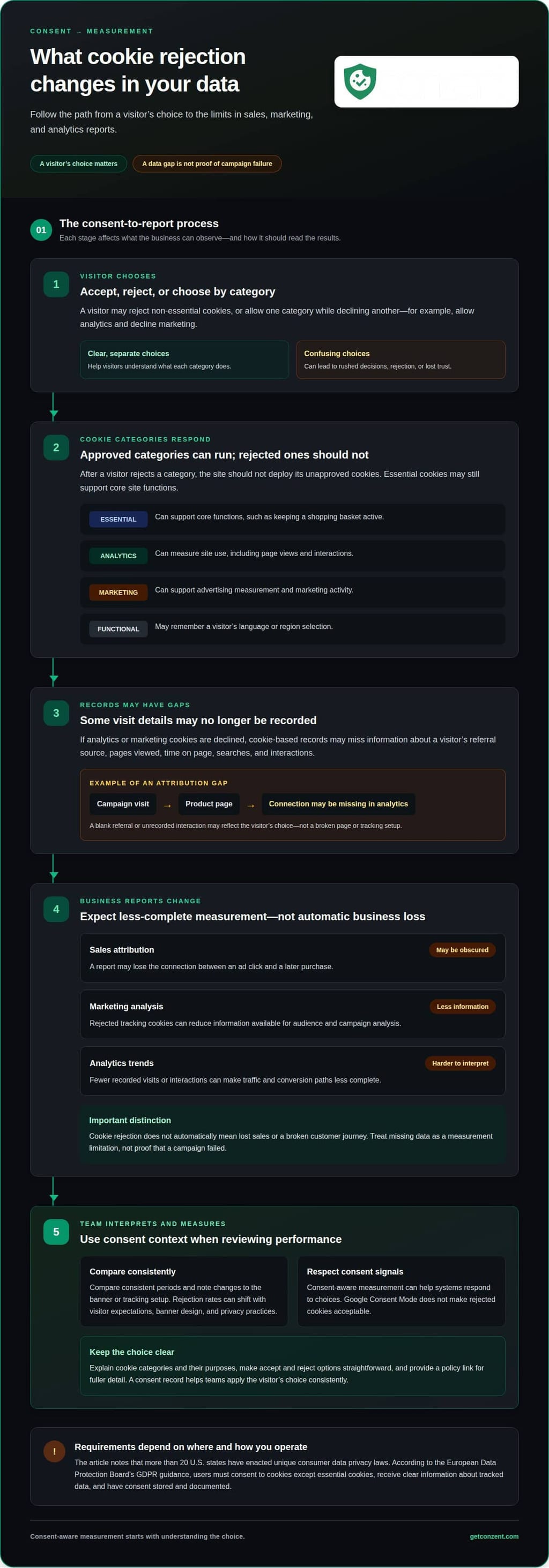
Yes, rejecting non-essential cookies can limit what your website records about a visit. If someone declines analytics and marketing cookies, you may lose information about their referral source, pages viewed, time on page, searches, and interactions. For example, your analytics may not show whether a visitor arrived from a campaign and then viewed a product page.
The effect depends on which cookies a visitor rejects and what your site uses them for. Essential cookies may still support functions such as keeping a shopping basket active. Non-essential cookies, by contrast, might measure visits or personalize marketing. A refusal does not necessarily erase information collected through other permitted methods, but it can leave gaps in cookie-based records.
Give visitors a clear explanation before they choose. Name the cookie categories, describe their purposes, and explain the types of information each category collects. For example, state that analytics cookies measure page visits and interactions, while marketing cookies can support advertising measurement. A link to a detailed cookie policy lets people review more information without crowding the banner. A well-organized cookie-banner design can present those choices and explanations together.
U.S. privacy requirements depend on the laws that apply to a website and its data practices. More than 20 U.S. states have enacted unique consumer data privacy laws, so businesses should not assume one disclosure fits every state. A useful banner explains what cookie categories do, what data they track, and how visitors can make a choice. The policy link can provide the fuller detail, including which cookies are affected.
Confusing or manipulative banners can prompt visitors to reject cookies, make rushed decisions, or lose trust. Hiding the reject option while making acceptance prominent creates less clarity, not more reason to consent. A visitor who cannot quickly understand the choices may reject cookies to avoid uncertainty. Clear, equally visible options make the decision easier to understand.
- Analytics cookies: Explain that they can record statistical information about site use, such as page views or interactions.
- Marketing cookies: Describe their role in advertising measurement or marketing activity.
- Functional cookies: Give a concrete example, such as remembering a language or region selection.
After a visitor rejects a category, the site should not deploy its unapproved cookies. Essential cookies may still operate as needed. This distinction helps teams interpret missing data: a blank campaign referral or unrecorded interaction may reflect the visitor’s choice, rather than a broken page or tracking setup. Clear banner explanations and a detailed policy help visitors decide with better information, giving businesses a more accurate basis for understanding what they can collect.
How Does Rejecting Cookies Affect Sales, Marketing, or Analytics?
When a visitor rejects non-essential cookies, campaign reports may lose the connection between an ad click and a later purchase. Analytics may also record fewer interactions, making traffic, conversion paths, and sales attribution less complete. Treat these gaps as a limit in measurement, not automatic proof that a campaign failed.
Rejection rates differ across age groups, countries, and devices because privacy expectations, consent rules, and banner usability vary. A crowded mobile banner can make choices harder to understand than a clear desktop layout. No single percentage describes every website: the mix of visitors, cookie categories, and consent design all shape the result.
Rates can rise or fall as visitor expectations, banner designs, and privacy practices change. Compare consistent periods and note changes to the banner or tracking setup. This gives your team context for interpreting a shift, rather than assuming that a change in rejection reflects a change in customer interest.
Cookie rejection can also affect functionality and personalization. Features that depend on non-essential cookies may not remember a visitor’s preferences, while essential site functions can continue. For example, a visitor may see less personalized content or advertising after rejecting related cookies.
Consent requirements shape which measurement can run. According to the European Data Protection Board’s GDPR guidance, users must consent to cookies except essential cookies, receive clear information about tracked data, and have consent stored and documented. A consent record helps teams identify and apply the visitor’s choice consistently, rather than treating silence as permission.
Granular controls let people choose between logical cookie groups instead of accepting or rejecting everything together. For example, a visitor might allow analytics while declining marketing cookies. These separate choices help businesses understand which measurement activities have consent, while respecting the visitor’s decision for each category.
- Sales: Missing cookie-based attribution can obscure which campaign contributed to a purchase.
- Marketing: Rejected tracking cookies can reduce the information available for audience and campaign analysis.
- Analytics: Fewer recorded visits or interactions can make trends harder to interpret.
Consent-aware measurement can reduce confusion without overriding a visitor’s choice. Google Consent Mode can help address data gaps while respecting privacy choices. It does not make rejected cookies acceptable; it helps measurement systems respond to consent signals appropriately. Teams can review consent platform options when deciding how to manage those signals and assess their impact.
Consent choices and data quality
Clear consent choices show visitors how a website handles data. They also help teams interpret consent signals and the records created by those decisions.
Choice and Data Quality
Choice makes consent data more useful by recording visitors’ selections instead of treating every visit alike. A record showing that someone accepted analytics cookies represents a different permission state from one showing rejection. When teams review website measurement, they can interpret results in light of visitors’ choices rather than assume everyone agreed to the same tracking.
Applying Visitors’ Choices
A website handles data as described when it applies each choice consistently. For example, if a visitor declines marketing cookies, the consent process should not allow those cookies to run. Clear labels, an accessible policy, and controls that make acceptance and rejection easy to understand help visitors decide what they want to allow. The site should then follow the selection recorded in its consent system.
GDPR Context
The General Data Protection Regulation (GDPR) is a European Union regulation governing personal data. The European Union’s General Data Protection Regulation (GDPR) came into effect in 2018. That context matters because cookies used to identify users qualify as personal data and are subject to the regulation, according to the European Union. A website’s cookie choices therefore connect directly to how it handles information that can identify visitors.
Choice also helps teams distinguish visitor intent from measurement outcomes. If someone rejects analytics cookies, an absent analytics record does not prove that the person never visited. A consent record can explain that gap. Teams can separate recorded activity from visits where relevant cookies were declined and explain data limitations more accurately.
Build that clarity into the experience. Use the same category names in the banner and policy, explain each category’s purpose, and make the visitor’s selection clear. For example, describe “analytics” as measurement rather than a requirement for using the site. A GDPR-focused consent approach can help align those explanations with the privacy context.
- Record different visitor choices separately.
- Interpret missing cookie-based data in light of those choices.
- Keep banner labels and policy explanations consistent.
- Apply the selection shown in the consent record.
An option to reject cookies lets visitors proceed without accepting them. The site should make clear that rejection is a valid choice, not hide it or suggest that every cookie category is essential. Visitors can then decide based on what each category does. The consent process should record that decision and prevent declined cookies from running.
Explain the available choices directly and ensure visitors understand what each selection means. Use consistent category names, describe their purposes, and apply the recorded choice across the site. These steps give people practical information to decide which cookies to allow and help teams handle consent records correctly. A visible rejection option matters only when the site respects it in practice.
Effects on analytics, attribution, and marketing
Cookie rejection changes what businesses can observe, not necessarily what visitors do. Analytics cookies provide statistical information about website use. Without them, reports may miss visits or interactions from people who declined tracking. For example, a product page can receive real visits while cookie-based analytics records fewer sessions. This gap affects how teams interpret performance.
Attribution is especially vulnerable. It connects a customer action, such as a purchase, with earlier interactions, such as an ad click or email visit. If a visitor rejects relevant cookies, that connection may disappear from reports. A sale can still happen, but marketers may see it as direct traffic or unattributed activity. This can distort comparisons between campaigns and channels.
Marketing analysis also depends on which signals remain available. A team might have less information about audience behavior, campaign responses, or the path from landing page to checkout. If a journey includes several visits, rejecting cookies can make those visits harder to connect. The resulting dataset represents measurable activity, not necessarily every customer interaction.
That distinction matters for decisions. If a campaign report shows fewer conversions, teams should consider both business performance and measurement coverage. For example, a change in consent choices can make reported traffic fall even when customer interest remains steady. Comparing campaigns without noting consent conditions can lead teams to pause an effective channel or shift resources for the wrong reason.
Consent-aware measurement tools can help interpret activity while honoring visitor choices. Google Consent Mode, the IAB Transparency and Consent Framework, and Microsoft UET Consent Mode can help address data gaps while respecting privacy and cookie choices. These tools don’t turn rejection into permission. They let systems respond to consent signals, so measurement reflects the user’s decision.
- Analytics: Read cookie-based trends as a view of measured activity, not every visit.
- Attribution: Treat unattributed purchases as possible gaps in the journey, not proof that marketing had no role.
- Marketing: Compare campaigns alongside consent conditions and changes to measurement.
Use the same interpretation across reporting periods. Note when consent settings or tracking methods change, then assess how those changes affect metrics. This gives sales and marketing teams a clearer basis for decisions without collecting data visitors declined to share. The goal is not to recreate every missing path, but to make sound decisions from the signals available.
Accepting or rejecting cookies
Accepting cookies is not automatically the best choice, and rejecting them is not a mistake. The right decision depends on what a visitor understands, which cookie categories they choose, and what the site needs to do. For a business, the practical goal is not to maximize acceptance. It is to make each option clear and respect the selection.
Visitors may accept cookies when they understand their purpose and value the related function. For example, someone may allow functional cookies to remember a language preference or analytics cookies to support site measurement. Another visitor may reject marketing cookies but accept analytics. Grouped controls let people decide without forcing an all-or-nothing response.
Rejection makes sense when someone doesn’t want optional tracking or sees no benefit in enabling it. The visitor might still use the site, but some personalization may not carry between visits. For instance, a language setting stored through a functional cookie may need to be selected again if that cookie is declined. The exact effect depends on which category the visitor rejects.
A clear banner helps people decide quickly. Present options in plain language, give acceptance and rejection comparable visibility, and make category controls easy to understand. Avoid unclear labels such as “improve your experience” without explaining what that means. Visitors should be able to tell whether a choice relates to analytics, advertising, or a feature such as remembered region settings.
For businesses, a useful decision framework separates the visitor’s choice from the site’s measurement needs:
- Accept: The visitor agrees to the described cookie categories, and the site applies that selection.
- Reject: The site respects the refusal and does not deploy the declined non-essential cookies.
- Choose by category: The visitor permits some purposes, such as analytics, while declining others, such as marketing.
Revisit the experience when the banner, cookie categories, or site functions change. Some websites may remind users about their cookie choice after six to 12 months. A reminder should make it possible to review the decision, not obscure the available options. That keeps consent choices connected to the current site experience.
Measurement can still account for consent signals. Google Consent Mode v2 can help a website respond to those signals while respecting cookie choices. It does not convert a rejection into acceptance. If your team needs a consent platform for managing those choices, explore consent platform options.
Conzent
Conzent’s Managed Cloud Consent Platform and Self-Hosted Open Consent Infrastructure give businesses different ways to manage cookie choices and understand their effects on consent data, marketing, and revenue measurement. Consent A/B Testing helps assess banner choices, while Revenue Impact Analytics shows how consent relates to business outcomes.
These tools can help when visitor choices are difficult to manage or their impact is hard to interpret. They support clearer consent and more useful measurement without pressuring visitors to accept cookies. Contact Conzent to discuss your consent needs.
Make your next consent decision with confidence
Set a useful goal for your next review: visitors should understand their choices, and your team should be able to interpret the resulting data. Understanding why users are rejecting cookies isn’t a reason to push for acceptance. It’s a prompt to make the experience clearer and align measurement with visitor decisions.
Conzent supports different approaches to consent management, including managed and self-hosted options, plus tools for testing banner choices. Start with the question your team needs to answer, then review the available consent platform options to find a practical next step for your website.
Frequently Asked Questions
To accept or not accept?
Choose based on the cookie’s stated purpose and whether you want that function. For example, someone comparing products may accept analytics cookies to support site measurement but decline advertising cookies. If the banner doesn’t explain a category clearly, open its preference details before deciding. You can also change your selection later if the website provides a preference control.
Why do users reject website cookies?
Some visitors reject cookies by default when a consent prompt interrupts what they came to do. Others want to avoid having browsing activity used beyond the page they’re viewing. Someone looking up a one-time answer, for example, may see little value in optional tracking. The choice can reflect the visitor’s immediate task, not a judgment about the website or its products.
What privacy concerns make users reject cookies?
Visitors may worry that data from separate browsing activity could be combined to build a detailed picture of their interests. They may also wonder how long information remains available or which parties receive it. To assess a policy, look for descriptions of data use, recipients, and retention. Broad phrases such as “personalize your experience” don’t answer those questions by themselves.
How does rejecting cookies affect targeted advertising and analytics?
It can make campaign comparisons less complete, especially when teams rely on cookie-based attribution. For example, a report may show fewer conversions for a campaign after consent choices change, even if purchases continue. Separate consent-related reporting from campaign performance where possible, and note changes to measurement settings. This helps analysts avoid treating a reporting shift as direct evidence of changing customer demand.
What cookie consent banner designs make it easier to reject cookies?
A banner makes rejection straightforward when it offers a clearly labelled reject option at the first decision point. A “Reject non-essential” button beside “Accept all” avoids extra navigation. A separate preferences view can then offer category-level controls and a way to save the selection. On a phone, keep those controls visible without making visitors scroll through lengthy text before choosing.
How do cookie rejection rates vary by age, country, or device?
Rejection rates differ across age groups, countries, and devices because privacy expectations, consent rules, and banner usability vary. For example, a crowded mobile banner can make choices harder to understand than a clear desktop layout.
How have cookie consent rejection rates changed over time?
Rejection rates can rise or fall as visitor expectations, banner designs, and privacy practices change. Compare consistent periods and note changes to the banner or tracking setup when interpreting shifts.