
Consent Banner Accessibility Standards: A Practical WCAG Guide

Can visitors reject cookies without a mouse, understand what each choice means, and move on without getting stuck? If not, a banner that looks simple may still block access. Applying consent banner accessibility standards (WCAG) means checking how people perceive, operate, and understand every part of the interface, not just how it looks.
Clear labels and strong contrast matter, but they don’t prove a banner works for everyone. Keyboard focus can disappear, a screen reader may announce buttons without enough context, and controls may be difficult to reach or use on mobile. Structured testing can reveal these barriers.
This guide explains how WCAG applies to consent interfaces and what to test with keyboard, screen-reader, mobile, and visual interactions. You’ll find a repeatable way to spot barriers, consider WCAG 2.2 criteria that may affect banner interactions, and compare implementation options. A configurable consent platform can support an accessible experience, but configuration and testing matter. No platform alone guarantees WCAG conformance.
Key Takeaways
- Use consent banner accessibility standards (WCAG) to connect each user task with relevant accessibility checks, rather than relying on a single visual review.
- Check text alternatives, semantic relationships, contrast, and reflow against relevant WCAG criteria. One passing check doesn’t prove the whole banner works.
- Keep accessibility and privacy reviews distinct. An accessible interface doesn’t prove that consent collection meets privacy requirements.
- Test the complete journey: open the banner, navigate its controls, make choices, close it, and return to preferences.
- Compare consent platforms by configurability and control over the resulting interface, then test the implementation with real interaction paths.
What WCAG Means for Consent Banner Accessibility
The Web Content Accessibility Guidelines (WCAG) are W3C guidance for making web content more accessible to people with disabilities. They apply to interactive interfaces as well as pages of text. WCAG 2.2 provides principles and criteria teams can use to assess whether a consent interface works beyond its visual design.
A consent banner is an interactive part of a website. It presents information, asks visitors to make a choice, and provides controls to act on that choice. If someone can’t perceive the message, reach a button, or understand what it does, the banner creates a barrier to using the site. A configurable cookie consent banner can help teams shape the experience, but accessibility depends on how it is configured and implemented.
Use WCAG’s four principles, often shortened to POUR, as a review lens. They turn the broad goal of accessibility into practical questions about content, behavior, and compatibility.
How the POUR principles apply to a consent banner
- Perceivable: Can users access the banner’s message, control labels, and status updates? Text should remain available when someone enlarges it or uses assistive technology, and meaning shouldn’t rely on color alone.
- Operable: Can users reach and activate every choice with the input methods they use? A keyboard user should be able to move among controls, identify the current focus, and select an option.
- Understandable: Are the options and their effects expressed clearly and consistently? “Accept” and “Reject” should be easy to distinguish, with no ambiguous labels or confusing sequence of screens.
- Robust: Does the interface communicate its structure and state reliably to browsers and assistive technologies? Proper semantics help technology identify controls and convey their names and roles.
These principles work together. A button may have sufficient contrast but still fail if it has no useful accessible name. A screen-reader user may hear the banner text but struggle if focus moves unpredictably. Review the complete interaction, not isolated design details.
Where WCAG ends and privacy consent requirements begin
WCAG addresses access to the interface: whether people can perceive, understand, and operate it. Privacy rules address a separate question: whether the site’s collection and handling of consent meet applicable requirements. An accessible banner does not, by itself, establish that a choice is valid or that relevant privacy rules have been met.
Keep both reviews in view, but don’t treat one as a substitute for the other. For the separate privacy question, see the overview of GDPR consent requirements. Which rules apply depends on the circumstances; accessibility guidance alone doesn’t determine legal applicability.
WCAG Checks That Matter Most in Cookie Consent Interfaces
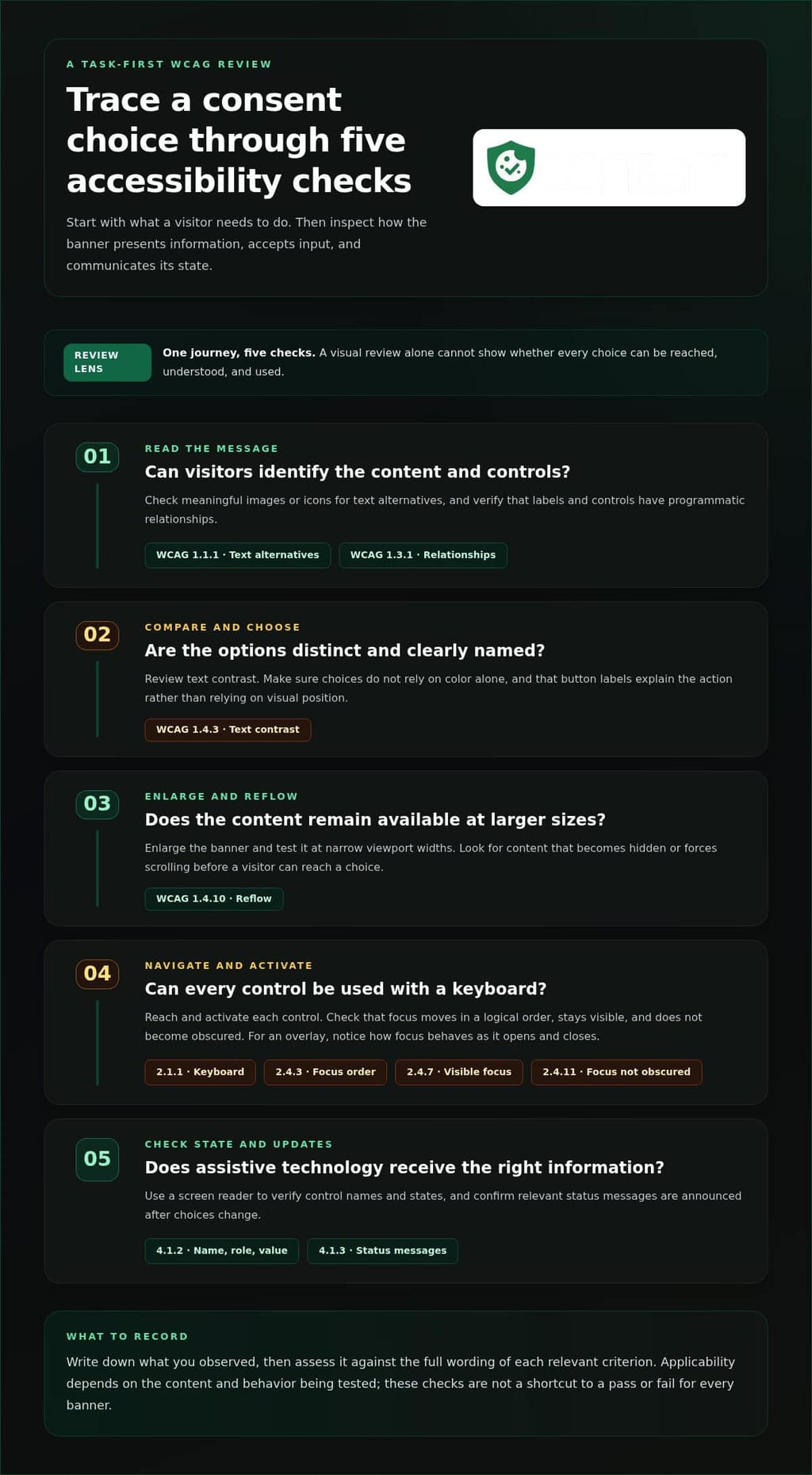
Start with the task a visitor needs to complete, then check the interface against the WCAG criteria relevant to that task. This separates visual review from keyboard and assistive-technology testing. The official WCAG guidelines from W3C provide the criteria and supporting guidance. The examples below show how to apply them to a consent interaction.
- Read the message and identify controls: Check text alternatives for meaningful images or icons under 1.1.1, and programmatic relationships between labels and controls under 1.3.1.
- Compare and choose options: Review text contrast under 1.4.3 and ensure choices don’t depend on color alone. Check that button labels explain the action, not just its visual position.
- Enlarge or reflow the banner: Test whether content remains available when zoomed and reflows at narrow viewport widths under 1.4.10. A layout that works at its default size may force scrolling or hide a choice when enlarged.
- Navigate and activate controls: Check keyboard operation under 2.1.1, logical focus order under 2.4.3, and visible focus under 2.4.7. For overlays, also review whether focused controls become obscured under 2.4.11.
- Understand updates and control state: Check that assistive technologies can determine a control’s name, role, and value under 4.1.2, and receive relevant status messages under 4.1.3.
These criteria aren’t a shortcut to a pass or fail for every banner. Applicability depends on the content and behavior being tested. Record what you observed and assess it against the full wording of each relevant criterion.
Visual and cognitive access to consent choices
Inspect the message and controls at normal size, with enlarged text, and in a narrow layout. Make accepting, rejecting, and managing preferences distinct actions with specific labels. Don’t rely on color, button placement, or an icon alone to explain a choice. A visible “Reject” label, for example, is clearer than an unlabeled icon or a color-coded button whose meaning may not be apparent to every visitor.
Keyboard, focus, and assistive-technology access
Complete the full choice path using a keyboard. Can you reach every control, identify which one has focus, activate it, and continue without getting trapped? For a dialog-style banner, test whether focus behaves sensibly as it opens and closes, and whether the underlying page interferes. Then use a screen reader to verify accessible names, control states, and announcements after choices change.
That task-first review is the practical core of consent banner accessibility standards (WCAG): connect each user action to the relevant criterion, then test the rendered interface. If you’re weighing a configurable platform as part of implementation planning, you can review consent platform pricing options alongside the accessibility checks.
Does an Accessible Cookie Banner Also Meet Privacy Requirements?
No. An accessible interface and valid consent are separate questions. WCAG helps assess whether people can use the banner; it doesn’t decide whether the site’s consent practices meet privacy requirements. A clear, keyboard-accessible “Reject” button is useful evidence about the interface, but it can’t show by itself whether the site handled the user’s choice correctly.
What WCAG can help you evaluate
A WCAG review can document observable interface behavior: whether controls have accessible names, keyboard focus is visible and usable, and users can understand the available actions. It can also assess how the banner behaves at different zoom levels and with assistive technology. These findings describe access to the interface. They aren’t a legal conclusion about consent.
Keep any conformance statement tied to a defined scope and a documented evaluation. A review of the initial banner, for example, doesn’t automatically cover the preference settings that appear after someone selects “Manage preferences.” The consent banner accessibility standards (WCAG) provide criteria for evaluation, not a shortcut from a feature list to a blanket claim.
What accessibility checks cannot establish on their own
Button contrast, keyboard support, and screen-reader compatibility don’t prove that consent was freely given, properly recorded, or handled as required. Those questions depend on privacy rules and the site’s implementation. Likewise, a consent platform’s capabilities or a clean automated scan can’t establish WCAG conformance without evaluating the resulting interface and its interactions.
For advertising consent signals, implementation may involve a framework such as IAB TCF. IAB TCF integration guidance addresses that technical context, but integration alone doesn’t establish whether a site’s consent practices meet every applicable privacy requirement.
Keep the evidence distinct: use accessibility findings to describe how people interact with the banner, and privacy review to assess consent handling and applicable rules. Legal obligations and referenced accessibility standards vary by jurisdiction. Consult current jurisdiction-specific guidance for applicability; don’t infer it from a WCAG result.
How to Test Consent Banner Accessibility in Practice
Test the banner as a sequence of tasks, not as a screenshot. A static view can show contrast and layout, but it won’t tell you whether someone can reach each choice, understand feedback, or return to preferences later. Repeat the checks at representative viewport sizes and zoom levels, and record the setup so another tester can reproduce the result.
Manual tests for keyboard and screen-reader users
Test each choice as a separate task. Reset the banner or use a fresh session between choices so an earlier selection doesn’t hide a problem in another path. Start with a keyboard, then test with assistive technology. Observe what happens rather than relying on visual inspection alone.
- Open the banner. Confirm it appears in context, and check whether assistive technology announces the new content when it opens.
- Navigate through the controls. Use the keyboard without a mouse. Follow the focus order, confirm focus stays visible, and check that no control is skipped or unreachable.
- Make each choice. Test accepting, rejecting, and managing preferences separately. Confirm each control’s name and state make sense when announced, and that preference changes are understandable.
- Close or complete the interaction. Check where focus goes afterward. It should not disappear or land somewhere unexpected.
- Return to preferences. Find the settings entry point and reopen it. Verify that the controls remain reachable and that the current state is communicated clearly.
Automated checks, fixes, and retesting
Automated accessibility scans can flag likely issues, such as missing names or certain contrast problems. They can’t judge every interaction, confirm that instructions make sense, or reliably test the full experience with a screen reader. Treat scan results as leads for investigation, not proof of complete WCAG conformance.
Also check the banner at different viewport widths and zoom levels, including when preferences are expanded. Look for clipped content, hidden buttons, overlapping controls, and focus obscured by an overlay. If the presentation needs adjustment, review the available cookie banner configuration options, then retest the rendered experience. Configuration helps shape the interface; it doesn’t replace testing.
Prioritize barriers that prevent someone from understanding or completing a choice. Fix those first, then rerun the same task under the same conditions. Keep a short findings record so the team can verify the fix:
- User task: Reject non-essential cookies.
- Barrier: Keyboard focus skips the Reject control.
- Affected control: Reject button in the initial banner.
- Reproduction steps: Open the banner, press Tab through the controls, and note the focus sequence.
- Retest result: Record whether the control is now reachable and can be activated.
A repeatable process makes consent banner accessibility standards (WCAG) actionable: test the task, document the barrier, apply a change, and verify the result. If you’re comparing implementation options, review consent platform pricing alongside your testing needs.
Choosing and Configuring a Consent Platform for Accessible Banners
A consent platform shapes how teams build and maintain a banner, but its feature list can’t show whether a particular setup works for users. Compare platforms by how much control they give your team over the experience, how clearly developers can inspect the deployed implementation, and how accessibility reviews fit into routine changes. The right choice supports accountability, but it doesn’t replace it.
Consider these differences when comparing managed cloud and self-hosted approaches:
- Configuration flexibility: Can your team adapt the banner’s content and presentation to your site’s needs without depending on a fixed template?
- Implementation visibility: Can developers examine the rendered interface and understand how platform settings affect the page?
- Change management: Can your team identify what changed between banner versions and route those changes to the right reviewers?
- Workflow fit: Does the platform approach work with the people and processes responsible for design, implementation, accessibility, and privacy?
Conzent provides customizable banners through an open-source platform, with managed cloud and self-hosted options. These are implementation choices, not proof of WCAG conformance. Your team still needs to assess the experience it configures and how well the platform fits its development and review process.
Questions to ask of a consent-management workflow
Can the team present distinct consent choices without being boxed into a design that conflicts with the site’s needs? Can developers see how configuration changes affect the deployed experience? Can the workflow include accessibility review in ordinary product changes, rather than treating it as a one-off task? Clear answers help show whether a platform supports your working practices.
A practical next step for teams
Set ownership before selecting or changing a platform. Design should own the content and presentation; developers should own the implementation; accessibility and privacy specialists should review their respective areas. A clear handoff keeps decisions visible and reduces the chance that a change made for one goal undermines another.
If you use consent A/B testing, make accessibility a condition for considering a variant, not an afterthought. Changes to layout or wording can affect how people experience the choice. Evaluate both the intended outcome and whether the variant remains usable.
Conzent offers a configurable consent platform that teams can assess against these needs. Compare Conzent plans for your consent implementation and consider which approach fits your requirements and review workflow.
Make Accessibility Part of Every Banner Change
For your next consent project, add accessibility requirements to the brief before comparing implementation options. Define how the banner should support people using different ways to navigate, and make those needs part of your decision criteria. This puts consent banner accessibility standards (WCAG) into planning, not just a post-launch checklist.
Conzent offers a configurable consent platform your team can assess against those requirements. Compare Conzent plans for your consent implementation and choose an approach that fits your project. Make accessibility a design priority from the start.
Frequently Asked Questions
Can a cookie consent banner be WCAG compliant?
Yes, a banner can meet the WCAG criteria included in a defined evaluation. Include more than the first screen in the scope. For example, a banner embedded through a third-party script may interact with the site’s layout, styles, or other overlays. Evaluate it as visitors encounter it on the live site, including any preference view reached from the initial prompt.
Does WCAG apply to cookie banners?
WCAG criteria can apply to a banner because visitors encounter it as web content and use its controls. Include the whole consent experience in your review plan, not only the first message. If someone opens detailed settings or returns to a preference center later, those interfaces are also part of the experience to evaluate. Record which pages and banner states fall within the review.
What WCAG level should a consent banner meet?
There’s no single level that applies to every organization. The appropriate target depends on the standards or requirements relevant to your situation. For a useful evaluation brief, specify the WCAG version, conformance level, and interface scope rather than writing only “WCAG compliant.” This gives reviewers a clear reference and helps prevent a broad claim from being mistaken for evidence of a complete assessment.
How do I test a cookie banner with a keyboard?
Use the keyboard as your only input, and test the banner on the page where visitors encounter it. Include controls that appear only after opening settings, not just those visible in the first prompt. Note whether page scrolling or another overlay changes where focus appears. These observations can reveal problems that a quick pass through the initial buttons may miss.
Do automated accessibility scanners prove a banner meets WCAG?
No. A scan may inspect only the page’s current state, so it can miss controls hidden until someone opens detailed preferences. Run checks with the relevant banner panels visible, and treat each result as a prompt for review rather than a final verdict. A clean report still doesn’t establish that the wording, interaction, and changing states work for people using assistive technology.
Does an accessible cookie banner make consent GDPR-compliant?
No. Accessibility evidence doesn’t establish whether a consent process meets GDPR requirements. A privacy review can compare what each control promises with the choice the site records and the behavior that follows. For instance, check whether a preference selected in the interface is represented consistently in the consent record. The applicable legal analysis depends on the circumstances and should use current guidance.
What should I look for in an accessible consent management platform?
Look for a platform that fits the systems and consent frameworks your site uses, then assess the banner it produces in that environment. A configuration that works on one page or integration may behave differently alongside another site component. Consider who will manage the implementation and how the team will review changes. These practical fit questions help narrow options before you assess the finished experience.