
Google Consent Mode v2 for WordPress: 2026 Technical Guide

Your WordPress site's relationship with Google Ads changed forever on June 15, 2026. With the consolidation of data controls, implementing google consent mode v2 for wordpress is no longer optional; it's the single bridge between your website and your advertising performance. The days of relying on "Google Signals" as a backstop for your data are over. You're likely feeling the weight of the Digital Markets Act (DMA) and the very real fear of losing your remarketing audiences. It's a technical headache to balance complex GTM configurations with WordPress plugins that often feel like black boxes.
We agree that privacy shouldn't be a barrier to growth. It's a necessary standard that everyone deserves to meet without hiring a fleet of expensive developers. This guide will help you master the technical setup required to protect your revenue and ensure total compliance. We'll demystify the mandatory transition to IAB TCF v2.3 and show you how to maintain accurate GA4 conversion modeling. You'll learn how to build a transparent, fast-loading consent infrastructure that respects your users and satisfies the latest 2026 requirements.
Key Takeaways
- Learn why Google Consent Mode v2 is now the mandatory signaling protocol for any WordPress site running Google Ads in the EEA.
- Understand how the new ad_user_data and ad_personalization signals act as a direct instruction manual for Google’s data handling.
- Evaluate the trade-offs between Basic and Advanced implementation to choose a strategy that balances user privacy with accurate conversion modeling.
- Follow a streamlined process to implement google consent mode v2 for wordpress using source-available infrastructure to maintain total ownership of your consent data.
- Discover why moving beyond black-box plugins to a managed cloud or self-hosted platform is essential for scaling privacy and protecting ad revenue in 2026.
Google Consent Mode v2 for WordPress: Why Implementation is Mandatory in 2026
The landscape of digital privacy reached a tipping point in early 2026. For anyone running a WordPress site, the arrival of Google Consent Mode v2 isn't just another technical update. It's a fundamental shift in how data moves between your visitors and Google's servers. If you operate in the European Economic Area (EEA), this protocol is now the mandatory signaling method for Google Ads and GA4. It's a necessary standard for survival in a privacy-first economy.
This shift is driven by the Digital Markets Act (DMA). This regulation places a heavy burden on "gatekeepers" like Google. They must now verify explicit consent for every single data point they process. They can't just assume consent anymore. They need a verifiable, granular signal from your site for every interaction. Implementing google consent mode v2 for wordpress is the only way to provide that signal without breaking your marketing stack. Conzent provides the managed cloud consent infrastructure needed to bridge this gap, ensuring your data remains compliant and your business remains operational.
The Shift from v1 to v2: What Changed?
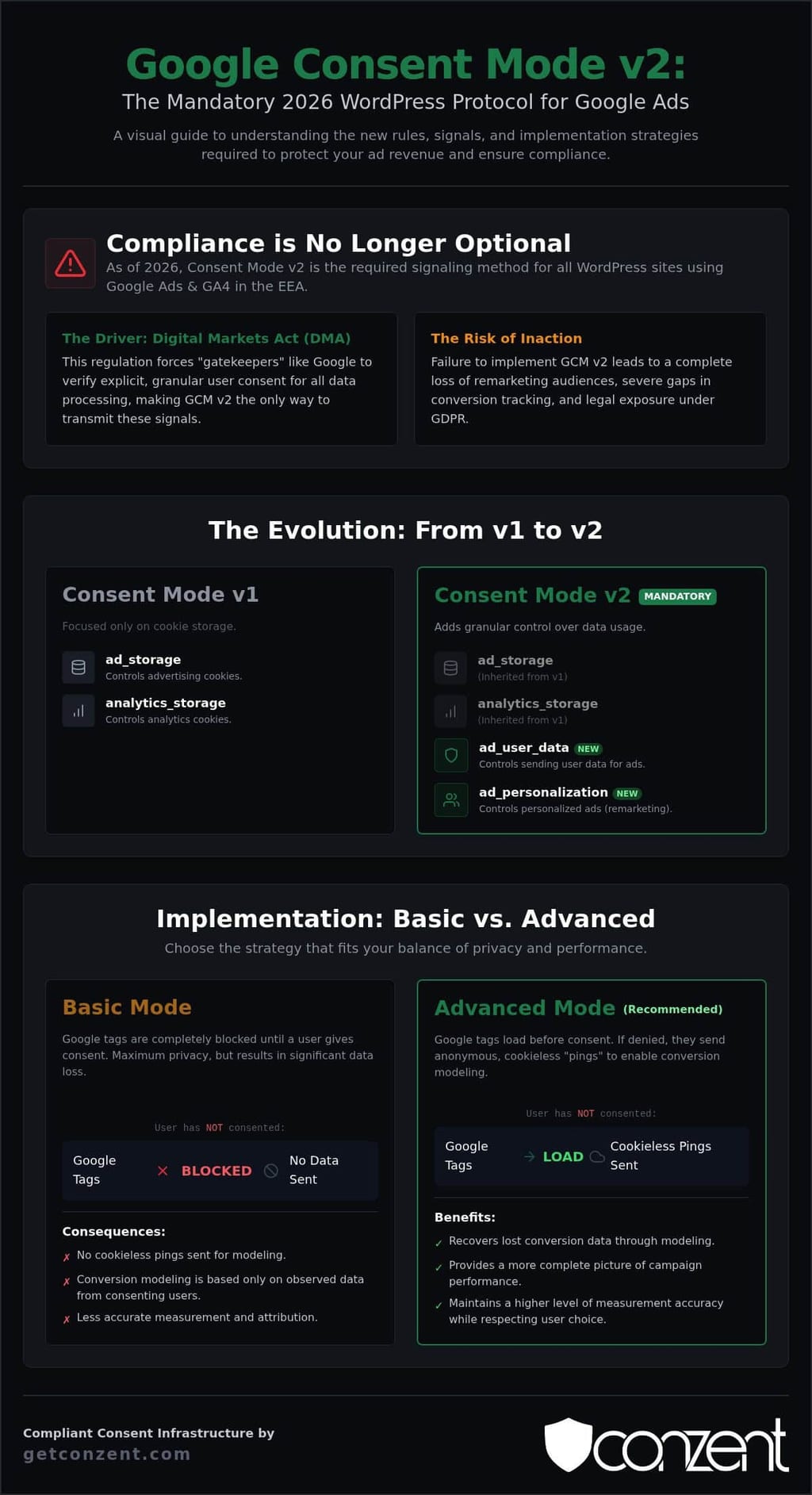
The original version of Consent Mode was relatively simple. It focused on two primary signals: ad_storage and analytics_storage. It told Google whether it could set cookies for ads or analytics. Version 2 goes much deeper. It introduces two entirely new parameters: ad_user_data and ad_personalization. It's not just about whether you set a cookie; it's about what you're allowed to do with the data once it reaches the server.
These signals don't just talk about storage. They talk about intent. Ad_user_data determines if user data can be sent to Google for advertising services at all. Ad_personalization controls whether that data can be used for things like remarketing. In 2026, these signals are the lifeblood of your marketing funnel. Without them, Google simply stops processing the data for those specific purposes.
The Risks of Ignoring the 2026 Deadline
The consequences of ignoring this deadline are immediate and measurable. The 2026 deadline is a hard wall. It's not a suggestion. First, your dynamic remarketing lists in Google Ads will go dark. If Google doesn't receive the ad_personalization signal, it cannot legally add that user to an audience. Your carefully built segments will shrink to zero in days.
Second, your GA4 reporting will become a guessing game. Missing conversion signals lead to massive gaps in your attribution data. You won't know which campaigns are actually driving revenue and which are wasting your budget. Finally, there's the legal reality. Failing to transmit granular consent states creates unnecessary exposure under GDPR. A simple cookie banner is no longer enough. You need an infrastructure that captures and transmits every specific preference with total transparency.
Decoding the New Signals: ad_user_data and ad_personalization
The two new signals introduced in version 2 are not mere technical additions. They represent a fundamental shift in user agency. Think of these signals as the explicit "instruction manual" that travels with every data packet from your site to Google's servers. They tell Google exactly what it can and cannot do with the information it receives. Mapping these correctly within your google consent mode v2 for wordpress setup is the difference between a compliant infrastructure and a legal liability.
How ad_user_data Protects Your Conversion Tracking
This signal acts as the primary gatekeeper. It is a binary choice: the user either grants permission or denies it. When a user selects "granted," Google is permitted to send their data to its advertising services and link interactions to specific user profiles. This is critical for attribution. Without this specific signal, Google cannot bridge the gap between a click and a purchase. This signal is the essential foundation of conversion modeling because it allows Google to fill in the blanks using anonymized data when other users deny consent. You can find the technical specifications for these states in the official Google documentation.
Ad_personalization and the Future of Remarketing
While ad_user_data handles the transmission of data, ad_personalization controls its utility. This signal dictates whether Google can use that data for personalized advertising, such as remarketing or interest-based targeting. For WordPress site owners using WooCommerce, this is the switch that powers your abandoned cart recovery and custom audience building. If a visitor denies this consent, they cannot be added to your remarketing lists, regardless of their other settings. This means your dynamic product ads will fail to reach the very people most likely to buy from you. It is a direct hit to your ROI if not handled with technical precision.
This signal is deeply integrated with the latest IAB TCF v2.3 standards. It ensures that the user's preference for "personalization" is respected across the entire advertising ecosystem, not just within Google’s walled garden. When you implement google consent mode v2 for wordpress, you are essentially translating the user's intent into a language that every ad tech partner understands. Managing these complex requirements shouldn't be a luxury reserved for enterprise firms. You can explore how to deploy these signals effectively by reviewing our managed cloud consent options.
Basic vs. Advanced Implementation: Choosing Your Strategy
Setting up google consent mode v2 for wordpress requires a choice between two distinct technical architectures. It is a strategic decision that balances legal absolute with mathematical probability. You must decide if your priority is total data isolation or the preservation of marketing ROI through modeled insights. This choice will dictate how your WordPress site interacts with every visitor before they ever click a button on your consent banner.
When to Choose Basic Implementation
Basic mode acts as a hard gate for your WordPress site. No Google tags fire and no data packets move until the user explicitly clicks "Accept" on your banner. This is the gold standard for high-compliance environments with strict legal teams. It ensures zero data transfer without consent. This approach provides maximum GDPR safety by removing any ambiguity about data flow. It is a clean, binary system: consent equals data, and no consent equals nothing.
However, this safety comes at a functional cost. Basic mode results in "dark spots" in your analytics. When a user denies consent or simply ignores the banner, that session effectively never happened in the eyes of Google Ads or GA4. Because no signals are sent, Google's AI has no foundation to build on. You lose the ability to model those lost conversions. Your reporting will always underrepresent your actual performance, making it difficult to justify ad spend on specific WordPress pages.
The Revenue Case for Advanced Implementation
Advanced mode offers a more sophisticated path for growth-focused sites. In this configuration, Google tags load before the consent banner appears. If the user denies consent, the tags don't set cookies. Instead, they send "cookieless pings" to Google's servers. These pings are anonymized and contain no personal identifiers, but they communicate that an interaction occurred. This allows you to maintain a more complete view of your ROI without violating individual privacy.
The revenue impact of this approach is significant. Google uses these pings to train its machine learning models, filling the gaps left by non-consenting users. Industry research indicates that this modeling can recover up to 65% of lost conversions in GA4. Simo Ahava provides an in-depth guide to Consent Mode v2 that explains how these signals function at a technical level. Without these pings, your attribution data remains broken and your bidding algorithms operate with incomplete information.
Success in advanced mode requires a platform that manages signals rather than just blocking scripts. The Conzent cookie banner provides the granular control needed to toggle between these states safely. For those focused on the bottom line, using Revenue Impact Analytics allows you to measure the actual financial value of your opt-in rates. You can finally see how much revenue is at stake when implementing google consent mode v2 for wordpress across your digital properties.
Step-by-Step GCM v2 Implementation for WordPress
Implementing google consent mode v2 for wordpress requires more than a simple plugin installation. It demands a precise sequence of technical steps to ensure data flows ethically and legally across your entire measurement stack. You aren't just checking a box; you're building a transparent bridge between user intent and marketing performance. This process ensures that your site respects individual privacy while maintaining the data integrity required for modern advertising.
- Install the Conzent WordPress integration to anchor your consent infrastructure within your site's architecture.
- Define your default consent state using a script in your header or a specialized GTM tag. In the EEA, this must be set to "denied" by default to align with GDPR and DMA requirements.
- Adjust your GA4 and Google Ads tags within Google Tag Manager (GTM). They must be configured as "consent-aware" to ensure they respond dynamically to user choices.
- Confirm that banner interactions trigger the correct updates across all four Google signals: ad_storage, analytics_storage, ad_user_data, and ad_personalization.
- Run a final audit using Google Tag Assistant and browser developer tools to verify that signals are transmitted accurately in real-time.
Configuring GTM for Consent Awareness
Your measurement tags need to know the consent state before they attempt to fire. Use the "Consent Initialization" trigger for your CMP script. This specific trigger ensures the consent framework is active and recognized before any other tag collects a single byte of data. Setting default states to "denied" for all users in the EEA is a non-negotiable step for legal safety. This prevents race conditions where tags fire before the user has made a choice. For specific code snippets and advanced container configurations, refer to Conzent’s GCM v2 compliance guide.
Debugging with Tag Assistant
Verification is the final pillar of a successful setup. Enter Preview mode in GTM and navigate to the "Consent" tab for each event in the summary pane. You should see the "On-page Default" and "Current State" reflecting the user's actual choices. To go deeper, inspect the network requests in your browser's "Network" tab for a parameter named "gcd". This string encodes the status of all four consent signals in a format Google's servers can read. You can spot a "granted" signal in a URL string by identifying the specific character codes within the "gcd" parameter that indicate permission has been explicitly transmitted to Google.
Ready to secure your measurement and protect your ad revenue? Explore our managed cloud consent plans to simplify your WordPress deployment today.
Scaling WordPress Privacy: Managed Cloud vs. Self-Hosted Infrastructure
Most WordPress users treat privacy as a plugin toggle. They install a tool and hope for the best. This approach is dangerous. Traditional plugins often act as black boxes that own your consent data. They lock you into proprietary ecosystems and hide the details of how signals are processed. We believe in a different path. Conzent provides source-available infrastructure that gives you total transparency. You can see the code. You can verify the data flow. You can maintain total control over your visitors' information.
Infrastructure ownership is your best defense against future regulatory shifts. When you own the code, you own the compliance. Our managed cloud solutions provide the speed of SaaS with the sovereignty of self-hosting. You get the best of both worlds. You aren't just implementing google consent mode v2 for wordpress; you're building a resilient digital asset. This isn't about following a trend. It's about securing your technical infrastructure for a future where privacy and performance are inseparable.
The Performance Advantage for WordPress
Site speed is a critical ranking factor. Many consent plugins are heavy and slow. They inject massive amounts of unused code that drags down your Core Web Vitals. Our lightweight, source-available scripts prevent this performance lag by loading only what is necessary. We host our managed cloud in Copenhagen to ensure ultra-low latency for your European traffic. Fast-loading banners reduce the risk of users bouncing before they even see your consent options. Better performance contributes directly to higher SEO rankings and improved ad quality scores. Speed is a technical right, and we treat it as such.
Measuring Impact with A/B Testing
Compliance shouldn't kill your conversion rate. You don't have to choose between legal safety and revenue. Use A/B testing to optimize your banner design for higher opt-in rates. Small changes in copy, button color, or banner placement can lead to significant shifts in user behavior. This testing helps you reclaim the "dark spots" in your analytics we discussed in previous sections. Stop guessing and start using data to balance your google consent mode v2 for wordpress requirements with your growth goals. Trust is not just a value. It is a performance metric for your WordPress site. When users feel respected and informed, they are more likely to grant consent. High opt-in rates are the direct result of transparent communication and efficient technical design.
Future-Proof Your WordPress Measurement
Implementing google consent mode v2 for wordpress is no longer just a technical choice. It's a fundamental requirement for any business that values its advertising revenue and its users' digital rights. You've seen how the Digital Markets Act (DMA) has turned granular signals like ad_user_data into the primary language of the modern web. Moving beyond the limitations of basic "black box" plugins is the only way to ensure your GA4 modeling remains accurate and your remarketing lists stay active.
True compliance isn't found in a simple toggle. It's built on a foundation of transparency and technical efficiency. Whether you choose managed cloud hosting in Denmark or self-hosted open infrastructure, the goal is the same: total ownership of your consent data. You don't have to sacrifice site speed for safety or marketing ROI for ethical standards. It's time to build a measurement stack that respects your visitors and protects your bottom line.
Deploy your compliant Consent Infrastructure with Conzent to secure source-available transparency that is fully GDPR and DMA compliant. You can start building a more resilient, transparent, and high-performing WordPress site today.
Frequently Asked Questions
Is Google Consent Mode v2 mandatory for all WordPress sites?
It's mandatory for any site using Google Ads or GA4 to target users in the EEA and UK. If you don't implement it, you'll lose the ability to capture audience data for remarketing and attribution. While technically voluntary for sites outside these regions, Google's consolidation of data controls makes it a necessary standard for anyone wanting accurate conversion tracking. It's the only way to signal consent to Google's gatekeeper services.
What is the difference between Basic and Advanced Consent Mode?
Basic mode blocks all Google tags until a user grants consent, resulting in zero data transmission for non-consenters. Advanced mode allows tags to load before consent, sending "cookieless pings" if a user denies permission. These pings don't contain personal identifiers. They provide the raw data needed for Google to use AI to model up to 65% of lost conversions in GA4. It's a balance between absolute data isolation and statistical accuracy.
How do I fix Google Consent Mode v2 "not detected" errors in WordPress?
These errors usually stem from a race condition where Google tags fire before the consent framework initializes. You must ensure your CMP script uses the "Consent Initialization" trigger in Google Tag Manager. Check the "gcd" parameter in your network requests to verify signals are actually being sent. If the signal is missing, your banner isn't correctly communicating with the Tag Manager container. Audit your header scripts to ensure no tags load prematurely.
Can I implement GCM v2 without a Consent Management Platform (CMP)?
You can manually code the integration, but it's highly complex and prone to errors. A certified CMP automates the signaling of ad_user_data and ad_personalization parameters. Manually managing these across every WordPress update and regulatory change is a massive technical burden. Using a source-available platform like Conzent gives you the transparency of custom code with the efficiency of a managed system. It simplifies scaling privacy without sacrificing your time.
Does Google Consent Mode v2 replace the need for a cookie banner?
No, it works alongside your banner rather than replacing it. The banner captures the user's choice, while Consent Mode translates that choice into a technical signal for Google's servers. You still need a visible interface to meet GDPR and DMA requirements. Without the banner, there's no way for the user to provide the "granted" or "denied" status that google consent mode v2 for wordpress requires to function correctly.
How does GCM v2 affect Google Analytics 4 data accuracy?
It improves accuracy by enabling conversion modeling for users who deny consent. Without it, these users are invisible to your reports, creating significant gaps in your attribution data. With Advanced implementation, GA4 uses anonymized pings to fill these gaps. This ensures your ROI calculations and bidding strategies are based on a more complete picture of site performance. It's the difference between guessing and making data-driven decisions for your business growth.
Is Conzent compatible with Google Tag Manager for WordPress?
Yes, Conzent is designed to integrate seamlessly with GTM. It uses a dedicated template that handles the complex signaling requirements for google consent mode v2 for wordpress automatically. This integration ensures that your tags remain "consent-aware" and only fire according to the user's specific preferences. You don't have to worry about manual script blocking or broken triggers. It provides a reliable, transparent infrastructure for your entire measurement stack without compromising site speed.
What are the ad_user_data and ad_personalization signals?
These are the two new signals introduced in version 2 to satisfy the Digital Markets Act. Ad_user_data determines if personal data can be sent to Google services for advertising purposes. Ad_personalization controls whether that data can be used for remarketing and interest-based ads. Together, they act as an instruction manual for Google's servers. They ensure that user intent is respected at every stage of the data processing journey across the Google ecosystem.