
How to Explain Cookie Use and Offer Clear Consent Choices

A cookie banner can be brief, but it must make each choice clear. How to communicate cookie usage to users starts with explaining what cookies do and why they’re used, then offering a clear way to accept or refuse non-essential cookies. In the EU, active consent is required before non-essential cookies are placed on a user’s device.
It’s reasonable to ask whether the law requires specific wording. Usually, the key is whether people can understand the cookies’ purposes and make an informed choice, not whether a banner follows a prescribed script. The Information Commissioner’s Office says cookie information should explain purposes, how cookies work, what they’re used for, and the potential consequences of allowing them.
This guide explains what effective cookie text can say, how acceptance and refusal should work, and how a consent banner differs from a Cookies Policy. It also includes examples of wording for common cookie purposes, helping you make disclosures clearer without crowding the first screen with every detail.
Key Takeaways
- Make consent a clear, informed choice, with acceptance and refusal options that are equally easy to find.
- Explain what each cookie category does, why it is used, and whether third parties can access the information.
- Use the banner for a concise explanation and immediate choices; use the Cookies Policy for fuller details.
- Compare banner examples by how clearly they explain purposes and present preference choices, not by appearance alone.
- Review cookie disclosures when your website’s technologies or data uses change, so the information stays aligned with what happens in practice.
Consent must be freely given, specific, informed, and easy to withdraw
Consent works only when people understand their choices and can make them before non-essential cookies run. That means clear information, active choices, and a practical way to change preferences later.
Conditions for Valid Consent
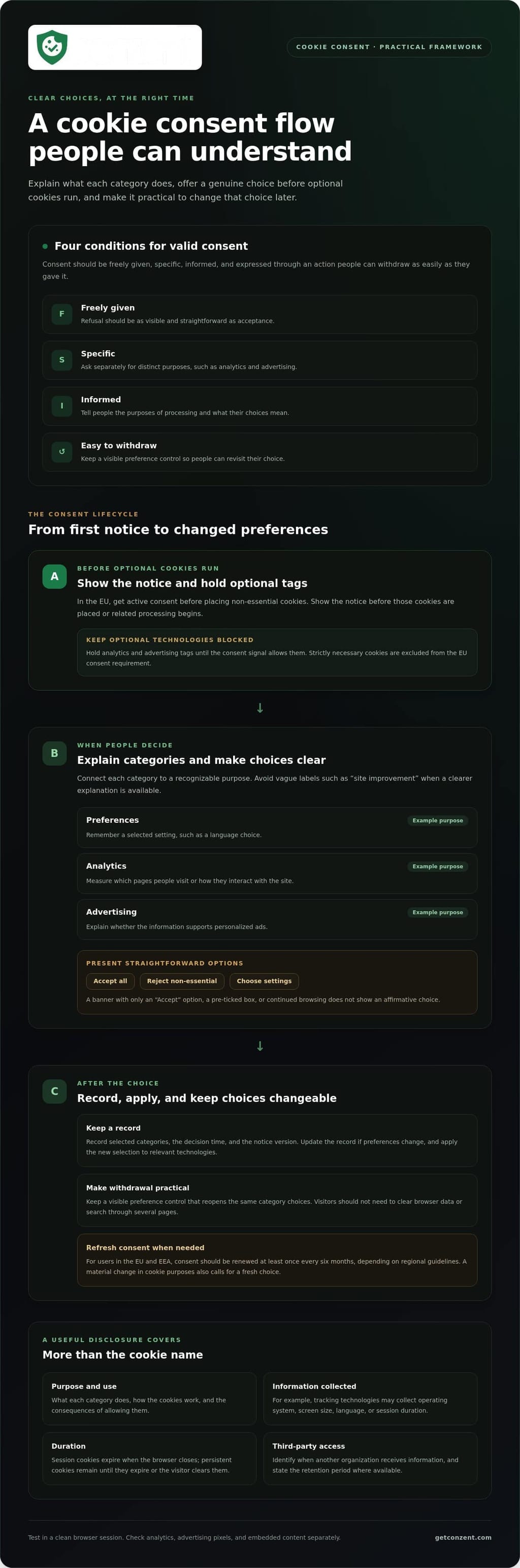
Valid consent is freely given, specific, informed, and expressed through an action that people can withdraw as easily as they gave it. The Information Commissioner’s Office says consent should identify the controller and the purposes of processing. For example, ask separately for analytics and advertising consent instead of combining them under one vague “accept” choice.
A pre-ticked box, continued browsing, or a banner with only an “Accept” button doesn’t show an affirmative choice. Offer clear options such as “Accept all,” “Reject non-essential,” and “Choose settings.” Make refusal as visible and straightforward as acceptance, and provide a persistent settings control so people can revise their choices.
Consent Requirements Across Regions
Cookie consent expectations can vary across the United States. That doesn’t mean one banner model covers every U.S. visitor. In the EU, active consent is required before non-essential cookies are placed; strictly necessary cookies are excluded from that consent requirement.
For a U.S. website with EU visitors, the GDPR and ePrivacy rules affect cookie disclosures by requiring information and prior consent for non-essential cookies. A site shouldn’t rely on a visitor’s U.S. location or default browser settings to treat EU consent as granted. Explain the purposes and offer a genuine choice.
Notice Timing and Consent Renewal
Show the notice before non-essential cookies are placed or related data processing begins. In practice, display the notice on a first-page visit while blocking analytics and advertising technologies until the visitor chooses. Strictly necessary cookies are excluded from the EU consent requirement, but that exception doesn’t justify activating optional tags early.
For users in the EU and EEA, consent should be renewed at least once every six months, depending on regional guidelines. A material change in cookie purposes also calls for a fresh choice. For example, adding advertising cookies to a site that previously used analytics alone changes what visitors are being asked to approve.
Keep a record of each visitor’s choice, including selected categories, the decision time, and the notice version. This helps show what the person agreed to and which wording they saw when they made the choice. If a visitor later changes settings, update the record and apply the new selection to relevant technologies.
Preventing cookies from firing before consent requires control over the scripts that set them. Hold non-essential tags until the consent signal allows them, then test the site in a clean browser session. Check analytics, advertising pixels, and embedded content separately. A blocked banner paired with an active tracking tag defeats the visitor’s choice.
Make withdrawal as easy as acceptance. A visitor who chose “Reject non-essential” shouldn’t have to clear browser data or search through several pages to change that decision. Keep a visible preference control in the site interface and make sure it reopens the same category choices offered in the original notice.
Assessing cookie types, purposes, and refusal options
A useful disclosure connects each cookie category to its purpose and a real choice. Explain what information each technology collects, how long it remains active, and whether another organization can access it. To communicate cookie usage without overwhelming visitors, organize the explanation around what each category does on your site.
Cookie Categories and Purposes
Cookie categories group technologies by function, helping visitors distinguish site features from additional uses. For example, a website might separate preferences, analytics, and advertising instead of grouping everything under “site improvement.” Session cookies expire when someone closes the browser; persistent cookies remain until they expire or the visitor clears them.
Connect each category to a recognizable action. A preference cookie might remember a language choice, while analytics helps measure which pages people visit. Don’t label a cookie “necessary” simply because it benefits the business. Explain its specific function, such as keeping a requested service available or saving a selected setting.
Data Collection Disclosures
A data collection disclosure tells visitors what cookie-related information is gathered and how it’s used. Tracking cookies may collect device details such as operating system, screen size, language, and session duration. The Information Commissioner’s Office says cookie information should explain purposes, how cookies work, what they’re used for, and the potential consequences of allowing them.
Describe the data flow in practical terms. For analytics, say whether a tool records page visits or interactions; for advertising, explain whether it supports personalized ads. Identify third-party access when another organization receives information, and state the retention period where available. Also include pixels or tags if they perform related collection, rather than describing cookie files alone.
Refusal Options and Notice Details
Make it easy for visitors to refuse non-essential categories without navigating a confusing menu. Offer choices such as “Accept all,” “Reject non-essential,” and “Manage preferences,” with controls that clearly name each category. The notice should identify who sets cookies, their purposes and duration, any third-party access, and how visitors can return to their choices.
Use the first notice for a concise overview and leave fuller explanations in the Cookies Policy. “Analytics helps us understand page use” becomes more useful when visitors can open settings to see what that means. Test the refusal path in a browser and confirm that declining a category stops its related technologies from collecting information.
Keep category names consistent across the notice, settings panel, and Cookies Policy. If the banner says “advertising” but settings say “marketing,” visitors may not realize they control the same activity. Before publishing, ask how to communicate cookie usage to users so the labels and controls make sense together. When comparing consent platforms, assess how their controls support clear choices and review pricing information for consent platforms as one part of that evaluation.
Cookie disclosures under privacy laws
Cookie disclosures support transparency, but the applicable rules depend on the visitor and the data use. A clear notice must match what the website’s cookies and other technologies actually do.
Privacy Regulation Requirements
Privacy regulation shapes what websites explain and when they must obtain consent. The European Union’s GDPR Recital 30 clarifies that cookie identifiers are personal data. That matters because an identifier can connect activity to a device or user, even when a website doesn’t display a person’s name.
For EU visitors, the ePrivacy Directive addresses storing or accessing information on a device, while the GDPR governs personal-data processing. EU rules require information and an opportunity to refuse before technically unnecessary data is stored. A shopping-basket cookie needed to provide a requested service is treated differently from an advertising cookie used to track activity.
Other frameworks take different approaches. The CCPA (CPRA) uses an opt-out system for cookies, with some exceptions. PIPEDA in Canada, Australia’s Privacy Act of 1988, and Brazil’s LGPD are also relevant to cookie disclosures. A website serving visitors across these regions should explain its data practices accurately and avoid treating one notice as a universal legal answer.
Risks of Unclear Disclosures
Unclear disclosures create a practical compliance risk: visitors may not understand what they’re agreeing to, weakening the basis for relying on consent. For example, a notice that says “improve your experience” while enabling advertising profiles doesn’t explain the actual function. The GDPR requires transparency about personal-data processing, and the European Union’s Recital 30 identifies cookie identifiers as personal data.
Misleading wording can lead to complaints, scrutiny, or enforcement under the rules that apply to the site. There is no single cookie-text penalty that applies across the United States, EU, Canada, Australia, and Brazil; consequences depend on the applicable law and conduct. Don’t imply that a specific fine automatically follows from a poorly written banner.
Profiling deserves particular care. If cookies build an advertising profile from browsing activity, describe that purpose plainly instead of hiding it under “personalization.” Explain what information is involved, who may receive it, and how visitors can refuse that use. The notice should reflect the technologies running on the site, not just the wording the team intended to publish.
Review the disclosure whenever the site adds a tag, changes a cookie’s function, or introduces a third party. Compare the live browser behavior with the notice and policy. If a shopping feature uses one cookie while analytics tools collect browsing patterns, describe those purposes separately. Specific, accurate wording helps visitors understand the privacy trade-offs and lets teams spot mismatches before they persist.
What cookie text is and how it differs from a Cookies Policy
Cookie text is the short wording in a banner or pop-up that introduces a website’s cookie use and gives visitors an immediate choice. A Cookies Policy is the fuller reference, explaining the technologies, purposes, and preference controls in greater detail. The banner starts the conversation; the policy provides the depth.
For example, a banner might say, “We use analytics cookies to understand how visitors use this site,” then offer “Accept,” “Reject,” and “Manage preferences.” The linked policy can explain what information analytics tools collect, how long it’s retained, and whether a third party receives it. The Information Commissioner’s Office says cookie policy text should be full and clear enough for people to understand the potential consequences of allowing cookies.
Keep the two pieces connected. Place a clearly labelled “Cookies Policy” link beside the banner’s choices, where visitors can find it before deciding. The link should open the relevant policy directly, not a general privacy page that leaves people searching for cookie details. A privacy notice can explain broader personal-data practices, while the Cookies Policy focuses on cookies and similar technologies.
Preference management should work beyond the first visit. A persistent “Cookie settings” control, for example in a website footer, lets visitors reopen their choices and enable or disable categories later. Keep the language consistent across the banner, settings panel, and policy. If the banner calls a category “analytics” but the policy calls it “performance,” visitors may not realize both labels refer to the same use.
Update the policy when the site changes its tracking technologies, adds a new purpose, or gives another organization access to cookie information. For instance, adding an advertising tag to a site that previously used analytics changes what visitors need to know. Review the live site as well as the written policy: a document that lists removed cookies or omits a newly added tool no longer describes the actual experience.
A practical review compares each listed cookie or technology with its purpose, duration, provider, and preference setting. Then check that the banner’s short explanation still matches those details. If visitors can reject analytics in settings, test that the related tools stop collecting information. This keeps the policy useful, the banner accurate, and each choice connected to the technology it controls.
Examples of cookie banners from websites
Good cookie banners use plain wording, readable controls, and choices that work with a keyboard or screen reader. The examples below are illustrative patterns, not quotations from specific websites. Each shows how wording can explain a purpose and make settings easier to understand.
Example: a small publisher. “We use essential cookies to keep this site working and optional analytics cookies to understand page visits. Choose ‘Accept all,’ ‘Reject optional,’ or ‘Manage settings.’” This separates necessary functions from optional measurement. “Manage settings” can open categories with short explanations, rather than leaving visitors to interpret broad labels such as “performance.”
Example: an online shop. “We use essential cookies for your shopping basket. With your permission, analytics cookies help us understand site use, and advertising cookies may support personalized promotions.” Separating the purposes helps visitors distinguish a requested shopping function from tracking. If third-party cookies are involved, explain that access in the expanded settings or policy, not through an unclear phrase like “selected partners.”
Example: a video or media site. “This video may use cookies from its provider. Choose whether to enable the video, or continue without it.” This explains why an embedded feature may behave differently before consent. A session cookie that supports a requested feature shouldn’t be described as serving the same purpose as advertising tracking.
Across these examples, strong wording names the purpose, explains the practical effect, and makes refusal straightforward. Avoid button pairs such as “Accept” and “Learn more” when the second option doesn’t let visitors refuse. Keep button labels specific. Make controls easy to select, preserve visible keyboard focus, and use sufficient contrast so people can read and operate them.
Accessibility also depends on behavior. When a banner opens, screen-reader users should be able to identify its message and controls; keyboard users should reach each choice without getting trapped. After someone saves settings, confirm the selection in clear language. A data protection notice should remain available, but it shouldn’t replace a direct choice in the banner.
Test the examples on a phone and desktop, with keyboard navigation and a screen reader. Confirm that “Reject optional” blocks the related technologies, while essential site functions remain available. If you’re assessing consent tools for clear banner choices and settings, review consent platform options as part of your evaluation.
Conzent: Managed Cloud Consent Platform
Conzent’s Managed Cloud Consent Platform helps websites manage cookie consent with customizable banners. It’s a practical option when your website needs a consistent way to present consent choices and manage preferences.
Teams that want to run the platform on their own infrastructure can use Conzent’s Self-Hosted Open Consent Infrastructure. Consent A/B Testing compares banner variations, while Revenue Impact Analytics helps assess how consent choices relate to revenue. These tools support implementation and measurement; they don’t replace clear disclosures or informed choices.
If you’re ready to explore a consent platform for your website, visit Conzent.
Make clear consent part of your next release
A practical approach to communicating cookie usage starts with treating consent as part of the website experience, not a notice added at the end. Before each release, compare live behavior with what visitors see: do the controls describe the choices accurately, and do the technologies respond to those choices? Make this review part of your publishing process.
Keep the work collaborative. Ask the people who manage analytics, marketing, and site operations to review changes that affect tracking or preference controls. A new tool or changed purpose can alter what visitors need to understand. Clear ownership helps keep disclosures aligned as the website evolves.
If you’re planning to improve how your site manages consent, explore Conzent’s consent platform options and consider which approach fits your needs. Clear choices are practical digital respect. You can make them part of every visitor’s experience.
Frequently Asked Questions
Are There Legal Requirements for Cookie Texts?
There’s no single cookie notice wording that applies everywhere; requirements depend on the visitor’s location and the technologies used. For U.S. visitors, the CCPA (CPRA) uses an opt-out system for cookies, with some exceptions. If your site serves people in the EU, account for EU consent and disclosure rules as well. A global banner shouldn’t assume every visitor faces the same choices.
Are there any exemptions?
Yes. Under UK PECR, consent isn’t required for cookies used solely to transmit a communication or strictly necessary to provide a service someone requested. A cookie that keeps a shopping basket available can serve that requested function. This exemption is narrow: an analytics or advertising cookie doesn’t become necessary simply because it supports business operations. Describe exempt cookies clearly, and keep them separate from optional categories.
Do the rules still apply if the data is anonymous?
Yes, cookie rules can still apply when information is anonymous. Under UK PECR, the rules apply even if cookie data doesn’t identify a person. For example, a site shouldn’t assume an analytics cookie is exempt just because its reports show aggregated visitor counts. Before deciding how to disclose it, assess what the cookie stores or accesses, its purpose, and the rules in the relevant jurisdiction.
How can I balance compliance with user experience in my cookie text?
Keep the first message focused on what visitors need to decide, then put technical details in the linked policy or settings panel. For example, a travel site can briefly distinguish cookies that remember a currency selection from optional audience measurement. Use readable contrast, descriptive button labels, and keyboard-accessible controls. Test the banner on a narrow phone screen to ensure choices remain visible without scrolling through a wall of text.
Is cookie text required by data privacy laws?
Privacy laws don’t generally prescribe one exact banner script, but they can require transparency about data processing and cookie use. The GDPR and ePrivacy rules address how cookies are handled and disclosed, rather than providing universal text to copy. A notice can explain those practices, but it can’t make a cookie compliant if the website’s actual behavior contradicts its wording.
What are Some Other Examples of Valid Cookie Texts?
For a language selector, try: “We use a preference cookie to remember your selected language.” For an embedded map: “Loading this map may allow its provider to set cookies. Choose whether to load it.” These are starting points, not universal templates. Adjust each statement to match the technology, information involved, and choices visitors can actually make on your site.
What counts as consent?
Consent is an intentional, informed action tied to a clear purpose, such as selecting “Allow analytics” in a settings panel. A visitor who keeps browsing hasn’t necessarily agreed, and a preselected checkbox doesn’t show an active choice. If a site asks permission for advertising, its controls should make that purpose clear instead of bundling it invisibly with unrelated functions.
How should websites explain necessary, analytics, and advertising cookies?
Describe each category by the task it performs. Necessary cookies might preserve a signed-in session; analytics cookies can measure how visitors move between pages; advertising cookies may support ad selection or measurement. If a third party sets a cookie, explain its role in the relevant category details. Don’t rely on labels alone: a short example helps visitors understand what enabling or refusing each category changes.