
Granular Cookie Consent Options: A Practical Guide to Clearer Choices

What if clearer cookie choices meant fewer toggles, not more? Granular cookie consent options work best when each choice maps to a clear purpose, such as analytics or advertising, instead of asking visitors to decide about every cookie individually. A single accept-or-reject button can hide meaningful distinctions. An interface crowded with controls can obscure them just as easily.
The challenge is to give people useful control without making decisions harder to understand. Cookie categories, processing purposes, and vendor choices are related, but they aren’t interchangeable. Start by deciding which distinctions matter to visitors, then present those choices in plain language.
This guide explains what granular consent means in practice, how to choose an appropriate level of detail, and how to document and improve the choices your interface presents. You’ll compare common control approaches and learn how testing and consent records can support a more transparent process. Conzent provides implementation infrastructure, including an audited IAB TCF v2.4 consent platform, but no interface can promise compliance on its own.
Key Takeaways
- Build granular cookie consent options around clear purposes and the technologies your site actually uses, rather than copying a generic category list.
- Choose the right level of detail: a simple summary, category controls, or vendor-level choices, based on what visitors need to understand.
- Use a five-step process to move from a technology inventory to ongoing review, and test that consent choices work as intended.
- Keep a timestamped record of visitor choices, including relevant category and consent-string details, to support your documentation process.
- Explore how Conzent’s customizable banner, with 9 layouts, dark and light themes, and 86 supported languages, can support a clear consent interface.
What Granular Cookie Consent Options Actually Let Visitors Choose
A consent screen should help visitors understand what they’re agreeing to, not make them decode a technical inventory. A single “Accept all” control is quick, but it doesn’t show whether someone is agreeing to analytics, personalized advertising, or another distinct use. More detail can make choices clearer, provided the interface explains them in language people can use.
Granular cookie consent is an interface approach that lets visitors make distinct choices about specific purposes for processing information. It doesn’t mean displaying a switch for every cookie. A familiar HTTP cookie is one way a website can store or access information, but a visitor’s meaningful decision is usually about what that information is used for.
Granular Consent Versus One General Choice
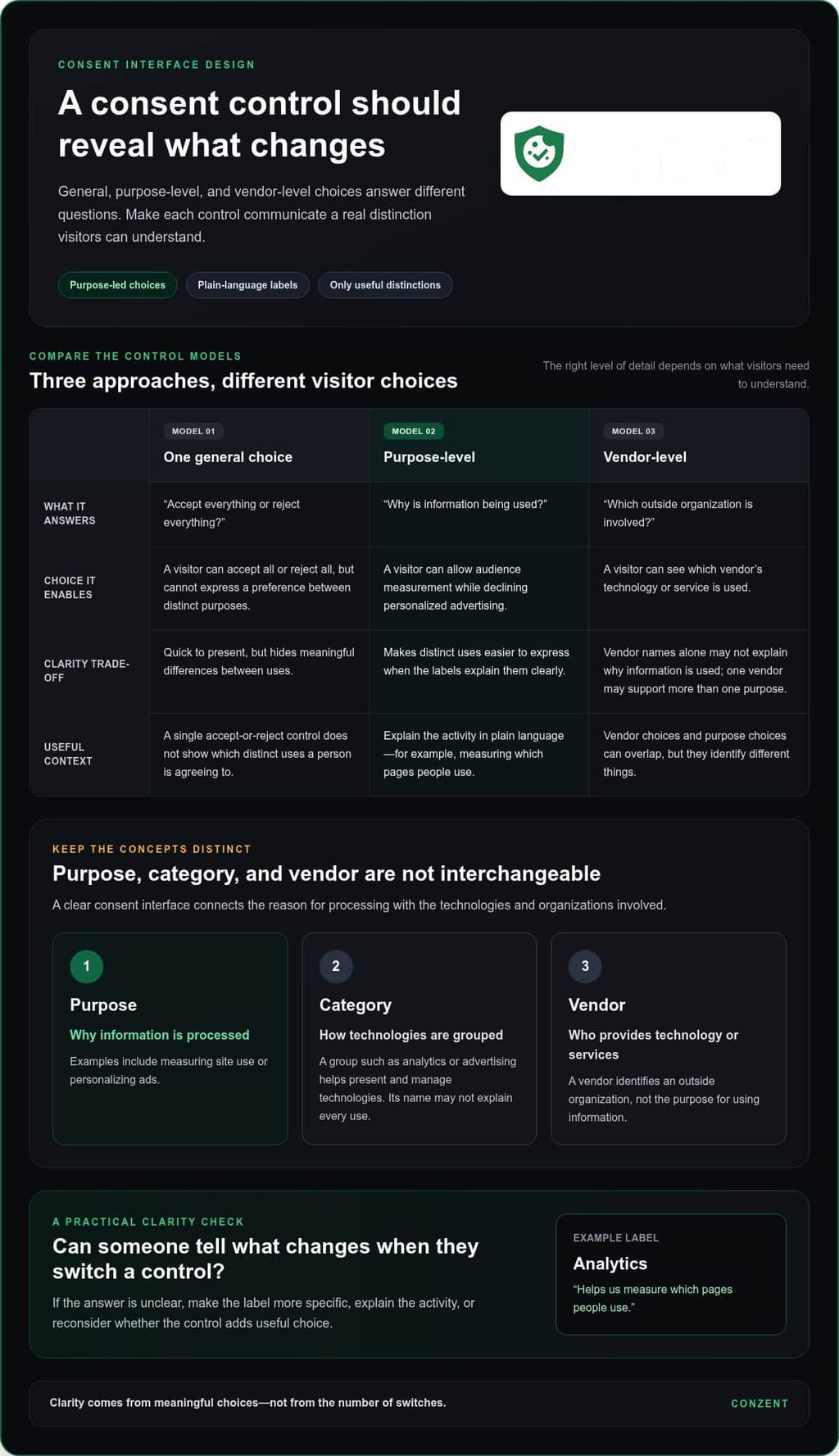
Purpose-level choices help visitors understand what accepting or declining an option means. For example, a settings panel might let someone allow audience measurement while declining personalized advertising. A blanket control hides that distinction: visitors can accept everything or reject everything, but can’t express a preference between those purposes.
Use a straightforward test: can someone tell what changes when they switch a control? If the label says “Analytics,” explain the activity in plain language, such as measuring which pages people use. Don’t assume every website needs the same categories. Build the structure around the site’s technologies and documented uses.
Purpose, Cookie Category, and Vendor Are Different Concepts
A purpose describes why information is processed. “Measure site use” or “personalize ads” gives visitors more context than a technical label alone. A cookie category, such as analytics or advertising, groups technologies for presentation and management, but the category name doesn’t necessarily explain every use within it. One category may cover several technologies, and a technology’s name may not make its purpose obvious.
A vendor is a separate layer: an outside organization whose technology or services are used on the site. A vendor-level control identifies who is involved; a purpose-level control identifies why information is used. These views can overlap. A vendor may support more than one purpose, so presenting vendor names alone may not explain the choices visitors are making.
Keep the interface focused on distinctions that help people decide. For each proposed control, ask: what purpose does it describe, which site technologies support it, and can the label explain the choice without specialist terms? If two controls lead to the same practical outcome, separate toggles may add effort without adding clarity. If one control bundles unrelated uses, visitors may not know what they’re accepting.
Clear interface design supports a careful consent process, but it doesn’t resolve legal questions by itself. The appropriate purposes, categories, and controls depend on the site’s actual processing and applicable requirements. Document those decisions, then make the visitor-facing choices match them. Clarity isn’t about the number of switches. It’s about whether each choice communicates a real, understandable distinction.
How to Structure Cookie Consent Categories Around Clear Purposes
Build categories from your site’s actual technologies and documented uses, not a template copied from another website. A useful category model connects each technology to the service it supports, the reason it processes information, and the visitor-facing choice that controls it. This gives your team a traceable basis for the interface and helps prevent unrelated activities from being bundled under a vague label.
Map Trackers to Their Purposes Before Designing Controls
Start with an inventory of cookies and other tracking technologies. Record where each appears, which service it’s associated with, what it does, and which purpose it supports. An auto-scan can help identify technologies, but treat the results as a starting point. For example, a scan may detect an analytics cookie; your team still needs to confirm where it runs and how the site uses the resulting information.
Conzent’s auto-scanning uses a database of 50,000+ known cookies to make discovery more systematic. Detection isn’t a legal decision, though. Check findings against your site configuration and document your reasoning. A cookie’s name or technical function alone doesn’t establish its legal basis or determine which category it belongs in.
Write Category Labels Visitors Can Understand
Translate internal terms into short, direct labels. “Audience measurement” is more useful than an internal system name; a short description can explain that it helps you understand which pages visitors use. Keep the wording consistent between the banner summary and detailed settings. A control shouldn’t change meaning as someone moves through the interface.
For each proposed category, answer three questions: what purpose does it cover, why are the associated technologies used, and what will the visitor’s choice affect? If the answer combines unrelated activities, split the category or improve its explanation. If it describes the same activity twice, simplify it.
Separate essential site functions from optional purposes only when that distinction is supported by the site’s legal basis and relevant requirements. Don’t classify a technology as necessary just because your team considers it useful. Jurisdiction and context can matter, so use Conzent’s GDPR compliance guidance as implementation context, not as a substitute for reviewing the rules that apply to your site.
Then connect each optional control to the technologies it governs and any downstream signals they trigger. If someone declines a purpose, the related technologies and integrations should respect that choice. Keep a mapping record alongside the interface copy so a change to a tool, service, or purpose prompts a review of the affected control.
That structure makes granular cookie consent options meaningful without multiplying toggles for their own sake. Conzent supports IAB TCF v2.4 and is audited as IAB CMP #446; this technical support doesn’t determine your site’s legal basis. If you’re assessing consent infrastructure for the model you’ve designed, review Conzent’s platform options.
Compare Consent Interface Options Without Adding Unnecessary Toggles
A useful interface gives visitors enough information to make a choice without turning the banner into a technical directory. The right level of detail depends on the purposes your site supports and the choices visitors need to make. Compare approaches by how well they explain those choices, not by how many controls they display.
| Interface approach | Clarity | Visitor effort | Implementation needs | Suitable use cases |
|---|---|---|---|---|
| Concise summary view | Quick overview, but limited detail | Low at first glance | Clear summary copy and a path to settings | A simple first view that links to fuller choices |
| Category-based preference panel | Shows choices by purpose or category | Moderate, depending on the number and wording of controls | Categories mapped to actual site technologies and uses | Sites that need distinct choices without listing every cookie |
| Vendor-level controls | Identifies participating vendors, but can require more explanation | Higher when visitors face a long vendor list | Vendor information and related framework signals | Advertising setups where vendor-level choices are relevant |
These approaches can work together. A concise first view can link to category settings, with more detailed vendor information available where it serves a real need. More toggles don’t automatically create more meaningful control. If two switches produce the same outcome, or their labels don’t explain what changes, extra controls can overwhelm visitors rather than help them.
When Category-Level Controls Are the Practical Starting Point
Category controls can offer meaningful choices without listing every cookie individually. Keep the first view focused on the main decisions, then use expandable explanations to show which activities and technologies sit behind each category. This keeps the interface readable while preserving access to detail. Categories still need to reflect the site’s actual purposes and applicable requirements, not a generic template.
When Detailed Vendor Choices May Be Relevant
Some advertising ecosystems involve multiple vendors and framework-level information. That detail serves a different function from a website’s own plain-language categories. A site might label a control by purpose, while a consent framework records signals associated with vendors and standardized purposes. Don’t present those signals as if they were identical to the site’s own category labels.
Conzent supports audited IAB TCF v2.4, including v2.3 and v2.2. The IAB Transparency & Consent Framework (TCF) provides a standardized way to communicate consent and related signals within participating advertising ecosystems. It’s a technical framework, not a replacement for clear wording or a determination of your site’s legal basis. Conzent’s IAB TCF guidance explains the framework-level context.
Start with the simplest interface that communicates the choices your site needs to present. Add vendor-level detail when it helps visitors understand or manage a distinct choice, not just to make the settings panel look more granular. The goal is control people can understand and use.
Implement Granular Cookie Consent Options in Five Practical Steps
Turn your category model into a working, testable consent flow. These five steps connect what the site does with what visitors see and what your systems honor.
- Inventory technologies. List the cookies, scripts, tags, and connected services used across the site. Note where each runs and who manages it. Use scanning to support discovery, then verify the findings against the live configuration.
- Map each technology to a purpose. Record why it processes information and which visitor choice should control it. Flag unclear uses for review instead of assigning them to a convenient category.
- Design the interface. Write concise labels and descriptions, then connect each control to the technologies and downstream signals it governs. Make the available choices clear in both the banner and preference settings.
- Test the full flow. Verify that optional scripts stay blocked until the relevant consent is given. Include a test where the banner fails to load. Confirm that optional scripts remain blocked in that state, rather than treating a missing banner as permission.
- Review and update. Recheck the inventory and controls when you add or change a script, service, or purpose. Assign someone to review changes so the interface and technical behavior don’t drift apart.
Test the Choice, the Banner, and the Consent Signals
Run through accept, reject, and preference-saving paths on different devices and page states. Change a saved choice and verify that the relevant scripts and signals respond as intended. If your site uses Google services, check that consent signals reflect visitors’ choices. Conzent’s Google Consent Mode v2 guide explains the signaling context.
Keep a record of test results, including the choice made, the page or state tested, and whether the expected scripts ran. This makes failures easier to reproduce and gives the team a clear basis for retesting after updates.
Use Testing and Records to Improve the Experience
Consent logs can create a timestamped audit trail of visitor choices. Records can include a pseudonymised IP address, country, selected category, and TCF string. Use these details to understand what was recorded and when; don’t treat a log as proof that the interface or legal basis is correct.
Conzent’s customizable banner lets teams test changes to copy, layout, and presentation. Its cookie banner features provide a practical starting point for shaping those controls. A/B testing can compare design, wording, and layout, but keep the choices clear and comparable in every version.
Use qualified legal counsel to review jurisdiction-specific interpretations and your site’s legal basis. Consent infrastructure supports implementation; it isn’t legal representation or a compliance guarantee. To compare the available platform plans for your implementation, review Conzent’s pricing options.
How Conzent Supports Clear, Granular Cookie Consent
Clear choices need more than well-written labels. They need implementation infrastructure that connects the banner to the technologies it controls, records visitors’ choices, and helps teams review how the interface works. Conzent brings these functions together, but it doesn’t provide legal advice or guarantee compliance. Your purposes and consent setup still need to reflect your site and the requirements that apply to it.
The customizable banner offers 9 layouts, dark and light themes, and 86 supported languages. Teams can shape its presentation around the choices they’ve defined, rather than forcing visitors through a dense list of technical details. That flexibility supports usable granular cookie consent options, while purpose mapping and legal review remain the basis for deciding what those options should be.
Connect Consent Choices to Scanning and Audit Records
Conzent’s auto-scanning detects and categorizes cookies and trackers using a database of 50,000+ known cookies. Treat scan results as operational input: review them against your live site, confirm what each technology does, and connect it to the purpose and control you’ve documented. A scan supports discovery; it can’t determine your legal obligations or decide which legal basis applies.
Consent logs provide an audit trail of visitor choices. They have a configurable three-year default retention period and support CSV export, giving teams a way to review and retain records for their processes. Logging helps show what was recorded; it doesn’t prove that the banner wording, category structure, or underlying legal assessment is correct. Keep those decisions documented separately and revisit them as your site changes.
Conzent also supports consent A/B testing and revenue impact analysis. Testing can help teams compare banner design, copy, and layout, while analysis can help them assess consent’s relationship to revenue. Keep visitors’ choices clear in every version. A design change shouldn’t hide a control or blur what a choice means.
Choose a Deployment Path That Fits Your Team
Conzent supports audited IAB TCF v2.4 and is IAB CMP #446, with support for v2.3 and v2.2. This provides technical infrastructure for teams using the framework; it isn’t a substitute for legal review or a promise that a particular configuration meets every applicable requirement.
The platform is open source under the Apache 2.0 licence. Teams can use the managed cloud platform or self-host the infrastructure for free, with unlimited sites and pageviews. These are different deployment paths for operating the consent platform. Choose based on how your team wants to manage its implementation, then keep responsibility for the site’s choices, testing, and review clear.
To assess which setup fits your consent workflow, compare Conzent plans and deployment options.
Make Consent Choices Part of Your Ongoing Practice
Your consent interface shouldn’t be a one-time setup. As your site changes, revisit whether each choice still reflects how information is used and whether visitors can still understand what they’re selecting. Treat clear consent as an ongoing practice, with a named owner and a straightforward process for reviewing changes.
That approach keeps granular cookie consent options connected to real decisions, not just a collection of settings. Start with the choices your visitors need to make, then choose implementation infrastructure that fits how your team wants to manage them.
Compare Conzent plans and deployment options to find a practical fit for your consent workflow. Clearer choices start with a clear process: map your site’s purposes, connect each control to the technologies it governs, and review the setup as your site changes.
Frequently Asked Questions
Is granular cookie consent required under GDPR?
Not every cookie automatically requires consent under GDPR. The appropriate approach depends on what information is processed, the purpose, the legal basis, and other rules that apply to your site. For example, a technology used for one function may raise different questions from one used for advertising. Map the actual processing instead of relying on a banner template, and seek qualified legal advice about your specific circumstances.
Can visitors reject some cookie categories and accept others?
Yes. Category-level controls can let visitors accept one purpose and reject another when the categories reflect the website’s actual uses. For example, someone might allow audience measurement while declining personalized advertising. The available granular cookie consent options should match the site’s technologies and legal basis. These choices aren’t the same as vendor-level signals, and there’s no single category model that fits every website.
How many cookie consent options should a website offer?
There’s no universal number that works for every website. Offer enough distinct choices to explain meaningful purposes, but don’t create arbitrary toggles that make settings harder to use. Start with a current inventory of trackers and the processing each supports. Then use labels visitors can understand. If two controls don’t represent distinct choices, combining them may make the interface clearer.
What is the difference between granular consent and cookie categories?
Cookie categories group technologies or activities; granularity describes whether visitors can make distinct choices between them. A category such as analytics can support a separate choice if it represents a clear purpose on the site. But a label alone doesn’t make the choice meaningful. Document which technologies each category covers, what purpose they serve, and how the visitor’s selection affects them.
Can a cookie banner offer granular choices without slowing down a website?
It can, but performance depends on the implementation and should be tested on your actual site, including its scripts and page layouts. Conzent documents a banner script load time under 50 ms, but that isn’t a guarantee for every configuration or page. Test layout stability as well as loading, and verify that optional trackers stay blocked until the relevant consent is given.
What happens if a visitor changes their cookie consent later?
A preference interface should let visitors return and update their choices. Your site should then apply the latest selection to the relevant technologies and consent signals. For example, if someone withdraws an earlier analytics choice, test that the associated behavior changes rather than relying on the updated label alone. Check that saved preferences and consent records also reflect the visitor’s latest selection.
Does IAB TCF provide granular cookie consent by itself?
No. IAB TCF supports framework-level vendor and purpose signals, while your website’s interface explains its own processing in language visitors can understand. Conzent is audited as IAB CMP #446 and supports IAB TCF v2.4, including v2.3 and v2.2. Framework support doesn’t replace clear interface design or review of the legal obligations that apply to your site.