
SPA Consent Management: A Practical Guide

In a single-page app, consent can fail after the first page load, even when the banner worked perfectly. That’s the central challenge of consent management for single page applications: route changes update the view without reloading the page, so tracking scripts and consent checks may not run when you expect them to.
If a tag fires on a new route before the app applies the visitor’s choice, an initial banner setup isn’t enough. Consent needs to stay in sync with application state, navigation, and any later change to the user’s preferences.
This guide walks through a practical implementation sequence, from setting the initial consent state and controlling scripts to handling route transitions. You’ll also find a repeatable way to test accepting, refusing, changing a choice, and navigating between views. Finally, we compare custom code with a consent management platform so you can assess which approach fits your stack and operational needs.
Key Takeaways
- Learn why showing a consent banner on initial load doesn’t confirm that choices persist across SPA routes.
- Trace how stored preferences, application state, and tag execution need to work together so navigation doesn’t bypass a user’s choice.
- Use a practical workflow to test consent on initial page loads and client-side navigation, including changes to user preferences.
- Compare custom code and a consent management platform by ownership, maintenance, integrations, and testing needs.
- Assess consent management for single page applications against your team’s SPA behavior, hosting, update, and measurement requirements.
Why consent management for single page applications needs more than a banner
A single-page application (SPA) updates its views without loading a new browser document for every navigation. A visitor might move from a product page to checkout while the app changes the URL and content in place. Although the browser hasn’t performed a full reload, the application may still record a virtual page view or run route-specific code.
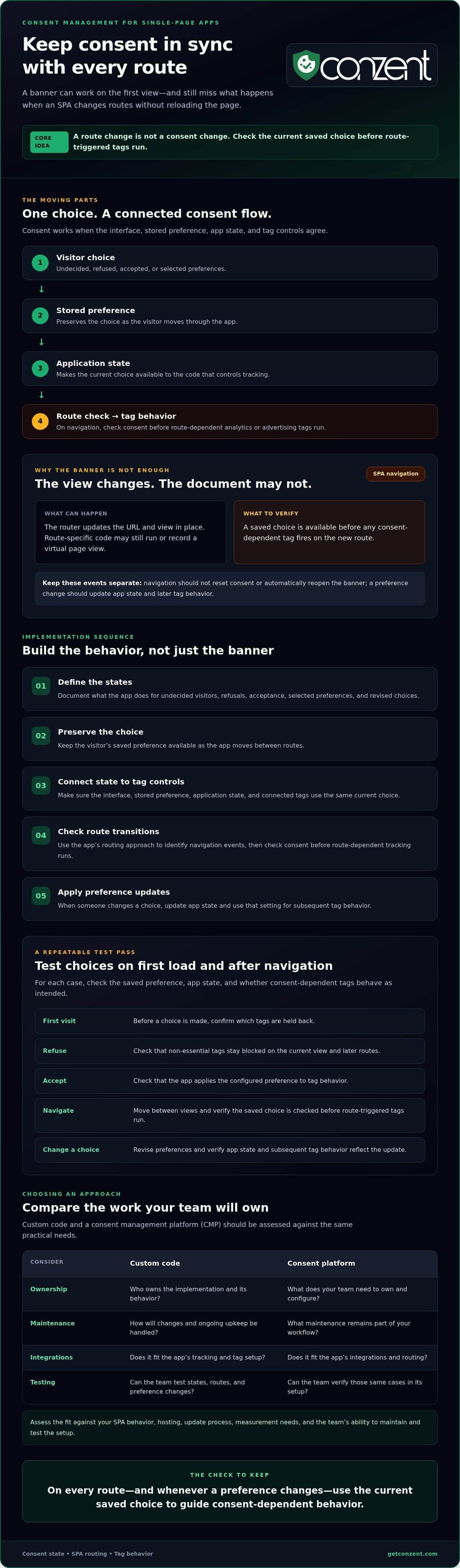
That creates three separate implementation concerns: what choice the visitor made, how the app stores and shares that choice, and which tags are allowed to run. Showing a banner once confirms only that the interface appeared. It doesn’t prove that tags respect the saved choice on later routes or that a changed preference affects tag behavior. A Privacy Policy can explain an organization’s data practices, but it doesn’t show whether the SPA enforces consent in its code.
Definition: Consent management for single page applications is the process of keeping a visitor’s consent choice aligned with application state, route changes, and tag behavior, not simply displaying a banner on the first view.
What changes when an SPA navigates between views?
In many SPAs, a router handles navigation by replacing part of the interface rather than requesting a fresh document. The implementation varies by framework and app, so check what your own router and tracking setup do. Analytics may send a virtual page view, and a route-specific component may initialize a tag, even though the banner doesn’t reappear.
A URL or view change is not itself a consent-state change. The visitor’s saved preference should remain available as the app moves between routes. Treat navigation and consent updates as separate events, then make route-triggered tracking check the current preference before it runs.
Which consent states and behaviors should teams define?
Document the states your implementation needs to handle. At minimum, distinguish an undecided visitor from someone who has refused, accepted, or selected specific preferences. Also define what happens when that person revises their choice. The consent interface, stored preference, application state, and tag controls should agree.
Use a behavior table or short specification to answer these questions:
- First visit: What happens before the visitor makes a choice, and which tags are held back?
- Refusal: How does the app prevent non-essential tags from running on the current view and later routes?
- Acceptance: Which tags can run under the configured preference, and how does the app apply that choice?
- Updated preferences: How does a changed choice reach application state and affect tag behavior?
These decisions make consent testable and reveal gaps a banner-only check can miss. For example, a route might trigger tracking before the app reads a saved choice, or a changed preference might update the interface without changing tag behavior.
How consent state and tracking interact with SPA route changes
Consent works only when each part of the implementation agrees. The consent interface records the visitor’s choice. A storage layer preserves it. Application state makes it available to the code that controls tracking. Tags then use that state to determine whether they can run. If these parts fall out of sync, the banner can show one choice while a route-triggered tag behaves as if no choice exists.
Keep these responsibilities distinct. The consent choice should persist as the visitor moves through the app, but a route change shouldn’t reset it or automatically reopen the banner. If someone changes their preference, update the state and apply the new setting to subsequent tag behavior. Don’t imply that this can undo data already collected or sent.
Rule of thumb: Re-evaluate consent-dependent behavior when the app changes routes or the visitor changes preferences, using the current saved choice each time.
How should consent be handled after client-side navigation?
Use the application’s routing approach to identify meaningful navigation events, such as moving from a product view to checkout. After a route change, check the current consent state before firing route-dependent analytics or advertising tags. This doesn’t mean showing the banner again on every view. Frameworks expose navigation events differently, so verify the right event and timing in your app’s documentation. Salesforce also outlines SPA tracking and consent use cases.
How do consent signals reach analytics and advertising tools?
Connected tags need a consistent signal that reflects the visitor’s current choice. The CMP or consent logic captures the preference; the integration then passes the relevant signal to each supported tool before it runs or updates tracking behavior. Check that route-triggered events use the same current state as tags initialized on the first view.
Google Consent Mode v2 communicates consent states to Google services. It doesn’t collect the visitor’s choice or replace the consent interface. Keep those roles clear, and check your configuration against the Google Consent Mode v2 guidance.
For consent management for single page applications, test the full chain: make a choice, navigate, and confirm the expected tag behavior. Then change the preference and repeat. If you’re weighing platform options, you can review Conzent’s available options as one part of that evaluation.
Compare custom SPA consent code with a consent management platform
There isn’t one right setup for every application. Custom consent code gives your team direct control, but also makes your team responsible for keeping the interface, stored preferences, route behavior, tag integrations, and tests in sync. A consent management platform (CMP) can centralize parts of that work, but you still need to confirm that it fits your app and test its behavior on your routes.
Compare the approaches against the work your team will own:
| Criterion | Custom implementation | Consent management platform |
|---|---|---|
| Consent-state ownership | Your code defines how choices are stored, read, and shared with the app. | The CMP manages consent preferences; your integration must still make them available to the SPA and tags. |
| Maintenance | Your team maintains preference controls, route behavior, and implementation changes. | Review the provider’s update process and identify which app-side integrations remain yours to maintain. |
| Integrations | You build and maintain connections to each required tag or service. | Check whether the CMP supports the integrations you need and how they work with client-side navigation. |
| Testing | Your team designs and runs tests for every relevant state and route. | The CMP may centralize configuration, but test the complete SPA flow rather than assuming the platform handles it automatically. |
When can a custom consent implementation make sense?
Custom code may suit a team that understands its routing and tag architecture and can assign clear ownership for ongoing maintenance. Before choosing it, confirm who will update the preference interface, preserve choices across navigation, review implementation changes, and test acceptance, refusal, and revised preferences. Custom code can implement your chosen behavior; it doesn’t, by itself, establish legal compliance. For a separate overview, see the GDPR consent guidance.
When should a team evaluate a CMP?
Consider a CMP if you want a central place to configure the banner, manage preferences, or connect supported tools. Then examine operational fit: Is the source available? Which hosting model fits your team? What updates or support will you need? These are separate questions, not guarantees about SPA compatibility or compliance.
For example, Conzent offers a source-available consent platform in self-hosted and managed-cloud options. Its managed cloud service includes infrastructure maintenance, automatic updates, and analytics dashboards. Compare those responsibilities with your team’s capacity, then check the platform’s current integration guidance and test it in your own SPA. The right approach to consent management for single page applications is the one your team can maintain and validate across its routes, tags, and user choices.
How to implement and test consent management across SPA routes
A reliable consent setup needs more than a successful banner test. Use a workflow that checks what happens before and after navigation, then keep a record of the results. Exact integration steps depend on your app and CMP, so verify framework-specific events and APIs against their current documentation.
- 1. Map routes: List key views and note where analytics or advertising tags may run, including on route entry.
- 2. Configure consent: Define the available choices and expected behavior for each. Confirm how the app reads and retains a visitor’s preference.
- 3. Connect tags: Make sure each consent-dependent tag receives the appropriate state before it runs or sends an event.
- 4. Test the flows: Test a fresh page load separately from client-side navigation. Repeat with different choices and routes.
- 5. Monitor changes: After app, tag, or CMP updates, rerun the relevant checks and record any behavior that changed.
Build an SPA consent test matrix
For each key route, test both direct entry and navigation from another view. A route that works after a fresh load may behave differently when the router changes the view without reloading the document. Record the expected tag behavior and what you observe, using the browser tools your team already relies on.
- Before a choice: Check the initial state and confirm tags behave as configured.
- After refusal: Verify the choice remains in effect on direct entry and later navigation.
- After acceptance: Confirm the expected tags and events run on the current view and subsequent routes.
- After changing preferences: Check that the updated choice affects later tag behavior.
- After browser refresh: Confirm the preference persists as intended and the initial-load behavior is correct.
Troubleshoot issues that appear only after navigation
If a tag fires unexpectedly, check whether route handling triggers it before the app can read the current consent state. Also inspect analytics for duplicate page-view events and check whether navigation initializes the banner repeatedly. Neither symptom has a single guaranteed cause, so compare event timing and consent state at each step.
Verify preference persistence and consent signals with your team’s chosen browser and testing tools. For consent management for single page applications, test both what the visitor sees and what the tags actually do. Keep the matrix with your release checks so route or integration changes don’t quietly break expected behavior. To compare Conzent’s available plans and hosting options, review Conzent’s pricing options.
Choose an SPA consent solution that your team can maintain
The right consent setup is one your team can operate, test, and update without losing track of what happens on each route. For consent management for single page applications, assess more than the banner. Confirm how the solution handles client-side navigation, how it connects to your tags, and who owns the work when your app or integrations change.
Questions to ask before choosing a consent platform
- SPA behavior: How does the platform handle route changes and virtual page views? Is that behavior documented, and can your team test it in your application?
- Integrations: Does it support the frameworks, tags, and consent signals you use? Check current compatibility rather than assuming an integration works the same way in every SPA.
- Hosting and updates: Who manages hosting, platform updates, and configuration in each deployment model? Identify what your team still needs to maintain.
- Measurement: Do you need consent-choice testing or analytics to assess revenue impact? Check what the platform provides and how your team will interpret those measurements.
These questions clarify the operational trade-offs. With a self-hosted setup, your team is responsible for hosting and maintenance. A managed service shifts some infrastructure work to the provider, but you still need to verify integration behavior and test within your application.
How Conzent fits into an SPA evaluation
Conzent offers a source-available consent management platform with self-hosted and managed-cloud options. Its capabilities include customizable consent banners, IAB TCF v2.3 integration, Google Consent Mode v2, consent A/B testing, and revenue impact analytics. Evaluate these capabilities against your requirements; they aren’t a promise of native SPA compatibility or a particular result.
Compare the deployment models against your team’s resources. The self-hosting option is available at no charge, while the managed cloud service includes infrastructure maintenance, automatic updates, and analytics dashboards. In either case, check how the current documentation addresses your framework, routing approach, tags, and consent signals. Then test the complete flow on your own routes before making a decision.
Once you’ve checked implementation needs and confirmed the fit, review Conzent pricing to compare the available options. Choose the approach your team can sustain, not simply the one that looks easiest to set up.
Make consent part of every SPA transition
Reliable consent management for single page applications depends on more than showing a banner. Keep the visitor’s choice aligned with application state and tag behavior, then test both initial page loads and client-side navigation. Include refusal, acceptance, preference changes, and refresh in your checks.
Choose an approach your team can maintain. Custom code puts ongoing ownership with your team; a consent management platform may centralize parts of the workflow, but you still need to verify integrations and behavior in your app.
Conzent offers a source-available consent platform, with a self-hosted option available at no charge and a managed cloud service that includes infrastructure maintenance, automatic updates, and analytics dashboards. These are different operational models, so consider which better fits your team’s capacity and needs.
Once you’ve defined your requirements and checked implementation fit, review Conzent pricing and choose an approach for your consent setup. With a clear test plan and a maintainable setup, your team can make consent behavior more consistent across routes and user choices.
Frequently Asked Questions
Does a single-page application need a cookie consent banner?
An SPA may need a consent banner, but its architecture alone doesn’t determine that. Requirements depend on the site’s audience, technologies, and applicable rules. A banner is one way to present choices; it doesn’t by itself ensure that tracking follows them. Review the data and tools your site uses, document the behavior you expect, and seek qualified legal advice for questions about your specific obligations.
How does cookie consent work in a single-page application?
Consent management for single page applications connects the visitor’s choice to the app’s stored preference, application state, and tracking tags. The app records whether the visitor has accepted, refused, or selected preferences, then uses that current state when tags initialize or routes change. A client-side route can trigger analytics without a full page reload, so test that the saved choice remains available and tags follow it.
Do I need to show the consent banner again after every SPA route change?
No, a route change alone usually isn’t a reason to show the banner again. The visitor’s saved choice should remain available as they move between views, and route changes should check that state rather than reset it. Keep a clear way for visitors to revisit their preferences. If no choice has been made, or the visitor chooses to manage preferences, show the interface according to your implementation.
How can I test consent management across SPA routes?
Test a fresh page load separately from client-side navigation. For each key route, check behavior before a choice, after refusal, after acceptance, after changing preferences, and after refreshing the browser. Record the expected result and compare it with observed tag activity. Use your browser’s developer tools to inspect network requests and stored preferences, and verify that route navigation doesn’t produce unexpected tag calls or duplicate page-view events.
Can Google Consent Mode v2 replace a cookie consent banner?
No. Google Consent Mode v2 communicates consent signals to supported Google services; it doesn’t ask visitors to make a choice or replace a consent interface. Your site needs a way to collect and manage preferences, then pass the relevant signals to connected tools. Treat collection and signaling as distinct parts of the setup, and verify that the signals reflect the visitor’s current choice on later SPA routes.
Can a consent management platform work with a single-page application?
A CMP can be used with an SPA, but compatibility depends on the platform, app, routing approach, and integrations. Before choosing one, check its current documentation for client-side navigation, supported tags, and consent signals. Then test direct route entry and in-app navigation with different preferences. Don’t assume that a platform’s banner working on initial load proves its consent behavior works throughout your application.
Will adding consent management slow down my SPA?
It depends on the implementation, scripts, and how they load. A consent interface and its supporting code add work that can affect performance, while the timing of analytics and advertising tags also matters. Measure your app before and after implementation under comparable conditions. Check page-load metrics and route transitions, and review which scripts load, when they load, and whether any are initialized more than once.