The Ultimate Website Cookie Compliance Audit Checklist (2026 Edition)
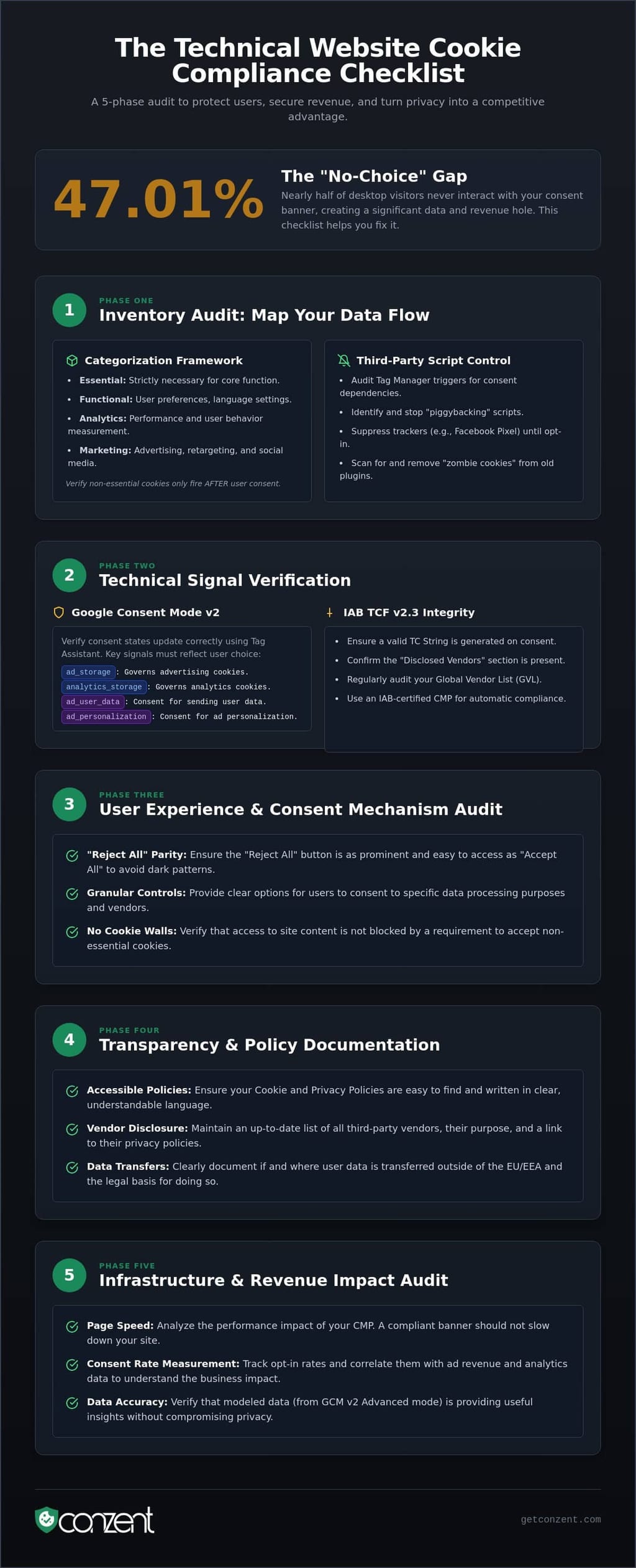
Nearly 47.01% of your desktop visitors never even touch your consent banner, leaving a massive hole in your data and your revenue. This website cookie compliance checklist addresses this "No-Choice" phenomenon directly. You've likely heard that strict compliance means sacrificing growth, or that complex technical standards are barriers to success. We disagree. Compliance is not a decorative UI widget; it is a fundamental technical infrastructure that protects your users and your bottom line simultaneously.
This guide provides the actionable framework you need to verify your tracking signals and maintain legal standing without losing ad revenue. We've built a comprehensive, technical audit that moves past the surface level to ensure every signal is accurate and every vendor is disclosed. You'll learn how to navigate IAB TCF v2.3 requirements, optimize for the latest CCPA updates, and implement a pass/fail system that turns privacy from a liability into a competitive advantage.
Key Takeaways
- Map your data flow to stop unmanaged scripts. Identifying trackers that load before consent is the first step toward genuine digital rights.
- Use this website cookie compliance checklist to verify technical signals like Google Consent Mode v2 and IAB TCF v2.3.
- Audit your interface for "Reject All" button parity. Ethical design prevents regulatory scrutiny and builds long-term user trust.
- Measure the revenue impact of your consent rates. Don't let compliance slow down your page speed or sacrifice data-driven growth.
Phase 1: The Inventory Audit – Mapping Your Data Flow
Visibility is the foundation of digital ethics. You cannot govern what you cannot see. A professional website cookie compliance checklist begins with a rigorous inventory of every script and tracker on your domain. This isn't a surface-level check of your marketing deck. It is a deep-scan of your actual production environment. According to 2026 data, 92% of the top one million websites still rely on third-party cookies for tracking, yet many site owners don't know exactly which scripts are firing at any given moment.
Start by identifying every active HTTP cookie and local storage item. Many sites suffer from "zombie cookies." These are trackers left over from retired marketing campaigns or legacy plugins. They serve no business purpose but create significant legal liability. You must also map data transfers to "third countries" outside the EU or EEA. If your data crosses borders, your documentation must reflect it clearly. Transparency is a technical requirement, not a suggestion.
Categorization Framework
Compliance requires clarity. Every tracker must fall into a specific category: Essential, Functional, Analytics, or Marketing. "Essential" is a narrow definition. It covers security, load balancing, and core site features. It does not cover "essential" marketing tools. If a cookie isn't strictly necessary for the site to function, it isn't essential. Verify that no non-essential cookies fire on the initial page load. Silence is the default state. Consent is the only trigger for data collection.
Third-Party Script Control
Most data leaks happen through third-party "piggybacking." This occurs when one authorized script calls another unauthorized tracker without your knowledge. You must audit your Tag Manager triggers to ensure they are tied to explicit consent variables. Scripts like the TikTok or Facebook Pixel must remain suppressed until the user opts in. Managing these technical dependencies is a core part of GDPR compliance. It turns a manual headache into a streamlined, automated process.
Don't let unmanaged scripts dictate your risk profile. By suppressing scripts at the source, you protect the user and your brand reputation. A clean inventory is the only way to ensure your cookie banner actually does what it promises. Control the data flow from the first byte to the last.
Phase 2: Technical Compliance – Google Consent Mode v2 & IAB TCF
A visible banner is only the surface of a compliant strategy. The real work happens in the data signals sent to your advertising and analytics stacks. If your banner UI says "rejected" but your tags fire anyway, you're not just non-compliant; you're creating a paper trail of violations. This website cookie compliance checklist requires a deep dive into the technical handshake between your site and global ad networks. Since the June 2026 updates, Google has made the ad_storage parameter the sole authority for advertising data, making a correctly configured Google Consent Mode v2 implementation your primary line of defense.
You must choose between "Advanced" and "Basic" implementation modes. Basic mode blocks all tags until consent is granted, ensuring zero data collection from opt-outs. Advanced mode sends "cookieless pings," allowing for modeled data without identifying the user. Your choice depends entirely on your legal risk appetite and your need for measurement accuracy. Regardless of the mode, you must verify that the ad_user_data and ad_personalization signals are accurately reflecting user choices. These aren't just technical settings; they are the bridge between user privacy and compliant ad measurement.
The GCM v2 Verification Checklist
Don't assume your signals are working because the banner looks right. Use Google Tag Assistant to watch the consent states in real-time. You should see states update from "denied" to "granted" only after the user clicks "Accept." It's vital that these signals are sent before your marketing tags fire. If there's a delay, you'll face data gaps that ruin your attribution. Testing this timing is a non-negotiable step for any modern audit.
IAB TCF 2.3 Signal Integrity
For publishers relying on programmatic revenue, IAB TCF v2.3 is the mandatory standard. As of the February 28, 2026 deadline, every TC string must include the "Disclosed Vendors" section to remain valid. You need to verify that your TC string is correctly generated and accessible via the API for your ad partners. Audit your Vendor List (GVL) regularly to ensure you aren't leaking data to unapproved third parties. Using an IAB TCF 2.3 certified CMP ensures these strings meet the latest specifications automatically.
Technical transparency isn't a luxury for enterprise brands; it's a standard for everyone. If you're ready to automate these signals and reclaim your data-driven revenue, you can explore our managed and self-hosted pricing options. Keeping your technical stack honest is the only way to stay ahead of shifting global standards.
Phase 3: User Experience & Consent Mechanism Audit
Compliance is an interface of respect. It is not a design challenge to see how many users you can trick into clicking "Accept." Your website cookie compliance checklist must transition from the technical signals discussed in the previous phase to the actual human experience on the page. Regulators across the EU and the US are now penalizing "dark patterns." These are deceptive design choices that nudge users toward consent against their actual intent. If your banner feels like a trap, it's non-compliant.
The core requirement is button parity. Your "Reject All" button must be as prominent, accessible, and easy to find as the "Accept All" button. This means no deceptive colors, no hidden links, and no pre-ticked boxes. In 2026, mobile users interact with consent banners at a rate of 76.35%, making responsive design a legal necessity. A banner that covers the entire screen or makes it impossible to access the privacy policy on a smartphone is a liability. You must test your implementation across all device types to ensure the choice remains clear and the site remains functional.
Optimizing for Opt-ins
Ethical design doesn't have to hurt your bottom line. You can refine your cookie banner design to align with your brand identity while remaining transparent. Use professional, approachable language that explains exactly why you are collecting data. Avoid dense legalese that confuses the reader. By utilizing A/B testing, you can identify which layouts and copy variations drive the highest engagement without resorting to coercion. Data-driven optimization works best when it's built on a foundation of honesty.
The Withdrawal Mechanism
Consent is not a permanent contract. It is a temporary permission that the user can revoke at any time. Your audit must verify that a "Withdraw Consent" or "Manage Preferences" link is visible on every single page. The process to change preferences should take no more than two clicks. Once a user withdraws consent, your technical stack must immediately stop all non-essential data collection. Finally, ensure your preference center is localized for every market you serve. A user in Germany should not have to navigate a preference center written only in English.
Phase 4: Transparency & Policy Documentation
Transparency is the bridge between technical implementation and legal accountability. It is one thing to block a script; it is another to explain why you are doing it. A robust website cookie compliance checklist must include a granular audit of your public-facing documentation. If your Cookie Policy is a static document from two years ago, it is a liability. Your policy must be a living reflection of your actual data flow. It is a map for your users, not a shield for your legal department.
You must verify that your Privacy Policy correctly references your consent management practices. It should not be a generic template. It should explicitly state how you handle user choices and which technical frameworks, like GCM v2, you utilize. This creates a chain of trust that regulators look for during audits. Consistency between your banner's behavior and your written word is the standard. Anything less is a deceptive practice.
The Cookie Policy Audit
Accuracy is the only metric that matters here. Your policy must list every tracker identified in your initial inventory. It is not enough to name the vendor. You must state who is collecting the data, especially when third parties are involved. Every entry needs a defined duration. Is it a session cookie that expires when the browser closes? Or is it a persistent tracker that stays for months? Your users deserve to know the shelf life of the data you collect. Finally, ensure a clear, direct link to this policy exists within your consent banner. Accessibility is a requirement, not a feature.
Consent Logging & Audit Trails
The most common failure in a website cookie compliance checklist is the lack of "Proof of Consent." If a regulator asks for evidence of a specific user's choice, a simple confirmation that you have a banner is not an acceptable answer. You need a secure, timestamped log for every interaction. These logs must include a pseudonymized user ID, the exact timestamp, and the specific consent state. For example, a log should show that a user granted analytics consent but denied marketing trackers.
Integrity is paramount. Your logs must be immutable. They should be stored in a way that prevents tampering or accidental deletion. In many jurisdictions, you are legally required to maintain these records for up to 5 years. This audit trail is your ultimate defense against GDPR fines, which can reach up to €20 million or 4% of global turnover. It transforms your compliance from a visible widget into a verifiable record of ethical data handling. You can find more details on these requirements in our GDPR compliance checklist.
Compliance should not be a mystery or a manual burden. We provide the infrastructure to handle these logs automatically, keeping you audit-ready without the technical overhead. If you are ready to secure your audit trails and protect your business, view our platform pricing to find the right fit for your infrastructure.
Phase 5: Infrastructure & Revenue Impact Audit
Compliance is a performance metric. If your CMP script bloats your page weight or delays your Largest Contentful Paint (LCP), you aren't just losing data; you're losing users. This final phase of your website cookie compliance checklist focuses on the technical infrastructure that powers your consent signals. A slow banner is a barrier to entry. Every millisecond added to your Cumulative Layout Shift (CLS) by a poorly optimized script directly correlates to a drop in conversion rates. You must audit the technical footprint of your consent platform as rigorously as its legal accuracy.
Transparency extends to the code itself. We believe that a CMP should not be a "black box" that hides its inner workings. When evaluating providers, verify if they offer a source-available or open-source infrastructure. This allows your technical team to inspect exactly how data is handled. It ensures no hidden tracking occurs behind the scenes. It is the difference between trusting a vendor and verifying a standard. Ethical compliance requires an infrastructure that is as open as the rights it protects.
Infrastructure Choices
The choice between a managed cloud solution and a self-hosted one is a strategic decision. Managed Cloud is the right choice for teams that prioritize speed and ease of maintenance. It handles the heavy lifting of server management and updates automatically. Conversely, self-hosted options are essential for high-security environments. By hosting your own consent infrastructure, you eliminate dependencies on third-party domains and maintain total control over your data residency. For a deeper dive into these trade-offs, consult our Managed vs Self-Hosted CMP Comparison.
Measuring the "Consent Gap"
Compliance often creates a "consent gap" in your data. This is the difference between what your server-side analytics see and what client-side tools like GA4 report. To truly understand your performance, you must audit this discrepancy. Use Revenue Impact Analytics to calculate the actual cost of your current consent rates. This isn't about guessing. It's about using hard data to find the balance between privacy and profit. You can't optimize what you don't measure.
The end of third-party cookies is not the end of marketing. It is a shift toward a first-party data economy. Use this website cookie compliance checklist to transition your strategy from reactive compliance to proactive data ownership. Our post-cookie strategy guide provides the roadmap for maintaining ad revenue while respecting the digital rights of every visitor. Ethical data collection is the only sustainable way forward.
Secure Your Digital Rights and Your Revenue
Compliance is not a decorative widget. It is a technical standard that defines your brand's integrity. By implementing this website cookie compliance checklist, you have moved beyond surface-level banners. You have built a framework that respects user choice while protecting your data-driven growth. True compliance is about signal accuracy; it is not about legal guesswork.
We believe that privacy tools should be transparent and accessible to everyone. Our infrastructure offers source-available clarity and is fully IAB TCF v2.3 and GCM v2 certified. You can reclaim your data control and use built-in revenue impact analytics to see exactly how ethical choices drive business value. It's time to stop hiding behind complexity and start leading with transparency.
Start your compliant journey with Conzent’s Managed Cloud Platform. Build a website that respects its users and its bottom line.
Frequently Asked Questions
How often should I perform a website cookie compliance audit?
Perform an audit at least once per quarter. Regular checks ensure your website cookie compliance checklist remains accurate as you add new marketing pixels or plugins. Significant site updates, new third-party integrations, or changes in global privacy laws also require an immediate re-evaluation of your data flow. Staying proactive prevents legacy scripts from creating silent legal liabilities or data leaks.
Do I really need a "Reject All" button on my cookie banner?
Yes, a "Reject All" button is mandatory for compliance in many jurisdictions, including the EU. Regulators require that rejecting cookies is as easy as accepting them. If you make the rejection process more difficult or hide the button in a sub-menu, you are using a dark pattern. This design choice significantly increases your legal risk and invites regulatory scrutiny during a routine audit.
What happens if I don’t implement Google Consent Mode v2 by 2026?
Failure to implement Google Consent Mode v2 will result in a total loss of advertising data for users in the European Economic Area. Google now uses these consent signals as the sole authority for data collection. Without them, you cannot build remarketing audiences, use conversion modeling, or track the effectiveness of your Google Ads campaigns. It is a technical requirement for modern digital measurement.
Can I self-host my cookie consent manager to improve performance?
You can self-host your consent infrastructure to eliminate third-party dependencies and improve site speed. Self-hosting provides total data residency and removes the performance lag often associated with external cloud scripts. It is a powerful option for high-security environments that demand full control over their technical stack. This approach ensures your compliance signals remain entirely within your own managed environment and reduces external script calls.
Is a cookie policy different from a privacy policy?
A cookie policy is a specific document that lists every tracker, its purpose, and its duration. A privacy policy is a broader document covering all aspects of personal data handling and user rights. While they are often linked, the cookie policy serves as the granular technical map of your site's tracking ecosystem. It provides the transparency users need to make informed choices about specific cookies and storage items.
How long do I need to store user consent logs for GDPR compliance?
You should store consent logs for five years. This duration aligns with the statute of limitations for regulatory audits and legal claims in many jurisdictions. Your logs must be immutable and timestamped to prove that consent was valid at the time of collection. Secure record-keeping is your primary defense if a data protection authority requests proof of a specific user's choice or challenges your data practices.
What are the most common "dark patterns" to avoid in cookie banners?
Avoid pre-ticked boxes, deceptive button colors, and "Accept" buttons that are larger or more prominent than "Reject" buttons. These dark patterns are designed to nudge users toward consent through confusion or visual trickery. Ethical design prioritizes clear choices and honest communication. Any design that makes it harder to say "no" than it is to say "yes" is a liability that can lead to heavy fines.
Does IAB TCF 2.3 affect my website if I don’t use programmatic ads?
IAB TCF 2.3 does not affect your website if you don't participate in the programmatic advertising ecosystem. It is a framework specifically designed for publishers and vendors who share data for real-time bidding and ad personalization. If you only use first-party analytics and direct marketing, you don't need to support TCF strings. It is an industry-specific standard for the ad tech stack rather than a general requirement.
Frequently Asked Questions
How often should I perform a website cookie compliance audit?
Perform an audit at least once per quarter. Regular checks ensure your website cookie compliance checklist remains accurate as you add new marketing pixels or plugins. Significant site updates, new third-party integrations, or changes in global privacy laws also require an immediate re-evaluation of your data flow. Staying proactive prevents legacy scripts from creating silent legal liabilities or data leaks.
Do I really need a "Reject All" button on my cookie banner?
Yes, a "Reject All" button is mandatory for compliance in many jurisdictions, including the EU. Regulators require that rejecting cookies is as easy as accepting them. If you make the rejection process more difficult or hide the button in a sub-menu, you are using a dark pattern. This design choice significantly increases your legal risk and invites regulatory scrutiny during a routine audit.
What happens if I don’t implement Google Consent Mode v2 by 2026?
Failure to implement Google Consent Mode v2 will result in a total loss of advertising data for users in the European Economic Area. Google now uses these consent signals as the sole authority for data collection. Without them, you cannot build remarketing audiences, use conversion modeling, or track the effectiveness of your Google Ads campaigns. It is a technical requirement for modern digital measurement.
Can I self-host my cookie consent manager to improve performance?
You can self-host your consent infrastructure to eliminate third-party dependencies and improve site speed. Self-hosting provides total data residency and removes the performance lag often associated with external cloud scripts. It is a powerful option for high-security environments that demand full control over their technical stack. This approach ensures your compliance signals remain entirely within your own managed environment and reduces external script calls.
Is a cookie policy different from a privacy policy?
A cookie policy is a specific document that lists every tracker, its purpose, and its duration. A privacy policy is a broader document covering all aspects of personal data handling and user rights. While they are often linked, the cookie policy serves as the granular technical map of your site's tracking ecosystem. It provides the transparency users need to make informed choices about specific cookies and storage items.
How long do I need to store user consent logs for GDPR compliance?
You should store consent logs for five years. This duration aligns with the statute of limitations for regulatory audits and legal claims in many jurisdictions. Your logs must be immutable and timestamped to prove that consent was valid at the time of collection. Secure record-keeping is your primary defense if a data protection authority requests proof of a specific user's choice or challenges your data practices.
What are the most common "dark patterns" to avoid in cookie banners?
Avoid pre-ticked boxes, deceptive button colors, and "Accept" buttons that are larger or more prominent than "Reject" buttons. These dark patterns are designed to nudge users toward consent through confusion or visual trickery. Ethical design prioritizes clear choices and honest communication. Any design that makes it harder to say "no" than it is to say "yes" is a liability that can lead to heavy fines.
Does IAB TCF 2.3 affect my website if I don’t use programmatic ads?
IAB TCF 2.3 does not affect your website if you don't participate in the programmatic advertising ecosystem. It is a framework specifically designed for publishers and vendors who share data for real-time bidding and ad personalization. If you only use first-party analytics and direct marketing, you don't need to support TCF strings. It is an industry-specific standard for the ad tech stack rather than a general requirement.