
User-Friendly Cookie Consent Examples: Compliant UX Patterns for 2026

A 2025 study of 10,000 EU websites found that 78% of their cookie banners were non-compliant. Most teams don't fail out of malice; they fail because consent is treated as a clumsy legal tax rather than an interface discipline. If you dread clunky overlays that alienate visitors, you aren't alone. You shouldn't have to choose between intrusive banners that spike bounce rates and regulatory fines from data protection authorities. Looking at practical, user-friendly cookie consent examples shows that honoring visitor privacy can elevate your site design instead of breaking it.
Real compliance is about clarity, not coercion. In this guide, you'll discover actionable, user-friendly cookie consent examples that respect user privacy, maintain regulatory compliance, and safeguard analytics. We review transparent interface patterns, unpack how to eliminate deceptive dark patterns, and preview essential technical setups like Google Consent Mode v2 and IAB TCF v2.3 so your engineering and design teams can move forward with total confidence.
Key Takeaways
- Understand the difference between intrusive legal roadblocks and ethical, privacy-first interfaces that respect visitor attention.
- Explore practical, user-friendly cookie consent examples showing how corner callouts and clean preference centers keep site experiences intact.
- Identify deceptive dark patterns like asymmetric buttons and pre-ticked boxes that attract scrutiny and fines from regulatory bodies.
- Discover how consent A/B testing and revenue impact analytics help you optimize opt-in rates without manipulating your audience.
- Build a durable technical foundation that aligns your interface choices with Google Consent Mode v2 and IAB TCF v2.3.
What Defines a User-Friendly Cookie Consent Experience?
Most cookie banners fail because they treat privacy as a compliance roadblock rather than a product feature. A true privacy-first interface respects visitor attention. It presents clear language, frictionless choices, and visual balance that matches your layout. Instead of trapping visitors behind opaque legal walls, effective designs clarify how data powers the on-site experience. While searchers looking for user-friendly cookie consent examples often focus entirely on colors and button styles, genuine usability runs much deeper. It bridges clean user interface patterns with strict data governance.
The distinction between compliance-first and privacy-first UX is simple. Compliance-first teams do the bare minimum to dodge fines, often deploying obstructive walls that disrupt reader tasks. Privacy-first teams view consent as a handshake. By clearly explaining what cookies are and why specific trackers run, you build brand equity while gathering clean, consented analytics data.
Core Principles of Transparent Privacy UX
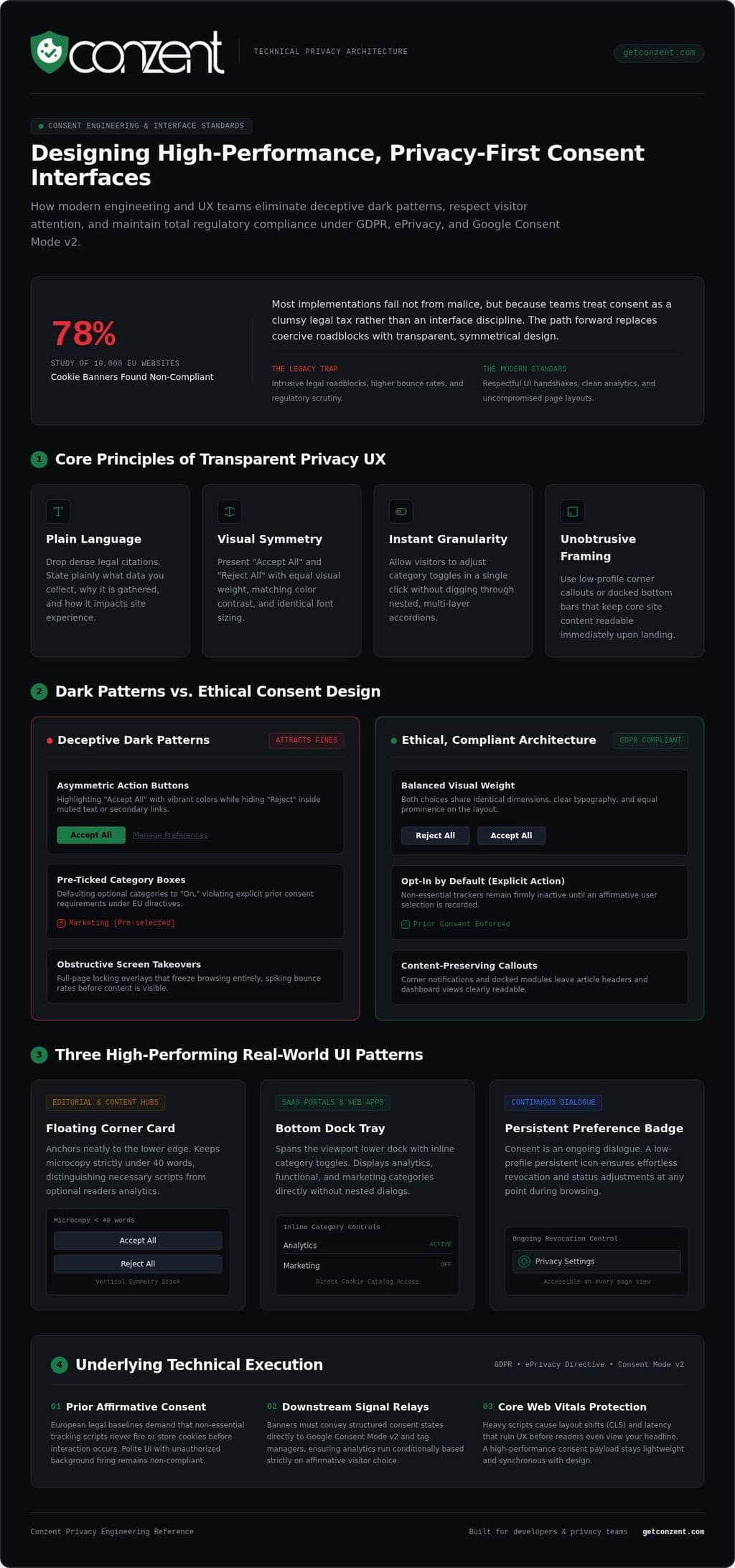
Clean consent interfaces rely on four foundational design decisions:
- Plain language: Drop dense legal citations. State plainly what data you collect and why.
- Visual symmetry: Present "Accept All" and "Reject All" buttons with equal visual weight, color contrast, and font sizing.
- Instant granularity: Let visitors adjust category toggles in a single click without digging through nested accordions.
- Unobtrusive framing: Use low-profile corner callouts or docked bars that keep core site content readable immediately upon landing.
The Technical Baseline: GDPR, ePrivacy, and Consent Mode
A banner cannot be user-friendly if the underlying code cheats. European regulations like the ePrivacy Directive and GDPR demand prior, explicit consent. Non-essential scripts cannot drop cookies before a visitor clicks an affirmative choice. If your interface looks polite but fires third-party tracking pixels in the background before interaction, it remains unlawful. Understanding how GDPR compliance frameworks govern data collection standards helps engineering teams implement proper conditional tag execution.
Downstream integration matters just as much. The banner must relay real-time consent signals directly to services like Google Consent Mode v2 and tag managers. The script payload itself must stay lightweight. Bloated consent widgets destroy Core Web Vitals, causing layout shifts that frustrate users before they even read your headline. Real usability requires lightweight code running in sync with honest, symmetrical interface design. That discipline defines the best user-friendly cookie consent examples on the web today.
Real-World Examples of High-Performing, User-Centric Cookie Banners
Cookie banners don't have to look like jarring system alerts. When you match consent mechanics to your platform's architecture, legal clarity becomes an extension of product design. One interface pattern won't suit every digital asset. An editorial publication demands minimal friction for readers, whereas a multi-vendor ecommerce platform requires granular vendor choices under the GDPR and ePrivacy Directive. Reviewing functional, user-friendly cookie consent examples shows how structural intent dictates effective UI execution.
The Floating Corner Card: Minimal Distraction for Content Sites
Content hubs and digital publications rely on fast reading immersion. Floating corner cards anchor neatly to the lower left or right edge of the viewport. Key microcopy stays under 40 words, explicitly distinguishing necessary operational scripts from optional reader analytics. The layout uses vertical stacking: "Accept All" sits directly above "Reject All" using identical padding, border radius, and readable contrast ratios. Readers immediately see that declining takes one tap, preserving reading flow without obscuring article headlines.
The Bottom Dock Tray: Clear Governance for Web Applications
SaaS portals and transaction-heavy interfaces require distinct layout handling. A bottom dock tray spans the lower viewport width, giving ample room to display inline category toggles without launching a nested modal. Users toggle analytics, functional, and marketing categories directly from the primary view. A persistent secondary text link routes directly to a searchable cookie catalog, ensuring transparency without hijacking screen real estate during complex dashboard tasks.
The Persistent Preference Badge: Effortless Revocation Control
Consent is an ongoing dialogue, not a one-time transaction. European authorities strictly mandate that withdrawing consent must be as effortless as granting it. To achieve this, deploy a subtle floating shield or lock badge anchored in the screen corner after initial choice submission. Clicking this persistent trigger immediately opens the preference drawer, allowing visitors to alter or revoke permissions at any point during their session. You can explore modern styling approaches on the Conzent cookie banner feature page.
When banners match your brand typography and design tokens, users treat them with trust rather than suspicion. If you are building a tailored privacy architecture across web properties, you can review modern CMP plans that support custom layouts out of the box. Practical user-friendly cookie consent examples prove that aesthetic integrity and regulatory compliance reinforce each other when implemented with care.
Dark Patterns vs. Ethical Consent Design: What to Avoid
Deceptive interface choices might artificially lift short-term acceptance rates, but they destroy user goodwill and create massive regulatory liability. Data protection authorities in Europe no longer issue casual warnings; they actively issue heavy financial penalties for dark patterns that nudge visitors toward consent. True user-friendly cookie consent examples prove that you don't need interface trickery to secure valid data permissions. Transparent design builds genuine reader trust while fully meeting regulatory expectations.
Recognizing Common Consent Dark Patterns
Deceptive banners generally rely on three manipulative interface techniques:
- Visual asymmetry: Styling the "Accept" button in high-contrast solid colors while demoting "Reject" to an unstyled, faint text link buried in the paragraph.
- Multi-step traps: Allowing one-click acceptance on the first layer, but forcing users through nested menus, multiple clicks, and pre-selected vendor lists to refuse tracking.
- Confirmshaming: Using guilt-inducing microcopy, such as labeling the decline option "No, I don't want a personalized experience," to emotionally manipulate the choice.
Designing Ethical, Symmetrical Alternatives
Ethical consent replaces manipulation with parity. Buttons must share identical dimensions, font weights, and distinct border outlines so neither choice dominates the visual field. A compliant layout uses a flat option hierarchy where "Accept All", "Reject All", and "Customize" sit side-by-side on the primary card. Copy should stay completely neutral. State what categories run, identify the third-party tools involved, and leave the judgment call to the user. Detailed requirements highlighted in the ICO's official cookie guidance make it explicit that refusing tracking must never feel like an obstacle course.
Legal and Reputational Consequences of Coercion
Coerced consent is legally invalid. Under GDPR enforcement standards, if a user cannot decline as easily as they can accept, any consent logged by your backend is nullified. That leaves your analytics stack open to severe enforcement action and retroactive data deletion orders. Deception also alienates privacy-conscious customers during their very first product touchpoint. Forward-thinking engineering and growth teams establish sustainable, non-coercive compliance by evaluating modern CMP architectures via the Conzent pricing platform options, proving that user-friendly cookie consent examples deliver resilient legal protection alongside clean visual execution.
Optimizing Banner Performance: UX Testing and Business Impact
A poorly configured cookie banner can wipe out 40% to 60% of your advertising measurement data. When tracking drops, marketing attribution breaks, leaving growth teams operating in the dark. The solution isn't to trick visitors with aggressive prompts; it's to treat consent optimization as an empirical science. Studying high-performing, user-friendly cookie consent examples reveals a clear pattern: when visitors encounter clean typography, honest choices, and fast-loading elements, consent rates stabilize naturally around legitimate intent.
Running Compliant A/B Tests on Consent Layouts
You don't need dark patterns to improve participation. Compliant experimentation focuses on interface clarity, message framing, and device responsiveness rather than psychological traps. Teams often test whether a bottom dock or a corner card yields better completion rates across mobile and desktop viewports. Testing neutral microcopy variations helps identify which explanations resonate best with readers without injecting manipulative nudges. Running structured experiments through native Conzent A/B testing tools lets you measure user responses accurately while keeping both test variants fully compliant with regional privacy laws.
Connecting Consent UX to Revenue and Conversion Tracking
Every percentage point in your opt-in rate directly affects the health of your paid acquisition channels. Without proper consent signaling, ad platforms cannot accurately attribute sales, causing automated bidding algorithms to misallocate ad spend. Implementing a modern Google Consent Mode v2 implementation allows your analytics stack to recover modeled conversions when users decline tracking, preserving essential performance signals. Pairing this protocol with dedicated revenue impact analytics gives finance and marketing leaders direct visibility into how consent choices affect pipeline value.
Monitoring Core Web Vitals and User Engagement
Technical performance is an inseparable part of consent usability. Heavy, unoptimized banner scripts trigger layout shifts and delay page rendering, driving visitors away before they ever evaluate your prompt. Consent scripts must load asynchronously, executing vendor tags only after choices are recorded. Monitor your bounce rates alongside opt-in velocity; an intrusive banner that drives high opt-in rates while spiking page abandonment is a net loss for the business. To launch privacy-first experiments that safeguard both user trust and measurement accuracy, view Conzent's CMP deployment plans and start testing your setup today.
Implementing a User-Friendly Consent Strategy for 2026
Building an ethical consent model is an operational discipline. It demands shared ownership across engineering, design, and privacy teams. Too many organizations view consent as a legal checkbox handed down by external counsel, ending up with rigid widgets that choke site speed and alienate users. In contrast, studying user-friendly cookie consent examples demonstrates that teams succeed when they treat consent as modern software infrastructure. Privacy and usability don't compete; they collaborate.
Choosing the Right Architecture: Cloud vs. Self-Hosted CMP
Your deployment model dictates how much control you maintain over your frontend stack. A managed cloud consent platform offers rapid deployment, central administration, and automatic regulatory updates across multiple jurisdictions. For teams requiring strict internal data governance, zero external script dependencies, or source code auditability, a self-hosted consent manager provides transparent infrastructure without vendor lock-in. Choosing flexible open infrastructure ensures your consent engine adapts to your codebase rather than imposing arbitrary layout constraints on your design team.
Multi-Framework Integration: IAB TCF 2.3 and Ad Tech Standards
Web applications do not operate in a vacuum. Monetizing programmatic publisher inventory or running cross-channel marketing campaigns requires direct compliance with global ad tech protocols. Implementing certified frameworks like IAB TCF v2.3 ensures that consent signals pass accurately across programmatic bidding exchanges and vendor networks. When integrated alongside Google Consent Mode v2, your application maintains clean data lineage. You honor individual visitor privacy without breaking downstream analytics feeds or loading redundant consent scripts.
Launch and Maintain Your Consent Experience
Deploying an interface is step one; long-term governance requires continuous hygiene. Teams should follow a structured rollout process:
- Audit existing trackers: Map every script, pixel, and third-party tag firing across your web properties before configuring categories.
- Align tags with consent gates: Ensure non-essential scripts remain blocked until affirmative signals trigger via your tag manager.
- Review vendor lists regularly: Schedule quarterly scans to verify that marketing deployments match your declared cookie disclosures.
By auditing technical touchpoints and examining high-performing user-friendly cookie consent examples, you balance legal mandates with business intelligence. When you are ready to deploy a resilient consent framework tailored to your stack, explore the options on the Conzent pricing page.
Turn Privacy UX into a Durable Competitive Advantage
Consent should never be a clumsy legal tax bolted onto your interface. As the most effective user-friendly cookie consent examples demonstrate, treating visitors with transparent, symmetrical design doesn't destroy opt-in rates. It fosters genuine trust, eliminates dark pattern liabilities, and secures high-quality consented data for your analytics stack.
You don't have to compromise between strict compliance and marketing velocity. Modern digital teams need flexible tooling that adapts to their code, whether they deploy source-available infrastructure or rely on managed cloud hosting. With built-in consent A/B testing, revenue impact analytics, and turnkey support for Google Consent Mode v2 and IAB TCF v2.3, you can empirically validate clean banner layouts while protecting your ad measurement pipelines.
Ready to deploy a consent experience that honors user agency without breaking site performance? Explore transparent plans on the Conzent pricing page and build a principled privacy framework that strengthens your brand today.
Frequently Asked Questions
What makes a cookie consent banner user-friendly?
A user-friendly banner prioritizes clear communication, visual balance, and zero friction. It explains data collection in concise, accessible terms rather than dense legal jargon. Both accept and reject actions carry equal visual prominence, letting users decide in a single interaction. Inspecting practical user-friendly cookie consent examples shows that good design avoids blocking the main page content, ensuring visitors explore your site immediately without feeling trapped or deceived.
Are accept-all and reject-all buttons legally required to look identical under GDPR?
Yes, European data protection authorities require visual and structural parity between choices. The "Reject All" option must be as prominent, accessible, and easy to click as "Accept All". If you style the accept button as a bright, contrasting element while hiding the reject option behind a faint text link or a secondary settings menu, regulatory bodies treat that asymmetry as an unlawful nudge that invalidates recorded consent.
How does a user-friendly cookie banner affect website analytics and ad revenue?
Clean, ethical banners stabilize opt-in rates by establishing immediate trust with visitors. While aggressive banners create visitor fatigue and high bounce rates, transparent interfaces encourage genuine participation. When combined with tools like Google Consent Mode v2 and revenue impact analytics, a user-friendly banner recovers modeled conversions for users who decline tracking, safeguarding ad measurement pipelines without violating regional privacy mandates.
What are cookie banner dark patterns and why are they risky?
Dark patterns are manipulative UI designs that trick or pressure visitors into granting data permissions. Common examples include buried decline buttons, confusing multi-step opt-out workflows, and pre-ticked category toggles. They carry extreme regulatory risk, as data authorities actively penalize deceptive designs with substantial fines. Beyond legal liabilities, dark patterns damage brand reputation and increase initial visitor bounce rates during their first interaction with your website.
Can I customize the design of my cookie banner to match my brand identity?
Yes, modern consent management platforms allow complete visual customization to match your site's design tokens, typography, and color palette. Studying user-friendly cookie consent examples shows that styling consent widgets like native interface components builds greater trust than generic third-party popups. The key is ensuring that customization preserves legal requirements, maintaining equal contrast and sizing across all affirmative and negative action buttons.
What is the best position on the screen for a cookie consent banner?
The ideal placement depends entirely on your site's structure and audience intent. Floating corner cards work best for blogs and content publishers because they leave navigation and article headlines immediately accessible. Bottom dock trays provide a solid layout for complex web applications and ecommerce stores, giving ample room for inline category toggles without obscuring critical screen real estate or triggering layout shifts.
How does Google Consent Mode v2 work with user-friendly banners?
Google Consent Mode v2 acts as a dynamic communication bridge between your consent banner and downstream Google tags. When a visitor accepts or rejects tracking, the banner script updates consent state variables in real time. If a user declines, Google tags adjust their behavior, sending anonymous, cookieless pings instead of personal data. This enables conversion modeling in Google Ads and GA4 while fully respecting user privacy choices.