
How to Fix Google Consent Mode v2 Errors: A 2026 Debugging Guide

Your data is only as honest as the infrastructure that collects it. In 2026, a consent mode error isn't just a technical glitch. It's a breach of trust. Privacy isn't a luxury for the few. It's a standard for everyone. We've moved past the era where compliance was an afterthought; today, it is the foundation of every conversion you track.
It's frustrating to see Google Ads warnings about missing signals when you've tried to play by the rules. You're likely staring at Tag Assistant, wondering why ad_user_data isn't firing. You see your GA4 behavioral modeling go dark. You want accuracy, not guesswork. You need to know how to fix consent mode errors without wasting weeks on trial and error. You aren't alone in this struggle, and the solution is more attainable than it seems.
This guide will show you how to restore data integrity and technical clarity. We'll move beyond vague warnings to isolate the root causes of signal failure. You'll learn to debug the new Google Tag system and resolve the mandatory IAB TCF v2.3 requirements that took effect earlier this year. We'll walk through the specific steps to validate your signals and ensure your setup is both technically sound and ethically responsible. Let's get your data back on track.
Key Takeaways
- Learn to distinguish between intentional user opt-outs and technical signal failures that trigger "Consent not detected" warnings in Google Ads.
- Discover how to fix consent mode errors by correctly sequencing "default" commands and mapping CMP categories to Google’s required parameters.
- Use real-time debugging tools like Tag Assistant and GTM Preview to isolate signal gaps and restore GA4 behavioral modeling.
- Ensure full compliance with IAB TCF v2.3 by verifying that mandatory "Disclosed Vendors" strings are present in your consent signals.
- Understand why infrastructure speed is the ultimate solution for late-firing signals that compromise your data accuracy and privacy standards.
Identifying Why Your Google Consent Mode v2 Setup is Failing
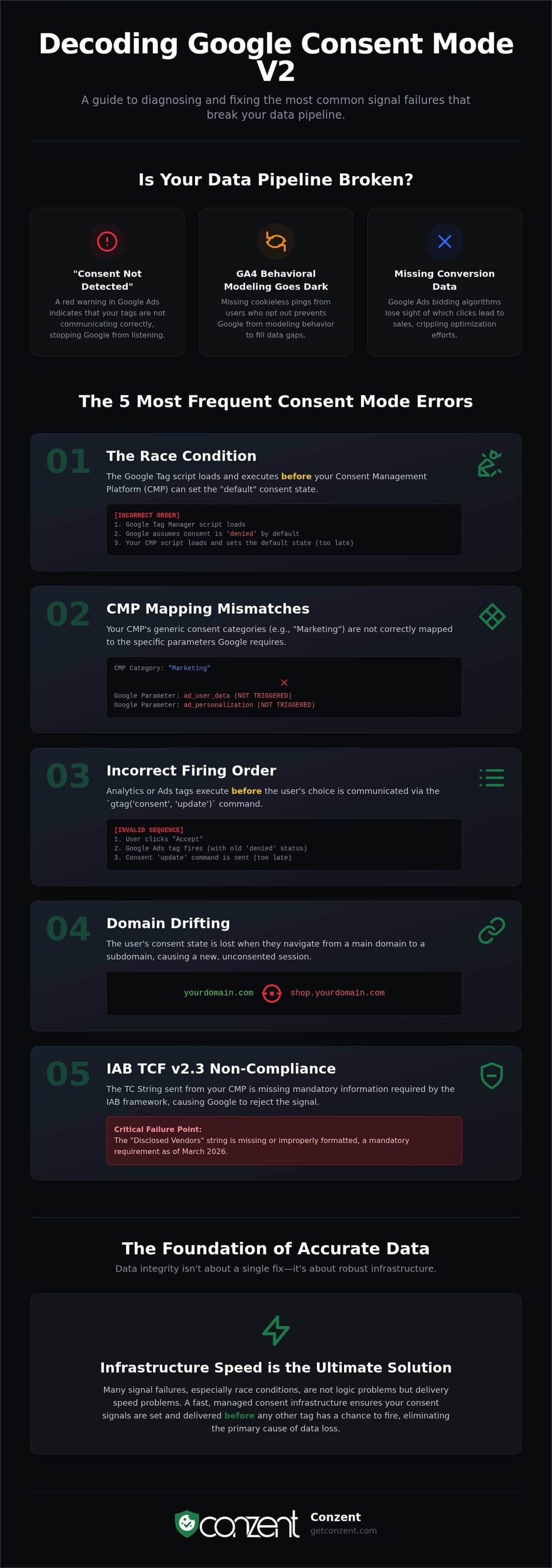
"Consent not detected." That red warning in your Google Ads dashboard is more than a notification; it's a signal that your data pipeline is broken. By 2026, the Digital Markets Act (DMA) has turned consent from a suggestion into a strict gatekeeper. If your tags aren't communicating correctly, Google simply stops listening. This isn't just about avoiding fines. It's about the technical precision required to run a modern business. Knowing how to fix consent mode errors starts with diagnostic clarity. You must distinguish between a user who said "no" and a system that failed to ask.
Failure often looks like a sudden drop in GA4 traffic or missing conversion data. However, the root cause is rarely the user's choice. Most errors stem from a disconnect between your Consent Management Platform (CMP) and the Google Tag. If you've chosen "Basic" consent mode, your tags are hard-blocked until a user clicks "Accept." If you're using "Advanced" mode, your tags should send cookieless pings immediately. Configuration errors happen when the system expects one behavior but receives the other, leading to silent data loss that cripples your marketing insights.
The High Cost of Ignored Consent Errors
Precision is the currency of 2026. When consent signals fail, your Google Ads bidding algorithms lose their sight. They can't see which clicks led to sales, so they stop optimizing. In GA4, missing pings mean you lose behavioral modeling. You aren't just missing data from users who opted out; you're missing the modeled data that fills those gaps. This technical debt directly erodes your bottom line. To understand the full scope of this risk, see our guide on the Revenue Impact of Cookie Consent.
Distinguishing Between CMP and Tagging Issues
Is the banner failing to load, or are the tags failing to listen? This is the first question you must answer. Sometimes the error is regional. A setup that works in New York might fail in the EEA because the ad_user_data parameter wasn't explicitly set for European IP addresses. Infrastructure bottlenecks also play a role. If your consent script loads too slowly, Google Tags may fire before the "default" consent state is established. This race condition is a primary reason why signals go undetected. It isn't a problem with your logic; it's a problem with your delivery speed.
The 5 Most Frequent Consent Mode Errors and Their Root Causes
Technical errors in consent signaling are infrastructure failures that directly impact your ability to measure growth. In 2026, the complexity of the IAB TCF v2.3 and Google's evolving tag architecture means that simple copy-paste implementations often fail. Understanding these root causes is the first step in learning how to fix consent mode errors before they erode your data quality. Most issues aren't caused by a lack of intent, but by a lack of synchronization.
- The Race Condition: If your "default" consent state command arrives after the Google Tag Manager (GTM) script loads, Google assumes consent is denied. The sequence is non-negotiable.
- Mapping Mismatches: Many CMPs use generic categories like "Marketing" that don't correctly trigger the specific
ad_user_dataorad_personalizationparameters Google requires. - Firing Order Failures: Tags that execute before the
gtag('consent', 'update')signal will fire without consent context, leading to blocked data or compliance risks. - Domain Drifting: Signals often get lost when a user moves from a main domain to a subdomain. If the consent state isn't preserved, the session is treated as a new, unconsented visit.
- TCF 2.3 Non-Compliance: As of March 1, 2026, all participants must use TCF v2.3. If your TC string is missing the mandatory "Disclosed Vendors" section, Google may reject the signal entirely.
Precision in your setup is a requirement for accuracy. If you want to move beyond manual script management, you can explore our managed infrastructure options designed to automate these sequences.
The "Consent Not Detected" Warning in Google Ads
Google Ads now relies exclusively on Consent Mode to control advertising data collection. The "Consent not detected" warning usually triggers when your setup fails to send the ad_user_data and ad_personalization signals. This disconnect often happens because your banner buttons aren't mapped to these specific API calls. You must ensure your CMP is updated to support the latest GCM v2 parameters as outlined in the official Google documentation. Legacy CMP implementations often use outdated API versions that Google no longer recognizes as valid.
GA4 Data Gaps: (not set) Attribution and Missing Pings
When the ad_storage signal is missing, GA4 cannot link clicks to sessions. This breaks the attribution chain, resulting in the dreaded "(not set)" value in your reports. In Advanced Consent Mode, GA4 should send cookieless pings to enable behavioral modeling. However, if the "default" state is set too late in the header, these pings never fire. You lose the ability to model the behavior of non-consenting users, making your data feel incomplete and untrustworthy. Fixing the sequence is the only way to restore this visibility.
Professional Debugging: Tools to Isolate Consent Signal Issues
Debugging is the process of verifying that your technical infrastructure respects human choice. When signals fail, you cannot rely on guesswork. You need a methodical approach to see exactly what the browser sends to Google’s servers. In 2026, auditing your setup is a requirement for both data accuracy and legal safety. Knowing how to fix consent mode errors requires you to look under the hood of the dataLayer and the network request stream.
The most effective starting point is the browser console. By typing dataLayer into the console, you can inspect the sequence of "consent" events. You are looking for a "default" command followed by an "update" command. If the update never appears after a user interacts with your banner, your CMP is failing to communicate. For those using a self-hosted open consent infrastructure, this transparency is built into the core, allowing you to see every signal transition without proprietary black boxes.
Mastering Google Tag Assistant for Consent
Google Tag Assistant remains the gold standard for real-time validation. When you enter preview mode, navigate to the "Consent" tab for every event in the summary list. You must compare the "On-page Default" with the "Current State." If the default is "granted" for a user in the EEA before they click your banner, you have a compliance failure. Conversely, if the "Current State" remains "denied" after a user accepts cookies, your update command is missing. The Consent State acts as the bridge between user choice and tag behavior. Identifying an update command that never fires is the fastest way to pinpoint a broken API connection between your CMP and GTM.
Using the Network Tab to Verify Cookieless Pings
Advanced Consent Mode relies on cookieless pings to maintain conversion modeling. To verify these, open your browser’s Network tab and filter for "collect" requests sent to Google Analytics. Look for the gcs (Google Consent Status) parameter in the request URL. This parameter tells you exactly what Google received. In 2026, these strings follow a specific logic:
- G100: No consent has been granted for either ads or analytics.
- G111: Both
ad_storageandanalytics_storagehave been granted. - G101: Analytics is granted, but advertising storage is denied.
If you see G111 but cookies like _ga or _gid are still being set while consent is denied, your tags are firing incorrectly. You must ensure that no identifiers are stored locally when the status is G100. This level of granular inspection is the only way to guarantee that your Google Consent Mode v2 implementation is actually performing as intended. Third-party privacy inspectors can provide a final layer of auditing, but the Network tab provides the raw truth of your data transmission.
Step-by-Step Fixes for Consent Default and Update Failures
Identifying a failure is the first step. Fixing it is the second. When you set out to learn how to fix consent mode errors, you are reclaiming control over your data ecosystem. This isn't just about technical maintenance; it's about building a site that respects user boundaries without sacrificing performance. A principled setup relies on a clean, predictable execution order. You don't need a complex workaround; you need a standardized workflow.
- Standardize defaults: Place your default consent command at the very top of your
<head>, before any other scripts. - Map categories precisely: Ensure your CMP categories, like "Marketing," trigger the specific
ad_user_dataandad_personalizationsignals Google requires. - Use dataLayer events: Implement a custom
consent_updatedevent to notify GTM the moment a user interacts with your banner. - Audit geolocation: Verify that users in the EEA receive strict "denied" defaults while global users receive your standard configuration.
Fixing the "Default Signal" Timing Issue
Timing is the most common point of failure. If your CMP loads asynchronously, it might miss the window to set the default state before GTM fires its first tags. You must place the gtag('consent', 'default', ...) command directly in your HTML header. It must sit physically above the GTM container script. This ensures Google knows the privacy rules before the tracking starts. For more on maintaining these standards, see our guide on Google Consent Mode v2 implementation.
Aligning GTM Triggers with Consent Updates
Your triggers must be as smart as your consent banner. Standard "All Pages" triggers are often too blunt. They fire before the user has made a choice, which leads to missed data or compliance breaches. Use the "Consent Initialization" trigger for tags that must understand the default state immediately. For everything else, implement a custom dataLayer event that fires when a user clicks "Accept." By using the "Require additional consent" setting in GTM, you create a fail-safe. Tags won't fire unless the specific signal is present. It's a simple change that makes your setup resilient.
You don't have to manage these technical sequences alone. Explore our Managed Cloud Consent Platform pricing to find a solution that automates these fixes for you.
Eliminating Compliance Errors with a Managed Consent Infrastructure
Fixing a script is a temporary patch. Upgrading your infrastructure is a permanent solution. Most guides on how to fix consent mode errors treat the symptoms, such as broken tags and missing pings, without addressing the disease: slow, unreliable consent delivery. If your CMP is a third-party black box, you are at the mercy of their latency. A principled approach to privacy requires a platform that is as fast as the tags it governs. Speed is not a luxury; it is a technical requirement for signal integrity.
Conzent’s Managed Cloud Consent Platform automates the delivery of GCM v2 signals at the edge. By moving consent logic closer to the user, you eliminate the race conditions that cause "Consent not detected" warnings. When your infrastructure is natively built for IAB TCF 2.3, regulatory shifts stop being technical emergencies. They become automatic updates. Once you have stabilized the technical layer, you can use Revenue Impact Analytics to see the literal value of your restored data flow. You move from guessing to knowing.
The Advantage of Source-Available Infrastructure
Transparency is a technical requirement. You cannot debug what you cannot see. Traditional CMPs hide their logic behind proprietary walls, making it impossible to verify how signals are processed. Our source-available model changes that. Whether you choose our managed service or follow our Self-Hosted Cookie Consent Manager guide, you gain total visibility. Self-hosting provides the maximum possible control over signal delivery. It ensures that your "default" state is established before the first byte of GTM even loads. You own the code, so you own the compliance.
Future-Proofing Your Consent Strategy
Solving how to fix consent mode errors is only the beginning. Once your signals are valid, the focus shifts from survival to growth. A compliant setup that nobody accepts is a failure of optimization. Use A/B testing to refine your banner design and messaging. By improving your opt-in rates, you recover the modeling data that technical fixes alone cannot reach. You aren't just checking a compliance box. You are building a high-performance data pipeline that respects digital rights. Stop fighting your infrastructure and start using it to grow.
Fix your infrastructure and protect your revenue by choosing a platform built for the standards of 2026.
Reclaiming Your Data Integrity
Data accuracy is a byproduct of principled infrastructure. You have seen that most failures aren't user choices; they're technical race conditions. By standardizing your default commands and precisely mapping signals like ad_user_data, you move from guesswork to precision. You now have the tools to audit your network requests and verify that every ping respects the boundaries of your users. This is the foundation of a resilient, privacy-first business.
Understanding how to fix consent mode errors is the first step toward reclaiming your marketing insights. It restores the behavioral modeling in GA4 that you need to understand your audience. It ensures your Google Ads account remains healthy and compliant with 2026 standards. You don't have to navigate these complex requirements alone. Conzent provides IAB TCF 2.3 certified infrastructure with native Google Consent Mode v2 integration. We offer both managed cloud and self-hosted options to fit your technical needs.
Stop debugging and start growing; view Conzent pricing today. You have the knowledge to fix your setup. Now you have the infrastructure to sustain it. Let's get your data back on track.
Frequently Asked Questions
Why does Google Ads say "Consent not detected" even though I have a banner?
A visual banner is not a technical signal. This error occurs because your banner isn't communicating with Google's API through the required ad_user_data and ad_personalization parameters. Google Ads requires these specific signals to validate that a user has opted into advertising tracking. You must verify that your CMP is updated to GCM v2 and that the "update" command fires the moment a user clicks your acceptance button.
How do I fix the "Consent Default" not being set before tags fire?
You must hard-code the gtag('consent', 'default', ...) command physically above your Google Tag Manager script in the site header. This ensures the privacy rules are established before GTM begins loading any tracking tags. Relying on an asynchronous CMP to set defaults often causes a race condition. In this scenario, tags fire before the consent state is known, leading to blocked data or compliance failures.
What is the difference between Basic and Advanced Consent Mode in terms of errors?
Basic mode blocks tags entirely until consent is granted. Errors here usually result in a total lack of detected signals in your dashboards. Advanced mode allows cookieless pings before consent is given. Errors in Advanced mode are more subtle, often involving "late signals" where pings fire without the correct parameters. This makes your data feel incomplete rather than entirely missing, which can be harder to diagnose without professional debugging tools.
Can I fix Consent Mode errors without changing my website code?
You can manage some aspects through Google Tag Manager, but a robust fix usually requires a header code change. While GTM templates can handle the "update" signal, setting the "default" state reliably requires a script placed before the GTM container itself. Learning how to fix consent mode errors effectively means accepting that infrastructure changes are often necessary. A code-based fix is a standard for accuracy, not a luxury for developers.
How do I verify that IAB TCF 2.3 is working correctly with Google Consent Mode?
Inspect the TC string in your browser console to ensure it contains the mandatory "Disclosed Vendors" section required as of March 1, 2026. Use Google Tag Assistant to verify that the ad_user_data and ad_personalization states transition from "denied" to "granted" based on the TCF string's contents. If the string is malformed or uses an outdated version, Google will reject the signal and stop modeling your conversion data.
Why is my GA4 data showing "(not set)" after implementing Consent Mode v2?
This happens when the ad_storage signal is missing or arrives too late to be associated with the initial page view. Without this signal, GA4 cannot link the click to the session, which breaks the attribution chain. Ensuring your default consent state is set to "denied" rather than being absent allows GA4 to send cookieless pings. These pings preserve attribution through modeling, even when a user hasn't accepted cookies yet.
How often should I audit my Consent Mode setup for new errors?
You should perform a technical audit quarterly or whenever you update your site's tagging infrastructure. Regulatory updates, like the TCF 2.3 enforcement in early 2026, can break legacy setups overnight. Regular auditing helps you stay ahead of how to fix consent mode errors before they cause significant gaps in your conversion data. Consistent monitoring is the only way to ensure your data remains both compliant and actionable for long-term growth.