What Are Cookie Banners? The 2026 Guide to Compliance and Trust
A cookie banner is not a legal nuisance. It is the ethical gateway to your website’s data infrastructure. If you are asking what are cookie banners, you are looking at the front line of digital trust. Compliance is not a minor technical detail. It is a core business requirement. With GDPR fines now exceeding €6 billion and Google Chrome’s global consent prompt reshaping the web, the stakes are high.
We understand the tension. Rules like the Digital Services Act and the CPPA's 2026 opt-out mandates make compliance feel like a moving target. You likely worry about falling opt-in rates or the technical complexity of Google Consent Mode v2. It’s hard to balance legal safety with the need for clean data. You shouldn't have to choose between following the law and growing your business.
You can master this shift. This guide teaches you how to implement a banner that protects your revenue without breaking your user experience. We provide a clear framework for choosing infrastructure that respects both privacy and performance. You’ll gain the confidence to navigate shifting regulations and build a strategy that treats your users like partners, not targets.
Key Takeaways
- Learn exactly what cookie banners are and how they function as a technical bridge that intercepts scripts before they process user data.
- Understand how to implement Google Consent Mode v2 to maintain data accuracy while respecting the evolving privacy standards of 2026.
- Discover the design principles that close the "Consent Gap" and prevent revenue loss caused by poorly executed compliance interfaces.
- Move beyond deceptive dark patterns by using clear language that builds long-term trust and drives higher opt-in rates.
- Establish a sustainable consent strategy that uses regular infrastructure audits to stay ahead of global regulatory changes.
Defining the Cookie Banner: More Than Just a Pop-up
Many digital managers treat the cookie banner as a minor UI annoyance. This is a mistake. If you are asking what are cookie banners, you must look past the visual layer. At its core, a cookie banner is a digital interface that captures and stores user consent for data processing. It is not a simple "notice" or a passive alert. It is a functional gatekeeper for your tracking scripts. When a user arrives at your site, the banner acts as a technical barrier. It prevents non-essential scripts from firing until a clear choice is made. A cookie banner is a legal and technical requirement for any site using non-essential cookies in 2026.
This interface serves as the critical bridge between abstract privacy regulations and your website’s technical execution. Without it, your marketing tags and analytics tools operate in a legal vacuum. In 2026, the standard has shifted from "inform and continue" to "ask and wait." Transparency is no longer a luxury. It is the baseline for doing business on the modern web. We view this not as a burden, but as an opportunity to respect user autonomy while maintaining data integrity.
The Legal Reality: Why You Need One in 2026
The regulatory environment is no longer fragmented; it is converging. The GDPR and the ePrivacy Directive set the initial standard for "informed and unambiguous" consent in Europe. However, the scope has expanded. As of January 1, 2026, the California Privacy Protection Agency (CPPA) mandates that businesses provide visible confirmation when a user opts out of data sharing. This global shift means that whether your users are in Berlin or Berkeley, they expect control. You can learn more about these specific requirements in our guide to GDPR compliance.
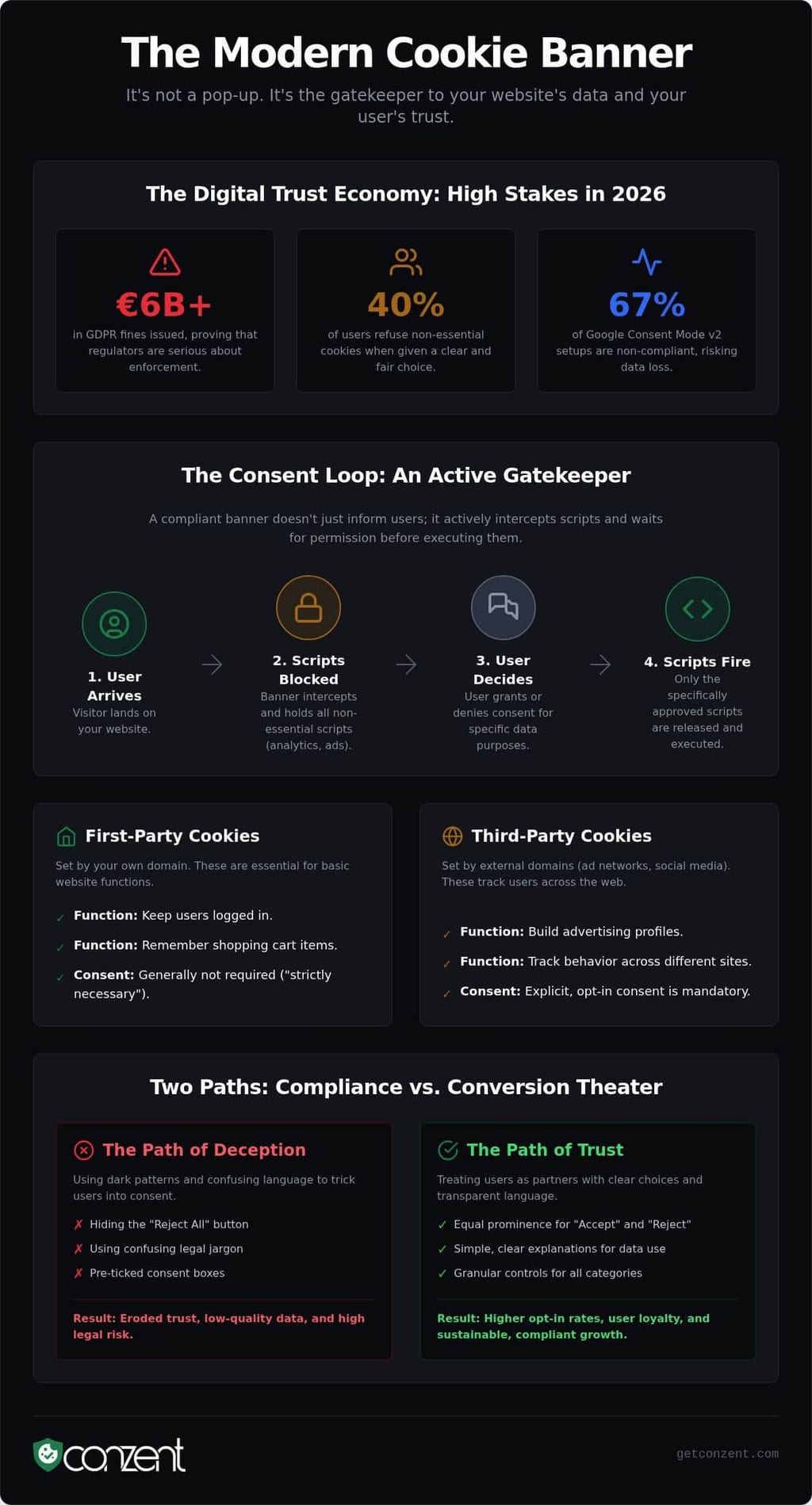
The risks of ignoring this are dual. First, there is the financial hit. GDPR fines have already surpassed €6 billion. These penalties are the floor. The ceiling is the total loss of user trust. In an era where 40% of users refuse cookies when given a choice, being dishonest about tracking is a fast way to kill your brand. A compliant banner isn't just about avoiding a lawsuit. It is about proving to your audience that you value their digital rights.
What Is a Cookie? (The Simple Version)
To manage consent, you have to understand what you are managing. An HTTP cookie is a small text file stored on a user's browser. First-party cookies are set by your own domain. They handle essential tasks like keeping a user logged in or remembering what is in a shopping cart. You generally don't need consent for these "strictly necessary" cookies because the site cannot function without them.
Third-party cookies are different. These are set by external domains, such as ad networks or social media platforms. They track users across different sites to build advertising profiles. These, along with other tracking technologies like pixels, tags, and local storage, are "non-essential." They require explicit consent. Your banner must be able to categorize these tools and block them individually based on user preference. This isn't just about cookies anymore. It's about every byte of data you collect from a visitor’s device.
How Cookie Banners Function: The Technical Link to Your Data
To truly understand what are cookie banners, you must look past the user interface. A banner is a technical interceptor. It operates through what we call the "Consent Loop." When a visitor lands on your page, the banner prevents marketing scripts and tracking pixels from loading. It holds them in a "pending" state. Only after the user makes a choice does the banner release the specific scripts they approved. This is the difference between a passive notice and an active gatekeeper. It ensures that no data flows until the legal requirement for consent is met.
Modern banners do more than block scripts. They communicate. Integration with Google Consent Mode v2 is now a technical necessity. This framework allows your website to adjust how Google tags behave based on the user's choice. If a user denies consent, Google uses "pings" to model conversions without identifying the individual. Without this integration, you lose critical data signals. However, research indicates that 67% of Consent Mode v2 setups are currently non-compliant. To remain legal, your banner must also adhere to the IAB TCF 2.3. This standardizes how consent signals are shared between publishers and advertisers across the digital ecosystem.
Compliance requires evidence. A professional Consent Management Platform (CMP) stores a "consent string" to prove compliance in an audit. This string is a compressed, digital record of the user’s exact preferences at a specific point in time. It is your technical defense against regulatory scrutiny. If you are evaluating your current setup, you can compare our infrastructure options to see which model fits your technical needs.
Managed Cloud vs. Self-Hosted Infrastructure
You have two paths for deployment. Managed Cloud offers convenience. It provides automatic updates and hosted analytics with zero maintenance. This is ideal for teams that prioritize speed. Contrast this with Self-Hosted Open Consent Infrastructure (OCI). Self-hosting provides full data sovereignty and developer control. You own the infrastructure. You eliminate third-party dependencies. In 2026, OCI is becoming the standard for businesses that view data privacy as a core value rather than a checkbox.
CMS and E-commerce Integrations
A banner must plug seamlessly into your existing stack. Whether you use WordPress, Shopify, or a custom-built application, the integration must be lightweight. Performance is non-negotiable. A heavy script will damage your Core Web Vitals and lower your search rankings. Your banner should also follow ICO guidance on cookies by ensuring accessibility across all devices. Mobile, tablet, and desktop users all deserve a clear, responsive, and functional consent experience that does not hinder their journey.
Compliance vs. Revenue: Why Most Banners Fail
Compliance is a standard. Revenue optimization is a strategy. Most businesses fail because they treat these two goals as enemies. If you view what are cookie banners as just a legal checkbox, you are likely suffering from the "Consent Gap." This gap represents the massive loss of data signals that occurs when users are confused, annoyed, or interrupted by a poorly designed interface. It isn't just a privacy issue; it's a hole in your sales funnel.
Many digital managers obsess over the "Accept All" rate. This is a surface-level metric that can be deceptive. A high opt-in rate is useless if your banner creates a high bounce rate because it blocks the mobile experience or slows down page loads. You must measure the revenue impact of your setup. This means understanding how consent choices directly affect your attribution models and your return on ad spend. Success is a banner that satisfies the law without sabotaging the user's journey to the checkout page.
We believe that transparency is a competitive advantage. When you explain why you collect data and how it benefits the visitor, you build the kind of trust that survives regulatory shifts. In 2026, the businesses that win are those that stop hiding their tracking and start justifying it through a clear value exchange.
Ad Revenue in a Post-Cookie World
A compliant banner is your best defense against signal loss. In 2026, ad platforms rely on high-quality consent signals to train their bidding AI. If your banner fails to communicate properly with Google Ads, your targeting becomes blind and your costs rise. Preserving your ability to run effective ads requires an infrastructure that respects the user while feeding the right data to your platforms. You can learn more about this in our guide on maintaining ad revenue without third-party cookies.
The Myth of the "Free" Plugin
"Free" is often the most expensive choice you can make. Unmanaged plugins frequently carry hidden costs like performance lag that hurts your SEO rankings and security vulnerabilities that expose user data. A "set it and forget it" mentality leads to compliance failures the moment global laws change. We advocate for a source-available approach because transparency in your code ensures you aren't just trusting a vendor. You are verifying your own security, speed, and long-term viability.
Designing for Trust: Best Practices for High Opt-in Rates
Trust is not a byproduct of good design. It is the foundation. When users understand what are cookie banners, they are seeing your brand’s first commitment to their privacy. Clarity beats cleverness every time. Avoid jargon. Instead, explain the value exchange. Tell your visitors exactly how their data improves their experience. If they know that a cookie helps remember their preferences or secures their session, they are more likely to engage. An honest cookie banner is a bridge, not a barrier.
You must avoid "dark patterns" at all costs. Tricking users into consenting through hidden "Reject" buttons or misleading colors is a short-term tactic with long-term consequences. In 2026, regulators are specifically targeting these deceptive practices. Ethical design is now a legal requirement. Accessibility is equally critical. Your consent interface must be readable and navigable for everyone, regardless of their physical or technical resources. Achieving the right "Privacy UX" balance means meeting every legal requirement while minimizing bounce rates through respect and efficiency.
A/B Testing Your Consent Banner
Data should drive your design decisions. Small changes in button placement, color contrast, or copy can lead to significant shifts in behavior. Through A/B testing, you can recover consent that is often lost to confusion or friction. For example, some sites have seen a 20% increase in opt-ins simply by refining the language used in their layered notices. This isn't about manipulation. It’s about ensuring your users have the information they need to make a confident choice. To start optimizing your own interface, view our platform features.
Non-Intrusive Banner Patterns
The layout of your banner dictates the user's first impression. A center-modal grabs attention but can be disruptive on mobile devices. A footer-bar is often more subtle but might be overlooked. Your choice depends on your audience and your specific compliance needs. We recommend using layered notices to provide detail without overwhelming the visitor. You can find a deeper analysis of these layouts in our article on non-intrusive cookie banners. By presenting information in stages, you respect the user's time while fulfilling your obligation to be transparent. This methodical approach turns a technical necessity into a trust-building asset.
Beyond the Banner: Building a Sustainable Consent Strategy
Building a strategy is not about checking a box. It is about ownership. If you only focus on what are cookie banners as a visual element, you miss the underlying technical shift. Consent management is an ongoing process of auditing and updating. Your website is a living organism. New scripts are added. Ad platforms update their requirements. Privacy laws evolve. A static banner is a liability. A dynamic strategy is an asset. You must move past the idea of compliance as a one-time project.
Regularly conducting a Website Cookie Compliance Audit is the first step toward long-term sustainability. You must know exactly what is running on your site to control it. This audit ensures your banner remains aligned with shifting technical standards like Google Consent Mode v2 and IAB TCF 2.3. As established earlier, these are not optional integrations. They are the protocols that allow your site to speak the language of modern privacy. If your banner fails to evolve with these standards, your data signals will eventually fail too.
We view privacy as a competitive advantage. In a transparent market, users gravitate toward brands that respect their boundaries. By building a resilient consent strategy, you protect your business from fines and your brand from irrelevance. You aren't just following the law. You are leading the market. Ethical data handling is the new standard for excellence.
Choosing Your Infrastructure: Cloud vs. Self-Host
Your choice of infrastructure reflects your values. Managed Cloud is the right choice for teams prioritizing speed and professional support. It handles the heavy lifting of hosting and updates. However, for those who demand maximum control and absolute data privacy, you should Self-Host your consent infrastructure. This approach eliminates third-party trackers within your own compliance stack. Our mission is to make high-level compliance accessible to everyone. We believe that transparency creates security. When you own your infrastructure, you own your future.
Next Steps for Your Website
Action follows understanding. Don't wait for a regulatory notice to fix your strategy. Follow this sequence to secure your site:
- Audit your scripts: Catalog every cookie and tracking tag currently active on your domain.
- Upgrade your CMP: Select a platform that supports the latest 2026 standards, including GCM v2 and TCF 2.3.
- Implement and test: Use A/B testing to refine your "Privacy UX" and recover lost consent.
- Optimize for revenue: Use analytics to understand how consent choices impact your bottom line.
Compliance is the floor. Revenue optimization is the ceiling. By treating what are cookie banners as infrastructure rather than decoration, you build a site that is both legal and profitable.
Secure Your Data Future in 2026
The digital landscape of 2026 doesn't reward shortcuts. Understanding what are cookie banners is the first step toward building a website that respects users and protects revenue. You've seen how a functional gatekeeper prevents data loss while meeting strict global standards. Compliance is no longer a hidden burden; it is a visible commitment to your audience's digital rights. When you prioritize transparency, you build the kind of trust that survives regulatory shifts.
You can move from technical overwhelm to operational clarity. We offer infrastructure that is IAB TCF 2.3 Certified and Google Consent Mode v2 Ready. Whether you need the speed of our Managed Cloud or the absolute sovereignty of our Self-Hosted options, we make high-level compliance attainable for every business. Don't leave your data strategy to chance or unmanaged plugins.
Take control of your consent strategy and turn transparency into your strongest competitive advantage. Deploy a principled cookie banner with Conzent today. Your users deserve a web that values their choices, and your business deserves a strategy that lasts.
Frequently Asked Questions
Do I legally need a cookie banner if I only use Google Analytics?
Yes. Google Analytics relies on non-essential cookies to track user behavior and measure site performance. Under GDPR and the ePrivacy Directive, you must obtain explicit consent before these scripts fire. Even with IP anonymization active, these tools process personal identifiers that require a clear opt-in. If you are asking what are cookie banners, they are the technical gatekeepers that ensure these specific analytics scripts only run after a user says yes.
What happens if a website does not have a cookie banner?
You face significant legal, financial, and operational risks. Regulators have already issued over €6 billion in GDPR fines as of early 2026. Beyond penalties, ad platforms like Google now require valid consent signals to run targeted campaigns. If you lack a banner, you lose access to critical marketing features. You also alienate the 40% of users who now refuse to interact with websites that don't respect their privacy.
Can I make my own cookie banner instead of using a CMP?
You can build a custom interface, but maintaining it is a massive technical burden. A compliant Consent Management Platform (CMP) does more than show a pop-up. It must correctly intercept every script, store audit-proof consent strings, and integrate with complex standards like IAB TCF 2.3. Without a dedicated platform, your team will struggle to update the code every time a privacy law changes or a new browser tracking policy emerges.
What is the difference between a cookie notice and a cookie banner?
A notice is passive, while a banner is functional. A notice simply tells users that cookies are present, which is legally insufficient in 2026. A banner is an interactive gateway that allows users to accept or reject specific data processing categories before any tracking occurs. If your interface doesn't actively block scripts until a choice is made, it's just a notice. True compliance requires a functional banner that manages script execution.
Do cookie banners affect SEO or site speed?
They can if they use heavy, unoptimized code. A poorly built banner will slow down your Largest Contentful Paint (LCP) and damage your Core Web Vitals rankings. To protect your SEO, you must use a lightweight script that loads asynchronously. When you understand what are cookie banners from a technical perspective, you see they should be high-performance infrastructure that fulfills legal requirements without adding latency to the user experience.
How long must I store records of user consent?
You should maintain consent records for as long as you process the data or until the statute of limitations for a privacy audit expires. While GDPR doesn't mandate a specific number of years, you must be able to prove consent was "informed and unambiguous" at the time of collection. Most organizations keep these digital records for five years. This ensures you have a technical defense ready if a data protection authority requests an audit.
What are "dark patterns" in cookie banner design?
Dark patterns are deceptive UI choices designed to trick users into consenting. This includes making the "Reject" button invisible, using confusing double negatives, or making the opt-out process take ten times longer than the opt-in. Regulators are now issuing heavy fines for these tactics. Ethical compliance requires giving the "Reject All" and "Accept All" buttons equal prominence. Tricking your users might increase short-term opt-ins, but it destroys long-term brand trust.
Does a cookie banner need a "Reject All" button?
Yes, especially for users in the EU and states with strict privacy laws. Data protection authorities have ruled that rejecting cookies must be as easy as accepting them. If your banner has a bright "Accept" button but hides the "Reject" option inside a secondary settings menu, you are non-compliant. Providing a clear "Reject All" button on the first layer of your banner is the standard for avoiding legal penalties and respecting user autonomy.
Frequently Asked Questions
Do I legally need a cookie banner if I only use Google Analytics?
Yes. Google Analytics relies on non-essential cookies to track user behavior and measure site performance. Under GDPR and the ePrivacy Directive, you must obtain explicit consent before these scripts fire. Even with IP anonymization active, these tools process personal identifiers that require a clear opt-in. If you are asking what are cookie banners, they are the technical gatekeepers that ensure these specific analytics scripts only run after a user says yes.
What happens if a website does not have a cookie banner?
You face significant legal, financial, and operational risks. Regulators have already issued over €6 billion in GDPR fines as of early 2026. Beyond penalties, ad platforms like Google now require valid consent signals to run targeted campaigns. If you lack a banner, you lose access to critical marketing features. You also alienate the 40% of users who now refuse to interact with websites that don't respect their privacy.
Can I make my own cookie banner instead of using a CMP?
You can build a custom interface, but maintaining it is a massive technical burden. A compliant Consent Management Platform (CMP) does more than show a pop-up. It must correctly intercept every script, store audit-proof consent strings, and integrate with complex standards like IAB TCF 2.3. Without a dedicated platform, your team will struggle to update the code every time a privacy law changes or a new browser tracking policy emerges.
What is the difference between a cookie notice and a cookie banner?
A notice is passive, while a banner is functional. A notice simply tells users that cookies are present, which is legally insufficient in 2026. A banner is an interactive gateway that allows users to accept or reject specific data processing categories before any tracking occurs. If your interface doesn't actively block scripts until a choice is made, it's just a notice. True compliance requires a functional banner that manages script execution.
Do cookie banners affect SEO or site speed?
They can if they use heavy, unoptimized code. A poorly built banner will slow down your Largest Contentful Paint (LCP) and damage your Core Web Vitals rankings. To protect your SEO, you must use a lightweight script that loads asynchronously. When you understand what are cookie banners from a technical perspective, you see they should be high-performance infrastructure that fulfills legal requirements without adding latency to the user experience.
How long must I store records of user consent?
You should maintain consent records for as long as you process the data or until the statute of limitations for a privacy audit expires. While GDPR doesn't mandate a specific number of years, you must be able to prove consent was "informed and unambiguous" at the time of collection. Most organizations keep these digital records for five years. This ensures you have a technical defense ready if a data protection authority requests an audit.
What are "dark patterns" in cookie banner design?
Dark patterns are deceptive UI choices designed to trick users into consenting. This includes making the "Reject" button invisible, using confusing double negatives, or making the opt-out process take ten times longer than the opt-in. Regulators are now issuing heavy fines for these tactics. Ethical compliance requires giving the "Reject All" and "Accept All" buttons equal prominence. Tricking your users might increase short-term opt-ins, but it destroys long-term brand trust.
Does a cookie banner need a "Reject All" button?
Yes, especially for users in the EU and states with strict privacy laws. Data protection authorities have ruled that rejecting cookies must be as easy as accepting them. If your banner has a bright "Accept" button but hides the "Reject" option inside a secondary settings menu, you are non-compliant. Providing a clear "Reject All" button on the first layer of your banner is the standard for avoiding legal penalties and respecting user autonomy.