
Developer-Friendly Consent Management API: A Buyer’s Guide

What if the consent tool that looks easiest to integrate creates the most work after launch? Choosing a developer-friendly consent management API isn’t just about endpoints. Your team also needs to understand how it fits your stack, who controls consent data and hosting, and what needs ongoing maintenance.
An API can offer flexibility, but it may leave your developers responsible for more of the consent workflow. A full consent management platform can handle more operational tasks, but its deployment model and control options matter too. The right choice depends on how your team balances integration effort, operational ownership, and control.
This guide gives you a practical way to assess that balance. You’ll compare integration fit, operational control, standards support, and the ongoing work your team must own. You’ll also see how managed cloud and self-hosted approaches differ, and where a source-available platform like Conzent can fit. The goal is to support your privacy workflows without adding avoidable complexity.
Key Takeaways
- Separate the API’s role from the wider consent platform, including its interface, storage, configuration, and reporting.
- Assess integration effort by looking at configuration, documentation, testing, and how consent fits your tag manager and analytics workflow.
- Choose managed cloud or self-hosting based on the operational work your team can take on and the control it needs.
- Validate consent behavior and standards support, treating IAB TCF v2.3 integration and Google Consent Mode v2 as distinct requirements.
- Use a developer-friendly consent management API to match infrastructure, standards, and measurement needs to how your team works.
What should a developer-friendly consent management API actually do?
A consent management API connects consent workflows with a website or digital product. Consent collection records a person’s choices; the systems that use those choices act on the resulting signals. That distinction matters. A banner can gather preferences, but tags, analytics tools, and advertising workflows still need to respond appropriately.
A developer-friendly consent management API should make that connection understandable and manageable. It should help your team trace how choices are presented, stored, updated, and shared with the parts of the stack that rely on them. The API is one part of the design, not the whole consent experience.
Which consent workflows should an API connect?
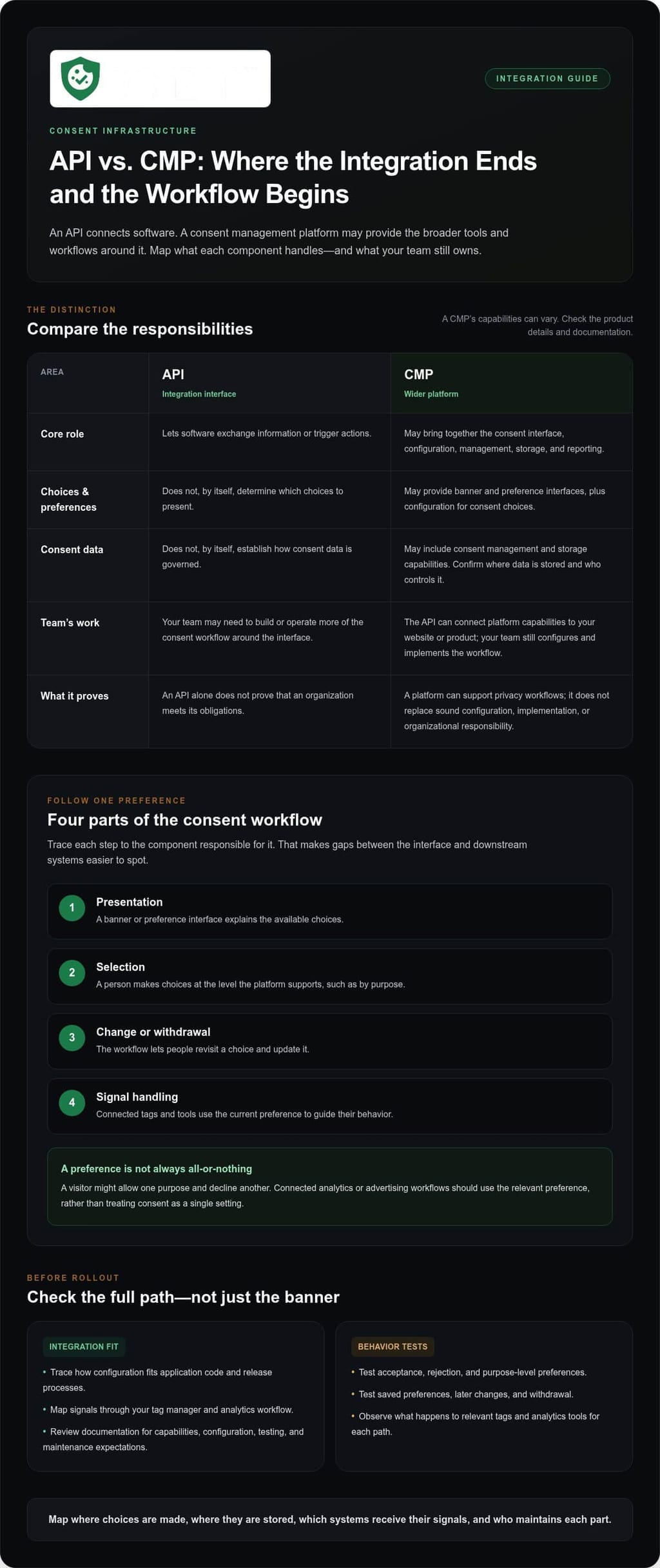
Trace the user journey and identify the systems that depend on each choice. A typical workflow presents a consent interface, records preferences, lets people change or withdraw those preferences, and makes updated signals available to connected technologies. Map each step to the component responsible for it, so gaps between the interface and downstream systems are easier to spot.
- Presentation: A banner or preference interface explains the available choices.
- Selection: A person can make choices at the level the platform supports, such as by purpose.
- Change or withdrawal: The workflow provides a way to revisit a choice and update it.
- Signal handling: Connected tags and tools can use the current preference to guide their behavior.
For example, a visitor might allow one purpose while declining another. A connected analytics or advertising workflow should use the relevant preference rather than treat consent as a single, all-or-nothing setting. That requires clearly represented choices and consistent interpretation by receiving systems. The banner is the visible entry point, and its design and customization are part of the wider workflow.
How is an API different from a consent management platform?
An API is an integration interface. It lets software exchange information or trigger actions, but it isn’t a complete privacy program. An API alone doesn’t determine which choices to present, establish how consent data is governed, or prove that an organization meets its obligations.
A consent management platform, or CMP, may bring together banner and preference interfaces, configuration for consent choices, consent management, storage, and reporting. Its API can connect those capabilities to a website or product, while the platform provides the wider tools and workflows. Map what the product handles and what your team must build or operate.
Make the distinction concrete by identifying where users make choices, where those choices are stored, which systems need the signals, and how your team will review changes and reporting. A platform can support privacy workflows, but the technology doesn’t replace sound configuration, implementation, or organizational responsibility.
How to evaluate consent management API integration and developer experience
A consent integration can look simple in a diagram and still create ongoing work across application code, tag management, analytics, and release processes. Evaluate the full path: how your team configures the consent experience, how connected systems receive changes, and who maintains each piece after launch. A developer-friendly consent management API should fit the way your stack is operated, not just work in a proof of concept.
What makes consent integration maintainable?
Look for a clear boundary between consent configuration and application code. If a banner change requires editing and redeploying unrelated product code, routine updates can become harder to manage. Assign ownership for configuration, deployments, monitoring, and integration changes. Then trace a real user journey through your tag manager and analytics workflow: which signals are passed, and how will your team verify the expected behavior?
Good documentation distinguishes supported capabilities from examples and assumptions. Review how it explains the integration surface, configuration process, testing approach, and maintenance expectations. Don’t assume a product has a particular endpoint, SDK, event, or response format unless the documentation describes it. For a site built on WordPress, review the details of the WordPress consent integration alongside your existing release and tag-management workflow.
Privacy data flows deserve the same scrutiny as other system interfaces. The Regulations.gov API and Privacy page offers a government example: its API provides public data that can include comment submitter information, while its privacy policy describes protections under the Privacy Act of 1974. Apply the same habit to your own integrations by mapping what they receive and how your team handles it.
How should teams test consent behavior before launch?
Test more than whether the banner appears. Walk through acceptance, rejection, purpose-level preferences, later changes, and withdrawal. For each path, observe what happens to relevant tags and analytics tools. Record the actual result in your implementation instead of assuming every integration behaves the same way.
- Map the path: Record the user action, expected consent state, and connected system that should respond.
- Check key journeys: Test first visits, saved preferences, preference changes, and withdrawal in the environments your team supports.
- Capture evidence: Note observed behavior, unexpected results, and unresolved edge cases for the responsible teams.
Before selecting a solution, use this short checklist:
- Can your team identify the supported integration and configuration methods?
- Are the documentation and testing guidance specific enough to validate your workflow?
- Is ownership clear for configuration, deployments, monitoring, and future changes?
- Can you trace consent choices through your tag manager and analytics tools?
These questions make developer experience an operational assessment, not just a feature claim. If you’re weighing managed and self-hosted options, compare the available consent platform options against your integration and maintenance needs.
Managed cloud or self-hosted consent infrastructure: which fits your team?
Deployment determines who carries the operational work. With managed cloud, the provider maintains infrastructure and platform updates. With self-hosting, the platform runs on your infrastructure, giving your team more direct control and more responsibility. Neither model is the default winner. A developer-friendly consent management API is only one part of the decision; your team’s capacity, governance needs, and existing systems matter too.
Use this comparison to make the ownership boundary visible. Specific responsibilities depend on the platform and your implementation, so treat it as a starting point for internal planning.
| Area | Managed cloud | Self-hosted |
|---|---|---|
| Infrastructure | Provider maintains the platform infrastructure. | Your team operates it on your infrastructure. |
| Platform updates | Automatic updates reduce update work for your team. | Your team manages deployment and update decisions. |
| Analytics | Cloud-based analytics dashboards support ongoing review. | Your team accounts for how analytics fit its own environment. |
| Deployment control | Less direct infrastructure control, with fewer infrastructure tasks. | More direct control, alongside operational ownership. |
When does managed cloud reduce operational work?
Managed cloud suits teams that want to avoid operating consent infrastructure themselves. Conzent’s managed cloud service includes infrastructure maintenance, automatic platform updates, and cloud-based analytics dashboards. Those dashboards give teams a way to review consent activity without building that view into their own infrastructure. Your team still owns its consent configuration, website implementation, connected systems, and decisions about how the workflows should operate.
This model can be practical when your engineers have limited capacity for platform operations or when you prefer automatic updates. It doesn’t remove the need to review configuration and integration behavior. For context on the regulatory landscape that may shape internal governance decisions, DLA Piper’s overview of US data privacy laws covers federal and state privacy laws.
When can self-hosting suit a technical team?
Self-hosting can fit teams with established infrastructure and the people to operate it. Conzent’s self-hosted option is available free on your infrastructure. That gives your organization direct control over where the platform runs, while making your team responsible for the surrounding infrastructure and ongoing operation. Use Conzent’s self-hosted consent infrastructure guide to plan those responsibilities.
Before choosing, identify who will handle deployments, updates, monitoring, and changes to connected systems. Compare that workload with the control your governance model requires. If your team already manages infrastructure and prefers direct deployment control, self-hosting may align with its operating model. If infrastructure work would compete with core product priorities, managed cloud may be more workable. Choose based on capacity and control, not the assumption that one approach is universally simpler.
Validate consent standards, controls, and outcomes before rollout
Standards support is a useful starting point, not proof that an implementation is configured correctly or meets every obligation. Before launch, trace the path from a person’s choice to the behavior of the website, tags, and measurement tools. A developer-friendly consent management API should make that path testable, while your team checks the implementation against its actual use.
How should teams assess standards support?
Separate the standards in scope. IAB TCF v2.3 integration supports workflows built around the IAB Transparency and Consent Framework. Google Consent Mode v2 is a separate capability for communicating consent choices to Google services. They aren’t interchangeable. Review support for each standard, then test how your configured choices flow into the systems that rely on them. The IAB TCF v2.3 guide provides protocol-focused background.
Use a simple validation sequence:
- Map requirements: Identify the standards and consent signals relevant to your website and connected tools.
- Review configuration: Compare purposes, banner choices, and tag behavior with the experience you intend to provide.
- Exercise each choice: Test acceptance, rejection, preference changes, and withdrawal in the implemented workflow.
- Inspect downstream behavior: Confirm that tags and measurement tools respond as expected for each state.
- Assign ownership: Record who maintains configuration and repeats these checks after changes.
Document results and unresolved issues. A platform can support IAB TCF v2.3 or Google Consent Mode v2, but the standard name alone doesn’t show how your website is configured or whether connected systems behave as intended. Treat support as a capability to validate, not a compliance outcome.
How can teams measure the consent experience responsibly?
Once behavior is verified, measurement can help your team understand how changes affect the experience and business outcomes. Consent A/B testing can compare banner experiences, while revenue impact analytics can help examine consent-related effects on revenue. Decide what you’re comparing and what you’ll observe before interpreting results. A measured difference is evidence to investigate, not a reason to obscure choices.
Keep meaningful user choice at the center. Compare clear, accessible presentations, and don’t treat acceptance rates as the only measure of success. Review whether people can understand their options and whether their selections produce the intended downstream behavior. This keeps optimization focused on improving the experience, not pressuring users toward a particular answer.
With standards, behavior, and measurement criteria in view, compare the consent platform options against your implementation needs.
Choose consent infrastructure your developers can operate with confidence
A sound decision starts with the work your team needs the consent system to support. List the integrations it must fit, the standards your workflows rely on, and the people who will review changes over time. Then compare those requirements with the operating model you prefer. That turns “developer-friendly” from a broad label into criteria your team can assess.
Conzent’s source-available platform lets teams inspect its implementation, while its managed cloud and self-hosted options support different deployment preferences. Use those options to frame a practical discussion: which approach fits your governance process, technical skills, and planned consent workflows? The answer should reflect how your team works, not a general preference for one deployment style.
How does Conzent fit different implementation models?
Start by assigning an owner for the consent setup and outlining how your team will review configuration changes. Then match your preferred hosting approach to your internal processes. Sponsorship contributions lower managed cloud pricing as sponsorships increase, so include the plan structure in your evaluation. Keep the focus on responsibilities, transparency, and the workflows your implementation needs to support.
What is a practical next step for an evaluating team?
Bring developers and the people responsible for privacy workflows into the same review. Agree on the systems to connect, the behaviors to validate, and how your team will assess the consent experience after changes. A shared view can expose gaps early, before the platform becomes part of a release process.
- Set evaluation criteria: Record the integration, standards, and measurement needs that matter to your project.
- Assign ownership: Name who will review configuration, system behavior, and future changes.
- Compare deployment fit: Decide which model best aligns with your team’s governance and technical practices.
Use those criteria to review Conzent’s current plans and deployment options. A clear evaluation helps your developers choose infrastructure they can work with confidently and maintain as your product evolves.
Make your next consent decision operational
Your consent architecture should be something your team can explain, test, and maintain as the product changes. Before choosing a solution, name who will own configuration, review integration behavior, and decide when changes require another validation pass. That ownership plan matters beyond launch. It gives future product updates a clear path through review instead of turning consent into an afterthought.
A developer-friendly consent management API should support that ongoing work without obscuring how the system is operated. Use the criteria in this guide to compare your team’s actual workflows, infrastructure, and measurement needs with each deployment option. A feature list can start the discussion, but the better question is whether your team can manage the solution confidently over time.
Compare Conzent’s plans and deployment options to find an approach that fits your team’s operating model. Review managed cloud and self-hosting against your integration, ownership, and measurement needs, then choose the model your team can maintain.
Frequently Asked Questions
Is a consent management API the same as a cookie consent platform?
No. An API is an integration mechanism; a cookie consent platform is the broader product that may provide the user-facing experience and tools for managing preferences. When comparing solutions, identify what the platform handles directly and what your team must connect or build around it. This reveals whether you’re evaluating a complete consent workflow or just one technical interface within it.
Can a consent management API work with an existing tag manager?
Yes, when there’s an integration path your tag manager can use. Map which tags depend on consent, what state each needs, and what should happen when a visitor changes a choice. Then test those rules with your tag container and tools. Verify that the signals reach the tags you use and produce the expected behavior, rather than relying on a general compatibility claim.
Does a developer-friendly consent API need to use REST?
No. REST is one possible API style, but it isn’t a measure of developer experience by itself. A developer-friendly consent management API should fit your architecture and provide clear documentation for the workflows you need. Don’t infer REST support, SDK availability, endpoint names, or data formats from general product language. Review the technical documentation before estimating implementation work or designing around a particular interface.
Can a consent management API support both web and mobile products?
Web and mobile implementations have different integration requirements. A web implementation may use a browser-based banner, while a mobile product may need a native consent experience and a way to pass preferences to its tools. Evaluate each environment separately. Map how preferences are captured, updated, and made available to connected systems rather than assuming a website integration automatically covers mobile apps.
How should developers test consent changes before deployment?
Use a test environment and run consent scenarios through the application’s release workflow. Check first-time visits, saved choices, preference updates, and withdrawal, then inspect relevant tags and analytics for unexpected activity. Include regression tests for changes to banner configuration or connected tools where your setup allows. Record the expected result and what the team observed, so future changes can be checked against a clear baseline.
Does using a consent management API guarantee GDPR compliance?
No. An API can support technical consent workflows, but using one doesn’t guarantee GDPR compliance. Results depend on how the organization configures and uses the platform, the website’s data practices, and the wider privacy processes in place. Treat the API as one part of implementation, not a substitute for organizational review. Document your choices and assess how the deployed workflow fits your specific operations.
What is the difference between IAB TCF v2.3 and Google Consent Mode v2?
They address different integration needs. IAB TCF v2.3 provides a framework for communicating consent information within participating advertising workflows. Google Consent Mode v2 communicates consent choices to Google services. Support for one doesn’t automatically replace the other. List the tools and workflows your site uses, determine whether you need one or both, and test each integration in your configuration.