
CCPA Cookie Consent: 2026 Implementation Guide

Compliance isn't a banner you slap on a site; it's the technical foundation of your digital trust. This CCPA cookie consent guide cuts through the noise of 2026 enforcement priorities to help you build a resilient privacy stack. You've likely felt the friction between GDPR opt-in and CCPA opt-out rules. It's frustrating to balance legal mandates with the fear that a bulky banner will tank your site speed or trigger an investigation into dark patterns. We know the stakes are high, especially with fines reaching $7,500 per intentional violation.
You don't have to choose between legal safety and ad revenue. This guide provides a clear roadmap to mastering the technical nuances of California's latest requirements. We'll show you how to handle "Do Not Sell" requests effectively and automate your response to Global Privacy Control signals. By the end, you'll have a streamlined strategy that manages global traffic automatically and keeps your performance metrics in the green. Let's move past the confusion and build a system that works for your users and your bottom line.
Key Takeaways
- Master the distinction between GDPR’s opt-in logic and California’s opt-out regime to ensure your site remains functional and compliant.
- Follow this CCPA cookie consent guide to implement the "Notice at Collection" and "Do Not Sell" links that 2026 regulators prioritize.
- Deploy geo-targeting to automate banner visibility based on user IP, protecting ad revenue and site speed for non-California traffic.
- Execute a thorough cookie audit to identify hidden data sharing activities that could lead to dark pattern violations and heavy fines.
- Transition to source-available infrastructure to gain full visibility into your consent stack without the complexity of traditional corporate vendors.
Understanding CCPA and CPRA Cookie Requirements in 2026
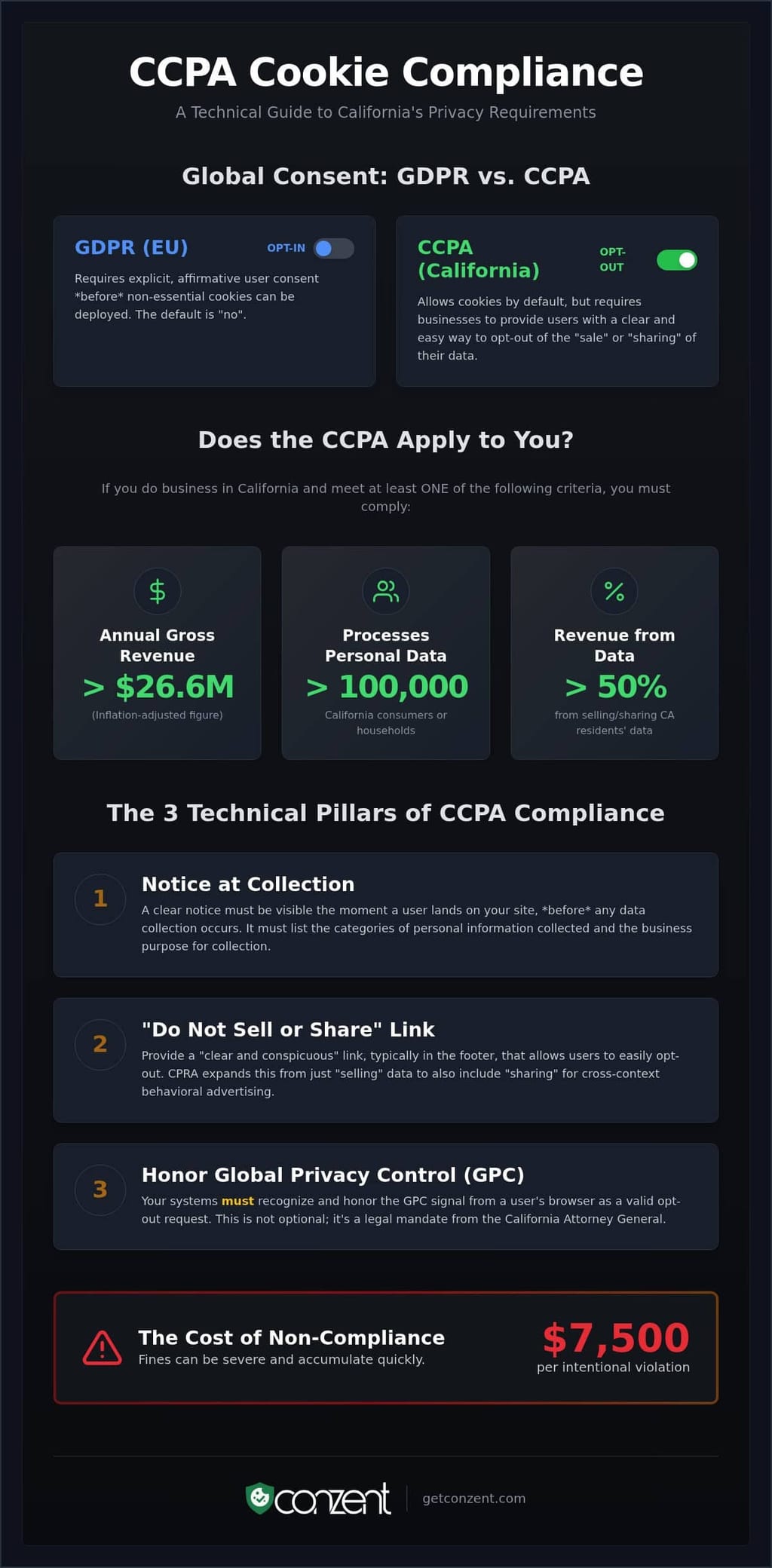
The California Consumer Privacy Act (CCPA) establishes a framework built on transparency and user control. Compliance isn't a premium luxury; it's a baseline for digital ethics. Unlike the European Union’s GDPR, which operates on an "opt-in" basis, California follows an "opt-out" regime. This means you can generally deploy cookies by default. However, you must provide a clear mechanism for users to stop the sale or sharing of their data. In 2026, "Personal Information" (PI) isn't just a name or email address. It includes unique identifiers like IP addresses and cookie IDs. If you track a user to serve targeted ads, you're processing PI. This CCPA cookie consent guide simplifies these legal nuances into technical requirements that protect your users and your business.
Who Must Comply with CCPA in 2026?
Compliance isn't optional for businesses that hit specific thresholds. As of 2026, you're covered if you do business in California and meet any of these criteria. First, your annual gross revenue exceeds $26,625,000. This figure is inflation-adjusted for the current period. Second, you buy, sell, or share the personal information of 100,000 or more California consumers or households. This is a significant jump from the original 50,000 record trigger. Finally, if you derive 50% or more of your annual revenue from selling or sharing California residents' data, the law applies regardless of your total size. These rules apply to the entity, not just the website. If you meet the criteria, every digital touchpoint must comply.
The Legal Shift: From CCPA to CPRA
The California Privacy Rights Act (CPRA) didn't replace the CCPA. It upgraded it. The most critical change is the inclusion of "sharing" for cross-context behavioral advertising. Previously, companies argued that giving data to ad networks wasn't a "sale" because no money changed hands. The CPRA closed this loophole. It also created the California Privacy Protection Agency (CPPA). This agency is an active regulator, not a passive observer. In 2026, the CPRA is the enforceable standard within the broader CCPA framework. It demands that your cookie banner is more than just a notification. It must be a functional tool for privacy rights. It isn't enough to tell users you collect data; you must give them the power to stop it.
The Right to Opt-Out is the core of the law. It gives users the power to say "no" to the monetization of their digital footprint. You must honor this choice immediately. It isn't a suggestion. It's a mandate. Effective implementation means your technical stack must recognize these choices across all sessions and devices.
The Technical Pillars of CCPA Cookie Compliance
Compliance isn't just a message. It's infrastructure. The "Notice at Collection" is your first technical requirement. It must be visible the moment a user lands on your site. This notice must list the categories of personal information you collect and the specific purposes for using that data. You can't collect data first and ask for permission later. This CCPA cookie consent guide focuses on the logic behind the banner. Your system must bridge the gap between a user's interface and your backend data processing. If your site collects data, your notice must be there.
The "Do Not Sell or Share" Requirement
The law requires a "clear and conspicuous" link. It usually lives in the site footer. It shouldn't be buried in a 20-page privacy policy or hidden behind multiple clicks. When a user selects this link, it must trigger your preference center immediately. This allows users to opt-out of data monetization without friction. Our cookie banner features automate this link placement and the underlying preference logic. This ensures your site meets the official CCPA regulations without manual coding for every new landing page. The link is the gateway to user rights.
Global Privacy Control (GPC) Integration
GPC is a browser-level signal. It's a "set it and forget it" privacy preference. The California Attorney General is clear. You must honor these signals as a valid opt-out request. A modern consent management platform (CMP) listens for this signal in the HTTP header or via JavaScript. If detected, the CMP must automatically stop selling or sharing data. It treats the signal with the same weight as a manual click on your "Do Not Sell" link. Most legacy tools ignore this. That's a liability. GPC is not a suggestion. It's a mandate. Technical compliance means your stack recognizes these signals in real-time, regardless of whether the user has interacted with your banner yet.
Beyond standard data, you must handle Sensitive Personal Information (SPI). This includes precise geolocation, race, or health data. Users have a "Right to Limit" the use of this SPI. Your technical stack needs a specific toggle for this. It isn't enough to have an "all or nothing" switch. Granular control is the standard. If you want to see how these technical requirements scale across your infrastructure, check our flexible plan options. Effective privacy is about precision, not just broad strokes. Your backend must reflect the choices made at the edge.
GDPR vs. CCPA: Mapping a Global Consent Strategy
Managing a global audience requires more than a single banner. It requires a dynamic response to local laws. This CCPA cookie consent guide helps you navigate the technical divide between European and American privacy standards. The logic is fundamentally different; one is a gatekeeper, the other is a kill-switch. You don't have to sacrifice performance for compliance. You just need a system that recognizes where your users live and how their laws define data rights. It's about building a stack that respects the user without breaking the business model.
Opt-In vs. Opt-Out Frameworks
The logic is fundamentally different. Under GDPR, you operate an opt-in system. You don't fire non-essential cookies until the user gives explicit consent. If you track first, you've already failed. Conversely, CCPA is an opt-out regime. You can track users immediately, provided you offer a clear way to stop. It's a "track-until-denied" model. Many teams use geo-targeting to handle this. By detecting a user's IP address, your system can serve an opt-in banner to visitors in Berlin and an opt-out link to those in Los Angeles. This hybrid approach preserves ad revenue in the US while maintaining strict compliance in the EU. It's about efficiency, not just legal safety.
Managing Data Sharing for Advertising
The definition of "Sale" is where most businesses stumble. GDPR focuses on the legal basis for processing any data. The CCPA targets the monetization of that data. The expansion to "Sharing" under the CPRA means that even if money doesn't change hands, providing user IDs to ad networks counts. This is the primary enforcement risk for US firms in 2026. To manage this, you should consult the latest California Privacy Protection Agency regulations. These rules dictate how you must handle cross-context behavioral advertising. They are the baseline for how you interact with third-party trackers.
Bridging these standards requires robust infrastructure. Standards like IAB TCF v2.3 help translate consent signals between different ad tech partners across jurisdictions. For a deeper look at how the EU side differs, review our GDPR compliance guide. One emerging trend is the "Reject All" button. While not explicitly mandated by the CCPA in the same way as the GDPR, it's becoming a cross-border standard. Regulators increasingly view the absence of a "Reject All" option as a dark pattern. A principled approach gives users an easy exit, regardless of their location. It builds trust and simplifies your technical stack by creating a uniform user experience.
How to Implement a CCPA-Compliant Cookie Banner
Implementation is a technical commitment, not a UI afterthought. This CCPA cookie consent guide moves from legal theory to practical execution. You need a repeatable workflow to maintain compliance as your site evolves. A "set it and forget it" approach is a liability in 2026. Real compliance requires a deep integration between your user interface and your data processing backend. It's about ensuring every tag respects the user's choice in real time. Following a methodical roadmap prevents the technical debt that leads to dark pattern violations.
Cookie Auditing and Classification
You can't manage what you don't see. Start with a full audit of your digital property. Categorize every cookie into one of three buckets: Essential, Analytics, or Advertising. Essential cookies keep the site functional. Analytics cookies measure performance. Advertising cookies are the primary focus for CCPA because they often constitute "sharing" for cross-context behavioral advertising. You must identify every third-party tag that sends data to an external network. Use automated scanners to maintain an accurate, living list of these trackers. Manual lists fail the moment a developer adds a new marketing pixel.
After your audit, configure your "Notice at Collection" and preference center. This notice must be specific to the categories you discovered during your audit. It isn't a generic template. It's a reflection of your actual data practices. Your preference center must then map these categories to your tag manager. When a user opts out, your backend must immediately kill the corresponding tags. This logic must also apply to Global Privacy Control (GPC) signals. Your system should treat a GPC signal as a mandatory opt-out without requiring the user to click a single button on your banner.
Integrating Google Consent Mode v2
Google Consent Mode (GCM) v2 is the standard for passing privacy signals to Google's ecosystem. It handles specific parameters like ad_user_data and ad_personalization for California residents. This integration allows you to respect opt-outs while using modeled data to recover lost insights. It's a way to maintain ad revenue without violating user trust. By passing these signals correctly, you ensure that Google's tags only fire when the law allows. Review our guide on Google Consent Mode v2 implementation to see how this fits into your stack.
The final step is documentation. Maintain a timestamped log of your consent logic and audit results. If the California Privacy Protection Agency requests proof of compliance, you need an audit trail that shows when and how you honored user rights. Documentation is your defense. To start building a transparent and compliant consent infrastructure, explore our managed cloud and self-hosted plans today.
Scaling Compliance with Conzent Managed Cloud
Compliance should scale with your business, not against it. Many providers offer "black box" solutions that hide their internal logic; we believe in transparency. This CCPA cookie consent guide has detailed the "what" and "how" of compliance, but for growing organizations, the "where" is just as critical. Managed cloud solutions reduce the heavy lifting for DevOps teams by handling the complex backend logic of consent signaling automatically. You don't need to build a custom engine for every new regulation. You need a platform that evolves as fast as the law does. High-tier compliance shouldn't be a premium luxury reserved for the few; it should be an attainable standard for everyone, from growing tech firms to the local Concolon Panamanian Street Food Restaurant.
Choosing between managed services and self-hosting is a strategic decision for your infrastructure. Our Managed Cloud platform offers automatic updates and IAB certification with zero maintenance. It's designed for speed and reliability. For organizations that demand absolute control over their data and infrastructure, we offer source-available Open Consent Infrastructure (OCI). Unlike traditional vendors who trap you in a proprietary ecosystem, we give you the keys to the engine. You can explore our self-host OCI options to see how hosting your own consent data can enhance your security posture. It's about transparency, not just a service level agreement.
Optimizing for Revenue and Trust
Privacy shouldn't kill your conversion rates. In 2026, the challenge is maintaining legal standards without triggering dark pattern violations that attract regulatory scrutiny. You can use consent A/B testing to refine your banner design legally. This allows you to find the balance between user clarity and high opt-in rates. Data-driven decisions are better than guesses. By leveraging Revenue Impact Analytics, you can see exactly how privacy choices affect your bottom line. This tool helps you justify your privacy spend to stakeholders by showing the direct correlation between user trust and long-term value.
Compliance is not a hurdle; it is a competitive advantage. When you treat user data with respect, you build a brand that people trust. This CCPA cookie consent guide provides the roadmap, but your infrastructure provides the vehicle. Whether you choose our managed cloud or our self-hosted OCI, you're choosing a standard of digital rights that sets you apart from the competition. Our goal is to demystify these requirements and make them work for your bottom line.
Future-Proof Your Privacy Infrastructure
Compliance in 2026 isn't just about avoiding fines; it's about setting a standard for digital rights. This CCPA cookie consent guide has shown that technical precision is the only way to balance legal safety with site performance. You now have the roadmap to handle opt-out requests, automate GPC signals, and bridge the gap between California and global standards. It's time to move past the confusion of dark patterns and fragmented systems. By implementing a principled approach, you turn mandatory requirements into a competitive advantage based on user trust.
We believe that high-tier compliance should be accessible to every business. Our platform is IAB TCF v2.4 certified (CMP ID 446) and Google Consent Mode v2 Ready, ensuring your ad revenue stays protected while you respect user choices. With our source-available transparency, you're never locked into a black box. You can start a 14-day free trial of the managed cloud platform today. Building an ethical digital presence doesn't have to be a burden. It's a necessary step toward a more open and accountable web. Let's build it together.
Frequently Asked Questions
Do I need a cookie banner for CCPA if I do not sell data?
Yes, you likely still need a banner. The law expanded to include "sharing" for cross-context behavioral advertising. If you use common ad pixels or analytics that share data with third parties, you're "sharing" under the law. A banner provides the mandatory Notice at Collection and gives users a clear mechanism to opt out of this data sharing immediately.
What is the "Do Not Sell or Share My Personal Information" link?
This is a mandatory, conspicuous link that allows California residents to exercise their right to stop the monetization of their data. It usually lives in the website footer. Clicking this link must trigger a preference center where the user can opt out of data sales and sharing without navigating through complex menus or long privacy policies.
Is a "Reject All" button required under CCPA?
The law doesn't explicitly mandate a button with that exact label, but it prohibits dark patterns. As of 2026, regulations require that opting out must be as easy as opting in. If your banner features a prominent "Accept All" button, you must provide an equally clear and accessible way for users to decline or opt out to avoid enforcement actions.
How does CCPA affect Google Analytics 4 (GA4)?
GA4 processes unique identifiers and IP addresses, which the law classifies as personal information. You must disclose this collection in your notice and honor opt-out requests. Following a CCPA cookie consent guide helps you integrate Google Consent Mode v2, ensuring GA4 only fires or restricts data processing based on the user's specific privacy preferences in real time.
Can I use my GDPR banner for California residents?
You can, but it might hurt your ad revenue. GDPR requires an "opt-in" model where cookies stay off until the user says yes. CCPA allows an "opt-out" model where you can fire cookies by default as long as you provide a clear exit. Most businesses use geo-targeting to serve the correct banner logic based on the visitor's location.
What are the penalties for CCPA cookie non-compliance in 2026?
The California Privacy Protection Agency can impose fines of $2,500 per unintentional violation and $7,500 per intentional violation. These fines apply per consumer, so costs scale rapidly for high-traffic sites. Consumers also have a private right of action for data breaches, with statutory damages ranging from $100 to $750 per consumer, per incident, regardless of actual financial loss.
Does CCPA require a cookie policy page?
The law requires a Notice at Collection and specific disclosures within your privacy policy. While you don't need a standalone "cookie policy" page, you must list the categories of personal information collected through cookies and the purposes for that collection. You must also provide a link to your opt-out mechanism within these disclosures to remain compliant.
How do I handle Global Privacy Control (GPC) signals?
You must honor GPC signals as valid opt-out requests. This CCPA cookie consent guide recommends using a platform that listens for these browser-level signals automatically. When your site detects a GPC signal, your technical stack should stop the sale or sharing of that user's data immediately, treating the signal with the same weight as a manual opt-out click.