
Cookie Consent for Headless CMS: Block Scripts Until Consent

A headless CMS doesn’t make consent optional; it makes consent a front-end responsibility. Effective cookie consent for a headless CMS means holding back non-essential scripts and embedded content until a visitor agrees. Where Article 5(3) of the ePrivacy Directive applies, prior consent is required before information is stored on or read from a visitor’s device, unless it’s strictly necessary for a service they explicitly requested.
That changes where consent controls need to work. A content API can deliver the page, but the frontend decides which analytics tags, marketing scripts, and third-party embeds load, and when. A banner alone isn’t enough if those elements run before a visitor makes a choice.
If you’re moving from a traditional CMS, it’s reasonable to expect consent settings to move with the content. In a headless setup, content and presentation are separate, so consent needs to be planned across the frontend, scripts, iframes, and platform integrations. This article explains why that matters, how to block trackers until consent, and what to consider for banners, script-loading order, and platform-specific setups. The goal is a consent experience that respects visitor choices without making your headless architecture harder to manage.
Key Takeaways
- In a headless setup, the frontend controls when analytics scripts and embedded content load, so consent needs to be part of its logic.
- The European Data Protection Board’s Guidelines 2/2023 confirm that Article 5(3) of the ePrivacy Directive covers local storage and other client-side storage mechanisms, not just cookies.
- Test the experience in a fresh incognito window to confirm that only essential storage runs before a visitor makes a choice.
- Keep consent behavior consistent across your frontend, tag manager, iframes, and any apps or other platforms that use the same content.
- Make the banner clear and accessible, and ensure a visitor’s choice actually stops the relevant trackers.
Why Is Cookie Consent Different in a Headless CMS?
In a headless CMS, the content API and website frontend operate as separate layers, so consent controls must reach the code that loads each tracker. Without them, analytics or marketing scripts may run before a visitor chooses, creating privacy risks and undermining that choice.
Consent Mode Defaults and Updates
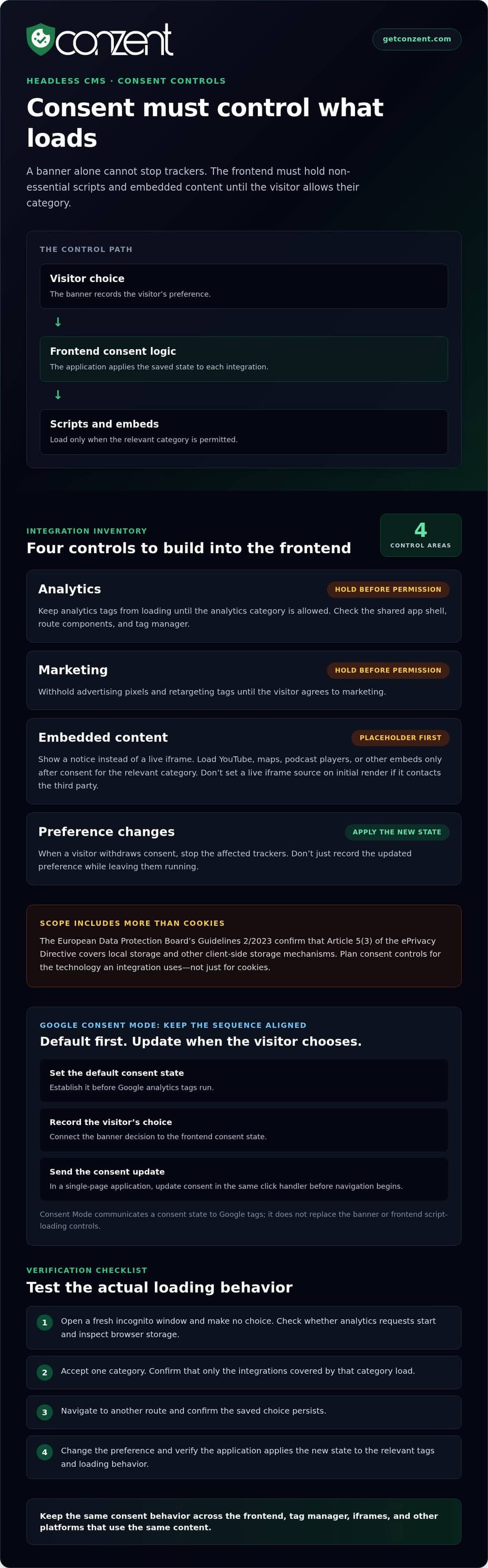
Google Consent Mode defaults establish the initial consent state for Google tags, while updates communicate a visitor’s later choice. In a headless build, developers must connect both states to the frontend rather than assume the CMS handles them. Set the default before analytics tags run, then update consent when the visitor saves a choice. That sequence helps prevent tags from acting on an outdated state.
For a single-page application, the saved choice and Google Consent Mode update belong in the same click handler, before navigation begins. This keeps the consent state aligned with the visitor’s action as the frontend changes views without a full page reload. Google Consent Mode v2 is an integration, not a substitute for the banner or the code that controls when scripts load.
Analytics Signals and Consent Risks
Analytics signals describe the consent state that Google tags should use; they don’t replace the site’s consent decision. That distinction matters because a tag receiving a signal is different from a frontend that prevents a script from loading. A headless implementation needs to coordinate both: the banner records the choice, and the application updates the relevant tags and loading behavior.
What are the risks of using a headless CMS without cookie consent controls? Non-essential analytics may run before consent, and later preference changes may fail to reach tags. Data could then be collected contrary to the visitor’s choice, even if the interface displays a banner.
The legal scope also reaches beyond traditional cookies. The European Data Protection Board’s Guidelines 2/2023 confirm that Article 5(3) of the ePrivacy Directive covers local storage and other client-side storage mechanisms. A frontend that stores analytics identifiers in local storage therefore needs the same careful consent planning as one that relies on cookies.
Map each analytics tool to its loading point, such as a shared app shell, route component, or tag manager. Test the flow in a fresh session: make no choice and observe whether analytics requests start. Save a choice, navigate to another route, and confirm the state persists. Then change the preference and verify that the application applies the new state rather than retaining the old one.
Blocking third-party scripts and iframes until consent
A headless frontend decides which third-party scripts and embeds load, so consent must control that decision directly. A cookie banner cannot prevent data collection if the browser has already loaded an analytics tag, advertising pixel, or embedded player. Connect each non-essential tool to a consent category, then hold its code until the visitor grants permission for that category.
Third-party technologies can store or read information on a visitor’s device, or send information to an external service. YouTube embeds in privacy-enhanced mode can still write identifiers to local storage when a page loads. A static page may also need a banner if its scripts or embeds access device information. What matters is what the integration does, not whether the page comes from a headless CMS.
Use a placeholder for an iframe that should wait. For example, show a short notice where a YouTube player would appear, and load the iframe only after the visitor accepts the relevant category. Use the same pattern for maps, podcast players, and other embedded services. Don’t set the iframe’s live source on initial render if that makes the browser contact the third party before consent.
Script gating means withholding a script until the saved consent state allows its category. Keep a clear inventory so every integration has an owner and defined behavior:
- Analytics: Keep analytics tags from loading before the analytics category is allowed.
- Marketing: Hold advertising pixels and retargeting tags until the visitor agrees to marketing.
- Embedded content: Replace blocked iframes with a placeholder, then load the service after consent.
- Preference changes: When a visitor withdraws consent, stop the affected trackers instead of only recording the new choice.
Heat-mapping and session-recording tools such as Hotjar, Clarity, and FullStory require explicit consent under GDPR. Make sure their scripts follow the same category rules as other analytics tools. A tag manager also needs gating: blocking a tag inside a container does not help if the container itself loads too early.
Content Security Policy (CSP) can restrict which domains may provide scripts, frames, and other resources. Developers can use it to limit unexpected third-party connections, but CSP does not read a visitor’s choice or replace consent logic. Maintain the policy alongside the integration inventory, so each new service is reviewed before its domain is permitted.
Test the complete flow in a fresh incognito window. Before consent, inspect the browser’s network requests and storage for calls to services such as YouTube or Hotjar. Accept one category and confirm only its integrations load; then withdraw that choice and verify the trackers stop. Teams comparing consent-management approaches can review consent platform pricing options as part of their implementation planning.
Consent banner placement and script-loading order
A consent banner works only if visitors can see and use it before optional tracking begins. On a headless site, the browser may execute JavaScript from the app shell before a banner component renders. Put the consent interface in the initial frontend experience, and make analytics and tag manager code wait for the visitor’s choice. A late banner cannot undo a request already sent.
There isn’t one universal cookie-banner rule for every US website. Requirements depend on jurisdiction and how the site uses information from a visitor’s device. For California visitors, assess the site’s tracking practices and applicable privacy obligations; a banner alone doesn’t settle every requirement. Make choices clear and relevant preference controls easy to find.
Placement affects whether visitors can act without hunting. Keep the banner visible without covering essential content, and provide a persistent way to reopen preferences after dismissal. For example, a footer link labelled “Privacy settings” can reopen the consent component on every route. In a single-page application, keep that control available as navigation changes the view, rather than attaching it only to the initial page.
Script-loading order should follow the interface state, not the other way around. Load the consent interface first, set the initial state for applicable tags, then allow optional scripts only after a visitor makes a permitted choice. A tag manager that initializes before the consent component can send requests before the banner appears. Test the first page load, route changes, and returning sessions to catch timing gaps.
Governance goes beyond banner design. The banner presents the choice; governance defines which teams own each tracker, how categories map to technologies, and how preference changes reach the application. Keep a shared inventory of tags, their purpose, and their loading behavior. When marketing adds an analytics tag, developers should know which category controls it and who approves the change.
Accessibility is part of a usable consent choice. Give buttons clear labels, support keyboard navigation, and ensure text remains readable against the banner background. Cookie banners should meet a minimum color contrast ratio of 4.5:1. Test the banner at different viewport sizes and with browser zoom, so the accept, reject, and settings controls remain visible and distinguishable.
Before launch, test the complete sequence in a fresh browser session: load a page, make no selection, choose preferences, navigate, and reopen the settings. Confirm that the banner doesn’t disappear behind a menu or block the page’s primary controls. Teams planning the operational side can compare consent platform options against their implementation needs.
Headless CMS and CMS-agnostic consent management
A headless CMS delivers content through APIs, while the frontend controls tracking and consent behavior. A CMS-agnostic approach connects consent to the frontend instead of relying on a plugin for one CMS.
Headless Architecture and Consent Management
Headless architecture separates the content repository from the presentation layer, so consent logic belongs where browser scripts run. This matters when one CMS feeds a website, mobile app, or another frontend, because each interface may load different tracking tools.
Which cookie consent platforms integrate with headless CMSs? CMS-agnostic platforms can connect through frontend code or APIs instead of relying on a specific CMS extension. Store the visitor’s preference in a consent cookie, and use a shared parent domain such as .example.com when subdomains need to read the same choice.
Evaluate consent in the visitor’s browser or at the edge, not in cached HTML. A cached page may serve identical markup to visitors with different preferences, so the frontend must apply each visitor’s current state.
Consent Management Platform Capabilities
A consent management platform centralizes the banner, service categories, preference controls, and consent records. For example, it can group analytics and marketing tools separately, then let visitors accept one category while declining another.
A shared configuration helps teams document which technologies belong to each category and apply preferences consistently across routes. It also lets visitors update their choices after the first page view. Treat the platform as a coordination layer, not a replacement for frontend code that controls script loading.
Check that the consent configuration reflects the site’s actual integrations. When a team adds an analytics tool, it should assign the tool to the right category and ensure the frontend follows the visitor’s saved preference.
Platform Integration and Setup
Adding a consent management platform means connecting its banner and preference state to the frontend that renders pages. How do you add one to a headless CMS website? Integrate the platform with the frontend, map services to consent categories, and connect preference updates to the code that loads those services.
Keep the integration separate from content models. An editor changing an article in the CMS shouldn’t need to edit tracking configuration. Developers can put consent logic in a shared application component, then test it across routes and subdomains that use the same consent cookie.
Include every frontend in the integration plan. A website and a mobile app may share content, but their tracking code and consent interfaces still need appropriate handling.
Loading Tag Managers After Consent
A tag manager container should not load before the visitor makes a consent choice. If it starts first, its tags may run before the frontend applies the saved preference.
Gate the container behind the relevant choice, then pass the updated state before loading permitted tags. On later visits, read the stored preference and apply it before initializing the container. Test a first visit and a returning session, including when a visitor changes preferences.
Keep consent state aligned with the active frontend. In a single-page application, route changes should not silently reset preferences or start blocked tags. Test the initial page, navigation, and preference updates as one connected flow.
Platform-specific cookie consent considerations
A consent setup must follow each platform’s behavior, not just the CMS name. One headless content source can serve a website, mobile app, kiosk, and smart device, but each frontend may store preferences and load tracking differently. Treat each platform as a separate implementation, then align its categories with visitor choices.
Start with a platform inventory. For a server-rendered site, identify where the browser receives consent state and whether cached HTML could expose the same tracking code to every visitor. For a single-page application, test route changes and session restoration. For a mobile app, map app-specific tracking separately from website scripts. A shared content model does not make these technical paths identical.
Google Consent Mode belongs in the web tagging flow. A website can send consent signals to Google tags, but that does not automatically govern an app’s other analytics SDKs or a kiosk’s storage behavior. Document which frontend sends each signal, which preference controls it, and what happens when a visitor changes that preference.
Native apps need a distinct review. Apple’s App Tracking Transparency prompt applies to cross-app tracking in native apps; it is not a cookie banner for a website. Keep the two experiences separate in the architecture, and don’t treat an app-level prompt as a substitute for browser consent controls.
Handle browser settings carefully, too. A browser’s Do Not Track setting can send a request to a website, and the website can choose whether to act on it. Document the site’s behavior so frontend developers can distinguish that signal from a stored consent preference. Don’t let a session-level default silently overwrite a visitor’s saved choice.
Use a platform matrix to reveal gaps before release:
- Website: Test fresh visits, saved preferences, route changes, and cached pages.
- Mobile app: Review app storage, analytics SDKs, and the separate Apple tracking prompt.
- Kiosk or smart device: Identify how the interface presents choices and retains them between uses.
- Shared content API: Confirm that each consuming frontend applies its own consent state before tracking starts.
Test each platform with the same scenarios: no choice, a limited preference, a changed preference, and a returning session. Compare network activity and storage behavior, not just the visible banner. This can reveal cases where one framework respects a choice while another continues sending signals.
Choose an implementation around your actual architecture, compliance goals, and organizational needs. If you’re evaluating consent platform options for those requirements, compare the available platform options.
Conzent: Managed Cloud Consent Platform
Conzent offers a Managed Cloud Consent Platform for teams managing consent across a headless website. Organizations that prefer to run the infrastructure themselves can use Self-Hosted Open Consent Infrastructure, which is free to self-host. Both options help teams fit consent management to their architecture and operational needs.
Consent A/B Testing helps teams compare banner approaches, while Revenue Impact Analytics helps assess how consent choices relate to revenue. These tools are useful once the technical setup is in place and the next task is improving the visitor experience with evidence rather than guesswork.
If you’re planning consent management for a headless CMS, contact Conzent to discuss the available options.
Make Consent Part of Every Release
Consent in a headless setup is not a one-time launch task. Make it part of the frontend’s release process: when a developer adds a tag, changes a framework, or introduces another platform, review how the change affects visitor preferences. This keeps the implementation aligned with the site as it evolves.
Cookie consent for a headless CMS works best when the technical setup fits how your team operates. Conzent offers a Managed Cloud Consent Platform, free Self-Hosted Open Consent Infrastructure, and Consent A/B Testing to evaluate banner experiences. These options help teams refine their approach across changing frontends.
Explore the available options and decide what fits your architecture: Contact Conzent about your consent setup.
Build consent into the work, not around it. Your next release can make visitor choice clearer and easier to respect.
Frequently Asked Questions
Can the CMS inject the consent banner instead of the frontend?
Yes, a CMS can supply banner content or render its markup, but the browser still needs code to make the controls work. For example, an editor can update the banner wording in a CMS field, while a frontend component handles button actions and preference changes. Check server-rendered templates for duplicate banners after hydration, especially when the same component appears in a shared layout.
How Does Consent Survive Static Generation and Edge Caching?
Keep visitor-specific consent values out of build artifacts. A static build should contain application code and content, not a choice copied from a developer’s browser during generation. Add a build review that searches generated HTML and JavaScript bundles for test consent values or personal data. This catches accidental inclusion before deployment without changing how the site generates or serves public pages.
How do I handle consent across subdomains and environments (staging/prod)?
Keep staging consent data separate from production data. Use distinct environment configuration and a dedicated test browser profile, then clear its stored choices between test runs. For example, a developer testing a new banner on staging should not carry that selection into a production session. Include environment separation in release checks so test tags and consent records don’t affect live behavior.
What is cookie consent in a headless CMS setup?
Cookie consent for a headless CMS is the visitor’s ability to choose how non-essential technologies may operate on the site. It involves both the recorded preference and the application’s response. An audit record showing a visitor’s choice is useful only when the site’s behavior reflects it. The CMS can support the content, but consent concerns the full visitor experience.
How does a headless CMS affect cookie consent implementation?
Editorial preview flows can be distinct from the public site. An editor preview may include draft content, test integrations, or unpublished page components that never appear to visitors. Keep preview configuration separate from production tracking configuration, and test preview links as carefully as published routes. This helps prevent editor-only tools or draft content from changing the public consent experience.
How can cookie scripts be blocked until visitors give consent?
Make script insertion conditional on the current preference, then test that condition at the component level. For example, a frontend test can verify that rendering an analytics component without permission creates no analytics script element. A second test can grant the relevant choice and confirm the element appears. These checks catch regressions when developers refactor route layouts or update shared components.
How do you audit cookies and third-party trackers on a headless CMS site?
Pair a technical review with a launch-time scan. Inspect browser storage and network activity, then compare the findings with the site’s declared services and consent categories. Run a fresh cookie scan within one week of a website launch, and repeat it after changes to forms, analytics, or embedded content. Record the route and feature that triggered each item so teams can trace unexpected findings to their source.
How do cookie consent tools compare for headless CMS websites?
Compare how clearly each tool documents its integration contract, preference format, and upgrade process. Consider whether consent configuration can be reviewed alongside application changes, and whether relevant records can be exported or migrated. For example, a framework upgrade should not require editors to rebuild consent categories manually. Choose an approach developers can maintain without tying consent logic to a single page template.