
Free WordPress Cookie Plugins: Risks and Trade-Offs

Free doesn’t automatically mean privacy-friendly. A WordPress cookie consent plugin displays a banner, records visitors’ choices, and should block non-essential cookies until visitors consent. The risks of using a free WordPress cookie plugin go beyond a weak banner: it may conflict with site tools, handle consent records in ways that affect privacy, or make its data practices unclear.
A free plugin can be a practical starting point. The key question isn’t just what it costs, but what happens behind the banner: which scripts it controls, whether consent data stays on your site or goes to the plugin provider, how long records are retained, and whether it works with your WordPress setup.
This guide explains what cookie consent plugins do and where free options can fall short. You’ll learn what to consider in compliance, compatibility, data retention, and visitor privacy, then use a clear comparison framework to decide what fits your site.
Key Takeaways
- Assess whether a plugin blocks non-essential cookies until visitors consent, rather than only displaying a banner.
- Treat the plugin as one part of a compliance setup, not proof that your site meets every applicable requirement.
- Consider how caching and security tools may affect consent scripts and banner behavior.
- Review how consent records are retained and how visitor data erasure requests are handled.
- Understand whether consent data is sent to the plugin provider or stays on infrastructure you control.
What Does a WordPress Cookie Consent Plugin Actually Do?
A WordPress cookie consent plugin can display a notice, record a visitor’s choice, and control selected scripts accordingly. A notice that merely reports cookie use doesn’t necessarily stop scripts from running. Test the behavior, not just the banner: open the site in a clean browser session, reject optional cookies, and check whether analytics or advertising scripts still load.
Consent needs to match the site’s actual setup. The European Union identifies strictly necessary cookies as exempt from the GDPR prior-consent requirement described here. The European Union and California Privacy Protection Agency identify GDPR and CCPA as relevant privacy laws. A plugin can support consent workflows, but it can’t determine which rules apply to a business or make every site’s practices compliant.
Free and paid plans can differ in script controls, integrations, customization, support, and consent-record management. Compare the features you need with the limits of the specific plan, then test whether the plugin blocks the scripts your site uses. Borlabs Cookie is one option to assess; don’t assume its capabilities or limits without reviewing the current version and plan details. A useful comparison distinguishes verified features from settings that still need configuration.
How can you tell whether a plugin is maintained and secure? Review its latest update history, compatibility information, changelog, and support activity in its listing. Then check that the release supports your WordPress setup, and install updates through the WordPress dashboard after backing up the site. An old changelog or unresolved compatibility reports deserve closer scrutiny.
When possible, install safely on a staging copy. Test consent, rejection, and withdrawal, along with the scripts each choice should control. Before replacing a plugin, document its settings and consent records. Then deactivate the old tool, configure its replacement, and retest before removing leftover code. This reduces the chance of duplicate banners or scripts that no longer follow visitors’ choices.
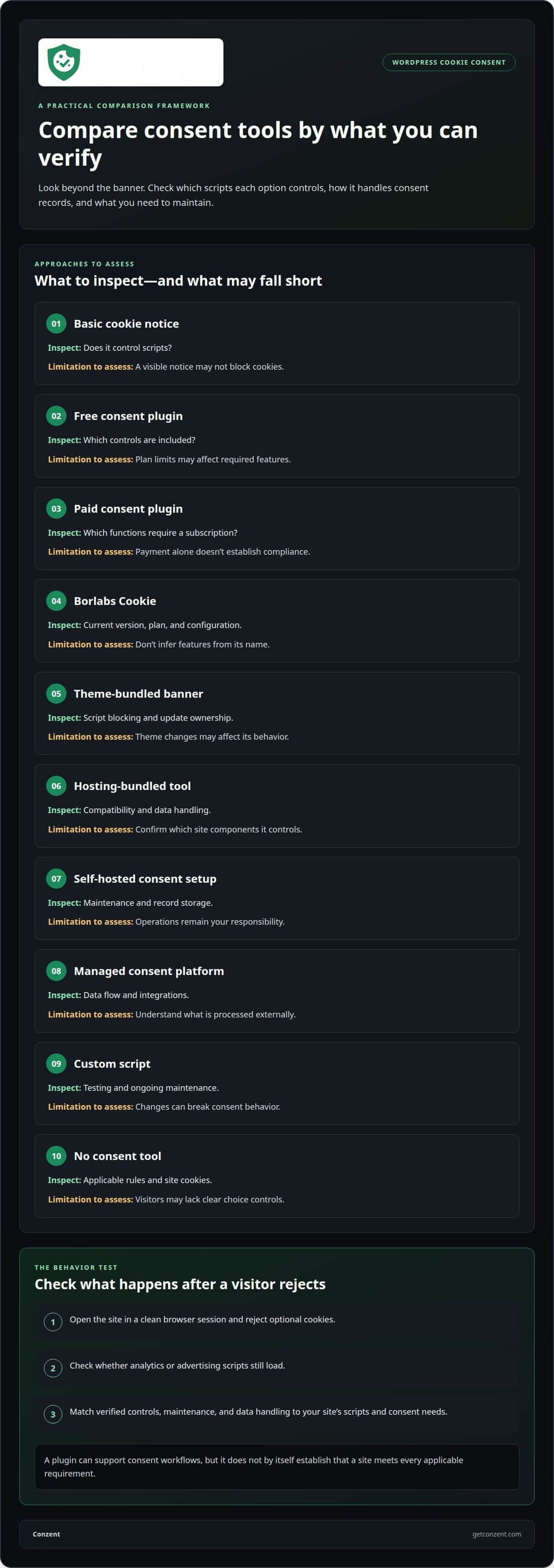
The table compares approaches by what to inspect, not by unverified product claims. For WordPress-specific integration context, see WordPress integration details.
| Option | Comparison criteria | Key limitation to assess |
|---|---|---|
| Basic cookie notice | Does it control scripts? | A visible notice may not block cookies. |
| Free consent plugin | Which controls are included? | Plan limits may affect required features. |
| Paid consent plugin | Which functions require a subscription? | Payment alone doesn’t establish compliance. |
| Borlabs Cookie | Current version, plan, and configuration | Don’t infer features from its name. |
| Theme-bundled banner | Script blocking and update ownership | Theme changes may affect its behavior. |
| Hosting-bundled tool | Compatibility and data handling | Confirm which site components it controls. |
| Self-hosted consent setup | Maintenance and record storage | Operations remain your responsibility. |
| Managed consent platform | Data flow and integrations | Understand what is processed externally. |
| Custom script | Testing and ongoing maintenance | Changes can break consent behavior. |
| No consent tool | Applicable rules and site cookies | Visitors may lack clear choice controls. |
Choose a plugin by matching its verified controls, maintenance, and data handling to your site’s scripts and consent needs.
Plugin use does not guarantee GDPR compliance
A plugin can provide consent controls, but installing it doesn’t make a WordPress site compliant by itself. The European Data Protection Board warns that using a cookie plugin alone does not ensure full GDPR compliance. Compliance depends on the site’s actual data processing, the scripts it runs, and how it responds to visitors’ choices. A configured banner can’t fix unrelated gaps in those practices.
Under the GDPR, organizations processing EU residents’ data need prior consent for non-essential cookies, according to the European Union. Strictly necessary cookies are exempt from that requirement. The practical test is whether analytics or advertising scripts wait for consent, and whether visitors can refuse as clearly as they can accept. A banner that appears after those scripts run doesn’t meet that sequence.
GDPR, ePrivacy, and CCPA/CPRA involve different legal frameworks, so a single plugin setting cannot establish compliance for every audience. The California Consumer Privacy Act, passed in 2018, uses an opt-out approach to cookie use rather than the opt-in model described for GDPR. A site serving visitors across regions needs to align its notice and controls with the rules that apply to its processing, rather than assume one banner covers every case.
Before treating a plugin as part of a compliant setup, map each consent choice to the site’s behavior. For example, reject optional cookies, then check whether analytics requests still fire. Repeat the test after accepting, withdrawing consent, and clearing stored preferences. Review the cookie policy and banner wording against the cookies and purposes the site actually uses. A policy that lists a service no longer installed can mislead visitors.
Other WordPress components matter too. A caching plugin can serve an old banner or alter consent scripts; a security plugin can block a required request. Test the live site after updates, not just the dashboard preview. Record the plugin version, banner configuration, and test results. This gives the site team a clear trail when a theme change or script update affects consent behavior.
What are the penalties for using a noncompliant cookie consent plugin? There is no single penalty simply for choosing a plugin. Consequences depend on the applicable law, the site’s conduct, and the enforcement response; a free or paid label doesn’t determine them. Focus on fixing underlying consent and data-handling practices, rather than treating plugin installation as a legal shield.
For teams assessing a different consent setup, reviewing consent platform options can help clarify which approach fits their operational needs.
The GDPR requires active opt-in or at least implied consent for cookies. A consent mechanism should make a visitor’s choice meaningful and ensure that choice is reflected in cookie behavior. The presence of a banner or installation of a plugin isn’t consent in itself. Treat the plugin as one part of the process: verify the available choices on the live site and review the setup whenever the site’s data processing changes.
Compatibility problems with security and caching plugins
Free cookie plugins can add scripts and database work, but their effect on speed depends on configuration and the rest of the WordPress stack. A banner may delay rendering, while an extra request can affect page loading. Caching can also serve an outdated banner or consent state. Compare page loads before installation and after configuration, using the same browser and page.
How do free cookie plugins affect WordPress site speed and performance? Their scripts can add work during page loading, while caching or minification may change how those scripts run. Measure the same page with the banner active and check whether the added behavior delays rendering or disrupts other site functions.
The key compatibility issue is behavior, not the plugin label. If a caching plugin alters or combines consent scripts, they may stop controlling tags as intended. Exclude affected consent scripts from caching and minification if those changes disrupt the banner. Then clear the cache and test a fresh visit, since an older cached page can hide the fix.
Security tools create a different failure point. A firewall or security plugin may block a consent request, an external script, or a visitor’s saved choices. For example, the banner may appear while a preference fails to save. Test acceptance, rejection, and withdrawal with security protections active. Don’t disable protection across the whole site to troubleshoot a single blocked request.
Consent mode adds another integration layer. Google Consent Mode depends on accurate consent signals reaching the relevant tags. If a banner updates a visitor’s choices after a tag fires, the site may send the signal too late. Test the tag sequence in a clean session: load the page, choose a consent option, then confirm the signal reflects that choice. Repeat after rejecting optional cookies.
Use a controlled troubleshooting sequence to locate conflicts:
- Record the WordPress, theme, consent plugin, caching plugin, and security plugin versions.
- Clear page, browser, and server caches before testing a new consent choice.
- Check whether consent scripts are excluded from minification when optimization changes them.
- Test the banner with security protections enabled and note any blocked requests.
- Change one setting at a time, then retest acceptance, rejection, and withdrawal.
Compare the results on mobile and desktop. A caching plugin may deliver different page versions, while a security rule may affect only certain requests. Keep the consent banner, scripts, and stored choices under review after plugin updates. A quick test after each change can catch conflicts before visitors encounter a broken banner or choices that don’t persist.
Also check that the cookie banner is responsive, compatible with your theme, and customizable to match it. Review the banner on mobile and desktop to confirm its layout adapts to each screen and suits the site’s appearance. If its styling or placement conflicts with the theme, adjust its customization options and retest it alongside the site’s other features.
Data retention and visitor data erasure
A cookie plugin may store a visitor’s consent choice, timestamp, and related technical details. Those records help a site remember preferences and demonstrate how its banner behaved. But storage creates another responsibility: understand what the plugin saves, where it keeps the information, and how the site removes it. A consent record and a Google Analytics event are separate data flows, so review them independently.
Retention settings determine how long consent records remain available. A plugin might keep a preference in a browser while also storing a record in WordPress or an external service. Those locations have different deletion steps. For example, clearing a browser cookie may remove the saved preference without removing a separate database record. Map each storage location before relying on a delete function.
GDPR Article 17 and the CCPA Delete right are frameworks for visitor-data erasure requests. A plugin label that mentions either framework does not show what data it can locate or erase. Identify the records connected to the request, the system holding them, and the deletion action available there. Then document what the plugin removes and whether another system still retains a copy.
Use a repeatable process when handling an erasure request:
- Locate the visitor’s consent record and identify its storage location.
- Check whether the plugin also stores preference data in the browser.
- Use the available deletion controls for each relevant record.
- Confirm that connected tools do not continue displaying the deleted record.
- Record the action taken and any remaining system-specific retention.
Updates can change where a plugin stores consent data or how its deletion controls work. After an update, test the banner again and review the plugin’s retention settings. A restored backup can also reintroduce records that someone previously removed. Include backups and connected storage in the site’s retention process, rather than treating the plugin dashboard as the only location.
Google Consent Mode v2 sends consent signals to Google tags; it is not a complete inventory of consent records. A signal used for tag behavior does not tell you whether the WordPress plugin, browser, or another connected service stores a visitor’s choice. Keep the signal flow and record-retention map distinct. That separation makes it easier to trace what a visitor’s choices control.
Free plugins can provide useful controls, but a delete button alone doesn’t describe the whole data lifecycle. Check whether the tool identifies stored records, supports their removal, and explains what happens after updates or plugin replacement. If a visitor changes or withdraws consent, test how the banner displays that choice and whether related records follow the configured retention process.
Privacy data sent to the plugin provider
A cookie plugin may run entirely inside WordPress or contact an external service. That difference affects where visitor information travels. Depending on its design, a plugin could send consent settings, site identifiers, or technical details from a browser request. The risks of using a free WordPress cookie plugin include unclear data flows that site owners may overlook. Don’t assume the notice explains every data flow. The settings, privacy policy, and actual network activity each reveal part of the picture.
What security risks can a free WordPress cookie consent plugin introduce? An outdated or poorly maintained plugin can expose a site to vulnerabilities, while unclear external requests can send visitor data beyond the site. The risk depends on the plugin’s code, update history, access, and data flows, not simply its price. For organisations looking to understand wider digital vulnerabilities beyond single plugins, FaultLine Cyber & Security provides assessments to identify hidden cyber and operational risks.
To understand what may leave the site, test the banner in a clean browser session. Open the browser’s developer tools, inspect network requests, and note which domains receive requests before and after a visitor makes a choice. For example, a request to an external server may expose the visitor’s IP address to that server. Check whether it includes consent preferences or other identifiers.
Do free WordPress cookie plugins include malware, tracking, or unwanted ads? The free label alone doesn’t establish that a plugin contains malware or adds tracking and ads. Review its source, update history, settings, and network requests to see what it actually does.
Owners should compare those findings with the plugin’s privacy policy and notice. Look for the data collected, recipients, purposes, retention details, and controls for disabling optional transmissions. If the policy describes only consent storage but the browser shows additional external requests, investigate that mismatch before relying on the plugin.
Use a simple review process:
- Record the plugin name, version, and active settings in WordPress.
- Inspect requests before consent, after acceptance, and after rejection.
- Note external domains and the request details visible in browser tools.
- Compare observed activity with the plugin’s privacy policy and notice.
- Repeat the review after plugin updates or configuration changes.
Site owners should also distinguish necessary delivery from optional analytics. A remote banner may need to request its configuration, while an analytics request may serve a separate purpose. The request’s destination and contents matter. Review them together, rather than treating every connection as proof of misuse or assuming every connection is harmless.
Choose a setup whose data flow you can explain clearly to visitors. If you’re assessing a managed consent approach, explore consent platform options in light of your privacy and infrastructure requirements. Keep a record of reviewed domains so future changes can be compared against the same baseline.
Conzent
Conzent helps website owners manage consent without treating a banner as the whole solution. Its Managed Cloud Consent Platform and Self-Hosted Open Consent Infrastructure offer different ways to operate consent technology. The right fit depends on whether you prefer a managed service or control over your own infrastructure.
Consent A/B Testing and Revenue Impact Analytics help teams assess how banner choices affect visitor consent and site outcomes. These tools support evaluation; they don’t replace the work of understanding your site’s data flows and privacy obligations.
If you’re reassessing a free plugin’s controls, data handling, or fit with your WordPress setup, contact Conzent to discuss your consent needs.
Make your next consent decision deliberate
The risks of using a free WordPress cookie plugin are easier to manage when your choice reflects your site’s actual needs, not just the appeal of a quick installation. Treat consent as part of your privacy infrastructure. Decide how much control you need over data flows, maintenance, and future changes, then choose an approach your team can operate and explain.
You don’t need to solve every technical question at once. Start with the gap that matters most to your site, whether that’s managing consent centrally or keeping the infrastructure under your control. A clear decision now can make future updates and changes easier to handle.
Conzent can help you explore an approach that fits your consent requirements. Contact Conzent to discuss cookie consent and take the next step with clarity.
Frequently Asked Questions
How can a WordPress cookie plugin expose visitor data or site credentials?
A plugin can expose visitor data if its code sends information to an external service, stores it insecurely, or contains a vulnerability. Site credentials face a different risk: a compromised plugin with excessive WordPress permissions could give an attacker a path to administrative functions. Review whether the plugin requests external connections and whether its settings require administrator access. Use unique administrator passwords and remove plugins you no longer need.
Can free cookie plugins reliably block cookies before consent?
Some can, but the free label doesn’t tell you whether blocking works across your site. A script added directly by your theme, a tag manager, or an embedded video may bypass a plugin’s controls. Test each source separately in a fresh browser session: reject optional cookies, then inspect whether those services still make requests. Repeat after changing the banner settings, because a correct setup depends on how each script is installed.