
Future-proof website privacy strategy for CCPA, CPRA, and evolving rules

A privacy banner alone won’t future-proof a website. A future-proof website privacy strategy connects consent, data handling, security, and regular reviews so the site can adapt as requirements and risks change. Treat privacy as part of how the website works, not as a fix to add after a new rule arrives.
It’s reasonable to find this challenging: CCPA, CPRA, GDPR, and other data-governance requirements can affect how a website collects and uses personal information. The practical goal isn’t to predict every change. It’s to build a clear, flexible approach that helps your team understand what data the site handles, respect user choices, and respond as expectations evolve.
This article explains what future-proofing means in practice, how to align U.S. and international privacy considerations, and why security and ongoing reviews belong in the same strategy. You’ll also see how consent tools can support that work without replacing sound data governance or legal advice.
Key Takeaways
- Build privacy into website design and operations so your approach can adapt as rules and user expectations change.
- Map the personal data your site collects and uses, then align its handling with the U.S. and international requirements relevant to your audience.
- Pair consent management with practical security measures, regular reviews, and clear data-retention practices.
- Review CCPA and CPRA requirements alongside other evolving privacy rules; a banner alone does not make a privacy program.
- Use consent tools to manage user choices and assess how consent experiences affect performance, while keeping broader governance decisions in view.
Adapting to changing regulations and security risks
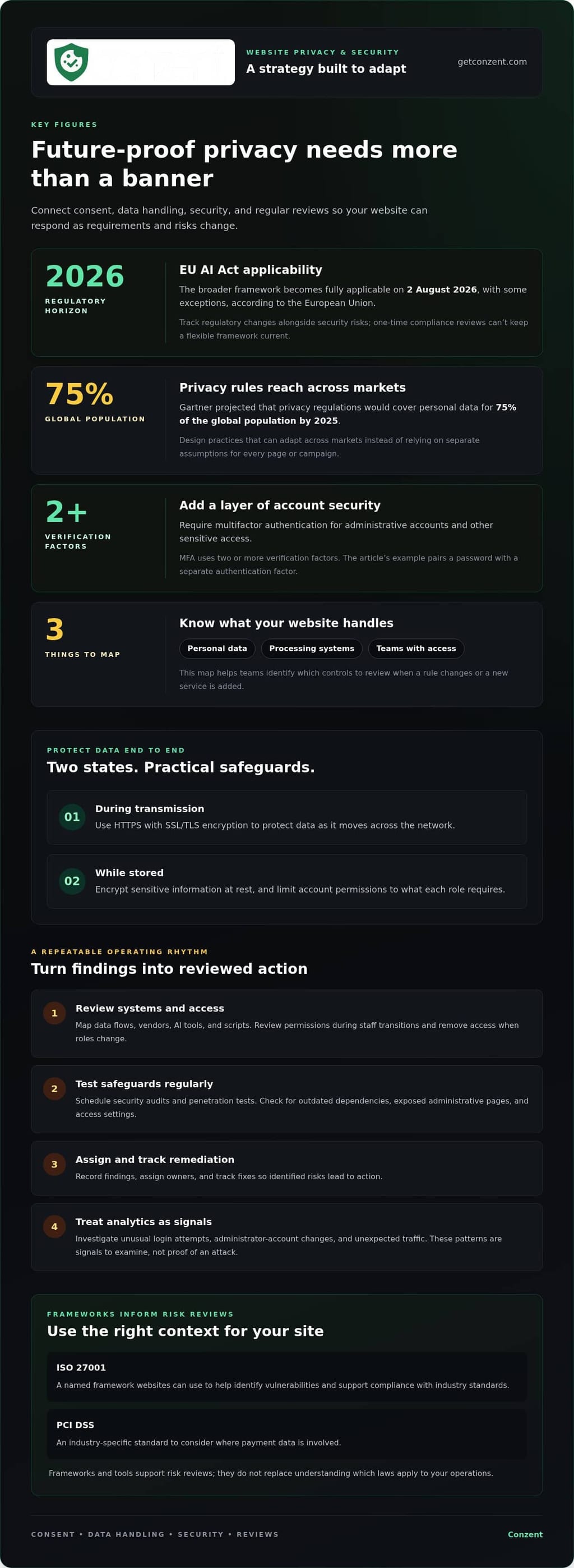
Privacy rules and cyber threats change on different timelines. A resilient website needs a flexible framework to track both, rather than a one-time compliance review. Start by mapping the personal data your site collects, the systems that process it, and the teams with access. When a rule changes or a new service is added, this map helps identify which controls to review.
Regulatory planning should connect privacy obligations with technical safeguards. The EU AI Act's broader framework becomes fully applicable on 2 August 2026, with some exceptions, according to the European Union. ISO 27001 is a named framework websites can use to help identify vulnerabilities and support compliance with industry standards, according to the International Organization for Standardization. PCI DSS is another industry-specific standard to consider where payment data is involved. These frameworks inform risk reviews; they don't replace understanding which laws apply to your operations.
Protect information as it moves across the network and while it is stored. Use HTTPS with SSL/TLS encryption to protect data during transmission, and encrypt sensitive information at rest. Require multifactor authentication (MFA) for administrative accounts and other sensitive access. MFA adds a layer of security by requiring two or more verification factors. For example, combine a password with a separate authentication factor, and limit account permissions to what each role requires.
Secure network access as carefully as website logins. Restrict administrative interfaces to authorized users, remove access when roles change, and review permissions during staff transitions. A web application firewall and AI-based security tools can help detect and mitigate threats such as SQL injection, cross-site scripting, and distributed denial-of-service attacks. Pair these controls with intrusion detection, encryption, and packet-level authentication to strengthen data-plane security.
Updates and testing keep safeguards relevant. Apply software updates to the website platform, plugins, and server components, prioritizing fixes for known vulnerabilities. Schedule regular security audits and penetration tests to find weaknesses before attackers exploit them. An audit can examine outdated dependencies, exposed administrative pages, and access settings. Record findings, assign owners, and track remediation so identified risks lead to action.
Use analytics to spot unusual patterns, but treat them as signals to investigate, not proof of an attack. Review unexpected login attempts, changes to administrator accounts, and unusual traffic alongside audit findings. A future-proof approach gives teams the ability to respond as threats and requirements shift. It relies on documented risks, clear ownership, and repeatable reviews, not a single tool or framework.
U.S. and international data-governance alignment
Websites serving people across borders need a structured view of data, vendors, and access. Manage vendor, AI, and script risks by mapping what each tool receives, limiting access, and reviewing its purpose and data flows.
Privacy by Design and Consumer Data
Privacy by design means considering data protection when planning a product, feature, or workflow, rather than adding it later. It matters because choices made during development shape what information a site collects and how teams can use it. Start with the purpose: identify the task, collect only the data needed for it, and set a retention approach. For example, an analytics feature may need aggregated usage patterns, not every detail a visitor submits.
Privacy-first consumer data practices also make choices easier to explain. Separate essential service data from optional analytics or personalization, then document how each category is used. Gartner projected that privacy regulations would cover personal data for 75% of the global population by 2025. That projection reinforces the value of designing practices that can adapt across markets, instead of building separate assumptions into every page or campaign.
Managing Vendor and Third-Party Risks
Vendor risk management means tracking how external tools access, process, or pass along website data. A script can collect information even when your application team never handles it directly. Keep an inventory of vendors, AI tools, and scripts, noting each tool’s purpose, data inputs, access level, and owner. For an AI feature, examine whether prompts contain personal information and whether outputs feed into other systems.
Review that inventory when adding a tag, changing a vendor, or deploying a new feature. Remove scripts that no longer serve a clear purpose, and limit remaining tools to the data and permissions they need. A third-party analytics tag, for example, should not receive form fields unrelated to measurement. For teams considering managed consent controls, compare managed consent platform options with the needs of their website.
Governance also needs evidence. Log administrative access, permission changes, data exports, and significant configuration updates. Review logs for unexpected accounts or access patterns, then record the response and responsible owner. Keep records consistent so teams can trace which system handled data and when a change occurred. These logs support operational oversight; they do not replace a review of applicable privacy requirements.
For international operations, document where providers process data and how information moves between systems. Compare practices with the requirements relevant to the people your site serves, including U.S. state laws and the GDPR. California’s privacy amendments bring state law more closely in line with Europe’s GDPR on restrictions concerning personal-data collection and use. A shared governance process can track differences without assuming one policy fits every market.
CCPA and CPRA privacy requirements
For California-focused privacy planning, connect CCPA and CPRA considerations to how your website uses tracking and handles individual requests. The practical task is to translate privacy choices into clear website behavior.
Cookie Consent, Tracking Pixels, and Analytics
Cookie and tracking controls explain how website technologies support analytics or advertising and how visitor choices affect them. For CCPA and CPRA planning, assess each technology’s purpose and data use rather than treating every cookie alike. A consent interface works as intended only when its choices match the site’s actual tracking behavior.
Make the controls specific. For example, separate analytics settings from advertising settings when visitors can choose independently. A tracking pixel used for an advertising campaign should respond to the relevant setting, while a measurement tag should follow its own configured choice. Test these behaviors in the browser after changing a setting, including on pages where tags load after the initial page view.
Keep the language near the controls direct and useful. Explain what each category does, then provide a visible way to revisit or change a choice. Review the experience on mobile as well as desktop, since small screens can hide secondary options or make settings harder to reach. Treat analytics reports as operational evidence: compare configured choices with observed tag behavior, and investigate mismatches before relying on the results.
Handling Privacy Requests
A privacy-request process gives people a consistent route to request access, correction, deletion, or an opt-out. It matters because a request may concern information beyond the page or account where the person first submitted it.
- Access: Search relevant customer-facing records and prepare a readable account of the information located.
- Correction: Confirm the requested change, update the appropriate record, and preserve consistency in connected account details.
- Deletion: Identify the records covered by the request and record what action the team takes.
- Opt-out: Capture the person’s preference in a way that relevant marketing or tracking processes can use.
Give staff a shared intake method and a clear escalation path for unusual requests, such as one involving an account used by multiple people. Record the request’s status and the systems reviewed, but limit access to those records. Confirm receipt and explain the next communication or outcome in plain language. These steps help teams handle requests consistently while assessing which rules apply.
Evolving privacy regulations
Write a website privacy policy in plain language that matches visitors’ actual experience, then update it when practices or relevant rules change. Name the information collected, its purposes, the tools involved, and how people can exercise applicable choices. The GDPR is a data privacy regulation relevant to website compliance under the European Union framework.
Regulations evolve across jurisdictions and sectors, so a policy copied from another website can miss important differences. California’s shift toward consumer privacy by default began in earnest with the California Consumer Privacy Act in 2018. Seven U.S. states enacted privacy laws in 2023. These developments show why a policy review should consider where visitors live and how the website uses personal data, not just where a business operates.
Use a change process tied to real events. Review policy language when adding an analytics tool, changing a form, introducing an AI feature, or altering data retention. Compare each change with existing descriptions of collection and use. If a new software tool gathers information through a form or script, update the relevant explanation before the change reaches the site. Keep dated versions and assign someone to approve revisions.
Make the policy easy to use. Organize it around concrete topics, such as information collected, purposes, sharing, retention, and user choices. Use labels visitors recognize, then connect each statement to the corresponding website function. For example, if a newsletter form asks for an email address, explain that collection where the policy describes contact information. Avoid broad wording that obscures whether analytics, advertising, or account features use data differently.
Privacy is part of a wider compliance picture. The European Accessibility Act is in effect for key products and services, including ecommerce. HIPAA is an industry-specific standard relevant to evolving regulatory requirements. These examples concern different areas, but reinforce a practical point: review the rules that apply to your service and audience rather than assuming one privacy policy covers every obligation.
Set a recurring review routine and event-based checks. Compare published policy language with current forms, tags, account features, and vendor arrangements. When a discrepancy appears, determine whether the website behavior or the policy needs to change, then document the decision. Keep an owner and an update record so teams can explain why the language changed and which digital experiences were affected.
Finally, make updates visible when they materially change how the site describes its practices. Clearly identify the revised topics and the policy’s effective date, and keep related notices consistent. A reliable policy is not a static legal page; it is a maintained description of the website’s actual data practices as regulations and products evolve.
What does a future-proof website privacy strategy include?
A resilient privacy program makes change manageable during design and release. Build website components so teams can update one experience without disrupting unrelated functions. For example, keep consent interfaces separate from page templates, and use documented integration points for analytics tags. This modular approach helps a team respond to new requirements or product changes without rebuilding the entire site.
Plan for usability as well as technical flexibility. Privacy choices should work for people using keyboards, screen readers, and mobile devices. Test the consent experience in different browsers and at different screen sizes. Check that buttons have clear labels, choices remain understandable, and visitors can complete the interaction without relying on color alone.
- Document design decisions: Explain why a consent control or data-related feature works as it does, so later teams understand its purpose.
- Use release checks: Include privacy-impact questions in feature reviews before a change reaches the live website.
- Test user journeys: Review how consent settings behave across landing pages, embedded content, and returning visits.
- Collect feedback: Give users a clear way to report confusing privacy choices, then route that feedback to the product team.
- Measure experience: Compare consent-interface versions for clarity and usability, not just interaction rates.
Consider how a change will affect the full visitor journey. If a checkout flow adds an embedded payment feature, review how the new component appears alongside existing privacy controls. If a site adds a language or theme, confirm that consent choices remain legible and usable. Small, defined checks help teams catch design conflicts before they become difficult to fix.
Keep implementation knowledge portable. Document consent settings, integrations, and release dependencies clearly. A future team should be able to understand where a control appears, which components depend on it, and how to test a change safely. This reduces reliance on undocumented workarounds and makes routine product development more adaptable.
Consent A/B testing can help teams compare interface approaches while keeping user understanding central to the evaluation. Conzent offers Consent A/B Testing and Revenue Impact Analytics for teams assessing how consent experiences relate to outcomes. To explore its platform options, review Conzent’s consent platform options.
Conzent: Managed Cloud Consent Platform
Conzent’s Managed Cloud Consent Platform helps websites manage consent as part of ongoing privacy operations. Use it to present consent choices and support consistent handling as your site’s tools and data practices evolve. For organizations that prefer to run the infrastructure themselves, Conzent also offers Self-Hosted Open Consent Infrastructure.
Consent A/B Testing lets teams compare banner approaches, while Revenue Impact Analytics helps assess how consent choices relate to revenue. These tools support informed decisions; they don’t replace privacy governance or determine which laws apply to your business. They suit teams that want to manage consent experiences and evaluate their impact within a broader privacy program.
Visit getconzent.com to explore Conzent’s consent offerings for your website.
Make privacy part of your next website decision
Make privacy a design question whenever your team plans a website change. Before approving a new feature, agree on how you’ll assess its effect on visitor choice and the experience you want to create. This keeps privacy connected to product decisions, not isolated in policy documents.
If you’re evaluating support for consent management, compare the available options with your team’s needs and operating model. Explore Conzent’s platform options as you consider the next step.
Steady, deliberate decisions can help your organization build digital experiences that respect people and adapt with purpose.
Frequently Asked Questions
What does it mean to future-proof a website?
It means designing website operations so privacy practices can adapt when the site, its tools, or user expectations change. For example, if a business adds a subscription feature, its team should be able to identify new data collection, update internal ownership, and assess whether notices or settings need revision. The goal isn’t to predict every change, but to make future changes easier to assess and manage.
Which US state privacy laws apply to websites in 2026, and what are their requirements?
Applicability depends on the states where your users live, your business activities, and the personal data you handle. California’s CCPA, as amended by the CPRA, is one relevant state privacy framework; requirements elsewhere differ. Start by identifying your audience and data practices, then assess each relevant state’s current rules and scope. Don’t assume that meeting California requirements automatically covers every other state.
How do GDPR, UK GDPR, and US state privacy laws differ for website operators?
They are separate legal frameworks, so a single privacy notice or consent setting may not address every requirement. The GDPR is relevant to website compliance under the European Union’s framework; UK GDPR and U.S. state laws bring distinct jurisdictional considerations. Compare how each framework applies to your users, data uses, and business activities. Then map those differences to notices, consent choices, and request workflows.
What privacy-focused analytics and consent management platforms are available, and how do their prices compare?
Options include analytics tools designed to limit personal data collection, managed consent platforms, and self-hosted consent infrastructure. Conzent offers a Managed Cloud Consent Platform, Self-Hosted Open Consent Infrastructure, Consent A/B Testing, and Revenue Impact Analytics. Compare platforms by deployment model, analytics features, integrations, and billing structure. A meaningful comparison focuses on the capabilities your website needs, not just the subscription label.
How can a website minimize personal data collection and set data retention limits?
Review each form and digital feature, and remove fields that don’t support a defined purpose. For example, a download form may need an email address for delivery, but not unrelated profile details. Assign an owner to each data store, document when its information is no longer needed, and securely delete it then. Revisit the schedule when the feature’s purpose or data flow changes.
What technical and organizational measures help protect website user data from breaches?
Combine safeguards that address different risks: HTTPS protects information in transit, encryption helps protect sensitive stored data, and multifactor authentication strengthens account access. Assign named owners for security updates and access reviews. For example, after a staff member changes roles, promptly revise their permissions and record the change. Regular audits and penetration testing can reveal weaknesses that routine software updates alone won’t catch.